Gemini Flash New Version Tested: A Daily Work Model With Doubled Code Performance

Google iterates Gemini Flash in just three weeks with major gains in instruction-following, design reproduction, and code generation.
Google has released a new generation of Gemini Flash just three weeks after the previous version, positioning it as the "most intelligent workhorse model" available. Key upgrades include stronger instruction-following, a 34% improvement in complex PDF comprehension, near-doubled code benchmark scores, and better design-to-code accuracy from reference images. A new three-tier Thinking Level control lets users tune compute usage by task complexity. The article also offers six actionable prompting tips — including naming prompt sections, providing reference screenshots, and leveraging the 1M token context window — to help users maximize output quality. The author closes with a reminder that all cited benchmarks are Google's own, and that real-world tasks remain the true measure of a model's value.
Google's Three-Week Cadence: Why Flash Is Moving So Fast
Just three weeks after the previous Flash model launched, Google has already released a new generation of Gemini Flash. This kind of update cadence is almost unheard of in the large language model space — typically, a flagship model iterates on a cycle measured in months or even quarters.
According to technical commentators who've analyzed the release, Google says this version was born from "developer feedback and ongoing research into future model architectures." In other words, it's both a rapid response to real user pain points and an early release of capabilities discovered during next-generation architecture development.
Interestingly, Flash is the most underrated member of the Gemini family. The Gemini lineup spans different scales: Pro is built for deep thinking and complex reasoning, while Flash is optimized for fast, everyday work — high-frequency, low-latency tasks. Most people are already using Flash without realizing it. It powers the Gemini app, Google AI Studio, and a wide range of features across Google Workspace.
Three Core Improvements: From Benchmarks to Real-World Experience
Google is calling this "the most intelligent workhorse model" available today. The improvements fall into three main areas: coding, knowledge work, and tool use. But more noteworthy than cold benchmark scores is the meaningful improvement to the actual developer experience.
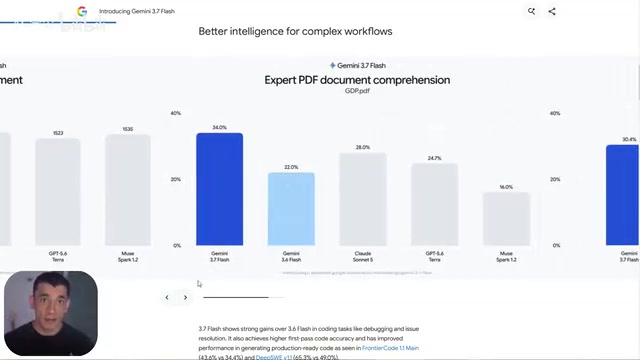
The most noticeable change in this release is instruction-following capability. According to Google, the model now proactively adjusts when it hits a blocker, and when a request is ambiguous, it asks for clarification rather than making blind guesses. This has a huge impact on real-world workflows — much of the frustration people feel using AI comes from models that go rogue and then require repeated corrections to get back on track.
Key Metrics: Breakthroughs in Both Code and Knowledge Work
The published numbers show some impressive gains:
- Production code tests: Significant performance improvements, with more stable handling of long-horizon software engineering tasks
- Complex PDF document understanding: The new version scores 34% higher than its predecessor — a critical gap for knowledge workers who regularly process long documents
- Automated test bench: Nearly doubled from roughly 17%
- Web development (WebDev Arena): The new model achieves an ELO score of 1588, surpassing the previous generation

Google specifically highlights that the new model can "generate more complete applications with fewer prompts." "Fewer prompts" is the key phrase here — it means lower communication overhead and a higher first-pass success rate, which is especially valuable for non-technical users.
Design-to-Code: From Screenshots to Runnable Output
One upgrade that's easy to overlook but highly practical is the model's improved ability to follow reference designs.

In short, you can hand the model a screenshot, an image, or a design system, and it will render the interface much closer to what you actually want. Taking it further, it can also audit existing code for consistency against a design mockup — a genuine efficiency boost for frontend development and UI implementation workflows.
Describing a page layout in words is notoriously difficult. The "give it a reference image" interaction pattern dramatically lowers the barrier between design and implementation.
Thinking Levels: Three-Tier Control Over Reasoning Depth
The new model also introduces a Thinking Level control with three settings — low, medium, and high:
- Low: Fastest, suited for simple tasks
- Medium: The default setting, balancing speed and quality
- High: For complex code and genuinely difficult tasks, but consumes more tokens and runs slower
The model supports a 1 million token context window and 64K token output, and has become the default model for Google's Agent tools. Importantly, this is not a preview — it's fully available for production use and ships with the same built-in tool suite as its predecessor.
Six Practical Tips to Double Your Gemini Flash Output Quality
Even the best model won't help if you don't use it well. Here are some immediately actionable tips that can transform your output quality:
- Name every section in your prompt: When building a landing page, list out "headline, benefits, form, testimonials, FAQ, buttons" — don't just say "make a landing page." The model builds what you name.
- Provide reference design screenshots: How well the output matches your vision depends largely on whether you've provided a screenshot or layout reference.
- Keep Thinking Level at medium: Many people reflexively max it out, but that wastes time on simpler tasks. Reserve high only for genuinely complex work.
- Be explicit when you want a single file: If you need an HTML page that opens directly in a browser, just ask for "a single HTML file."
- Let the model ask questions: The new version proactively seeks clarification. Answer its questions carefully — one good exchange can save five rounds of revisions.
- Take advantage of the long context window: With 1 million tokens of context, you don't need to summarize a PDF first. Just drop in the full content and ask your question.

Beyond Benchmarks: Your Own Tasks Are the Real Standard
One final reminder worth taking seriously: all the numbers cited here come from Google's own internal benchmarks. Benchmarks are useful, but they are not the only valid measure of a model's value in your workflow. The real test is your own actual tasks.
For most users, there's a significant gap between "getting excited about a review" and "opening the tool and staring at a blank prompt box." A first-pass output is often about 80% right and 20% off — deciding whether to rebuild or just fix one thing is precisely where many people give up.
The new Gemini Flash's improvements in instruction-following, design reproduction, and tool use genuinely shorten that learning curve. But the real payoff still requires iterating in your own real-world scenarios. Try it on an actual task you have right now, and see what happens.
Related articles

Salesforce Acquires Rune for $375M: AI Logistics Tech Bolsters Defense Business
Salesforce reportedly acquires defense tech startup Rune for $375M. Rune's AI logistics tech will strengthen Salesforce's Missionforce defense platform, continuing its M&A spree.

Why Fair Use Benefits Everyone in the AI Era
Starting from a Hacker News discussion, this article analyzes the legal logic and controversies of the fair use principle in AI training and content creation, and its dual impact on creators and the tech ecosystem.

Mistral Large 4 Open-Sources a Trillion Parameters, Microsoft Offers Voluntary Severance to 60,000 Employees
Mistral Large 4 open-sources a trillion-parameter multimodal model with a coding agent score of 48; SanDisk earnings show AI inference reshaping NAND demand; Google Gemini adds in-app file editing, OpenAI raises Codex quotas, and Microsoft offers voluntary severance to 60,000 employees.