Generate Editable Research Framework Diagrams with GPT-6: Do in 10 Minutes What Used to Take Two Days

GPT-6 Astra two-step workflow turns research framework diagrams into editable PPTX files in 10 minutes.
This article presents a two-step workflow using GPT-6 Astra to dramatically speed up research figure creation. Step one: invoke the Architecture Diagram Skill in ChatGPT with a style reference image and architecture description to generate an initial diagram. Step two: prompt the model to redraw it directly in PowerPoint without using any Skill, producing a fully editable PPTX file in ~15 minutes — with text, arrows, and shapes all individually modifiable.
Researchers know the pain of academic figures all too well — a single well-structured framework diagram, with arrows aligned, text boxes adjusted, and colors properly laid out in PowerPoint, can easily eat up a day or two. With the latest GPT-6 Astra, that process has been compressed to roughly ten minutes, and the output is a fully editable PPTX file — not a static image you can't touch afterward. This article breaks down exactly how this workflow operates.
The Key Leap: From "Generated Image" to "Editable File"
Using AI to generate research figures used to have one fatal flaw: the model would spit out a static image with text, arrows, and color blocks all baked into pixels. Changing a single label meant redrawing the whole thing. The core breakthrough demonstrated here solves exactly that problem.
The entire workflow runs in two steps. Step one is to invoke the "Architecture Diagram Skill" in the web version of ChatGPT — feed it a style reference image, add a text description of your architecture, and the model will generate an initial framework diagram accordingly.
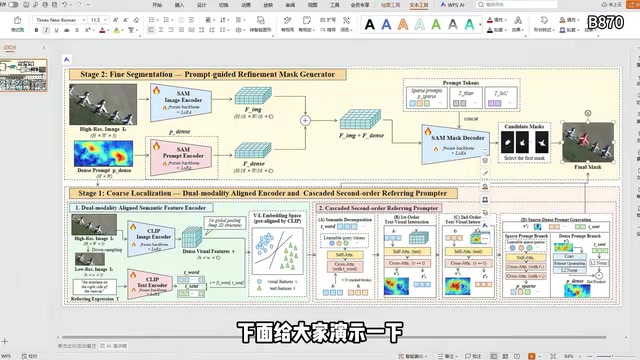
At this point, however, the output is still a non-editable image — you can view it, but you can't modify it.
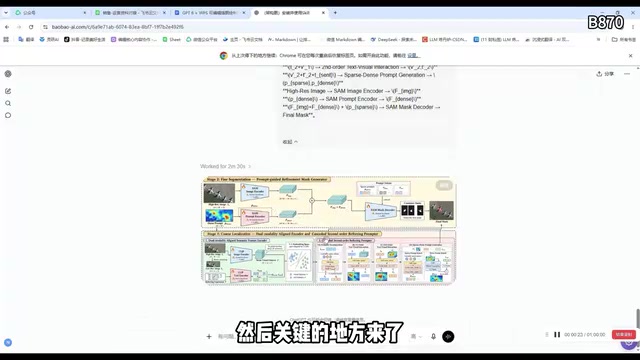
Getting GPT to "Redraw" It Inside PowerPoint
The real technique is in step two: instead of settling for an image, you instruct GPT to redraw that diagram inside PowerPoint and output it directly as a PPTX file.
The key to the prompt is explicitly telling the model to "not use any Skill — just draw this directly in PPT based on this image." This instruction matters — it bypasses the Skill's image-generation pipeline and instead calls on the model's understanding of office document structure, having it reconstruct the visual using real PPT elements (text boxes, shapes, connectors).
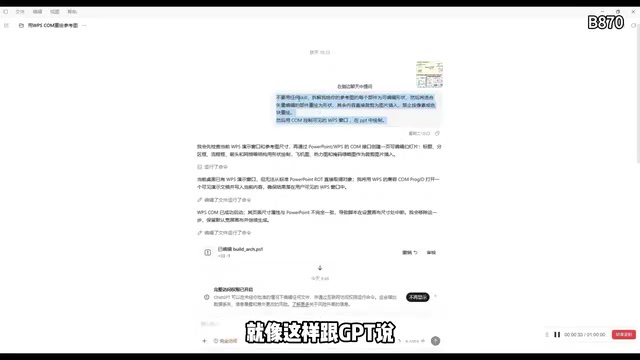
In the author's hands-on test, the entire drawing process took under 15 minutes — impressively fast. More importantly, the fidelity was high, with the visual result nearly identical to the original diagram.
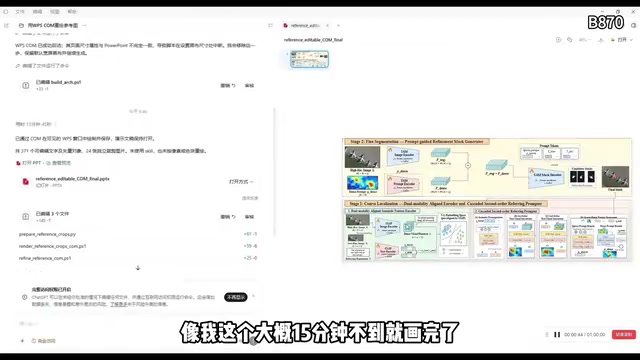
It's worth clarifying what "Skill" means in GPT-6 Astra. Skills are built-in or extended capability modules on the ChatGPT platform — similar to plugins. The Architecture Diagram Skill is specifically responsible for invoking an image-generation pipeline to render a finished graphic. When you explicitly say "don't use any Skill," the model falls back to a pure text-and-code reasoning path, using Python's python-pptx library (or similar document generation libraries) to write code that programmatically creates real PPT elements — including Shape, TextBox, Connector, and other objects — ultimately outputting a structured PPTX file. The fundamental difference between these two paths: the former produces bitmap pixels, while the latter produces XML structures that PowerPoint can parse and edit. That's what makes the output editable.
Why This Workflow Is Valuable for Researchers
In the resulting PPT file, text, boxes, and arrows are all individually editable — colors, positions, and wording can all be freely adjusted. For anyone writing a paper, this means you can use the AI-generated framework as a starting point and quickly adapt it to your specific research content, skipping the tedious labor of aligning everything from scratch.
In other words, AI here isn't acting as a black box that "generates a finished image at the push of a button" — it's a collaborator that "builds you a solid skeleton, then lets you refine the rest." This positioning as a producer of editable artifacts, rather than just pretty-but-untouchable images, is far more practically useful.
In academic papers — especially in computer science, bioinformatics, systems science, and related fields — framework diagrams (Architecture Diagrams / Framework Figures) typically appear right after the abstract or at the start of the methods section. They do the heavy lifting of "one picture is worth a thousand words," helping reviewers quickly grasp the overall logic and module relationships of a study before reading the body text. Precisely because of this role, these figures demand both visual precision and editability — during revision rounds, authors often need to repeatedly adjust label wording, module boundaries, or color semantics based on reviewer feedback. Common tools researchers have relied on include Visio, Lucidchart, draw.io, or manual assembly directly in PowerPoint — all time-consuming and alignment-heavy. The significance of AI-generated editable PPTX is that it automates the most time-consuming phase — "building from scratch" — so researchers can focus their energy on refining content accuracy rather than layout mechanics.
Key Steps at a Glance
Here's a summary of the core steps in this approach:
- Invoke the "Architecture Diagram Skill" in the web version of ChatGPT, providing a style reference image + architecture text description
- Have the model generate an initial framework diagram (still a non-editable image at this stage)
- Add a follow-up instruction: explicitly request "don't use any Skill — redraw this in PPT based on the image"
- Wait approximately 15 minutes and receive an editable PPTX file
- Freely modify text, arrows, and color blocks in PowerPoint to fit your paper
One caveat: this article is based on a single demonstration from a Bilibili content creator, and actual results may vary depending on the complexity of the reference image and the clarity of the architecture description. For particularly complex framework diagrams, fidelity and processing time may differ. Readers interested in trying this are encouraged to test it with their own prompts.
Final Thoughts
AI-assisted research figure creation is graduating from "toy" to "tool." When a model can not only generate images but also understand and manipulate the underlying structure of office documents, it genuinely integrates into a researcher's real workflow. This "generate image → redraw in PPT → editable output" approach chains together AI's visual capabilities with its document processing abilities — and it's worth a try.
Related articles

Should U.S. College Fraternities Be Banned? A Researcher's Incisive Observations
Why not just ban U.S. college fraternities? A researcher finds the key resistance comes from decision-makers' own fraternity identities and schools' "willful ignorance."

Microsoft Discovery: Accelerating Scientific Discovery with AI Agents
Microsoft's Discovery platform runs specialized AI agents to help researchers screen and prioritize the most promising compounds and experimental paths, reducing experiments and accelerating scientific discovery.

Cambridge Heavy Industries Secretly Develops Desktop-Scale Nuclear Fusion Device
Cambridge Heavy Industries is secretly developing a desktop-scale laser-driven nuclear fusion device, targeting the equipment supply market for fusion power plants. This article analyzes its miniaturization technology path, commercialization logic, and unique positioning in the fusion startup wave.