Generate iPhone Lock Screen Push Notifications for Free, with iOS 27 Liquid Glass Support

Free browser tool quickly generates iPhone lock screen push notification mockups with iOS 27 Liquid Glass clock.
A free tool called iOS Push Notification Mockup on Product Hunt helps developers and marketers quickly generate realistic iPhone lock screen push notification mockups in the browser. No registration or installation needed—add up to three notifications, customize icons and avatars, and choose Liquid Glass or solid clock styles. Outputs full-resolution PNGs with or without iPhone frames, adapted to App Store iPhone Duo sizes. All processing is done locally in the browser for privacy. Suitable for indie developers, marketers, and designers, but limited to lock screen notification scenarios.
Generate iPhone Lock Screen Push Notifications for Free, with iOS 27 Liquid Glass Support
In App Store screenshots and promotional materials, a realistic iPhone lock screen push notification often speaks louder than any copy. But creating such a mockup usually requires opening design software, finding a wallpaper, adjusting fonts and bubbles—it's time-consuming and laborious. A free tool on Product Hunt aims to make this happen in the browser in seconds.
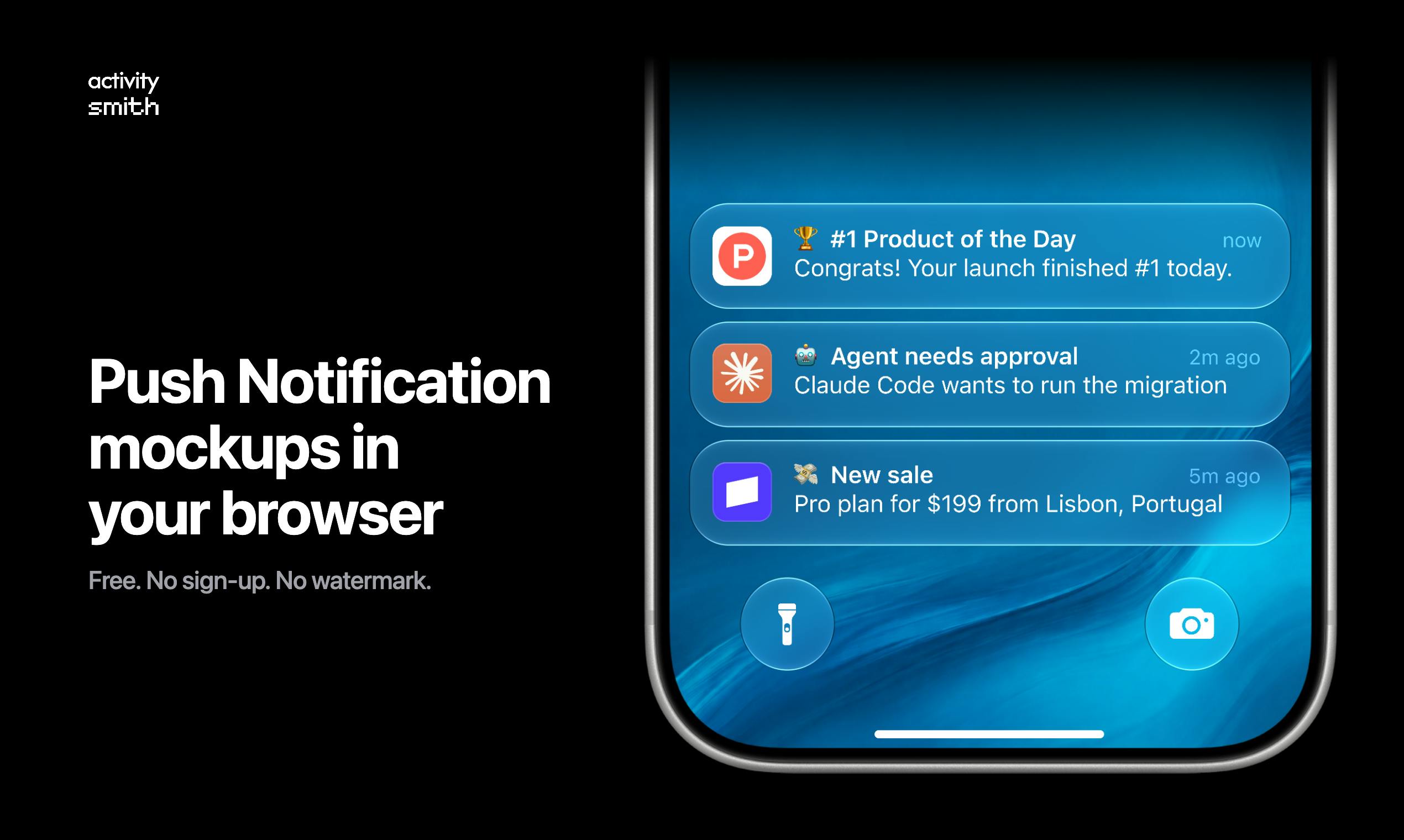
A Lock Screen Generator That Runs Entirely in the Browser
The tool, called iOS Push Notification Mockup, has a very clear positioning: helping you quickly generate iPhone lock screen mockups with push notifications. Its core selling points are "zero barrier" and "free."
You don't need to register an account or install any software. After opening the webpage, you write up to three notification messages, choose real app icons or upload your own, add a chat avatar, and you can assemble a lock screen screenshot that looks realistic enough. The wallpaper can be replaced, and the clock can be set to the latest "Liquid Glass" style or a traditional solid color style.
The final output is a full-resolution PNG image, and you can choose a version with or without the iPhone frame. The tool also specifically mentions support for "iPhone Duo App Store sizes," meaning the generated results can be used directly for App Store screenshot scenarios.
"iPhone Duo App Store sizes" refers to a requirement in Apple's App Store specifications for app screenshots. The App Store allows developers to upload screenshots in multiple device sizes, where "iPhone Duo" typically refers to the display size combination of 6.7-inch and 6.5-inch large-screen iPhones (such as iPhone 15 Pro Max and iPhone 11 Pro Max). Apple requires screenshots to be full-resolution PNG or JPEG and must not include device frames (unless for specific marketing materials). This tool supports direct output of images that meet this size specification, meaning the generated results can skip secondary cropping and be used directly in App Store product page screenshot slots—particularly practical for indie developers who need to launch quickly.
Design Details: Liquid Glass Clock and Real Icons
Notably, this tool has put considerable effort into visual details. The "Liquid Glass" design language rumored for iOS 27 has been introduced as a clock style option, making it closer to the latest system style than many crude mockup generators on the market.
For app icons, the tool includes a library of real app icons and also supports uploading your own icons—very practical for developers who need to create promotional materials for their own products. The addition of chat avatars makes notifications look more like real social scenarios rather than dry system alerts.
All image processing is done locally in the browser, and the official statement explicitly says "your images never leave the browser." For teams handling unreleased product screenshots or internal materials, this is a reassuring privacy guarantee.
"Liquid Glass" is an interface design language introduced by Apple in iOS 26 and continuously evolving in subsequent versions, characterized by translucent frosted textures, dynamic light refraction, and fluid highlights on element edges. On the lock screen clock, this effect manifests as digits with a glass-like transparency and ambient light reflection, rather than traditional solid colors or simple gradients. Since iOS 27 has not been officially released, the "Liquid Glass" style provided in the tool is more likely an approximate rendering based on existing public design resources or community speculation, rather than output from Apple's official SDK. For developers who need to preview the new system style, it remains a valuable reference, but they should be aware that there may be subtle differences from the final system's actual appearance.
Who Should Use This Tool
From the feature description, the target users of this tool are quite clear: indie developers, app marketers, and UI designers who need quick visuals.
For indie developers, newly launched apps often don't have the budget to hire a design team for polished store screenshots, and this tool provides a zero-cost alternative. Marketers can use it to quickly iterate push notification effects with different copy to test which expression is more eye-catching. Designers can use it as a rapid prototyping tool to see the general effect before formal design.
On Product Hunt, this product received 9 upvotes, ranked 20th for the day, and had 3 comments. This data indicates it's still a relatively new product with limited community discussion, but the combination of free, no watermark, and no registration is indeed attractive among tool-type products.
Client-side processing means all image composition, text rendering, and export operations are completed within the user's device browser via JavaScript, Canvas, or WebAssembly, without sending original images or generated results to a remote server. The advantage of this architecture is privacy protection—sensitive materials such as unreleased product screenshots and internal test icons do not leave the user's device, reducing the risk of leaks. At the same time, local processing also reduces dependence on network bandwidth and server computing power, typically achieving faster response times. However, its functionality is limited by browser capabilities, and complex filters or high-resolution batch exports may not be as smooth as native desktop software.
Limitations Are Also Obvious
To be objective, this is only a mockup generation tool, not design software. What it can do is strictly limited to the "lock screen + push notification" scenario. If you need to create in-app interface screenshots, batch generation of multilingual versions, or more complex device display effects, it may not meet your needs.
Additionally, whether the tool continuously follows iOS system design changes, whether the icon library is rich enough, and how the actual rendering quality of the Liquid Glass effect is—these can only be judged after actual use. The official description does not provide more detailed technical parameters or update plans.
For users who only occasionally need to create lock screen mockups, it's worth a try. For teams with high-frequency, complex design needs, professional design tools remain the safer choice.
Conclusion
Making the small task of "generating iPhone lock screen push notification mockups" simple enough, free enough, and privacy-focused enough is the core logic of this tool. In an era where AI-generated images are rampant, a lightweight tool focused on a single scenario, without watermarks, and with local processing actually seems pragmatic. For developers who need to quickly produce store materials, it lowers the barrier to trying.
One-line Summary
A free browser tool for quickly generating iPhone lock screen push notification mockups with iOS 27 Liquid Glass clock.
Paragraph Summary
A free tool called iOS Push Notification Mockup has appeared on Product Hunt, designed to help developers and marketers quickly generate realistic iPhone lock screen push notification mockups in the browser. Users don't need to register or install software—they can add up to three notifications, customize app icons and chat avatars, and choose Liquid Glass or solid color clock styles. The tool outputs full-resolution PNGs, supports versions with or without iPhone frames, and adapts to App Store iPhone Duo sizes. All image processing is done locally in the browser, ensuring privacy. The tool is suitable for indie developers, marketers, and designers to quickly create store promotional materials, but its functionality is limited to lock screen notification scenarios—complex design needs still require professional software.
Related articles

Gemini 4 Neon Leak: A Potential Strong Contender Against Opus 5.5
A Hacker News thread suggests Gemini 4 Neon looks like an Opus 5.5 competitor. This article unpacks the product positioning behind this community signal, shifts in the top-model competitive landscape, and what it means for developers' model selection strategy.

Claude Fable 5.2's Self-Authored Short Film 'Fable' Sparks Discussion
A short film 'Fable,' credited to Claude Fable 5.2 for script, visuals, and directing, appears on Hacker News. This article analyzes the significance of full-pipeline AI creation, community reactions, and what it means for content creators.

Anthropic IPO Pricing: A Signal of AI Giants Going Public
Anthropic's IPO pricing draws attention. This article analyzes its potential impact on AI industry valuation, commercialization paths, and the competitive landscape, and highlights public-market expectations and challenges for AI companies.