Generative UI Streaming in Chat SDK Agents: A Deep Dive into json-render

json-render lets chat agents stream structured UI cards rendered in each platform's native format
The article explains how json-render combined with Chat SDK enables generative UI: developers use defineCatalog to define a typed component catalog, and the model outputs JSON specs describing the interface under those constraints rather than free text or HTML. streamCard publishes the card as soon as the root element appears and keeps updating it as the stream continues, throttled to once every 500ms by default; toCard validates each prop and throws CardSpecError with a readable issue list fed back to the model for correction, closing the loop. Adapters degrade gracefully when platform message limits are exceeded, or developers can pass limits to reject over-limit specs outright. Suited to reports, monitoring, and dashboards; plain-text Q&A doesn't need it.
From Plain Text to Dynamic Interfaces: The UI Evolution of Chat SDK Agents
Chatbots have long been trapped in a plain-text box. Even as the underlying models grow more capable, what users see in Slack or Teams is still just blocks of text, with complex tables and charts barely expressible through ASCII or images. The combination of json-render and Chat SDK is changing this—agents can now stream structured UI cards mid-conversation and render them directly in each platform's native format.
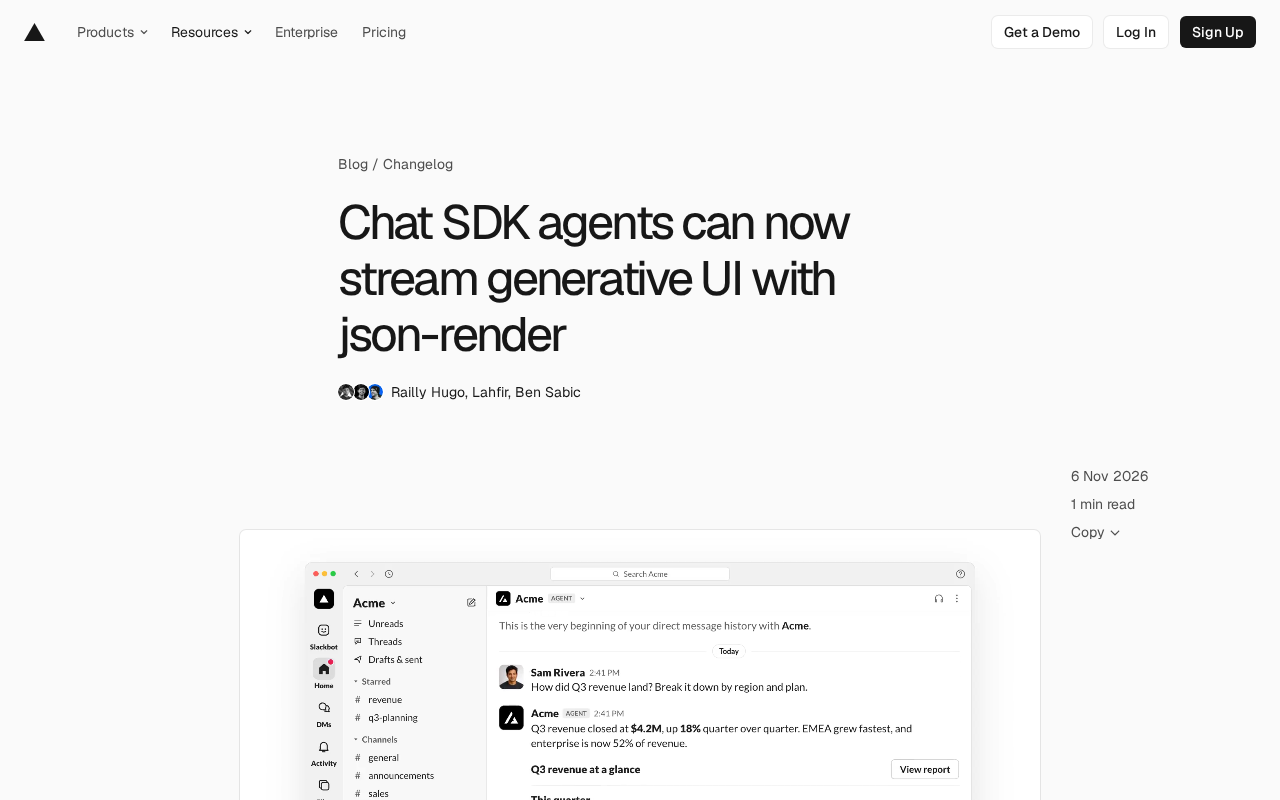
The core idea behind this capability isn't complicated: constrain the model's output space with a typed component catalog, have the model write JSON instead of free-form output, and let the rendering layer translate that JSON into the card format each target platform understands. Constraints buy determinism—the model works within catalog boundaries and its output is inherently verifiable.
How It Works: Typed Catalog Plus JSON Specs
The whole pipeline relies on one key abstraction—a typed component catalog. Developers use defineCatalog to define the schema and the available component set; the catalog comes with built-in definitions for standard components like tables, charts, and buttons. After receiving the prompt generated from the catalog, the agent outputs a JSON spec describing the interface, rather than arbitrary HTML or Markdown.
The code structure is quite compact. Take lib/bot.ts as an example: define the catalog, then call streamText inside the onNewMention callback to let the model stream JSON, and finally use streamCard to turn the text stream into a chat card. The system prompt comes directly from catalog.prompt(), explicitly telling the model which components are available and what format the spec should follow.
This design fully decouples "what to draw" from "how to draw it." The model only produces the spec, json-render maps the spec to Chat SDK cards, and each platform adapter handles the final format—Slack uses Block Kit, Teams uses Adaptive Cards. Developers don't need to build and maintain a separate set of tools for every message format.
streamText is the streaming completion interface provided by the Vercel AI SDK. It returns an async readable stream: each time the model generates a chunk of tokens, it pushes them downstream immediately rather than waiting for the full response. The difference from ordinary generateText lies in the nature of latency—the latter's time-to-first-byte equals the full generation time, while the former spreads the wait across the entire generation process. Companion tools like streamObject and toDataStreamResponse let the frontend or server incrementally consume structured output, and Chat SDK's streamCard does throttling and card mapping on top of that layer. Understanding this helps gauge the lower bound on streaming UI latency: it depends on the arrival time of the model's first valid token, not on the rendering cost of card components.
Streaming Rendering: Cards That Update as They're Written
streamCard's behavior deserves a closer look. It doesn't wait for the model to finish the entire JSON and then post the card all at once; instead, it publishes as soon as the root element has content, then keeps updating the message as new elements stream in. The default edit frequency cap is once every 500 milliseconds, which aligns neatly with Chat SDK's own streaming interval.
This throttling design is pragmatic. Chat platform APIs have implicit costs around message editing; updating too frequently both wastes quota and tends to trigger rate limits. The 500-millisecond window makes the interface feel like it's "growing in real time" without putting pressure on the platform adapter. Once the stream ends, the message settles into the validated final card.
For users, it feels like "watching the interface being drawn stroke by stroke." For agent applications, this means long-running tasks can continuously surface intermediate state during execution, instead of leaving users staring at a "typing…" indicator.
Validation and Platform Limits: Making Failures Fixable
The biggest risk with generative UI is non-compliant model output. toCard acts as the gatekeeper: it checks each element's props against the component schema one by one and throws a CardSpecError on violation. Crucially, each problem generates a readable issue, and developers can feed that issue list back to the model to produce a corrected spec.
This turns validation errors into feedback signals the model can consume, closing the loop. Compared with simply erroring out and retrying, this context-rich correction path has a higher success rate.
Platform limits are another hurdle. There's a cap on how much content a single message can carry, and Chat SDK adapters degrade gracefully when that limit is exceeded—for example, the Slack adapter turns a second table into a code block. This silent degradation is sometimes acceptable, but sometimes it breaks the information being conveyed. Developers can pass a limits parameter to streamCard so that over-limit specs are rejected outright, giving them active control over degradation behavior.
CardSpecError belongs to the "structured validation error" design pattern: the error object carries not just failure information but a machine-parseable list of issues (typically annotating element path, expected type, and actual value), letting the caller programmatically decide whether to retry or degrade. Contrast this with throwing string exceptions, which only allow all-or-nothing retries. In generative UI scenarios, serializing such errors into the next round's prompt is essentially a "self-correction" loop, rooted in the same mechanism as passing error information back to the model after a failed tool call. Note that retries should have a cap and preserve the original error; otherwise the model may keep producing the same non-compliant output, leading to an infinite loop that only burns tokens.
Practical Significance and Scope
This approach moves generative UI from proof of concept to practical engineering. The typed catalog solves output controllability, streaming rendering solves response experience, validation feedback solves consistency, and platform adapters solve cross-platform cost. Each of the four problems has a corresponding mechanism, and together they form a complete pipeline.
Its applicable scenarios are fairly clear: agents that need to display structured data—report queries, monitoring dashboards, task boards—benefit directly from table and chart components. Conversely, if the conversation is mostly plain-text Q&A, adding this rendering pipeline only increases complexity.
One more thing to keep in mind: the coverage of the catalog's components determines the agent's expressive ceiling. Requirements outside the catalog can only fall back to text representation, which means catalog design is itself part of product design—you need to anticipate the interface shapes that will appear in real conversations. The docs and playground provide entry points, but actual results still need to be validated under each platform's specific limits.
Related articles
 Tech Frontiers
Conductor Cloud Service Shutting Down? A Comparative Review of Three Parallel AI Coding Agent Solutions
Conductor's cloud service is shutting down—how can developers keep running AI coding agents in parallel? This article compares three alternatives: Orca, Codex, and Cursor: Orca is open-source and free and compatible with old workspaces, Codex is built into the ChatGPT desktop app and supports cloud handoff, and Cursor offers multi-agent windows within the editor. Choose the tool that best fits your workflow.
 Tech Frontiers
Cursor Launches Live Apps: One-Click Shareable Links
Cursor launches Live Apps for cloud agents: auto-build a web app, configure Postgres and Cursor login, run security checks, deploy to your domain, and generate a shareable link. Here's what it covers, its governance controls, and getting-started advice.
 Tech Frontiers
Passing Tests ≠ Correct Code: Cursor's Four-Step AI Code Review Method
Cursor warns that passing tests doesn't mean correct code, proposing a four-step review method: watch the diff in real time, stop and redirect on deviation, use Review/Find Issues after tasks, and read the diff yourself.