Getting Started with AI Programming: A Practical Guide to Copilot Setup, Configuration, and Model Selection

A systematic overview of AI programming tool categories, model selection strategies, and complete GitHub Copilot setup.
This article categorizes current AI programming tools into three types: fully automated Vibe Coding (Bolt/Lovable), AI-enhanced editors (Cursor/Windsurf), and integrated assistants (GitHub Copilot/Claude Code). It focuses on GitHub Copilot's installation and configuration in VS Code, plan selection and the Premium Request multiplier mechanism, compares use cases for GPT 4.1, Claude Opus 4, Gemini 2.5 Pro and other models, and demonstrates how to use Open Router to access additional models while saving quota.
As developers, we can no longer ignore AI's presence in our workflows. Whether you embrace it or remain on the sidelines, AI programming tools are fundamentally reshaping the developer's role. Based on Net Ninja's AI programming course series, this article systematically covers the selection strategies for mainstream AI programming tools, model configuration methods, and the complete setup process for GitHub Copilot.
Why Developers Need to Embrace AI Programming Tools
Many developers are hesitant about AI programming tools, typically for two reasons: first, the AI field iterates so rapidly that what you learn today might be outdated in a few days; second, using AI to generate code seems to strip away the joy and sense of accomplishment of "learning to code" itself — that satisfaction of battling a bug for hours and finally solving it is something AI truly cannot replace.
But the reality is that the developer's role is changing (note: changing, not being replaced). As model capabilities continue to grow, the positioning of AI programming tools becomes increasingly clear: they're not here to replace developers, but to boost productivity and creativity. The key is learning to choose the right tools and integrate them into your workflow.
What Are the Current Mainstream AI Programming Tools
Today's AI programming tools can be broadly categorized into three types:
Fully Automated Vibe Coding Tools
Represented by Bolt and Lovable, these tools focus on a "describe your requirements, automatically generate an application" experience, suitable for rapid prototyping and non-professional developers.
Vibe Coding as a concept was formally introduced by OpenAI co-founder Andrej Karpathy in early 2025, describing a completely new programming paradigm where developers rely entirely on AI-generated code and barely write code directly. The core idea is: developers step out of the "writing code line by line" role and instead become requirement describers and result reviewers. Tools like Bolt and Lovable productize this philosophy — users simply describe in natural language "I want a task management app with user login," and the tool automatically generates complete frontend or even full-stack application code. These tools lower the barrier to programming, but they also demand stronger requirement expression skills and result judgment from users, since you need to be able to identify potential architectural flaws or security vulnerabilities in AI-generated code.
AI-Enhanced Code Editors
Cursor and Windsurf fall into this category. They're essentially VS Code clones but with deeply integrated AI features. The entire editor is redesigned around the AI experience, suitable for developers who want to fully embrace an AI-centric workflow.
Both Cursor and Windsurf are built on VS Code's open-source core (Code - OSS), meaning the plugin ecosystem and keyboard shortcuts you're familiar with can migrate almost seamlessly. Unlike the Copilot plugin approach, these editors embed AI capabilities deep into the editor's foundation — for example, Cursor's "Composer" feature enables AI-assisted editing across multiple files simultaneously, while Windsurf's "Cascade" introduces agent-like cascading operation capabilities. Choosing these tools means you're willing to place AI at the core of your workflow, rather than in a supporting role.
Integrated AI Programming Assistants
GitHub Copilot and Claude Code belong to this category. They integrate into existing development environments as plugins or command-line tools, requiring no editor switch, making them ideal for developers who want to gradually introduce AI into their traditional workflows.
GitHub Copilot launched in 2021 as one of the first large-scale commercial AI programming assistants, powered by OpenAI's Codex model (a code-specialized version of the GPT series) and continuously upgraded to stronger foundation models since. Claude Code is Anthropic's command-line AI programming tool released in 2025, designed for directly operating on codebases, executing commands, and managing files within the terminal environment, representing the evolution of AI programming assistants toward "autonomous agents." The biggest advantage of these tools is zero migration cost — you keep your existing editor habits and workflow while AI steps in as a "co-pilot."
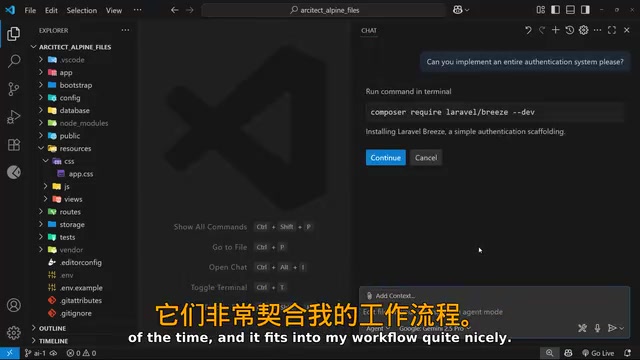
This course series focuses on the GitHub Copilot + VS Code combination because it integrates most naturally into most developers' existing workflows. It will also cover MCP (Model Context Protocol) servers — an open standard protocol released by Anthropic in late 2024 that defines unified communication specifications between AI models and external tools/data sources, similar to a "USB port" for AI. Through MCP, AI assistants can securely and standardizedly communicate with APIs like GitHub and Supabase, significantly expanding AI assistant capabilities without developing separate integration solutions for each service.
GitHub Copilot Installation and Plan Selection
Installation Steps
- Install VS Code (code.visualstudio.com)
- Search for "Copilot" in the Extensions panel and install it — the system will automatically install the Copilot Chat extension as well
- After restarting VS Code, Copilot icons will appear at both the top and bottom
- Sign in with your GitHub account and select a Copilot plan
Copilot Plan Comparison and Premium Request Mechanism
GitHub Copilot offers three plans:
- Free plan: Access to basic models with unlimited chat and code completions
- Pro plan: More model options and Premium Request quota
- Pro Plus plan ($39/month): Unlocks the latest Anthropic models with more Premium Requests
It's especially important to understand the Premium Request multiplier mechanism here, as it directly affects your usage costs:

Premium Requests are the metering units GitHub Copilot uses to manage quotas for advanced model calls. Unlike a simple "each request costs 1 credit" system, Copilot uses a multiplier pricing model — each Agent session has a base value of 1 Premium Request, but is multiplied by different coefficients based on the selected model's computational cost. This mechanism essentially passes through the underlying API cost differences to users, allowing them to weigh functionality needs against cost. For example:
- GPT 4.1 has a multiplier of 0 on paid plans, meaning it's completely free to use
- Claude Opus 4 has a multiplier of 10, so 5 sessions consume 50 Premium Requests
- Basic models on the Free plan have a multiplier of 1, consuming 1 request per session
This pricing structure has been adjusted multiple times and will very likely change again in the future — it's advisable to regularly check GitHub's official documentation.
How to Choose the Right AI Programming Model
Different AI models perform significantly differently across various programming tasks. Choosing the right model is key to using AI programming tools efficiently:
| Model | Best For |
|---|---|
| O4 Mini | Simple or repetitive tasks |
| Claude Opus 4 | Complex coding problems |
| GPT 4.1 | General-purpose tasks |
| Gemini 2.5 Pro | Excellent overall performance, great daily driver |
Understanding the differences between these models helps you make smarter choices. O4 Mini is the lightweight version of OpenAI's reasoning model series, offering fast speed and low cost for structured, rule-clear programming tasks; Claude Opus 4 is Anthropic's flagship model, excelling when deep code architecture understanding, complex logical reasoning, or large-scale refactoring is needed; GPT 4.1 is OpenAI's general-purpose flagship model, delivering balanced performance across code generation, documentation, debugging explanations, and more; Gemini 2.5 Pro leverages its ultra-long context window (supporting million-token levels) to offer unique advantages when analyzing large codebases.
In practice, every developer works differently. The best approach is to try different models for different tasks and compare the results, finding the combination that best fits your workflow.
Expanding Copilot's Model Options Through Open Router
Beyond Copilot's built-in models, you can use Open Router to access virtually all mainstream AI models. Open Router is an AI model aggregation routing platform that lets developers access hundreds of models from Google, Anthropic, OpenAI, Meta, and other providers through a unified OpenAI-compatible API interface. Its core value lies in: transparent pricing (billed by actual token usage, typically lower than official API pricing), automatic failover (switching to backups when a model is unavailable), and unified usage tracking — eliminating the complexity of managing multiple API keys. You only need to purchase credits once, then call any provider's models on demand.
More importantly, models called through Open Router do not count against Copilot's Premium Request quota, making this a highly practical cost-saving strategy for heavy users.
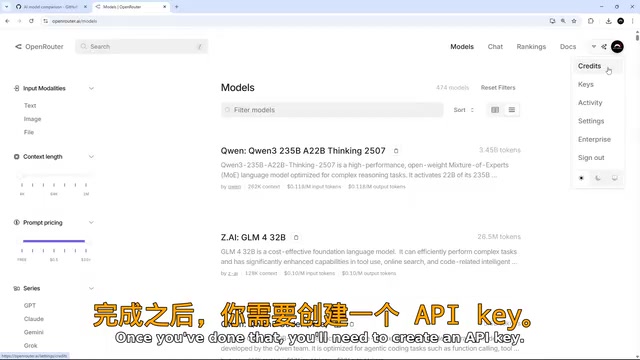
Open Router Configuration Steps
- Register an Open Router account and add credits
- Go to Settings → API Keys and create a new API key
- In VS Code's Copilot chat window, click "Manage Models" at the bottom of the model dropdown menu
- Find Open Router in the provider list, click the gear icon, and enter your API key
- Check the models you want to use — they'll automatically appear in the chat window's model selection list

Once configured, you can freely switch between different models during chat sessions. You may not have noticed, but currently using Anthropic models through Open Router occasionally encounters some stability issues, while Gemini 2.5 Pro performs quite reliably in daily workflows and makes a solid default choice.
The Right Mindset for Using AI Programming Tools
AI programming tools are neither a silver bullet nor a threat. They're more like a capability multiplier — provided you have solid programming fundamentals and engineering judgment. AI-generated code still requires developers with sufficient technical depth to review: identifying potential security vulnerabilities, evaluating architectural soundness, and spotting performance bottlenecks. This means "knowing how to ask the right questions" and "knowing how to verify answers" are equally important — perhaps even more critical than pure code-writing ability. In this era of rapidly iterating AI tools, rather than worrying about "will AI replace me," it's better to think about "how can I leverage AI to make myself stronger."
Upcoming articles in this series will dive deeper into the practical applications of Copilot's Chat, Edit, and Agent modes, as well as MCP server configuration and usage. Stay curious, keep learning — that's a developer's most important competitive advantage in the AI era.
Key Takeaways
- AI programming tools fall into three categories: fully automated Vibe Coding (Bolt/Lovable), AI-enhanced editors (Cursor/Windsurf), and integrated assistants (GitHub Copilot/Claude Code)
- GitHub Copilot's Premium Request multiplier mechanism means different models have vastly different costs — GPT 4.1 is free on paid plans while Claude Opus 4 costs 10x
- Open Router lets you access additional models without consuming Copilot's Premium Request quota
- Gemini 2.5 Pro offers strong overall performance and stability as a daily default choice
- The best practice is to try different models for different tasks and compare results to find your optimal workflow combination
Related articles
 Tutorials
ChatGPT Plus Subscription Guide: Are GPT-5.5, image-2, and Codex Worth the Upgrade?
A detailed look at ChatGPT Plus features — GPT-5.5, image-2, and Codex — with a Plus vs Pro comparison and a complete step-by-step subscription guide for users outside the US.
 Tutorials
Harness AI Engineering in Practice: Using Claude Code to Master Enterprise-Level E-Commerce Development
Deep dive into Harness AI Engineering: master enterprise e-commerce development with Claude Code using the Rules, Skills, Wiki, and Changes framework.
 Tutorials
Cursor + Codex Dual-IDE Collaboration: A Practical Methodology for Open-Source Project Customization
A complete methodology for open-source project customization based on real-world experience, detailing the Cursor+Codex dual-IDE workflow, seven-stage process, MVP validation, and AI source code reading techniques.