Getting Started with Codex: Why Frontend Developers Prefer It Over Cursor or Claude Code

Why frontend developers are switching to Codex over Cursor and Claude Code.
This article compares the three leading AI coding tools — Codex, Cursor, and Claude Code — across pricing, stability, and use-case fit. It explains why Codex's standalone app form makes it the top pick for frontend developers, backed by one developer's real migration story from Cursor through Claude Code to Codex.
Codex: A New Paradigm for AI Coding Tools
With AI coding tools proliferating at a rapid pace, Cursor, Claude Code, and Codex have emerged as the industry's recognized "Big Three." For developers, being familiar with all three is no longer a bonus — it's table stakes. After all, different companies often mandate different AI tools and provide corresponding accounts. This article focuses on Codex, breaking down its core form factor and competitive advantages to help you decide whether it deserves a spot as your primary tool.
Background: The Technical Approaches Behind the Big Three Cursor, Claude Code, and Codex each represent a distinct mainstream approach to AI-assisted coding. Cursor is a deeply customized fork of VSCode with built-in support for multiple large models including GPT-4 and Claude. Claude Code, developed by Anthropic, centers on a terminal CLI interface and emphasizes deep understanding of entire codebases. Codex, powered by OpenAI's GPT-4o model family, has evolved in recent years from a pure API service into a standalone app product. All three tools are built on the code comprehension and generation capabilities of large language models (LLMs), but they differ in product form factor, how they leverage context windows, depth of integration with development environments, and which types of programming tasks they're optimized for.
One significant development worth noting: Codex now has a dedicated standalone app. This means it currently offers four modes of use: terminal (CLI), graphical interface (GUI), web, and editor plugin.
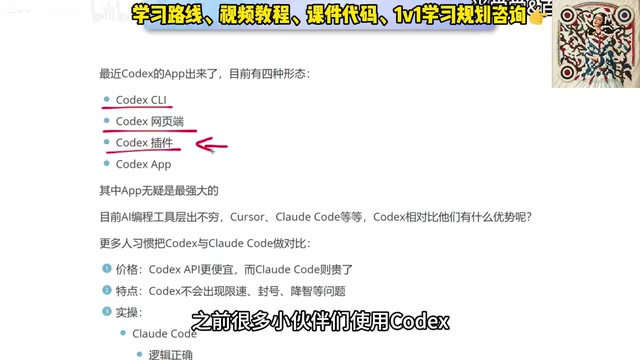
In the past, most developers integrated Codex as a plugin embedded within various development tools. The recommended approach now is to use the Codex app directly. The reason is straightforward: among all four modes, the app offers the most complete feature set and the best overall experience. Equally important, the app doesn't replace traditional tools — it works seamlessly alongside classic environments like VS Code, further amplifying its utility.
The Core Difference Between CLI and App The difference between CLI (command-line interface) and GUI (graphical user interface / app) goes beyond user experience — it reflects the mental model each tool is designed for. CLI tools like Claude Code require familiarity with terminal operations and are well-suited for backend engineers who favor scripted, automated workflows. The app form of Codex lowers the cognitive barrier through visual interaction, which naturally appeals to frontend developers whose work is inherently reliant on visual feedback. From a product strategy perspective, launching a standalone app represents a significant repositioning for Codex — a deliberate move to capture the "non-terminal user" segment previously dominated by Cursor.
Codex vs Claude Code: A Practical Comparison of Price and Stability
Many developers naturally compare Codex and Claude Code side by side. Let's break down the differences across two key dimensions.

Price: Codex Offers Better Value
In terms of pricing alone, the Codex app is significantly cheaper, while Claude Code sits at a higher price point. For developers who use AI coding tools heavily over the long term, cost is an unavoidable consideration — and Codex holds a clear advantage here.
Stability: Rate Limiting and Account Bans
Based on real-world user feedback, Claude Code has a few notable pain points, the most common being rate limiting and account suspension issues. Codex, by comparison, performs more consistently on these fronts, delivering a smoother, less interrupted experience.
Why Rate Limiting and Bans Happen Rate limiting and account suspension issues in AI coding tools stem fundamentally from how large model APIs allocate resources. Anthropic enforces strict TPM (tokens per minute) and RPM (requests per minute) caps on the Claude API. Since Claude Code is a high-frequency usage scenario, it's prone to hitting these limits. Account bans tend to be linked to account sharing, API key abuse, or regional policy enforcement. By contrast, OpenAI's Codex uses a more flexible subscription-based quota system, and its app form applies smarter batching and caching optimizations to API requests — resulting in relatively better stability under heavy use. When evaluating tools, developers should factor both stability and price into their TCO (total cost of ownership) assessment.
On the topic of "quality degradation" (where model response quality drops over time), opinions are mixed: some users report no noticeable degradation in their workflows, while others say Codex is also susceptible. This is best evaluated through your own hands-on testing.
Frontend vs. Backend: How Your Role Shapes Your Tool Choice
Beyond price and stability, the two tools have noticeably different capability strengths — and this is often the most important factor when choosing between them.
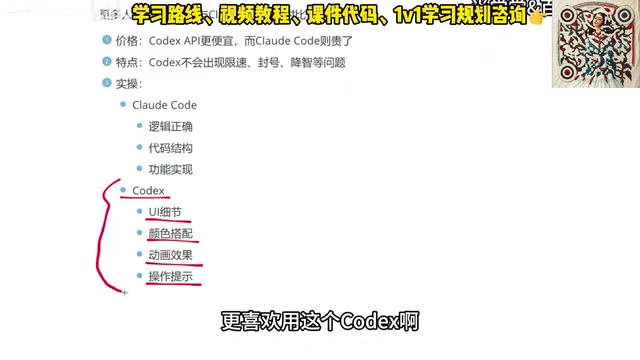
Based on feedback from actual developers:
- Claude Code prioritizes logical correctness, code structure, and feature implementation — making it the preferred choice for backend engineers.
- Codex excels at UI details, color choices, animations, and interaction cues — making it a natural fit for frontend developers and app developers.
Why the Model Capability Gap Exists Codex's strength in UI and frontend tasks is closely tied to its training data composition. OpenAI's Codex series was pretrained on a massive corpus of public GitHub code, where frontend code (HTML/CSS/JavaScript/React/Vue, etc.) is highly represented, with abundant visual examples of UI components and animation effects to learn from. Claude, by contrast, has undergone more systematic RLHF (reinforcement learning from human feedback) optimization for instruction-following and logical reasoning, making it more robust at handling complex business logic, API design, and system architecture — classic backend concerns. This divergence in capability is ultimately the result of different companies making different trade-offs in model training objectives and data strategy, not merely product-level feature decisions.
This distinction makes one thing clear: choosing a tool is fundamentally about matching it to your work context, not blindly following popularity rankings. Frontend developers gravitating toward Codex and backend engineers preferring Claude Code are both making rational choices.
From Cursor to Codex: One Developer's Real Migration Story
Tool evolution almost always comes with adjustments to workflow habits. Here's a real migration path from a seasoned frontend developer that's worth referencing.

Phase 1: Cursor — used for over six months. Cursor is feature-mature, but expensive, and the ongoing subscription cost became a psychological burden.
Phase 2: Claude Code — switched to domestic models to reduce costs, which did lower expenses overall, but the experience was unsatisfying. The pure terminal CLI interaction style was also uncomfortable, and motivation to use it steadily declined.
Phase 3: Codex app — became the final primary tool. The core reason: the app form factor completely eliminates the command-line constraint while integrating seamlessly with VS Code and similar tools. For frontend developers — especially those just entering the field — Codex offers a much more approachable experience, both in terms of visual feedback and onboarding difficulty.
Summary: How to Choose Among the Three AI Coding Tools
No tool is objectively superior — it all comes down to fit for your use case. Each of the three leading AI coding tools has its own strengths:
| Tool | Core Strengths | Best For |
|---|---|---|
| Cursor | Mature features, rich ecosystem | Developers who prioritize tool stability |
| Claude Code | Strong logic, excellent code structure | Backend engineers, algorithm developers |
| Codex | Great value, strong UI details, excellent app UX | Frontend developers, app developers, AI coding beginners |
For those just getting started with AI-assisted coding, it's worth maintaining a working familiarity with all three tools to handle the varying requirements of different companies and projects. But if you're a frontend developer, or if you want to boost development efficiency at lower cost with a more approachable interface, Codex is unquestionably the first tool worth trying. Upcoming content will dive deeper into the complete workflow from installing Codex to putting it into real-world practice.
Key Takeaways
Related articles

Resume Guide for Programmers Transitioning to AI: From an HR Perspective to Job Requirement Matching
How should programmers transitioning to AI write a resume? This Bilibili tutorial gives five key preparation actions: set aside two or three days to review skills and projects, choose a simple template, reverse-engineer the tech stack from job sites, emphasize LLM capabilities, and do a final check from an HR perspective.

Building a RAG Knowledge Base: A Complete Guide from Architecture to Retrieval Evaluation
A systematic overview of the full RAG knowledge base workflow: from overall architecture and mature retrieval solutions to key details of retrieval evaluation and who should learn it, helping developers build a path from beginner to hands-on practice.

Turn Screenshots into Web Code in Seconds: Anyone Can Write HTML with AI
A Bilibili creator demonstrates using AI to turn webpage screenshots directly into HTML and CSS code without manual coding. The article analyzes the tool's usage, new features like video-based app cloning, iterative refinement, and the real boundaries of AI giving zero-foundation users programming ability.