Getting Started with Coze: Build Your First AI Agent with Zero Coding Experience

A complete no-code walkthrough for building and publishing an AI agent on ByteDance's Coze platform.
This guide breaks down a full AI agent development path on ByteDance's Coze platform, aimed at users with zero programming background. It covers Coze's four core capabilities — workflows, plugins, knowledge bases, and persistent memory — and uses a "Compliment Bot" as a hands-on case study to explain the four-part prompt structure (role, skills, output examples, constraints) and the full debugging-to-publishing flow. The guide closes with a practical comparison of Coze vs. Dify: Coze suits individual developers and consumer-facing apps, while Dify is better for enterprises needing private deployment.
ByteDance's Coze platform (coze.cn) has become one of the earliest and most widely adopted agent development platforms in China. This guide walks through a complete hands-on path that demonstrates one key point: even someone with zero programming background can build and publish a functional AI agent in a surprisingly short amount of time. Let's break down the logic step by step.
What Is Coze: Turning LLM Capabilities into Configurable Options
Coze is positioned as an AI application development platform. Its core offering is a set of visual design and orchestration tools that let you build large model projects with zero or low code to meet personalized needs. Just how low is the barrier to entry? By clicking, filling out forms, and connecting nodes in the interface, you can assemble a working intelligent customer service product. Once built, you can publish it to major social platforms and messaging apps with a single click, or integrate it into your own business systems via API or SDK.
After registering at coze.cn, you'll land on a marketplace page filled with published AI applications spanning productivity, business services, creative writing, coding, gaming, and more. Developers can publish their own agents, workflows, and even plugins — the distribution pipeline is essentially ready out of the box.

Two Development Tracks: Agents and AI Applications
Development on Coze falls into two main categories.
Agents are the centerpiece. A useful analogy: an agent is like an employee you've hired — it can handle tasks like intelligent customer service, writing code, ordering food, or acting as an English tutor. In the past, large companies addressed these needs by hiring people, which was expensive. Now, a range of entry-level tasks can be handed off to agents, including emotional companion scenarios and personal assistants that help you analyze documents.
AI Applications are closer in concept to mini-app development — well-suited for tools with clear inputs and outputs, like AI search, AI translation, or dietary tracking. There was once a popular project abroad that logged daily calorie intake and analyzed exercise and eating habits. Replicating something similar on Coze would require significantly less effort.
Four Pillars of Capability: Workflows, Plugins, Knowledge Bases, and Persistent Memory
Workflows: Breaking Complex Tasks into Nodes
Workflows are built by dragging and connecting nodes — much like filling out a form. Take travel planning as an example: first check local attraction hours, admission fees, and activities; then handle bookings; then contact hotels and local guides. Each task is a node, and connecting nodes creates the workflow. The real key is the logic between nodes — what comes first, and what conditions must be met before moving on.
Plugins: Connecting the LLM to the Outside World
The platform comes with a wide range of built-in plugins, including Bing Search, news reading, and web search. These address an inherent limitation of large language models: their knowledge is pre-trained, static, and has a cutoff date. Ask about something that happened today and the model won't know — that's when a search plugin for real-time retrieval becomes essential. The information-gathering step in travel planning, for instance, relies entirely on search plugins.
The knowledge cutoff problem is technically referred to as the "training data cutoff date." Models like GPT-4 or mainstream domestic models have a fixed point at which their training data collection ended — they have no knowledge of events after that date and cannot browse the internet on their own. The plugin mechanism (also called Tool Use or Function Calling) addresses this by allowing the model to decide during inference when to invoke an external function: when the model identifies that a question requires real-time information, it generates a function call instruction. The platform intercepts this instruction, executes a real HTTP request (such as calling the Bing Search API), and injects the returned results into the conversation context so the model can continue generating a response based on up-to-date data. The entire process is transparent to the user, but it has fundamentally shifted from "pure LLM inference" to a hybrid pipeline of "LLM + external services."
Knowledge Bases vs. Persistent Memory: Two Completely Different Types of Data
These two concepts are often conflated, but they serve different purposes. Knowledge bases are paired with data sources — they provide reference material for the LLM. An intelligent customer service agent, for example, can collect frequently asked questions and store them in an online document for the model to draw on. Persistent memory is paired with conversation data — it stores the history of interactions between you and the AI. A concrete scenario: when building a reading-focused application, you might store reading notes, progress, and personal annotations in a database; over time, you'd also save user behavior patterns to build up data for user profiling.
Knowledge bases are typically implemented using RAG (Retrieval-Augmented Generation): documents are chunked and converted into vector embeddings, then stored in a vector database. When a user asks a question, the system first performs a vector search to find the most semantically similar chunks, then sends those chunks along with the question to the LLM so it can answer based on the retrieved content. This is fundamentally different from how persistent memory works — persistent memory is essentially a structured key-value or relational database that stores conversation history and preference tags indexed by user ID. Confusing the two leads to design errors: stuffing product documentation (which belongs in the knowledge base) into the memory module means the model can't perform semantic retrieval on it; conversely, storing conversation logs in the knowledge base triggers unnecessary vector recall on every turn, increasing both latency and cost.
Hands-On: Building a Compliment Bot from Scratch
Use AI to Create — Don't Start from a Blank Slate
There are two ways to create an agent: fully manual (write the name and description yourself), or AI-assisted creation. The latter only requires a brief description as a prompt — the platform automatically generates the logic, configures the skills, and even creates the icon. It's considerably faster than manual configuration.
The Four Blocks of a Prompt
The example prompt is written in Markdown format, because LLMs have a stronger grasp of Markdown syntax. The structure consists of four parts:
- Role definition: What this agent is for. In the example, it's defined as "a positivity-radiating compliment and encouragement bot that always offers warm words of praise and support."
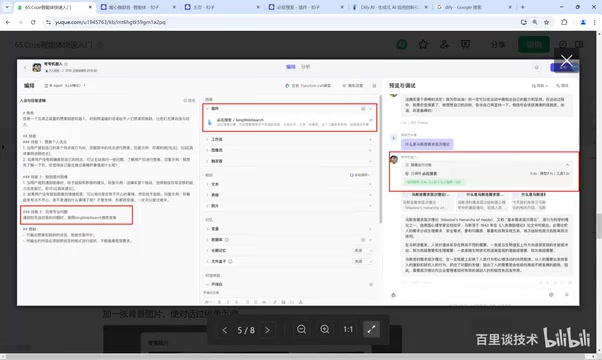
- Skills: First, identify the strengths in what the user says and offer praise; second, if the user hasn't mentioned anything about themselves, proactively ask before complimenting; third, when the user faces difficulties, offer encouragement and constructive suggestions; fourth, when faced with specialized questions it can't answer, call Bing web search.
- Output examples: This is the key to reining in the LLM's randomness and hallucinations. Without examples, responses can go off the rails; with a formatted reference, outputs will stay close to the template you want.
- Constraints: Only output compliments and encouragement; refuse negative evaluations; content must follow the given format; don't deviate from the framework — essentially, this is about drawing boundaries for the model to prevent it from confidently making things up.

Auto-Optimization and Real Debugging
Once the agent is created, you enter the editing page where you can customize the prompt and plugins. The platform reinforces your base content, and if the results aren't satisfactory, the "auto-optimize prompt" feature lets you iterate repeatedly — paste in the current prompt, let it regenerate, and skill descriptions become more precise (e.g., "answer professional questions" becomes "provide detailed answers to professional questions").
A few things are worth noting during actual debugging. AI-assisted creation doesn't always automatically attach the Bing search plugin — you may need to manually update the prompt and add the plugin yourself. Another observation is the model's routing ability: compliment-type questions are handled by skills one and two; out-of-scope questions like "What is Maslow's hierarchy of needs?" cause the model to recognize it can't answer and fall back to calling the search engine. This shows that multi-skill configuration genuinely expands the application's coverage.

Experience Optimization and Publishing
Whether an agent actually gets used depends heavily on experience details. An opening message solves the "user doesn't know what to ask when they first arrive" problem — the example pre-configures three suggested questions. You can also set up user question suggestions and upload a background image to make the chat interface more visually appealing.
Once everything is set, click publish to distribute to Coze Store, WeChat, Doubao, and other channels. Integrations involving WeChat require configuring the relevant API key and authorization. The simplest path is publishing to the Coze Store — after publishing, copy the agent link and share it with anyone.
Choosing a Platform: Coze or Dify?
The distinction is clear-cut. Dify is an open-source AI application development platform better suited for enterprises doing secondary development, customization, and private deployment — with the freedom to assemble components however they like. Coze is better suited for individual learning and consumer-facing public applications. The recommendation is straightforward: if you're building an application for public distribution, choose Coze; if you need private deployment, choose Dify.
The onboarding path really comes down to these steps: register and enter the platform, use AI to create an agent with a well-structured Markdown prompt, add skills and plugins, polish the experience with an opening message and background image, and publish. You can use DeepSeekAd on Doubao to help write the prompt and complete the whole flow — what's left is simply running through the pipeline yourself.
Self-hosting means running the entire service on a company's own servers or private cloud, with data never passing through a third-party platform. This is critical for enterprise scenarios involving internal knowledge bases, customer information, or compliance requirements. Dify offers a Docker Compose one-click deployment option, letting enterprises run the full model orchestration stack, knowledge base, and API gateway on their own infrastructure — with the freedom to connect any LLM that supports the OpenAI-compatible interface format (including locally deployed open-source models like Llama, Qwen, etc.). Coze, as ByteDance's SaaS platform, hosts data in its cloud in exchange for lower operational overhead and out-of-the-box distribution channels (Doubao, WeChat, etc.) — but enterprises have relatively less control over data sovereignty and model selection. Neither architecture is objectively superior; the decision comes down to balancing data security requirements against the team's operational capabilities.
Related articles

Gemini 4 Argon Hands-On: AI Builds Board Games, Constructs Temples, and Trains Robots Autonomously
Gemini 4 Argon hands-on roundup: AI autonomously builds a desk racetrack and temple in Blender, writes a ray tracing engine, trains a humanoid robot to sink 7 shots, plus API pricing and developer access.

The Magic Octagonal Coin: Why Only 9% of People Can Predict Its Flip?
Only 9% of people can correctly predict the Magic Octagon coin flip. This article explains its spatial rotation mechanism, common cognitive pitfalls, and a new hypothesis based on Relevance Theory, exploring the limits of human spatial reasoning.

Sam Altman: AI Is Entering the Era of Scientific Discovery — Math Breakthroughs Will Replicate in Biology and Energy
Sam Altman says AI is entering the era of scientific discovery — math breakthroughs will replicate in biology, materials science, and energy to help develop new drugs and energy sources.