Getting Started with J Language Module System: Differences Between import and load, Plus Multi-File Project Practice

J language module system design analysis: the division of responsibilities between import and load keywords
This article dissects J language's core syntax and module system through a "Hello Sailor" program. J language uses double colons :: to unify constant and function definitions, its print function employs type-safe unified % placeholders, and the module system achieves clear layered separation of module discovery and file assembly through the dual-keyword design of import (for standard library modules) and load (for file inclusion), with support for custom search paths via compiler parameters and compilation times of just 0.08 seconds.
Introduction
The module system design of a programming language often determines how far it can go in real-world engineering. J language, as an emerging systems programming language, has carved out its own path in modular organization.
This article progressively breaks down J language's fundamental syntax, function definitions, printing mechanisms, and module import system through a "Hello Sailor" program. The content is organized based on a technical video from Bilibili and is suitable for developers interested in programming language design who want to quickly get started with J language.
J Language Basic Syntax: From the main Function to Constant Definitions
Program Entry Point and Constant Binding
J language's program entry point is also the main function, but the definition approach is quite distinctive. J language uses double colons :: to define constants, and functions themselves are also treated as constants:
main :: () {
    // function body
}
:: indicates that main on the left is a constant binding. Defining regular constants uses exactly the same syntax:
count :: 13
This unified binding syntax maintains a high degree of consistency between variable and function definitions—you only need to remember one set of rules.
This design originates from the core concept in functional programming that "functions are first-class citizens." In languages like Haskell and ML, function definitions are essentially binding a lambda expression to a name. This uniformity means the compiler internally doesn't need to distinguish between "variable declaration" and "function declaration" as two separate AST node types, simplifying the language's formal semantics. Rust's const fn and Zig's comptime functions reflect a similar approach—blurring the boundary between compile-time constants and functions. For developers, you don't need to remember "what syntax to use for defining variables" versus "what syntax to use for defining functions"—everything is a binding from a name to a value.
Function Parameters and Return Values
Function parameters go inside parentheses. The main function accepts no parameters, so the parentheses are empty. If a function needs a return value, you specify the return type with a **trailing arrow -> **:
main :: () -> u16 {
    // ...
}
This design style is similar to modern systems programming languages like Rust and Zig—the syntax is concise and type information is immediately clear.
The arrow -> syntax for specifying return types is called a "trailing return type," and this design has become a mainstream trend in modern languages. Traditional C/Java places the return type at the front (e.g., int main()), which seriously impacts readability when type expressions become complex (such as function pointers or generics). Rust, Swift, Kotlin, and Go (using spaces rather than arrows) all adopt trailing return types. Another advantage of this design is that it facilitates type inference—when the compiler parses a function signature, it can first determine the parameter types, then infer or verify the return type based on context. This is particularly important for languages that support generics and type deduction.
J Language print Function: Type-Safe Formatted Output
When we directly call the print function in main, the compiler reports an error: "undeclared"—it doesn't know where print comes from. This introduces J language's module import mechanism.
After importing the standard library with import basic, the print function can be used normally. However, J language's print has strict type constraints: the first argument must be a string type.
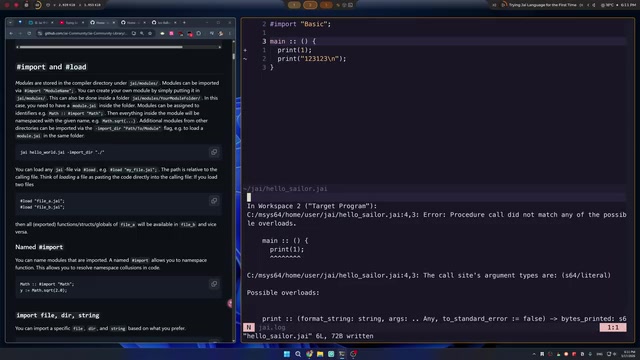
Passing the number 1 directly causes the compiler to immediately report an error: "procedural call doesn't match any of the possible overloads". The correct approach is to use the percent sign % as a placeholder:
print("%", 1)
Key Differences from C's printf
C's printf requires format specifiers like %s, %d, etc. to distinguish types, while J language uniformly uses a single % as a placeholder regardless of the type being passed. Using multiple placeholders is also intuitive:
print("% % %", 1, 2, 3) // Output: 1 2 3
This design dramatically reduces the cognitive burden of formatted output—you no longer need to remember various format specifiers, and the compiler automatically handles type matching. It also fundamentally eliminates security vulnerabilities in C caused by mismatches between format strings and argument types.
From a technical implementation perspective, J language's unified use of % as a placeholder without requiring type specification relies on a compile-time polymorphic dispatch mechanism. The compiler knows the concrete type of each argument at compile time, so it can automatically select the correct serialization method to convert values to strings. This is fundamentally different from C's printf which parses format strings at runtime—printf decides how to interpret bytes on the stack based on %d, %s, etc. at runtime, and if the format string doesn't match the actual arguments, it leads to undefined behavior or even security vulnerabilities (such as format string attacks, where an attacker reads or writes arbitrary memory by controlling the format string). Rust's println! macro, Python's f-strings, and C++20's std::format all employ similar compile-time type safety strategies, but through different implementation paths: Rust generates type-specialized code at compile time through macro expansion, C++ achieves it through template metaprogramming, and J language accomplishes it through its compiler's built-in overload resolution mechanism.
J Language Module System Explained: The Division of Labor Between import and load
J language's module system revolves around two core keywords: import and load, with clearly defined responsibilities that don't overlap. Understanding the difference between import and load is a key step in mastering J language project organization.
Programming language module systems roughly fall into two camps: file-based implicit modules (like Go and Python, where a file is a module) and declaration-based explicit modules (like Rust's mod or C++20's module). J language's import + load dual-keyword design actually combines both approaches: import provides a declarative module discovery mechanism, while load retains file-level direct inclusion capability. This layered design solves a classic dilemma—how to allow library authors to flexibly organize internal file structures while maintaining module encapsulation. C/C++'s #include led to header file hell and compilation time bloat due to its lack of module semantics, while pure module systems (like Java's package) can sometimes feel overly rigid. J language's approach strikes a balance between the two.
import: Importing Standard Libraries and Registered Modules
import is used to import modules, typically standard libraries or modules placed in specific search paths. When you write import basic, the compiler searches for a module named basic along preset search paths:
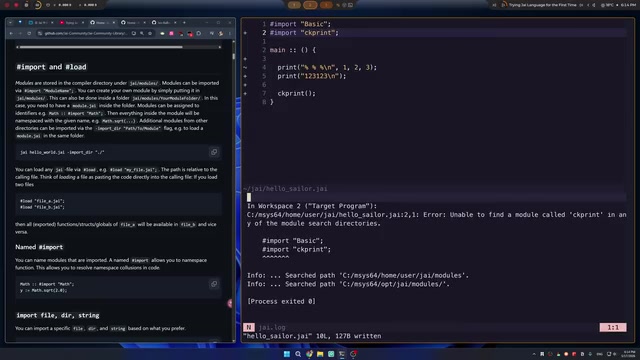
The search paths mainly include two locations:
- Global standard library path: Located in the system's
/opt/j/modules/directory, containing official modules likebasic,mgui,input, etc. - Current user's modules directory: Located at the
j/modules/path under the user's home directory
The standard library's directory structure is straightforward: each module folder contains a module.j as the entry file, which internally uses load to bring in various sub-files.
load: Directly Loading File Contents
load operates at a lower level—it "pastes" the code from a specified file as-is into the current location, similar to #include in C/C++.
Suppose we create a custom function ckprint and save it in a ckprinter.j file:
ckprint :: () {
    import basic;
    print("this is check out");
}
To use it in the main program, there are two approaches:
Approach 1: Place it in the modules directory and import it
Place the file in the modules directory within the search path, and you can directly import ckprinter.
Approach 2: Use load to directly load the file path
load "./path/to/ckprinter.j";
Note that load requires specifying the complete .j file extension—this differs from import which only uses the module name.
Building Multi-File J Language Module Libraries
When a library contains multiple files, you need to create a subdirectory and provide a module.j entry file:
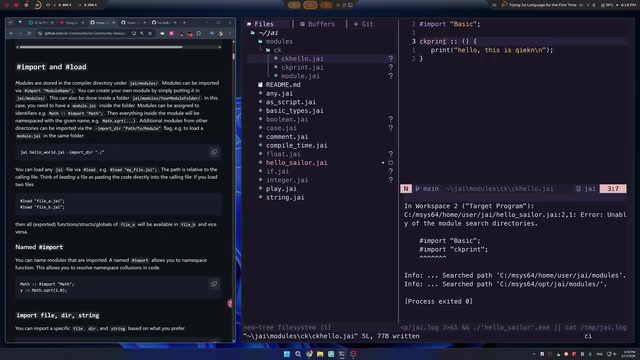
For example, to create a module library named ck containing ckprinter.j and ckhello.j, the directory structure would be:
modules/
  ck/
    module.j      // entry file
    ckprinter.j
    ckhello.j
In module.j, all sub-files are brought in via load:
load "ckprinter.j";
load "ckhello.j";
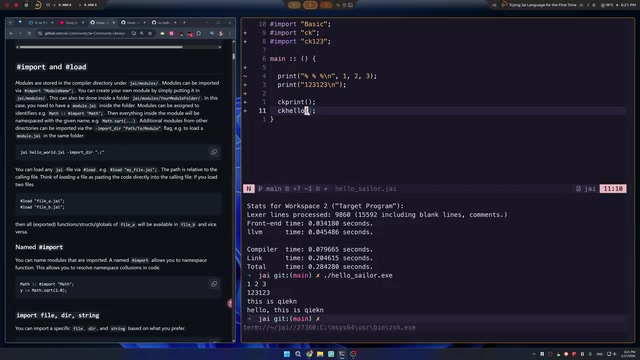
The main program only needs a single line import ck to use all functions in the library. This layered design where import handles module discovery and load handles file assembly creates a clear boundary between a module's public interface and its internal implementation.
Custom Import Paths and Multi-Project Builds
In real project development, we often don't want to copy all library files into a fixed modules directory. J language provides the ability to specify additional import paths at compile time, making project organization more flexible.
Through the -import-directory parameter in the compile command, you can add custom module search paths:
j hello_sailor.j -import-directory ./test
This way, modules placed in the ./test directory can also be found by import. This feature is particularly useful in the following scenarios:
- Sharing common libraries across multiple projects: Place shared modules in a unified directory and reference them via parameters from each project
- CI/CD build environments: Flexibly configure module paths across different environments
- Third-party library management: Place downloaded third-party modules in a project-local directory
The compiler's error messages are also quite helpful—when it can't find a module, it clearly tells you "unable to find module called xxx in any of the module search directories" and lists all paths that were searched, helping developers quickly locate issues.
Compilation Speed and Development Experience
The compilation speed demonstrated in the video is impressive—the entire project compiles in just 0.08 seconds. For a programming language with a complete module system, this compilation speed means an extremely short feedback loop.
The benefits of fast compilation are straightforward: you can see results almost immediately after changing code, without waiting for a build process to finish. This noticeably improves debugging and iteration efficiency in daily development, delivering an experience close to the instant feedback of interpreted languages while retaining the performance advantages of compiled languages.
Putting this figure in industry context makes its significance more apparent. For comparison, a Rust project of equivalent scale typically takes several seconds to tens of seconds for the initial compilation (mainly due to borrow checker analysis and code generation overhead from monomorphizing generics), and C++ projects often take considerable time due to template instantiation and repeated header file parsing. Achieving fast compilation typically requires trade-offs at the language design level: limiting generic complexity, adopting incremental compilation architectures, avoiding complex type inference algorithms, and using single-pass or few-pass compilation strategies. Go is also renowned for compilation speed (typically completing medium-sized projects in 1-2 seconds), with its secrets including prohibiting circular dependencies, simplifying the type system, and package-level parallel compilation. J language's ability to achieve such compilation speed likely involves similar careful design in language complexity and compiler architecture—this "compilation speed first" design philosophy is particularly important for systems programming scenarios that require frequent compile-run-debug cycles.
Summary: Core Highlights of J Language Module Design
Although J language is not yet a mainstream language, several noteworthy design ideas emerge from its module system:
- Constant binding syntax
::: Unifies the way variables and functions are defined, keeping concepts simple - Type-safe print function: Replaces C's complex format specifiers with a unified
%placeholder—both simple and secure - import + load dual keywords: Cleanly separates module import and file inclusion needs, each serving its own purpose
- Flexible search path configuration: The
-import-directoryparameter accommodates both standard library usage and custom library management - Extremely fast compilation speed: 0.08-second compilation time delivers a smooth development experience
For developers interested in programming language design, J language's design choices in its module system—particularly the division of responsibilities between import and load, and the type-safe formatted output—are worth studying and drawing inspiration from. If you're interested in new directions in systems programming languages, consider giving J language a try, starting with a simple Hello Sailor program.
Related articles
 Tutorials
ChatGPT Plus Subscription Guide: Are GPT-5.5, image-2, and Codex Worth the Upgrade?
A detailed look at ChatGPT Plus features — GPT-5.5, image-2, and Codex — with a Plus vs Pro comparison and a complete step-by-step subscription guide for users outside the US.
 Tutorials
Harness AI Engineering in Practice: Using Claude Code to Master Enterprise-Level E-Commerce Development
Deep dive into Harness AI Engineering: master enterprise e-commerce development with Claude Code using the Rules, Skills, Wiki, and Changes framework.
 Tutorials
Cursor + Codex Dual-IDE Collaboration: A Practical Methodology for Open-Source Project Customization
A complete methodology for open-source project customization based on real-world experience, detailing the Cursor+Codex dual-IDE workflow, seven-stage process, MVP validation, and AI source code reading techniques.