Getting Started with ROS2 Robot Development: Core Concepts and Environment Setup
ROS2 solves robot module coupling through a unified communication framework, supporting cross-language collaboration and ecosystem reuse.
This article addresses the complexity and high coupling of module communication in robot development and introduces ROS2 as the solution. It first analyzes the hardware and software composition of robot systems and the drawbacks of tangled communication relationships under traditional development approaches, then introduces the definition of ROS2—an open-source robot software development framework and middleware—and explains its two core advantages: cross-language division of labor enabled by unified interfaces, and a rich package ecosystem that avoids reinventing the wheel. It then compares ROS1 to explain why ROS2 has become mainstream, and finally presents environment setup and the Turtlesim simulation experiment as a hands-on entry path, emphasizing mastering core mechanisms such as node communication and topic publish/subscribe through experimentation.
Why Does Robot Development Need ROS2?
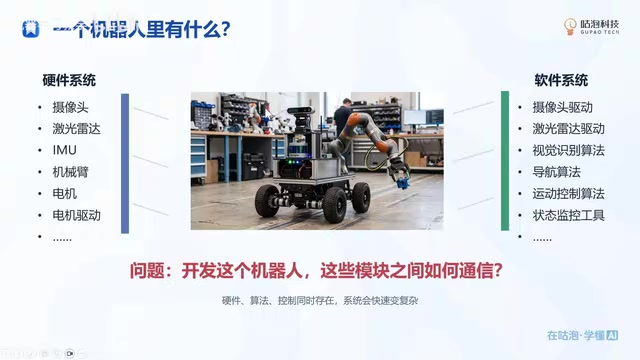
A complete robot system consists of two major parts: hardware and software. Hardware includes sensors and actuators such as cameras, LiDAR, IMUs, robotic arms, and chassis motors; software requires writing drivers for each peripheral and developing upper-layer algorithms such as navigation and visual recognition. The problem is: how do these modules communicate with each other?
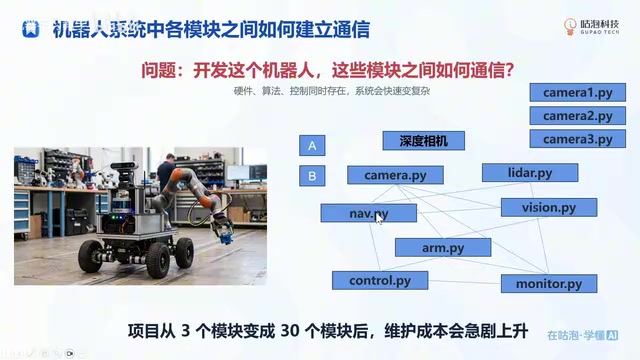
Take a navigation algorithm as an example—it needs LiDAR data, so a send function must be written in the LiDAR driver, and a receive function must be written in the navigation algorithm. If visual recognition also needs camera data, the camera must have a separate send function written for the vision algorithm. As modules multiply, the communication relationships become tangled and complex, and the system's scalability and maintainability deteriorate sharply.
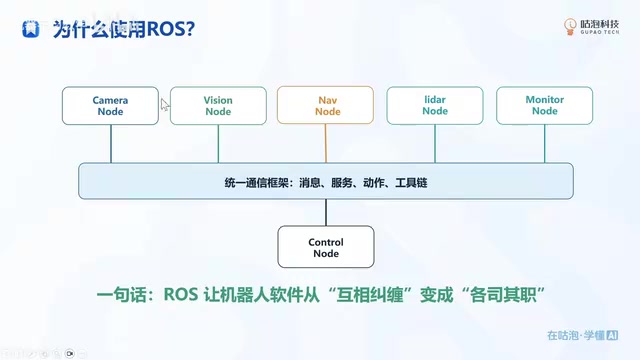
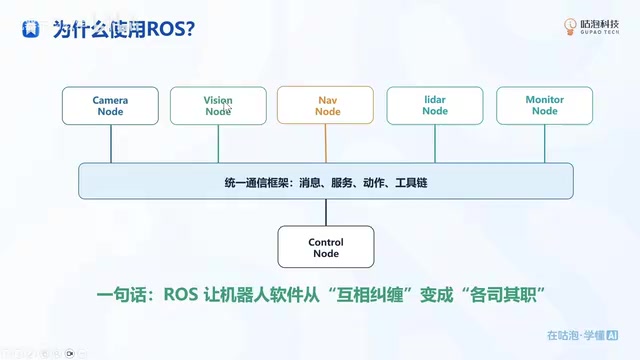
ROS2 was born precisely to solve this problem. It unifies the communication framework between modules, so developers only need to publish or subscribe to data according to the specification without caring who is on the other end. In one sentence: ROS2 turns robot software from a tangled mess into a system where each module minds its own business.
The publish/subscribe model is the core mechanism by which ROS2 solves the communication coupling problem. In this model, the module that sends data is called the "Publisher," and the module that receives data is called the "Subscriber," and the two are connected through a "Topic." The publisher only needs to publish data to a specified topic, and the subscriber only needs to read data from the topic it is interested in—neither side needs to know of the other's existence, quantity, or implementation language. This indirect communication method completely decouples the dependencies between modules, so that adding, removing, or replacing any module will not affect the normal operation of other modules. For example, the LiDAR driver only needs to publish data to the /scan topic, and both the navigation algorithm and visualization tools can subscribe to that topic simultaneously without interfering with each other.
What Exactly Is ROS2?
ROS2 stands for Robot Operating System 2. It is officially defined as a set of software libraries and tools that help build robot applications—from drivers to advanced algorithms to development tools—and it is fully open source.
It is not an operating system in the traditional sense (such as Windows or Linux). More accurately, it is a robot software development framework, middleware, or toolbox. It defines a set of development specifications that allow developers to quickly build robot systems.
Two Core Advantages of ROS2
Easy division of labor and collaboration: All modules use a unified interface. A camera engineer only needs to develop the camera driver and publish data through the ROS2 API; an algorithm engineer simply subscribes to the required data. More importantly, different languages can interoperate—a driver written in C++ publishes data, and an algorithm written in Python can still subscribe to it, greatly facilitating team collaboration.
Don't reinvent the wheel: ROS2 has a rich open-source ecosystem and provides a large number of packages. When you need navigation functionality, you can simply download the corresponding package and use it without developing from scratch. This building-block style of development greatly improves efficiency.
Middleware is a key layer in the ROS2 architecture, sitting between the application and the operating system. ROS2's communication layer is implemented based on the DDS (Data Distribution Service) standard. DDS is a data-centric publish/subscribe middleware protocol that provides rich Quality of Service (QoS) policies, such as reliability, real-time performance, and history cache depth. The introduction of DDS gives ROS2 distributed discovery, real-time communication, and multi-platform support capabilities, which is one of the major architectural improvements of ROS2 over ROS1. Developers do not need to interact with DDS directly—ROS2's client libraries (such as rclcpp and rclpy) have encapsulated the underlying details—but understanding the existence of middleware helps with troubleshooting communication issues and configuring QoS parameters.
A package is the basic unit of software organization in ROS2. Each package contains node code, configuration files, launch files, message definitions, and more. Packages in the ROS2 ecosystem are distributed and installed through package managers (such as apt or rosdep), and developers can overlay multiple packages in a workspace for compilation and execution. Dependencies between packages are managed through dependency declarations (package.xml) that specify versions and build order. Common capabilities such as navigation, SLAM, and motion planning all have mature packages (such as Nav2 and slam_toolbox) that can be reused directly—this is the technical foundation of the "don't reinvent the wheel" philosophy.
Why Choose ROS2 Instead of ROS1?
ROS1 was originally designed for small robot systems. As its applications broadened and systems became more complex, many problems and maintenance difficulties surfaced. The development team redesigned ROS2 with numerous improvements. Today, ROS2 has gradually replaced ROS1 and become the mainstream choice for robot development.
Environment Setup and the Turtlesim Simulation
The goal of this lesson is to guide everyone step by step through ROS2 environment setup and to run the classic Turtlesim simulation experiment, giving a first taste of what ROS2 can do.
The ROS2 course series emphasizes practice, with relatively little algorithm theory. As long as you follow the steps and complete each experiment, you will master the basic use of ROS2.
After the environment is set up, the Turtlesim example lets you intuitively experience core mechanisms such as node communication and topic publish/subscribe. Learners are encouraged to visit the official ROS website for the latest documentation and tutorials to continue in-depth study.
A node is the basic execution unit in ROS2. Each node typically handles one independent function, such as reading sensors, executing control algorithms, or providing a visualization interface. Nodes can be distributed across different processes or even different machines, communicating through topics, services, or actions. In the Turtlesim simulation, the turtle's display, motion control, and keyboard teleoperation are each implemented by different nodes. Learners can view nodes with ros2 node list and view topics with ros2 topic list, gaining an intuitive understanding of node-based design and the publish/subscribe mechanism.
Summary
ROS2 solves the coupling problem between robot modules through a unified communication framework, and its cross-language support and rich ecosystem make development more efficient. In the introductory stage, you should focus on mastering the core concepts and environment setup, and deepen your understanding through simulation experiments. Subsequent lessons will dive into packages, common tools, and node communication development, gradually building a complete robot application.
Related articles
Codex in Practice: From Environment Setup to Skills and MCP Calls
Codex is OpenAI's AI coding assistant. This guide covers its positioning, how it compares to Claude Code, model configuration pitfalls, and practical Skills and MCP usage for beginners.

SLAM Mapping and Navigation Tutorial: A Complete Learning Path from Theory to Practice
This Bilibili SLAM mapping and navigation tutorial starts with a navigation overview, covering architecture, installation commands, and practical prerequisites, then connects to the Fourteen Lectures on Visual SLAM, slam_toolbox, and Cartographer—a complete learning path from theory to practice.

LangChain Beginner's Guide: Core Concepts and Hands-On Tools
What is LangChain? This guide covers its core positioning—Agent = Model + Harness—and the three key problems it solves: training time limits, external data connections, and multi-turn conversation context.