Getting Started with Spring AI: A Large Language Model Integration Framework for Java Developers

Spring AI is Java's LangChain-equivalent framework for LLM integration, built on top of Spring Boot.
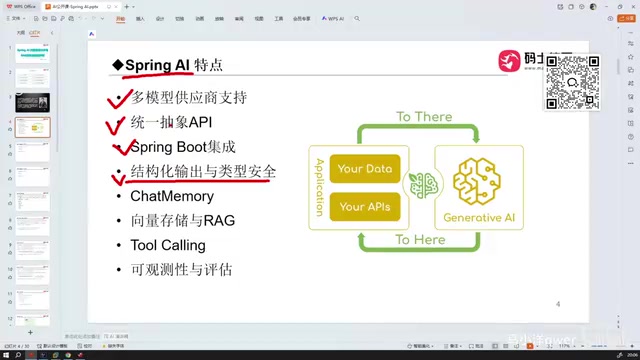
Spring AI is the Java ecosystem's answer to LangChain, following Spring Boot's familiar configuration and auto-wiring patterns so Java developers can get started with minimal friction. Core features include a unified abstract API, structured output mapped to Java objects, Chat Memory for multi-turn conversations, vector storage with RAG support, and MCP-aligned Tool Calling. The framework abstracts away vendor differences so switching models requires minimal code changes. Observability support makes AI calls traceable and monitorable. Requires Spring Boot 3.x+, JDK 17+, and Maven 3.9+.
What Is Spring AI
Spring AI is a framework for interacting with large language models (LLMs) within the Java ecosystem — think of it as the Java equivalent of Python's LangChain. Just as LangChain empowers Python developers to work with AI models conveniently, Spring AI plays the same role in the Java world. It supports not just text-based conversations, but also multimodal operations such as image recognition, speech recognition, and text-to-speech.
For developers already familiar with Java, the biggest advantage of Spring AI is that it follows the design philosophy of the Spring ecosystem. Familiar Spring Boot patterns — externalizing configuration, auto-wiring, and dependency encapsulation — are all preserved in Spring AI. In other words, if you already know Spring Boot, picking up Spring AI requires almost no additional learning curve.
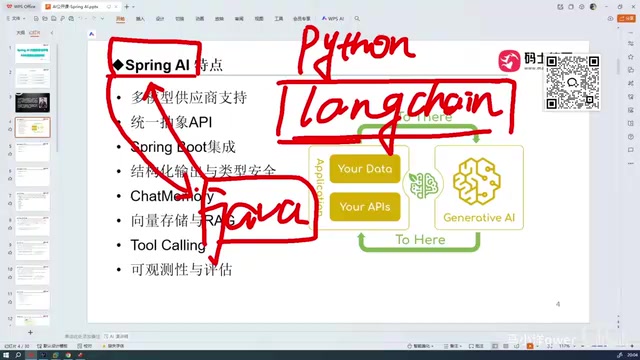
Two key ideas capture the essence of Spring AI: first, it's the Java ecosystem's answer to LangChain for LLM interaction; second, it integrates deeply with Spring Boot, making it highly convenient to use.
Core Features of Spring AI
Spring AI offers a fairly comprehensive set of capabilities, covering the major use cases for enterprise-grade AI application development. While it supports fewer models than LangChain, most mainstream multimodal and multi-provider model vendors are already included.
Unified Abstract API and Structured Output
Spring AI provides a unified abstract API that integrates with models in a style consistent with Spring and Spring Boot. One particularly useful feature is structured output with type safety: responses from models can be automatically deserialized into objects — returning JSON by default, or mapped directly to Java objects. This is extremely convenient for scenarios where model outputs need to feed into business logic, eliminating a large amount of manual parsing work.
Chat Memory and Conversation History Management
Chat Memory allows the model to retain conversation history across multiple turns. By default, conversation history is stored in memory, but this feature must be explicitly enabled. Developers can also use Chat Memory to persist conversation history to a database, preserving context across application restarts or between sessions — a critical capability for production-grade conversational applications.
Vector Storage and RAG Support
When building RAG (Retrieval-Augmented Generation) applications, Spring AI supports vectorized storage and retrieval of data in vector databases. This enables developers to build intelligent Q&A systems grounded in their own knowledge bases — one of the most common approaches to deploying enterprise AI in practice.
What is RAG? RAG (Retrieval-Augmented Generation) is an architectural pattern that combines external knowledge bases with large language models. The core idea is to split private documents, product manuals, and other unstructured text into chunks, convert each chunk into high-dimensional vectors using an embedding model, and store them in a vector database. When a user asks a question, the system first retrieves the most relevant text chunks from the vector database, then sends them as context to the LLM so the model can generate answers grounded in real source material. This approach effectively addresses two major pain points of LLMs — the knowledge cutoff date and hallucinations — since the model answers based on traceable private data rather than making things up. Spring AI's vector storage support covers major vector databases including Redis, PostgreSQL (pgvector), and Pinecone, and includes a built-in pipeline for document loading, chunking, and embedding, significantly reducing the engineering complexity of building RAG applications.
Tool Calling and the MCP Protocol
Tool Calling is another important capability in Spring AI, and it's closely related to the MCP (Model Context Protocol).
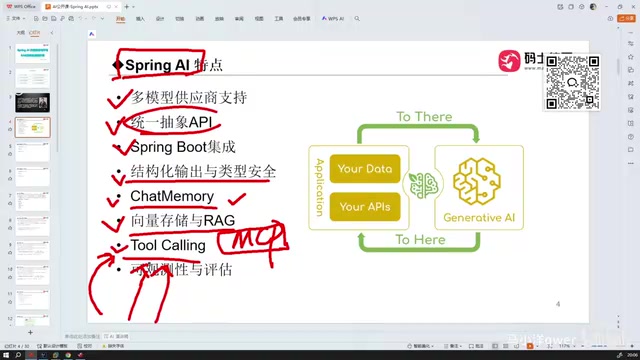
Different LLMs each have their own independent APIs for tool calling — whether it's DeepSeekAd, Claude, or ChatGPT, the interface specifications differ, creating significant migration overhead for developers. MCP emerged as a protocol to unify this fragmented landscape.
Spring AI's design already aligns well with Spring's abstract API style, and its underlying implementation of tool calling closely follows the spirit of MCP. This means that implementing Tool Calling in Spring AI and implementing MCP are very similar in practice. The framework abstracts away the tool-calling logic for various LLMs, so switching between models requires minimal code changes — just swap out the model — and migrating to MCP becomes equally straightforward.
What is MCP? MCP (Model Context Protocol) is an open protocol proposed and open-sourced by Anthropic in late 2024, designed to establish a unified standard for interactions between LLMs and external tools and data sources. Before MCP, each model vendor's Function Calling / Tool Use interface was proprietary: request body structures, tool description formats, and response parsing methods all differed, forcing developers to write substantial amounts of glue code to adapt a single tool for multiple models. MCP decouples the "tool server" (MCP Server) from the "model client" (MCP Client) — a tool only needs to implement an MCP Server once, and any MCP-compatible model or framework can call it directly. Spring AI has supported MCP since relatively early versions, allowing developers to register Spring Bean methods directly as MCP tools or connect to third-party tool services as an MCP Client, greatly improving the reusability of the tool ecosystem.
Observability and Engineering Capabilities
Spring AI also provides observability and evaluation support, including traceable records of model call counts and call logs. These engineering capabilities are critical in enterprise applications — they make AI calls transparent rather than a black box, making it easier to monitor costs, troubleshoot issues, and optimize performance.
Should Java Developers Learn Spring AI?
In the AI development space, Python remains the dominant language by a wide margin — that's simply a fact. Companies using Java and Spring AI for AI development are still a minority.
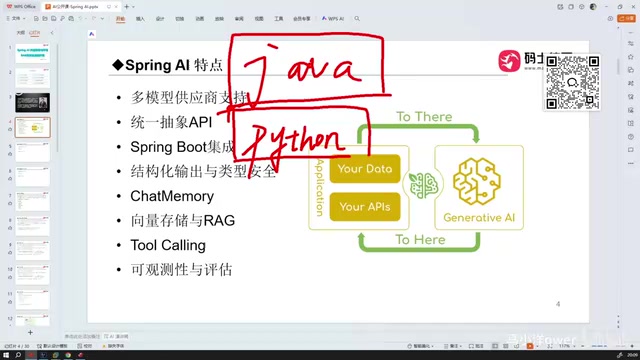
That said, there are practical reasons to include Spring AI in your learning path: some companies do choose Java-based technology stacks when actually shipping AI applications. For engineers who have been coding long-term, programming languages themselves shouldn't be a barrier — developers unfamiliar with Java can follow along with example code and get up to speed without too much trouble, since the underlying programming concepts translate across languages.
Environment Requirements
Before using Spring AI, pay close attention to the following environment requirements — using outdated versions will lead to errors or outright failures:
- Spring Boot: Version 3.x or above is required; lower versions will fail to start
- JDK: Version 17 or above is required; JDK 8, which is still common in many enterprises, will not work
- Maven: Version 3.9 or above is required; older versions may fail to resolve dependencies
Setting up your environment with the above version combination will avoid most mysterious compatibility issues. Once your environment is ready, create a Spring Boot project and you can start integrating with LLMs — this is both the most important part of learning Spring AI and the most commonly used pattern in enterprise settings.
Related articles

Stop Over-Engineering Prompts: An Engineer's Guide to Agent Thinking
A tech blogger rejects the over-engineering narrative of Prompt Engineering: engineers' problem isn't imprecise prompts but turning one-sentence questions into complex features. With T3 Code case studies, this article explains how Agent thinking replaces reinventing the wheel and how to build MCP and other infrastructure for Agents.

Exponential Backoff with Jitter Still Fails 64%: 100 LLM Calls Tested and Root Cause Analysis
Tested 100 concurrent LLM calls: exponential backoff with ±10% jitter still fails 64%; full jitter improves tail but increases requests; honoring Retry-After and client-side rate limiting reduce times to 11.8s and 8.0s. The article also exposes three llm-retry bugs and offers eight practical retry and circuit breaker recommendations.

Google Open-Sources Harness2: Letting AI Agents Self-Evolve
Google Research open-sources Harness2, a framework that lets AI Agents automatically improve system prompts, tools, and memory configurations through a propose, trial-run, and select loop—no labeled data or scoring model required, validated on Gemini and GLM.