Getting Started with WorkBuddy: What Can Tencent's Desktop AI Agent Actually Do for You?

WorkBuddy is Tencent's desktop AI agent that automates real office tasks — no coding required.
WorkBuddy is Tencent's desktop AI Agent that goes beyond chat — it reads and writes local files, calls tools, and executes office tasks automatically. The article uses a "college intern vs. special forces" analogy to contrast WorkBuddy with Codex: WorkBuddy requires no setup and integrates deeply with WeChat, Feishu, and DingTalk, making it ideal for everyday professionals, while Codex is more powerful but better suited for developers. Three common misconceptions are addressed, and the key takeaway is to start with WorkBuddy to build an "AI manager" mindset before advancing to more complex tools.
From Chatbot to AI Employee: What Makes WorkBuddy Different
Most people interact with AI in one way: open a chat window, type a question, copy the answer. This feels efficient, but it exposes the fundamental limitation of traditional web-based AI — it's purely a Q&A tool with no access to your local files. Ask it how to batch-rename a folder of files, and it'll walk you through the steps. But you're still the one doing the actual work.
That's exactly the problem Tencent's WorkBuddyAd is designed to solve. It's not another chat window — it's a desktop AI Agent. You give it tasks in plain language, and it handles the assignment, research, execution, and delivery on its own. You just review the results. As the video puts it, this means shifting your role from "asking AI questions" to "managing AI as a worker" — you're the manager, WorkBuddy is the employee, and your computer is the company.
This shift in perspective is the key to understanding WorkBuddy. Prompts are just suggestions, and suggestions aren't worth much on their own. Execution is what creates value. WorkBuddy's core purpose is turning suggestions into actual actions.
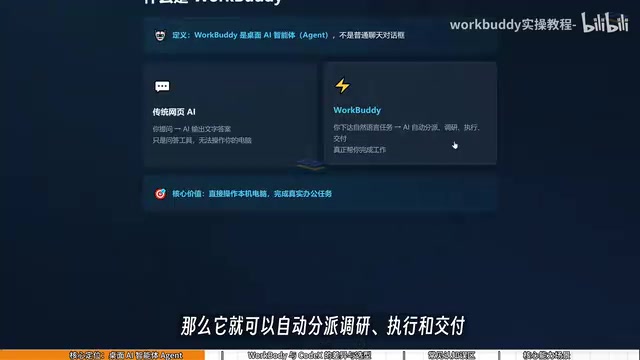
The fundamental difference between an AI Agent and a regular chat AI lies in tool-calling capability. Traditional conversational AI (like the web version of ChatGPT) runs in a sandboxed server environment with no access to the user's local device. A desktop Agent, by installing a client on your machine, gains permission to call operating system APIs — reading and writing files, launching applications, simulating mouse and keyboard input, and even interacting with local apps like WeChat and DingTalk. This architectural difference is what lets an Agent cross the line from "answering questions" to "completing tasks." It can perceive its environment (read file contents, take screenshots to identify UI state), plan steps (break complex tasks into executable sub-steps), call tools (run code, invoke APIs), and report results — forming a complete perception–decision–action loop.
WorkBuddy vs. Codex: College Intern vs. Special Forces
Many people hear about Codex before they encounter WorkBuddy, which leads to a natural question: if Codex is more powerful, why bother learning WorkBuddy?
The video offers a memorable analogy. If Codex is a "special forces operative," WorkBuddy is more like a "college student assistant." Codex is powerful, but using it requires you to act like a commanding officer — specifying exact files, directory structures, execution parameters, and so on. That demands real technical skills and experience. WorkBuddy, by contrast, is more like an eager-to-help intern. It may struggle with complex engineering tasks, but everyday office work — "send this file to someone," "organize this archive" — is well within its capabilities.
The differences between the two come down to three areas:
Setup Barrier
WorkBuddy is ready to use right after installation. No environment configuration, no VPN, no command-line setup — just scan a QR code and you're good to go. Codex requires more involved configuration and a stronger technical background, making it better suited for users with programming experience.
Ecosystem Fit
WorkBuddy deeply integrates with the domestic software stack that Chinese office workers actually use: WeChat, WeCom (Enterprise WeChat), Feishu, DingTalk, Tencent Docs, Baidu Netdisk, and more. That's the heart of its practical appeal. Codex, on the other hand, is oriented toward the international ecosystem and has limited support for Chinese workplace tools.
Cost
This is what most working professionals care about most. WorkBuddy gives away free credits daily, with bonus credits available during promotional events. Check in every day and you can accumulate around 3,000 credits over a month. Codex runs on a subscription model, meaning you're paying real money even while you're still learning. The video recommends clicking on your profile icon in the bottom-left corner after logging in to find the "Buddy Fuel Station" and claiming your daily check-in credits — they stack up over time.
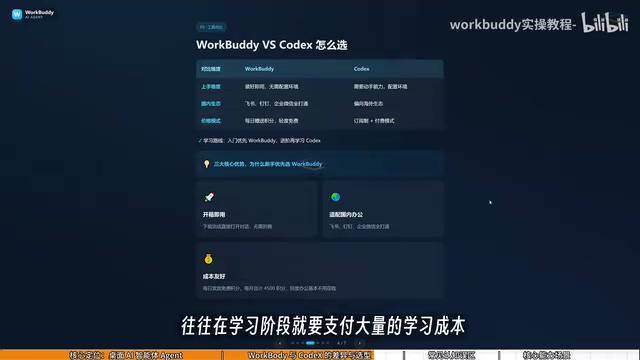
Codex is an AI system developed by OpenAI with a focus on code generation and execution. Its core strength lies in writing, debugging, and running programs within a specified code repository or sandboxed environment. It demands precision in task descriptions: users typically need to specify programming language, directory structure, dependencies, and other technical parameters for Codex to work effectively. This makes it a natural fit for software developers rather than general office use. WorkBuddy, by contrast, is designed to handle natural language instructions — even vague ones — and infers the execution path automatically, dramatically lowering the barrier for non-technical users. The two tools aren't rivals; they're complementary products aimed at different users and use cases.
Three Common Misconceptions
New users often fall into a few traps when first learning tools like this. The video addresses each one directly.
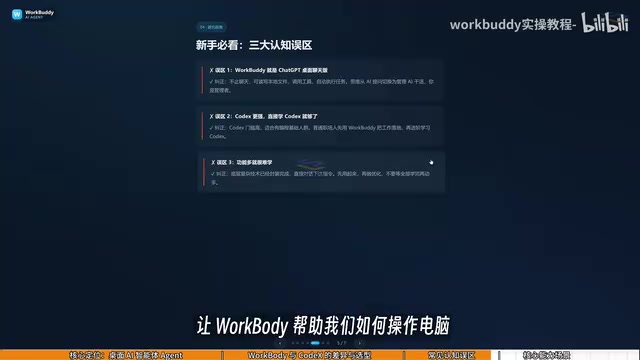
Misconception #1: WorkBuddy is just a desktop chat version of ChatGPT. Not quite. Yes, WorkBuddy can hold conversations and offer suggestions just like GPT — but more importantly, it can read local files, call tools, and automatically execute tasks. The mindset shift from "asking AI" to "managing AI" is essential.
Misconception #2: Codex is more powerful, so I should just skip ahead to learning Codex. Codex has a steeper learning curve and is better suited for users with a programming background. For the average office worker, mastering WorkBuddy to handle real work is the smarter starting point. It's more than sufficient for most office scenarios — and when you eventually hit its limits, that's the right time to graduate to Codex.
Misconception #3: More features means harder to learn. WorkBuddy's interface is actually very similar to tools like Tongyi Qianwen, Doubao, and GPT. The learning curve isn't about the UI — it's about shifting how you think about prompting. The transition is from "asking questions" to "giving commands."
What WorkBuddy Can Actually Do
Beyond the concepts, WorkBuddy's real value shows up in practical use. The video highlights several high-frequency scenarios:
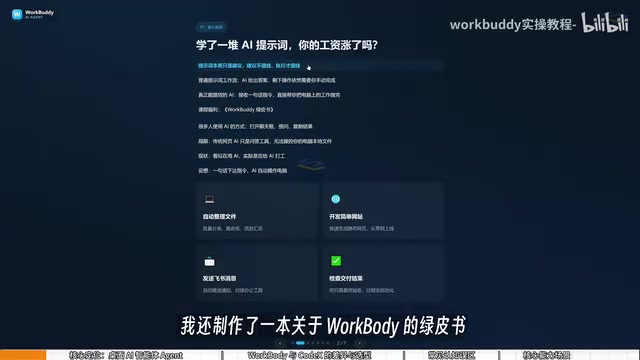
File Management: Batch sorting, batch renaming, and consolidating information from multiple documents. A real example from the video: when recording tutorial videos numbered 01, 02, 03 in sequence, if one episode is too short and needs to be merged with the previous one, manually renaming everything becomes a nightmare. WorkBuddy can handle the full renaming automatically in one go.
Document and Data Processing: Auto-generating weekly reports and Excel spreadsheets, extracting key data from multi-page PDFs, and producing PPT outlines.
Cross-App Automation: Automatically extracting files from a WeChat group and compiling them into Excel; pulling content from Baidu Netdisk to auto-write a Feishu weekly report; monitoring spreadsheet updates and pushing daily reports to a team via WeCom; even using a voice message on mobile WeChat to remotely trigger your computer to export data from an application.
Web and Automation Development: Building simple websites, generating recurring work summaries, and similar tasks.
None of this is theoretical. As long as you give it a clear enough instruction, WorkBuddy will execute it directly.
Final Thoughts: From AI User to AI Manager
The video opens with a pointed observation: you've learned a bunch of prompting techniques and your salary still hasn't gone up. That hits home for a lot of AI learners. The reason is simple — prompts produce advice, and advice alone doesn't create value. Execution does.
That's the real significance of desktop Agents like WorkBuddy. They upgrade AI from a "Q&A tool" to something that actually acts. No programming knowledge required, no complex setup — just an AI that can genuinely operate your computer and carry out office tasks.
For most users, the most practical learning path is this: start with WorkBuddy, automate your daily workflows, and build the habit of thinking like an AI manager. Once your skills and needs outgrow it, that's the time to level up to Codex. Changing how you think is more important than mastering any specific feature.
Background Notes
WorkBuddy's cross-app automation relies on two underlying technical approaches. The first is using official open APIs from each platform — such as the WeCom Bot API, Feishu Open Platform, and DingTalk Connector — to read and write data. The second is RPA (Robotic Process Automation), which simulates manual UI interactions and covers software that doesn't expose open APIs. API-based integration is more stable and faster; RPA is more broadly compatible but sensitive to UI changes. As the developer of both WeCom and Tencent Docs, Tencent has a natural advantage in API authorization for those platforms — which explains why WorkBuddy can achieve deeper automation integration there than third-party tools could easily replicate.
Related articles

Should U.S. College Fraternities Be Banned? A Researcher's Incisive Observations
Why not just ban U.S. college fraternities? A researcher finds the key resistance comes from decision-makers' own fraternity identities and schools' "willful ignorance."

Microsoft Discovery: Accelerating Scientific Discovery with AI Agents
Microsoft's Discovery platform runs specialized AI agents to help researchers screen and prioritize the most promising compounds and experimental paths, reducing experiments and accelerating scientific discovery.

Cambridge Heavy Industries Secretly Develops Desktop-Scale Nuclear Fusion Device
Cambridge Heavy Industries is secretly developing a desktop-scale laser-driven nuclear fusion device, targeting the equipment supply market for fusion power plants. This article analyzes its miniaturization technology path, commercialization logic, and unique positioning in the fusion startup wave.