Getting the Most Out of Claude Opus 5.5: Define Completion States, Steer Precisely, and Avoid Max Mode

How to maximize Claude Opus 5.5 with completion states, smart reasoning levels, and effective steering
Drawing on Addy Osmani's usage guide and Theo's hands-on demos, this article breaks down how to get maximum value from Claude Opus 5.5. The core principle: hand off the entire task at once using a three-part structure (what you want, what counts as done, when to stop and ask). On reasoning levels, Max mode forces full thinking capacity — making responses 20× slower and 13× more expensive for just 1% accuracy gain — so stick with High or X High. New models also treat mid-task messages as steering rather than resets, and pairing clear CLAUDE.md rules with cross-model code review helps you catch more bugs with less effort.
After Claude Opus 5.5 has been out for a while, a growing number of power users consider it an exceptional model: high-quality code, smooth interaction, and the ability to work independently for extended periods. Addy Osmani — a former Chrome team member now at Anthropic — published a usage guide, and this article combines that guide with hands-on demonstrations from YouTuber Theo to outline how to truly squeeze every bit of value out of Opus 5.5.
Key Differences Between Opus 5.5 and Previous Versions
Using Opus 5.5 is broadly similar to Claude as you already know it, but a few behavioral differences are worth noting: it can work autonomously for longer, explains what it did in plain language, and thinks before every response.
These changes mean that habits formed around older models can actually hold it back. The guide recommends trying three things in your first few sessions: hand off the entire task at once (prompting wider), remove phrases like "please think carefully," and — after a long task completes — read what the model needs from you before anything else. These three points seem simple, but they directly determine whether you can get the model to run far and steady.
How to Prompt: Define What "Done" Looks Like First
The single most important principle is this — you must clearly tell the model what "done" looks like, then let it run.
Instead of saying "start working on this feature," say "I want you to build it, meeting these three criteria, verify it with a screenshot, and open a PR." That gives the model a clear finish line: no screenshot, no PR, not done. High-end models from Anthropic and OpenAI perform exceptionally well when given an explicit completion state, because they'll keep pushing until they reach it.
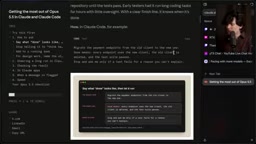
Addy's example is extremely instructive: "Migrate the payments endpoint from the old client to the new one. Done means every endpoint uses the new client, the old one is deleted, and the test suite passes. Only stop to ask me if a test fails for a reason you can't explain." This is the perfect three-part structure — what you want, what counts as done, and an "exit" for when it gets confused.
Stop Asking It to "Think Deeply"
Many people still write "think deeply about this" in their prompts — it's unnecessary. The model already knows how much to think. More importantly, you need to understand what reasoning levels actually do: Low and Medium mean "stop thinking at this cap," while High and X High set a higher cap. They change the ceiling, not the minimum thinking required.
Why You Should Never Touch Max Mode
Theo repeatedly emphasized in his video: do not use Max reasoning. The reason is that Max operates on a fundamentally different mechanism than other levels — it doesn't let the model "think more," it strips away its ability to think less.
He ran a comparison test using a skate bench benchmark, and the results were striking: at X High, the average response was 338 tokens, took 6 seconds, and maxed out at 31 seconds. Switching to Max sent the average token count soaring to 5,000 (over 10×), with average latency jumping to 50 seconds — Max's average was slower than X High's worst case, and the slowest response was 20× slower at 600 seconds.
What did all that extra compute buy? Accuracy went from 78% to 79% — one extra correct answer — at 13× the cost. The conclusion is clear: other levels adjust the ceiling, so X High can still be fast and think less when appropriate; Max is a will (forced), not a can (permitted). Keep your level at High or X High for daily use. The difference between them is negligible — X High is occasionally a bit slower but less likely to miss details.
The "reasoning levels" here correspond to the
budget_tokensparameter in Claude's extended thinking API. Low, Medium, High, and X High essentially set different token caps for the model's internal reasoning chain: the model can choose to use fewer tokens, but cannot exceed the cap. Max mode removes the "use fewer" option entirely, forcing the model to run its thinking tokens to the limit — turning "can think this much" into "must think this much." This mechanism explains why Max mode shows an order-of-magnitude difference in token consumption and latency compared to other levels, without a proportional accuracy gain. For most tasks, the excess thinking is wasted computation.
Steering Long Tasks: An Evolved Capability
One important capability is "steering" — sending a message while the model is working to nudge it in the direction you want.
Steering used to have an annoying problem: RL training was done on individual messages. If you said "do tasks 1, 2, and 4" and then mid-run added "oh, also 3," the model would immediately drop everything and only do 3, declare completion, and forget 1, 2, and 4 entirely. Models like Opus, Fable, and Astra have been retrained to treat mid-task messages as steering rather than resets, dramatically reducing the cost of real-time course correction during long tasks.
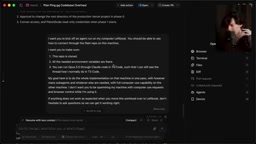
Theo demonstrated a great example: he wanted to migrate a locally running task to another machine called Leftbook. Rather than manually SSHing, cloning, and copying environment variables, he just told the model what to do. The prompt had several key design choices:
- Require verification: "Make sure the repo is cloned, environment variables are in place, and everything runs correctly" — the model doesn't just do it, it proves it can be done.
- Pre-authorize actions: Explicitly allow it to copy environment variables so it doesn't stop to ask for permission over security concerns.
- Specify what you don't want: "Don't spam me with computer use and browser control while I'm using my computer" — explicit prohibitions are often more valuable than explicit requirements.
- Give it an exit: "If anything doesn't go as expected during the migration, don't hesitate — just ask me." This line is critical. These models are RL-trained to be extremely reluctant to abandon tasks, so they default to grinding through. Adding this line makes them more willing to stop and ask for help when stuck.
Use CLAUDE.md to Define When to Stop and When to Continue
Opus 5.5 sometimes pauses during long tasks to "check in" rather than continue — giving a summary and asking "should I keep going?" The fix is to write clear stopping rules in CLAUDE.md: "When a step doesn't require my input, continue. Put status updates in the same message. Only stop to ask me if you genuinely can't proceed without me, or before performing destructive operations (deleting data, force pushing, modifying content outside the repo)."
For pair programming sessions where you want more involvement, you can flip this around and ask it to provide a one-line plan before starting and a brief recap when done. For auditing, migrating, or reviewing large codebases, explicitly tell it to "use sub-agents" — Opus 5.5 doesn't always proactively split into sub-agents unless instructed to do so.
RL (Reinforcement Learning) here refers to the training approach used for these models. Models are optimized through reward signals across large numbers of conversation samples, learning "which behaviors are better." Older models were RL-trained by scoring individual messages, so the model defaulted to treating each new message as an independent new instruction rather than an addition to the current task. Newer models like Opus 5.5, Fable, and Astra were trained with longer context windows and multi-turn task tracking, enabling them to distinguish "mid-task correction" from "entirely new task instruction" — fundamentally improving stability during long-task interactions.
CLAUDE.mdis a Markdown file placed in the project root directory (or a user-level config directory) that Claude automatically loads when starting a new session or reading project context. Think of it as a "persistent working agreement" for the model — unlike a system prompt you have to paste into every conversation,CLAUDE.mdis written once and remains in effect for the entire lifecycle of the project. Sub-agents refer to the model splitting a large task and dispatching it to multiple independent agent instances running in parallel or series, suitable for large-scale parallel work like codebase audits or multi-file refactors.
Designing Tasks: Say What You Don't Want
Some users report that Opus 5.5's design output is weaker than Fable 5.1, and Theo initially agreed. But the truth is: Opus 5.5's strength isn't "make it look better when told to" — it's "follow design instructions in the right direction."
With no design direction at all, it falls back on a few default styles. Saying vaguely "avoid generic-looking design" just swaps one default for another. What actually works is listing specific patterns to avoid, like: "no beige or off-white backgrounds, no italic emphasis words, no 1-2-3 numbered labels, no monospace font tags, no pill-shaped buttons."
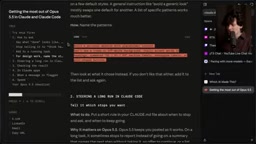
Theo shared a practical tip: use a screenshot tool to draw an arrow pointing at the problem area, paste it directly into the conversation, and say "this part looks bad, fix it." It works surprisingly well.
Reviewing Results: Cross-Model Code Review and Risk Assessment
After a long task finishes, start by reading what Claude is waiting for you to do (pending decisions, changes awaiting approval), then read its summary. Opus 5.5's reports are significantly clearer than Opus 5's, and worth reading.
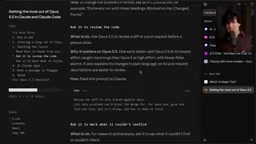
Theo strongly recommends doing code reviews across different model families. In a "code improvement benchmarking" test he ran on a T3 codebase: Astra and Grok 4.7 each found 8 substantiated improvement points, GPT-6 Sol found 9 (though slightly lower quality), and Fable only found 5. Opus 5.5 nearly doubled its success rate compared to Opus 5, with no unverifiable or self-contradictory findings — whereas Opus 5 would slip in one invalid finding for every two valid ones.
His two most-used prompts are: "What are the risks of merging this code today?" and "What's the worst that could happen if we merge right now?" These help you judge whether to merge far better than reading hundreds of lines of incomprehensible diff. Also remember to ask the model to flag parts it cannot verify — give it tools like a browser, test suite, or computer use to check things, and it will honestly tell you what it couldn't confirm.
Notes on Using the Claude App
Opus 5.5 is the first Opus model to feature Fable-level biosecurity and cybersecurity safeguards. Most flagged messages will be handed off to an older model to continue the work. Searching source code for security vulnerabilities is permitted, and everyday health and education questions should work normally, but the safeguards occasionally misfire on legitimate tasks.
One pitfall: don't ask the model to "show its reasoning process." Any phrasing that mentions reasoning risks being flagged, because Anthropic hides reasoning traces to prevent distillation. When you want to know why it made a particular change, rephrase your question for safer results.
Closing: Give Your Agent More Leash
Condensed into a checklist: tell the model what done looks like; don't tell it to think harder (it already will); design requests should specify both what you want and what you don't want stylistically; use screenshots to communicate context; stay far away from Max mode.
We've reached a point where agents need more autonomy — they can self-verify, operate highly independently, and get the job done. The one thing they haven't yet mastered is how to collaborate with people. But as long as you tell them what you need and what you expect, especially with a model like Opus 5.5, they'll usually deliver. The more you trust them and give them the conditions to verify their own work, the further they can go.
Related articles

AI + SRC Automated Vulnerability Hunting: Rebuilding the Three-Step Method with AI Agents
A complete guide to AI+SRC automated vulnerability hunting — comparing traditional methods with AI Agent-powered workflows covering asset recon, false positive filtering, and report generation.

Testing DeepSeek Desktop Agent: Auto-Generate a Full Video for Just $0.35
A blogger tested DeepSeek Harness desktop Agent: auto-generated a full video for $0.35, built a daily briefing, and an app from plain English — all for $0.59 total.

Antigravity 2.0 Complete Guide: MCP, Skills, and Automation Explained
A complete guide to Antigravity 2.0 covering Projects/Conversations/Agents, MCP with Figma, Skills, automation, and 6 real-world use cases including design-to-code and Android app generation.