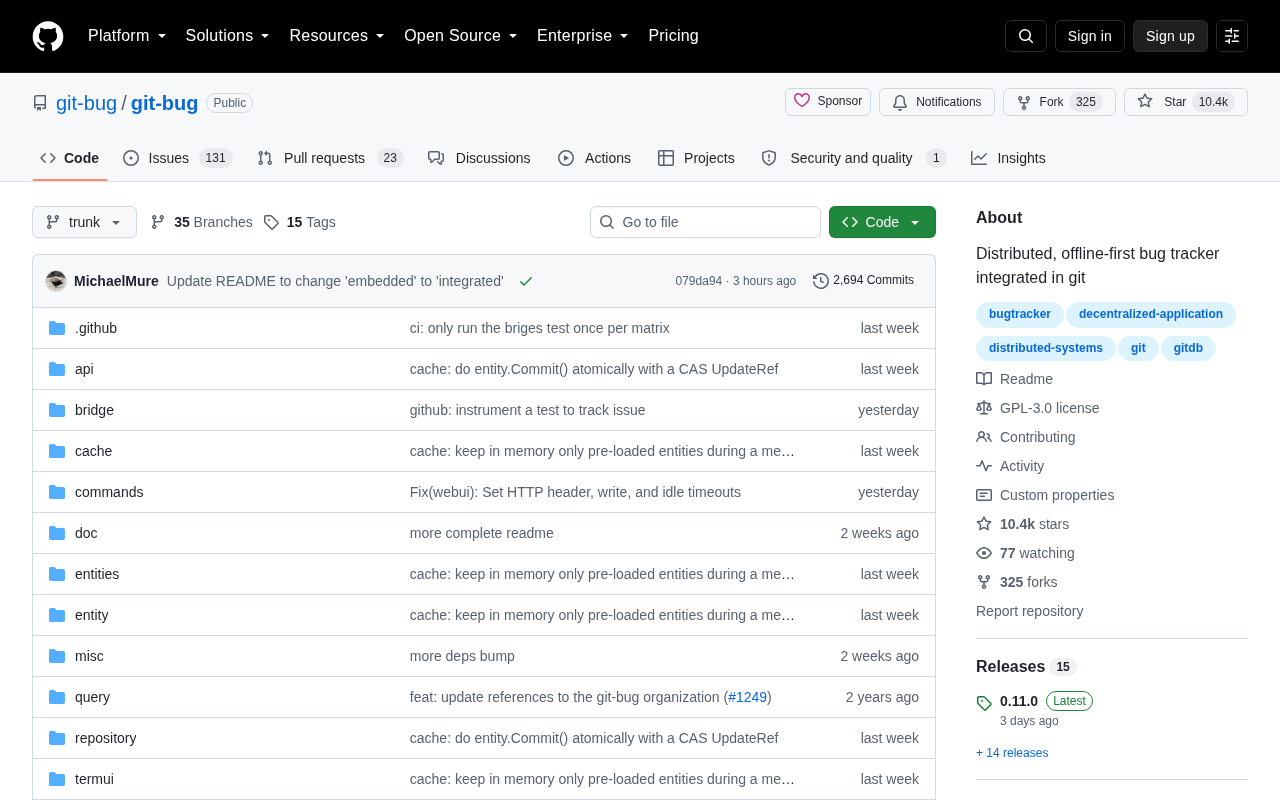
Git-bug: A Distributed, Offline-First Bug Tracker Embedded in Git

Git-bug stores issues as native Git objects for offline-first, platform-independent bug tracking.
Git-bug is an open-source tool that embeds an issue tracker directly inside a Git repository using Git's native object storage (refs namespaces), keeping bug data out of the source tree while inheriting Git's distributed and offline-first properties. Developers can create, comment on, and close issues without a network connection, then sync via standard push/pull. Because data follows the repository rather than a platform, issue history survives any hosting migration. The tool also offers bidirectional bridge sync with major platforms, preserving existing workflows while championing a "data belongs to the repo, not the platform" philosophy.
When Bug Tracking Comes Back to Git
A common friction point for development teams is that code lives in a Git repository, while issue tracking depends on external platforms like GitHub, GitLab, or Jira. This means that once you go offline — or switch hosting services — the discussion history around your issues is often interrupted or lost entirely. Git-bug is designed to solve exactly this pain point: it embeds a bug tracker directly inside your Git repository, operating as a distributed, offline-first tool.
The project earned 235 upvotes and 83 comments on Hacker News, a signal that it resonates with real developer frustrations. Its core premise is straightforward: if code itself is managed in a distributed version control system, why can't the issue records tied to that code be equally distributed and travel alongside the repository?
How It Actually Works
The cleverest aspect of Git-bug's design is that it doesn't store data in some .txt file or embedded database. Instead, it leverages Git's internal object storage mechanism, saving bug data as native Git objects. This means issue records don't pollute your source tree — you won't see them in a normal git log or your working directory — but they are genuinely version-controlled right alongside the repository.
Distributed and Offline-First
Because the data lives inside Git, it naturally inherits Git's distributed properties. You can create, comment on, and close issues without a network connection, then sync with your team via git push / git pull exactly as you would with code commits. For developers who regularly work on planes, subways, or in unstable network environments, this is a genuine productivity gain.
Independent of Hosting Platforms
Because bug data is stored inside the repository itself, it's no longer tied to any single hosting service. Whether you migrate your repo to GitHub, GitLab, or a self-hosted Gitea instance, your issue tracking history comes along for the ride. This portability is especially attractive to teams concerned about vendor lock-in.
Git's object store is the core low-level database of Git — all content, commits, file trees, and file blobs are stored as content-addressed objects of four types: blob, tree, commit, and tag. Git-bug exploits Git's refs (references) and notes mechanisms, writing bug data into a separate namespace (such as refs/bugs/), keeping it entirely separate from the normal commit history. This data is invisible to everyday commands like git checkout and git log, yet it propagates freely between remotes via git push and git fetch. This "parasitic on Git's infrastructure" design pattern has also been used by tools like git-notes and git-appraise, representing a family of approaches that treat Git as a general-purpose distributed database.
Vendor lock-in is particularly acute in issue tracking. GitHub Issues and GitLab Issues use incompatible data formats. While both offer data export APIs, the output is typically JSON or CSV that requires custom scripts to migrate — and metadata such as comment timestamps, mention relationships, and linked PRs is frequently lost in translation. More critically, issue numbers on platforms like GitHub (e.g., #42) are tightly coupled to references in code commits; once you change platforms, those historical references become dangling links. Git-bug identifies each bug with a UUID, avoiding dependence on platform-assigned numbers and significantly improving data integrity during cross-platform migrations.
Bridging Existing Platforms with Bidirectional Sync
Abandoning mainstream platforms entirely isn't realistic, so Git-bug provides a bridge mechanism for bidirectional synchronization with issue systems on GitHub, GitLab, and similar platforms. This design is pragmatic: teams can continue using their existing collaboration workflows and the externally visible issue interface, while retaining a complete, offline-accessible copy in the local repository.
In other words, Git-bug doesn't force an either/or choice — it lets local distributed records and cloud platforms coexist, with each playing to its strengths. For open-source project maintainers, this means that even if a platform experiences an outage, the historical discussion doesn't disappear with it.
Bidirectional sync (bidirectional sync) faces the classic distributed systems problem of conflict resolution: when both local and a remote platform modify the same issue simultaneously, whose version should win? Git-bug's bridge mechanism takes an approach inspired by CRDTs (Conflict-free Replicated Data Types), recording each operation — creation, comment, status change — as an immutable event stream rather than directly overwriting state. This allows deterministic merging under concurrent edits from multiple sources, rather than simply applying a "last write wins" strategy. This is the most fundamental architectural difference between Git-bug and a naive sync script that fetches from a platform API and writes back.
Use Cases Worth Noting
In terms of positioning, Git-bug is best suited to a few specific types of users: teams who value data sovereignty and don't want to be locked into a hosting platform; developers who need to work efficiently in offline environments; and projects where having issue records tightly consistent with the codebase — permanently versioned — matters.
That said, it's not a universal solution. Traditional issue platforms remain more mature when it comes to graphical interfaces, permission management, kanban boards, automation workflows, and collaboration with non-technical team members. Git-bug's primarily command-line interaction model carries a learning curve for teams accustomed to web-based interfaces. It's more of a tool built for Git purists and heavy terminal users.
A Back-to-Basics Philosophy
Git-bug embodies a design philosophy of "returning tools to the source of the data." In an era where SaaS and platform-hosted everything has become the default, pulling issue tracking back into Git — the distributed infrastructure developers trust most — is a thought-provoking move against the grain.
It probably won't replace Jira or GitHub Issues. But it offers an important option: should your project's data belong to a platform, or should it belong to you? For development teams who are increasingly attentive to data sovereignty and long-term maintainability, the answer to that question is becoming more and more consequential.
Related articles

Stop Over-Engineering Prompts: An Engineer's Guide to Agent Thinking
A tech blogger rejects the over-engineering narrative of Prompt Engineering: engineers' problem isn't imprecise prompts but turning one-sentence questions into complex features. With T3 Code case studies, this article explains how Agent thinking replaces reinventing the wheel and how to build MCP and other infrastructure for Agents.

Exponential Backoff with Jitter Still Fails 64%: 100 LLM Calls Tested and Root Cause Analysis
Tested 100 concurrent LLM calls: exponential backoff with ±10% jitter still fails 64%; full jitter improves tail but increases requests; honoring Retry-After and client-side rate limiting reduce times to 11.8s and 8.0s. The article also exposes three llm-retry bugs and offers eight practical retry and circuit breaker recommendations.

Google Open-Sources Harness2: Letting AI Agents Self-Evolve
Google Research open-sources Harness2, a framework that lets AI Agents automatically improve system prompts, tools, and memory configurations through a propose, trial-run, and select loop—no labeled data or scoring model required, validated on Gemini and GLM.