GitHub Agent HQ: A Practical Guide to Multi-AI Agent Parallel Collaborative Development

GitHub launches Agent HQ to unify multiple AI coding agents for parallel development
GitHub has released Agent HQ, providing developers with a centralized control center to orchestrate multiple AI coding agents—Copilot, Claude, and Codex—from a single interface. Developers can directly assign Issues to different AI agents for parallel processing, with support across web, mobile, and VS Code. This marks a paradigm shift in AI coding from single-assistant mode to multi-agent collaboration, as the developer's role evolves from code executor to AI orchestrator.
GitHub is redefining how developers work. With the newly launched Agent HQ, developers can orchestrate multiple AI coding agents—Claude, Codex, and Copilot—simultaneously on a single platform, transforming traditional sequential development workflows into a truly parallel development model.
What Is Agent HQ? A Control Center for Managing All AI Agents
Agent HQ is a new Agents tab on GitHub that provides a centralized control center, allowing developers to manage all cloud-based AI agent sessions from a unified interface.
Specifically, within Agent HQ you can:
- Assign tasks to GitHub Copilot
- Invoke Anthropic's Claude (Cloud) to handle requests
- Use OpenAI's Codex to execute coding work
- Connect custom agents for specific needs
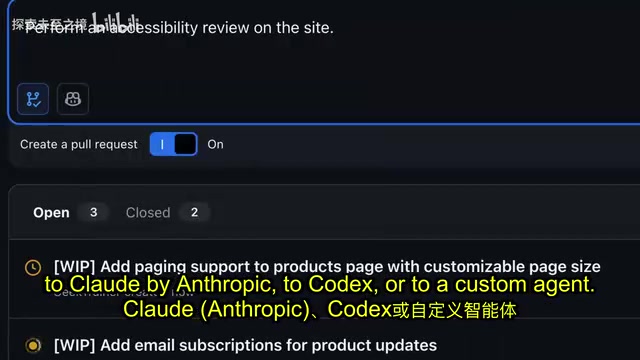
This means developers no longer need to switch between different tools and platforms—all AI coding agent monitoring and management can be done in one place on GitHub.
Technical Background: Why Multiple AI Agents?
Multi-Agent Orchestration is an important evolutionary direction in AI engineering in recent years. Its core idea stems from the "separation of concerns" principle in software engineering—different AI models have different strengths due to variations in training data, architecture design, and optimization objectives, resulting in differentiated capability boundaries for specific tasks. For example, Claude excels at long-context understanding and document generation, Codex is specifically optimized for code completion and unit test generation, while Copilot deeply integrates context-aware capabilities from GitHub code repositories. By decomposing complex tasks and assigning them to the most capable agent, the overall result often surpasses what a single model can achieve trying to handle everything. Agent HQ is essentially an Agent Orchestration Layer that returns model selection decisions to developers, rather than forcing them into a single vendor lock-in.
From Issue to Code: Automated Task Assignment Workflow
In real-world development, most change requests are initiated through Issues. Agent HQ deeply integrates with this workflow—you can directly assign an Issue to an AI agent for processing.
The Engineering Value of GitHub's Issue System
GitHub's Issue system is one of the foundational infrastructures of modern collaborative software development, supporting core workflows including bug tracking, feature requests, and technical discussions. A well-structured Issue typically contains: reproduction steps, expected vs. actual behavior comparisons, associated code snippets, historical discussion comments, and references to other Issues or PRs. Connecting AI agents directly to the Issue system means the AI can read this complete contextual information, rather than just an isolated natural language description. This enables agents to understand the business intent behind changes, locate relevant code files, and generate code changes that comply with project conventions on the correct branch—a level of deep integration that traditional chat-based AI assistance tools struggle to achieve.
The workflow is remarkably streamlined:
- Select the target Issue: Find the change request that needs to be handled
- Specify the base branch: Choose which branch you want the agent to develop from
- Choose an AI agent: Select from Copilot, Claude, Codex, or custom agents
- Launch the task: Let the AI agent handle the rest automatically
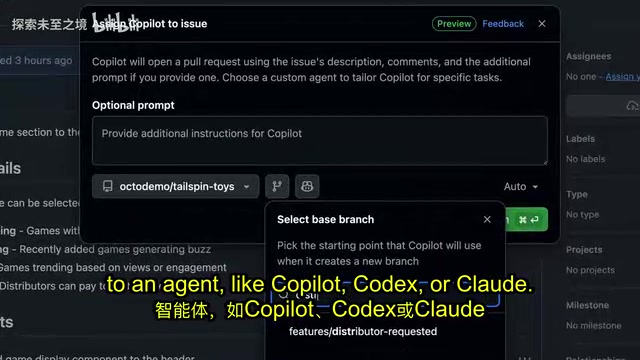
The core value of this model lies in parallelization. You can simultaneously assign different Issues to different agents, letting multiple AIs work at the same time. For instance, have Copilot handle a frontend UI adjustment while Codex refactors a backend API, and Claude writes test cases—three tasks progressing in parallel, multiplying development efficiency.
Mobile Support: Dispatch AI Agents Anytime from Your Phone
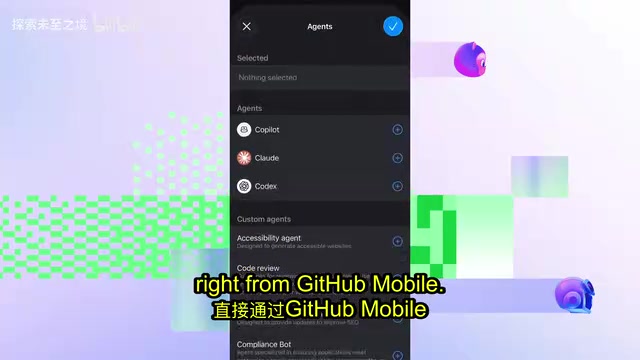
Inspiration doesn't only strike at your desk. GitHub has fully considered this—GitHub Mobile also supports Agent HQ's core functionality.
Developers can do the following on their phones:
- View task execution status for each agent
- Directly assign new tasks to AI agents
- Monitor progress of parallel sessions
This is especially useful for scenarios requiring quick responses—for example, receiving an urgent bug report during your commute, you can immediately assign the Issue to an AI agent via your phone to start the fix, without waiting to open your laptop. This "async initiation, review later" workflow aligns perfectly with the on-call culture of modern software teams: agents work continuously in the background while developers step in to review results at their convenience, rather than standing watch the entire time.
Deep VS Code Integration: Manage All Agent Sessions Within Your IDE
Developers spend most of their time in an IDE, so Agent HQ naturally integrates deeply into VS Code.
In VS Code, you get agent management capabilities fully consistent with the GitHub web interface:
- Orchestrate all agent sessions: Unified management of both local and cloud agent sessions
- Flexible task assignment: Same support for Claude, Codex, Copilot, and custom agents
- Specify models: Choose specific AI models for different tasks

This in-IDE integration means developers can complete the entire workflow from task assignment to result review without leaving their coding environment. Local agents handle immediate coding assistance while cloud agents tackle more complex independent tasks, both operating collaboratively within the same interface.
Architectural Differences: Local Agents vs. Cloud Agents
Local Agents run on the developer's machine, typically integrating deeply with the IDE through the Language Server Protocol (LSP) or extension APIs. They offer extremely low response latency, making them ideal for real-time code completion, inline suggestions, and other immediate interaction scenarios, but are limited by local computing power for complex reasoning tasks. Cloud Agents run on remote servers, can invoke models with larger parameter counts, support longer context windows, and are suited for complex tasks requiring a global perspective—such as cross-file refactoring or complete feature module generation. Agent HQ unifies both modes in a single interface, allowing developers to flexibly choose based on task complexity and response time requirements, without manually switching between two separate toolchains.
A Paradigm Shift in Parallel Development: From AI Assistant to AI Team
The launch of Agent HQ marks an important trend: AI coding is evolving from a single-assistant model to a multi-agent collaboration model.
Traditional AI coding assistance is linear—you ask a question, the AI provides an answer, then you ask the next question. Agent HQ breaks this pattern, allowing developers to manage multiple AI agents like managing a team, with each agent handling its own responsibilities and working in parallel.
What's even more noteworthy is that GitHub hasn't locked developers into a single AI vendor. Copilot, Claude, and Codex—three mainstream AI coding models—compete on the same stage, and developers can choose the most suitable agent based on the characteristics of each task. This openness not only gives developers more choices but also drives healthy competition among AI coding tools.
For development teams, Agent HQ's value goes beyond efficiency gains—it represents a fundamental shift in how work gets done. From "humans write code, AI assists" to "humans manage AI, AI writes code," the developer's role is evolving from executor to orchestrator.
The Historical Context of Developer Role Evolution
The role shift from "executor" to "orchestrator" is not happening for the first time in software engineering history. Every leap in abstraction level has been accompanied by a redefinition of the developer's role: from hand-writing machine code to assembly language, developers shifted from "operating hardware" to "describing logic"; from procedural programming to object-oriented, from "writing steps" to "designing structures"; from manual operations to DevOps and CI/CD pipelines, from "executing deployments" to "defining processes." What Agent HQ represents is the latest node in this evolutionary chain: a developer's core competency is shifting from "how to write correct code" to "how to clearly define problems, accurately review AI output, and design maintainable system architectures." This doesn't mean coding ability is becoming less important—quite the opposite. Only developers who deeply understand code can effectively review and guide AI agent output, preventing code that "looks correct but is actually flawed" from silently entering production.
Key Takeaways
- GitHub Agent HQ provides a centralized control center supporting management of multiple AI coding agents—Copilot, Claude, Codex—from a single interface
- Developers can directly assign Issues to AI agents, enabling automated parallel processing from requirements to code
- Agent HQ supports three-platform collaboration across GitHub web, GitHub Mobile, and VS Code, covering all development scenarios
- The multi-agent parallel model marks a paradigm shift in AI coding from single-assistant to multi-agent collaboration
- An open multi-model support strategy lets developers flexibly choose the most suitable AI agent based on task characteristics
Related articles
 Tutorials
ChatGPT Plus Subscription Guide: Are GPT-5.5, image-2, and Codex Worth the Upgrade?
A detailed look at ChatGPT Plus features — GPT-5.5, image-2, and Codex — with a Plus vs Pro comparison and a complete step-by-step subscription guide for users outside the US.
 Tutorials
Harness AI Engineering in Practice: Using Claude Code to Master Enterprise-Level E-Commerce Development
Deep dive into Harness AI Engineering: master enterprise e-commerce development with Claude Code using the Rules, Skills, Wiki, and Changes framework.
 Tutorials
Cursor + Codex Dual-IDE Collaboration: A Practical Methodology for Open-Source Project Customization
A complete methodology for open-source project customization based on real-world experience, detailing the Cursor+Codex dual-IDE workflow, seven-stage process, MVP validation, and AI source code reading techniques.