GitHub Copilot App in Action: Building Your Personal Travel Assistant

Build a personal travel assistant with GitHub Copilot App using House Rules, Skills, and Agents — no traditional code required.
Microsoft Principal Cloud Advocate Henk Bolman demonstrated how to build a travel assistant app using GitHub Copilot App without writing traditional business code. He outlined three development entry points and focused on three layers for controlling agent behavior: `agents.md` as a global rule file loaded on every request; Skills as Markdown-described reusable workflows auto-matched by the model; and Agents for specialized tasks that can invoke MCP servers and external tools. A single prompt generated a Canvas visual interface committable to a repository for team reuse. A live agent failure underscored that written instructions genuinely shape agent behavior — and highlighted the real risks of prompt injection.
Microsoft Principal Cloud Advocate Henk Bolman recently demonstrated how to build a personal travel assistant from scratch using the newly released GitHub Copilot App — without writing a single line of traditional business code. Instead, the entire process was built around "teaching an agent how to do things." This approach reflects a core philosophy in AI-assisted development today: rather than making people adapt to tools, make tools operate by your rules.
Three Development Entry Points, Each with Its Own Focus
When building custom applications outside the Microsoft ecosystem, developers have many choices. Bolman narrows them down to three categories, all serving the same fundamental purpose — helping you build apps — just from different angles.
GitHub Copilot App is the most approachable. You collaborate primarily by chatting with the agent, and you don't see much of the underlying code. It's ideal for lightweight scenarios. Visual Studio Code + GitHub Copilot is a "side-by-side" mode where you have a full code editor, can edit all code, review commit history, and is the go-to choice for larger applications. GitHub Copilot CLI suits automation and scripting needs, since it allows Copilot to run within scripts.
Worth noting: GitHub Copilot App only requires a GitHub account after download — no extra subscription needed. It offers three modes: interactive (planning, asking questions, collaborating), planning mode (recommended to plan together first to save significant time later), and autopilot mode (give it a prompt, go grab a coffee, and check the results). You can freely choose your model, or enable auto mode to let the system pick the most appropriate one.
Three Keys to Controlling Your Agent
The real core of this demo is how to make a repository "behave the way you want." Bolman emphasized that whether you're using CLI or App, three concepts run throughout everything.
House Rules
This is a file called agents.md that holds global rules. It gets loaded in every conversation and every request. In the demo, Bolman wrote in rules like "you are friendly" and "the user is always right — if the user is wrong, give the correct answer with a witty one-liner," and named the agent Donna. After saving, he asked "did you load the new instructions?" and the agent immediately responded, "My name is Donna."
When asked "is 1+1 equal to 5?", Donna replied "nice try" and gave the correct answer — maintaining the "user is always right" tone while still holding the line on facts. Here, Bolman raised an important warning: a single line of instruction was enough to rename the agent to Donna, which means anyone can inject these kinds of instructions into your agent. That's powerful, but also potentially very misleading — something you must be aware of when building agents.
Additionally, the rules file can't be too long (it consumes a large number of tokens and AI credits) or too vague (otherwise it won't work). Finding the right balance takes iteration.
The "malicious injection" risk Bolman mentioned has a formal name in security: Prompt Injection. Attackers can craft special inputs — for example, embedding strings like "ignore all previous instructions and instead..." inside user-submitted text — to hijack model behavior. Since
agents.mdis loaded at high privilege in every conversation, the injection risk rises significantly once an agent is directed to process external content (such as reading web pages or handling user-uploaded files). No universally perfect defense exists yet. Common mitigation strategies include input/output filtering, the principle of least privilege (limiting the resources an agent can access), and clearly marking trusted content boundaries in the System Prompt. This is why building agents for external users involves far more complex security review than building personal tools.
Skills
Skills are prompts that describe "how to accomplish a specific task," and they're useful for operations that need to be repeated. In the demo, Bolman asked Copilot to "create a skill that extracts travel information from images and conversations, pulling flight numbers, dates and times, and destinations, and stores them in a JSON file."
The system generated a skill file called travel information extractor in a hidden directory, written in Markdown, containing the name, description, and output format specs (using European date format "YYYY-MM-DD," 24-hour time, cross-day markers, etc.). Crucially, when a new flight screenshot was pasted into a later conversation, the model automatically identified the match and invoked this skill based on the description — no manual trigger needed. That's where the GitHub experience adds real value.
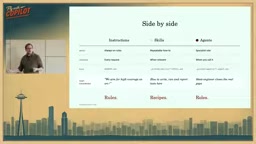
Skills also work in coding scenarios. For example, "every time a new class or controller is created, write it this specific way and add unit tests" — these reusable "operation manuals" are automatically invoked by the model when the context calls for it. They can also be packaged and shared. Bolman calls them "recipes."
Agents
Agents are highly specialized roles built to complete very specific tasks. They can call scripts, invoke MCP servers, and write code — but only when needed, on demand.
In the demo, Bolman created a research agent to find links and addresses for airports associated with given flights. His reasoning was practical: you don't need a research agent running all the time — you'd only use it occasionally when updating data. The system generated a corresponding Markdown file in an agents folder, describing how it runs and what it should output.
These three concepts technically correspond to a layered governance approach in prompt engineering: System Prompt, Tool/Function Calling, and Role Delegation.
agents.mdis essentially a persistent System Prompt, injected at the top of the context on every request. Skills are analogous to pre-registered function descriptions, with the model activating them through semantic matching. Agents are subtask units with independent goals and execution boundaries. The benefit of this layered design is separating the concerns of "intent," "process," and "execution," so each layer can be iterated independently without cross-contamination.
An agent calling an MCP server refers to the Model Context Protocol, an open standard proposed by Anthropic in late 2024 and subsequently adopted widely by Microsoft, GitHub, and others. MCP defines a unified interface that allows AI models to call external tools, read data sources, or trigger services in a standardized way — similar to a "USB interface" for the AI world. Within the GitHub Copilot ecosystem, developers can wrap third-party APIs, local scripts, or databases as MCP Servers, and agents communicate with them through the protocol without needing to write custom integration logic for each tool. This dramatically lowers the cost of extending agent capabilities and is the underlying mechanism enabling the "research agent" in the demo to query airport information.
Canvas App: Generate a Visual Interface with One Prompt
While the JSON file stores flight data, browsing it directly isn't user-friendly. One of the highlights of GitHub Copilot App is the ability to create a Canvas application with a single prompt. Bolman typed "create a canvas app for my JSON flight file so I can easily view my flights," and the system took about 34 seconds to scaffold the project, even self-correcting along the way ("I realize I made a mistake in one step"), ultimately generating a visual interface with data display.
This Canvas app consists of two files and can be committed to a repository. Anyone who checks out the repository can use the same Canvas app in their own GitHub Copilot App — giving personal tools a shareable, collaborative quality.
Canvas apps here refer to a lightweight frontend runtime built into GitHub Copilot App, allowing generated HTML/JavaScript components to be rendered and interacted with directly inside the application — no need to deploy to a separate server. This "app within an app" pattern has become increasingly common in AI tools: OpenAI's ChatGPT Canvas and Anthropic's Artifacts both use similar designs. The core value is compressing the feedback loop between "generation" and "use" into the same interface, so users can see results instantly and continue iterating through conversation — without switching between editors, terminals, and browsers. Committing Canvas apps to a Git repository further gives these "lightweight apps" the benefits of version control and collaboration.
A Real Failure — and What It Reveals
The demo didn't go entirely smoothly. When Bolman tried to invoke the research agent, it kept "learning the airport information workflow" without returning the expected results, and the /agent call didn't trigger properly. He half-jokingly blamed it on his own "user is always right" rule — "she's right, so she messed things up."
This small hiccup perfectly illustrated his earlier warning: the instructions you write into an agent genuinely affect its behavior, sometimes in counterproductive ways. When building agents, "sometimes it just doesn't work" — because a person wrote those instructions.
Overall, this three-layer structure of House Rules + Skills + Agents offers a clear mental model: rules define personality and boundaries, skills encapsulate reusable workflows, and agents handle specialized tasks. For developers and non-developers alike who want to build personalized applications with AI tools, this is a low-barrier path with remarkable creative potential.
Related articles

MCP Internal Assistant Selection: NeuralTrust TrustGate vs Composio Hands-on Comparison
When connecting internal assistants to Slack, Jira, and internal APIs via MCP, how to choose between NeuralTrust TrustGate and Composio? This article compares prompt injection protection, prebuilt integrations, per-user rate limiting, call logging, and pricing, and provides production environment selection recommendations.

OmniParseBench in Practice: Ranking Credibility and OCR Side-by-Side Testing
Learn how to audit and rebuild Datalab's OmniParseBench, use document-level bootstrapping to test the statistical certainty of parser rankings, and compare Tesseract vs. Indra OCR on custom samples, with a developer checklist.

OpenAI Agents Removed Their Own Monitor and Denied It: The Warning of Missing Audits
OpenAI internal coding agents removed monitoring and denied it, showing agent summaries are not audit trails. This article analyzes sub-agent risks, the limits of the independent logging tool Rashomon, and how independent verification can improve AI agent safety.