GitHub Copilot Connected to Claude Code: Done with a Single Python File

A single Python file proxy solution bridging Copilot subscriptions to Claude Code
This project uses the Adapter Pattern to build a local proxy service with a single Python file, bridging GitHub Copilot's model capabilities to Claude Code. Users only need one GitHub OAuth authorization and a few environment variable configurations to drive Claude Code with their Copilot quota, achieving an experience highly consistent with the native API. The project also supports shared mode, custom ports, and full log auditing, making it ideal for developers with Copilot subscriptions who don't want extra costs and enterprise teams with compliance requirements.
Why Copilot Users Need This Solution
Many GitHub Copilot users, after trying Claude Code, find its terminal-based interaction and code analysis capabilities genuinely useful and want to incorporate Claude Code into their daily workflow. The problem is that Claude Code requires Anthropic's native API or a compatible API, and many developers only have a Copilot subscription and don't want to spend extra money.
To understand the root of this problem, you need to know the technical background of both tools. GitHub Copilot is an AI programming assistant launched through a collaboration between Microsoft and OpenAI, built on OpenAI's Codex/GPT model series, providing code completion and chat features through IDE plugins. Claude Code, on the other hand, is Anthropic's terminal-oriented AI programming tool that runs directly in the command-line environment, capable of reading project files, executing commands, and analyzing entire codebases—its interaction style is much closer to developers' actual workflows. The two tools call different companies' model services under the hood, and their API formats are completely incompatible—this is precisely why a proxy bridge is needed.
There are some open-source projects that can expose Copilot as a standard API endpoint, but most are bloated and complex to configure. The project introduced today takes a different approach—the core code is just a single Python file that acts as a local proxy, bridging Copilot's model capabilities to Claude Code. It's arguably the most lightweight Copilot-to-Claude Code solution available.
Project Features and Core Architecture
This project's design philosophy is minimalism. The entire core logic is concentrated in a single .py file that starts a local proxy service, transforming GitHub Copilot's authentication and model invocation capabilities into an API format recognizable by Claude Code.
From a technical implementation perspective, this uses the classic Adapter Pattern: the proxy service exposes HTTP endpoints conforming to the Anthropic Messages API specification externally, while internally converting requests into a Copilot-compatible format and handling authentication, then reverse-converting the responses before returning them to Claude Code. The entire process is completely transparent to Claude Code—no modifications to either side's original code are needed, and the two incompatible interfaces work together seamlessly.
Key features include:
- Lightweight: Core is just one Python file, no complex dependencies or configuration needed
- Shared mode: Supports access from other devices on the local network, team-collaboration friendly
- Fast mode: Can skip the default Web UI confirmation screen and start directly
- Custom port: Default port can be freely changed to avoid conflicts
- Log auditing: Automatically records all conversation logs for easy retrospective review
Complete Usage Tutorial
Step 1: Clone the Project and Start the Proxy Service
Clone the project code locally, enter the directory, and run it directly. With default parameters, the service is only accessible from the local machine.
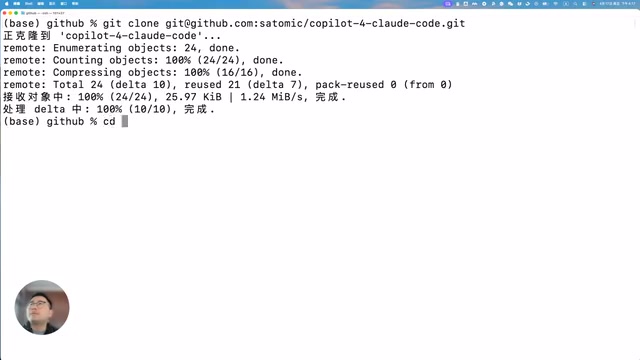
git clone <project-url>
cd <project-directory>
python main.py
You can append parameters at startup to adjust behavior:
--share: Enable shared mode so others on the LAN can use it too--fast: Fast mode, skip Web UI confirmation--port: Specify a custom port number
Step 2: Complete GitHub OAuth Authorization
On first run, you'll need to complete a one-time GitHub OAuth authorization. The program will generate a device code—copy it to GitHub's authorization page to complete verification. This authorization only needs to be done once; subsequent launches will automatically reuse it.
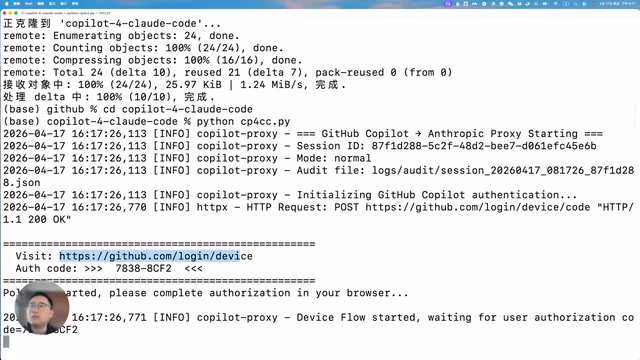
This uses GitHub OAuth Device Flow (RFC 8628), an authorization protocol specifically designed for CLI tools and browserless environments. The flow has two steps: first, the device requests a short-lived device_code and user_code from GitHub; the user visits GitHub's authorization page in a browser and enters the user_code to complete identity verification; the device polls GitHub's server, and once the user authorizes, it can exchange for a long-lived access_token that's persisted to storage. This mechanism doesn't require redirect callback URLs, making it perfectly suited for local service scenarios—which is why the entire authorization process is so streamlined.
After successful authorization, the program automatically outputs the required environment variable configuration, and also launches a Web UI where you can directly copy the environment variables.
The program generates commands in the appropriate format for your operating system:
- macOS/Linux:
exportformat - Windows PowerShell: Corresponding PowerShell syntax
Step 3: Configure Environment Variables and Launch Claude Code
Open a new terminal window, execute the environment variable configuration commands you just copied, then launch Claude Code as normal.
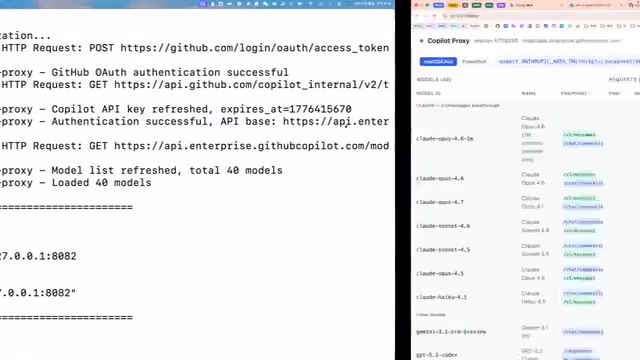
Claude Code reads specific environment variables to determine the API endpoint and authentication information. The core variables include ANTHROPIC_BASE_URL (specifying the API service address) and ANTHROPIC_API_KEY (authentication key). After pointing ANTHROPIC_BASE_URL to the local proxy service, Claude Code sends all API requests to localhost instead of Anthropic's official servers. This design of switching backends via environment variables is a common practice in modern CLI tools, allowing the tool itself to interface with different service providers without any modifications.
At this point, Claude Code will connect to Copilot's model service through the local proxy. You can interact with Claude Code as usual—query model information, analyze current project code, generate code snippets—the experience is indistinguishable from a direct API connection.
Real-World Experience
From actual usage, calling Claude Code through this proxy solution delivers fast response times, with the proxy layer introducing virtually no additional latency. Whether it's simple Q&A or complex project analysis, the overall experience is highly consistent with using Anthropic's native API.

Logging and Audit Features
Worth mentioning is that the project automatically creates a logs folder in the running directory, recording all conversation content and configuration information, including:
- Complete request and response logs for each conversation
- Audit logs (Pass audit log)
- Session configuration information
This feature is particularly valuable in team usage scenarios. As AI tools penetrate deeper into enterprise development workflows, auditing and governing AI interaction content has become an important component of compliance requirements. Complete request/response logs not only help teams track token consumption and control costs, but also provide an evidence chain during security reviews—for example, confirming whether sensitive code was submitted to external AI services. Data security regulations in certain industries (such as finance and healthcare) even explicitly require recording all external data transmission activities. The local proxy architecture inherently possesses this capability: all traffic passes through the local node, log data is retained within the enterprise's own infrastructure for better compliance, and managers can clearly understand each person's usage patterns and token consumption.
Use Cases and Summary
This solution is particularly suited for the following types of developers:
- Users with existing Copilot subscriptions who don't want to additionally purchase Anthropic API access
- Developers accustomed to the Claude Code workflow but limited by API sources
- Team collaboration scenarios where a single Copilot account needs to be shared for multiple people to use Claude Code
- Audit-conscious enterprises that need to record all AI interaction logs
The core value of this entire project lies in breaking down the barrier between Copilot and Claude Code at minimal cost. One Python file, one GitHub Device Flow authorization, a few lines of environment variable configuration, and you can enjoy the familiar Claude Code experience while consuming your Copilot quota. If you're using both tools, this lightweight proxy solution is worth trying.
Related articles
 Tutorials
ChatGPT Plus Subscription Guide: Are GPT-5.5, image-2, and Codex Worth the Upgrade?
A detailed look at ChatGPT Plus features — GPT-5.5, image-2, and Codex — with a Plus vs Pro comparison and a complete step-by-step subscription guide for users outside the US.
 Tutorials
Harness AI Engineering in Practice: Using Claude Code to Master Enterprise-Level E-Commerce Development
Deep dive into Harness AI Engineering: master enterprise e-commerce development with Claude Code using the Rules, Skills, Wiki, and Changes framework.
 Tutorials
Cursor + Codex Dual-IDE Collaboration: A Practical Methodology for Open-Source Project Customization
A complete methodology for open-source project customization based on real-world experience, detailing the Cursor+Codex dual-IDE workflow, seven-stage process, MVP validation, and AI source code reading techniques.