GitLab CI/CD in Action: Using a Pipeline to Catch the 'Free Shipping Over ¥199' Java Bug

Use a GitLab CI/CD pipeline to automatically catch the 'free shipping over ¥199' boundary bug, showing the full test, package, and deploy workflow.
Using a 'free shipping over ¥199' boundary bug as an example, the article shows how to automatically intercept such errors with a GitLab CI/CD pipeline. The demo project first writes test cases to lock in the correct expectations, then runs them automatically on every push through a pipeline with three stages: test, package, and deploy. After the buggy version is pushed, the pipeline fails at the test stage and blocks subsequent delivery, and the log pinpoints that an order of exactly ¥199 was overcharged ¥10 for shipping. After changing 'greater than' to 'greater than or equal to,' the new pipeline passes entirely, and the fix is verified through the number of tests, the artifact fingerprint, and the actual API response. The article concludes with reusable CI/CD checking habits.
Starting with a Shipping Fee Boundary Bug
In e-commerce systems, the easiest bugs to overlook often hide in boundary conditions. Suppose the mall's rule is "free shipping over ¥199"—when a customer buys exactly ¥199 worth of goods, the shipping fee should be ¥0. But if the code writes the condition as "greater than 199" instead of "greater than or equal to 199," an order that exactly meets the threshold will be charged an extra ¥10 shipping fee.
This error is invisible on ordinary orders—large orders pass normally, and only orders that land exactly on the threshold expose the problem. A Bilibili creator demonstrated how to automatically intercept this type of bug with a complete GitLab CI/CD pipeline: first write test cases that lock in the expected behavior, then have the pipeline automatically run tests, package, and deploy on every push, using the commit ID to trace each run's results.
Tests First: Nailing Business Rules into Assertions
The demo project is a Java mall service, and all monetary amounts in the API are expressed as integer cents: ¥199 corresponds to 19900 cents, and the ¥10 shipping fee corresponds to 1000 cents. The test cases revolve around three positions—one cent before the threshold, exactly at the threshold, and one cent after the threshold—with expected shipping fees of ¥10, ¥0, and ¥0 respectively.
The key practice is to write the correct expectations in tests first, and not change them along with the buggy code. Each data set includes the item amount and the expected shipping fee, and the assertion compares expected with actual. The exactly-at-threshold group requires a return of 0 cents; if the actual return is 1000 cents, the test must fail. In addition, there are five API test cases that check responses, totals, and invalid input. Before and after the fix, the two test files remain unchanged—this is what proves that the error was identified first and the fix was then verified, rather than achieving a pass by loosening the checks.
Three Pipeline Stages: Test, Package, Deploy
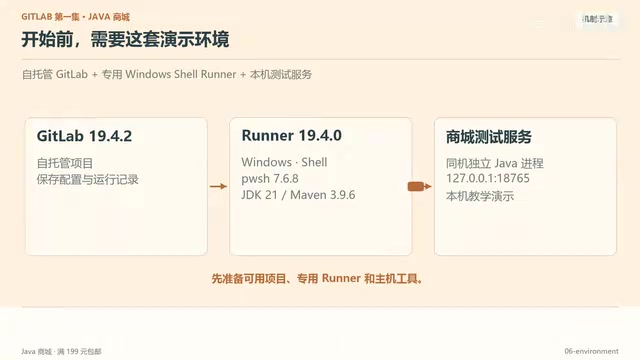
GitLab CI/CD has only three core concepts: Pipeline (the entire run), Stage (a group of jobs), and Job (a specific command). In the demo configuration, test, package, and deploy are each a group, and each group contains exactly one job. The outer frame contains the stages, and the stages contain the jobs. Once you see this containment relationship clearly, you can understand a single run by looking at the configuration.
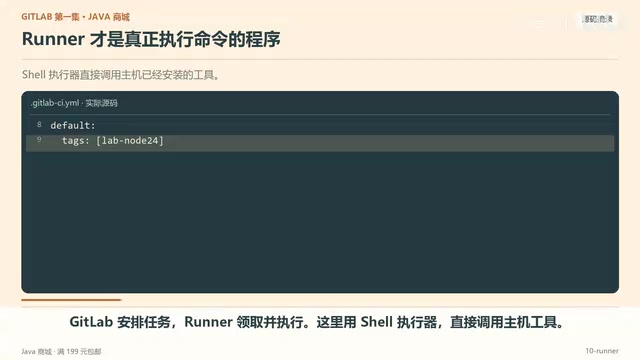
A Runner picks up jobs and executes them. Here a Shell executor is used to directly invoke host tools, and tags are used to match Runners. The test job calls Maven's Test, passes the short commit ID as the build version parameter, and then checks the exit code—if Maven returns non-zero, the failure is propagated to the job so that later commands do not mask it. Test reports are collected even on failure, making it easier to pinpoint which test case went wrong in GitLab.
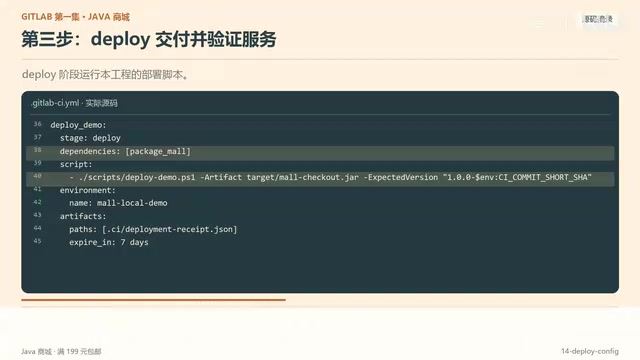
The package job calls Maven's Package to output a runnable JAR, then computes a file fingerprint for the artifact. The packaged file is passed to the deploy job via Archive build artifacts, and deployment uses the same package so that the result that passed the checks can be matched against the pre-run result.
Runner and Executors
GitLab Runner is the agent process that actually executes CI/CD jobs. Jobs defined in a Pipeline are ultimately picked up and executed by some Runner. Runners can be registered globally or bound to a specific project. To let different Runners handle different types of jobs, GitLab uses tags for matching: a job declares the required tags in the configuration, and only Runners carrying those tags can pick up that job. The demo uses the Shell executor, which means the Runner directly invokes commands such as Maven on the host, and the job shares the host's filesystem. Another common approach is the Docker executor, where each job runs in an isolated container with better isolation. The screenshot text mentions a "Cell executor," which may be a custom name in the demo environment, but the core mechanism is still that the Runner picks up jobs via tags and invokes host tools. Understanding the Runner's role helps troubleshoot issues like "why is the job stuck in pending."
Failing Pipeline: One Push Catches the ¥10 Bug
After pushing the buggy version, pipeline number 66 fails. After the test fails, both package and deploy show as skipped and do not continue. Going into the failed job's log, you can locate the exactly-at-threshold case: expected shipping fee 0 cents, actual 1000 cents—that is the extra ¥10. There are 8 tests in total, and this single failure is enough to block subsequent delivery.
In the log, first find the failed test case and the difference between expected and actual, then go back to the corresponding code. The direction of the fix becomes obvious: change "greater than" to "greater than or equal to," so that exactly ¥199 also enters the free-shipping branch. The two test files remain unchanged; under the same expectations, the error is identified first and the fix is then verified.
Exit Codes and Failure Propagation Across Jobs
When the Shell executor runs a job, each command returns an exit code: 0 means success, non-zero means failure. GitLab CI by default treats a non-zero exit code as a job failure and immediately stops subsequent commands in that job; if allow_failure: false is configured (the default), the failure also blocks jobs in the same stage and later stages. The demo deliberately checks Maven's exit code to prevent later commands in the script from masking a test failure—even if Maven returns a failure, if later commands succeed, the whole job might still be marked as passing. By explicitly checking $? or using set -e, you can ensure failures propagate upward. This is also why package and deploy show "skipped" after the test fails: they depend on the test job succeeding, and the pipeline is intercepted at the point of failure. Only by understanding the exit code mechanism can you design job scripts correctly and avoid a "false green."
Fix Verification: The Chain of Evidence Behind a Green Result
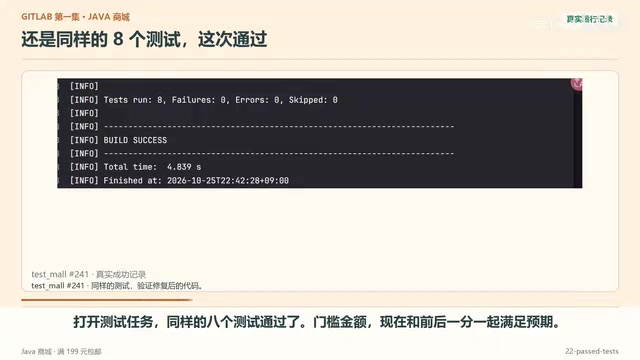
After making the change, commit and push to the same branch. GitLab creates pipeline number 67 for the new commit using the same configuration, and all three jobs succeed. The test job passes the same 8 tests, and the threshold amount now meets expectations along with the cent before and after it; the package job generates the JAR for the current commit and saves it as an artifact; the deploy job calls a script to hand the package to the demo host, and the script waits for the service to respond and checks the shipping fee and version.
Green means the commands in the configuration succeeded, but you still need to look at the number of tests, the artifact, and the actual response to confirm what exactly succeeded. After deployment, make an independent request to the mall: item ¥199, shipping fee ¥0, total ¥199. The build version carries the short commit ID of the fix commit, and the fingerprint of the artifact matches that of the running file, showing that the package built from this commit is serving the correct checkout result, rather than an old service that was not updated.
Build Artifacts and File Fingerprints
Build artifacts are files generated by a job that need to be passed to later jobs or made available for download, such as a JAR produced by Maven packaging. In GitLab CI, you declare artifact paths via artifacts:paths; after a job succeeds, the artifacts are uploaded to GitLab, and jobs in later stages can automatically download them. A file fingerprint (such as a SHA-256 checksum) uniquely identifies file content: any change in content produces a different fingerprint. The demo computes a fingerprint for the JAR and checks the running file's fingerprint after deployment, confirming that the running service really uses the package built in this run, not an old version or a cached file. This is a more reliable verification method than "seeing the job is green," especially when deployment scripts may fail silently—fingerprint comparison provides an end-to-end chain of evidence.
Reusable CI/CD Checking Habits
This pipeline can catch the overcharged shipping fee because the tests explicitly check the threshold. Applied to other projects, four habits hold just as well: write business rules as tests, especially thresholds that are easy to miss; use the commit ID to find the corresponding run; explain failures or successes from the job logs; and confirm that the running service uses the package built in that run. Do these, and you can understand and reproduce a complete pipeline from test to deployment.
One-line Summary
Use a GitLab CI/CD pipeline to automatically catch the "free shipping over ¥199" boundary bug, demonstrating the full test, package, and deploy workflow.
Paragraph Summary
Using a "free shipping over ¥199" boundary bug as an example, the article shows how to automatically intercept such errors with a GitLab CI/CD pipeline. The demo project first writes test cases to lock in the correct expectations, then runs them automatically on every push through a pipeline with three stages: test, package, and deploy. After the buggy version is pushed, the pipeline fails at the test stage and blocks subsequent delivery, and the log pinpoints that an order of exactly ¥199 was overcharged ¥10 for shipping. After changing "greater than" to "greater than or equal to," the new pipeline passes entirely, and the fix is verified through the number of tests, the artifact fingerprint, and the actual API response. The article concludes with reusable CI/CD checking habits.
Related articles
world2vec: Building Mechanistic World Models with Latent Dynamics Learning
world2vec proposes a reward-free method for learning mechanistic world models via latent dynamics, faithfully reproducing systems over long horizons with at least an order of magnitude fewer parameters than DreamerV3, TD-MPC2, and LeWM, and achieving accurate system identification on 71 attractor benchmarks.

A New KL-DRO Paradigm: Adaptive Scenario Generation Around a Learned Density Model
KL-DRO research proposes centering the KL ball on a learned density model instead of the empirical distribution, with adaptive scenario generation guiding sampling toward the worst case. Experiments show lower cost under distribution shift when records are scarce and the model can extrapolate, with comparable in-distribution cost.

ODE Samplers for Discrete Diffusion Models: Exponential Residual Flows Accelerate Generation
Discrete diffusion models lack deterministic ODE sampling? This article introduces Exponential Residual Flows (ERFs), which introduce continuous residual variables per token to construct piecewise ODEs for deterministic sampling and support consistency distillation acceleration. Superior to prior methods on code and text generation tasks.