GLM5 Coding Plan Hands-On Review: Only $84/Year with Full Setup Tutorial & Pro Tips

GLM5 delivers near-mainstream AI coding assistance at a fraction of the cost
Zhipu AI's GLM5 coding subscription enters the AI programming tools market at just $10/month or $84/year for the Lite plan — roughly one-tenth the cost of Claude Code and Codex. GLM5 is compatible with mainstream development environments including Kilo CLI, VSCode, and Cloud Code, supports skill library extensions and multi-agent orchestration, and covers over 90% of coding assistance needs. Key usage tips include controlling thinking depth and watching for context rot, making it ideal for students and independent developers who prioritize value for money.
The Cost-Performance Battle in AI Coding Tools
In the AI-assisted programming space, Claude Code and Codex have long been the go-to tools for developers, but their steep subscription fees have kept many individual developers and students at bay. Recently, GLM5 officially joined Zhipu AI's lightweight coding subscription plan, entering the market at an extremely competitive price — the Lite plan costs just $10/month or $84/year, nearly 60% cheaper than Claude Code Max's monthly fee and well below Codex's subscription price.
Zhipu AI is an artificial intelligence company incubated from the Knowledge Engineering Laboratory of Tsinghua University's Computer Science Department. Its GLM series models are built on the General Language Model architecture and have been iterating continuously. GLM5 is the latest generation in this series, featuring significant improvements in code generation, logical reasoning, and Chinese language understanding, approaching GPT-4-level performance across multiple programming benchmarks. This technical foundation is the core enabler behind GLM5's ability to deliver high-quality coding assistance at a low price.
What does this price point mean? You can get over 90% of the coding assistance capability for roughly one-tenth the cost of Claude and Codex. Below, I'll break down GLM5's configuration methods, usage tips, and the pitfalls I've encountered in real-world use.
GLM5 Subscription Plans & Price Comparison
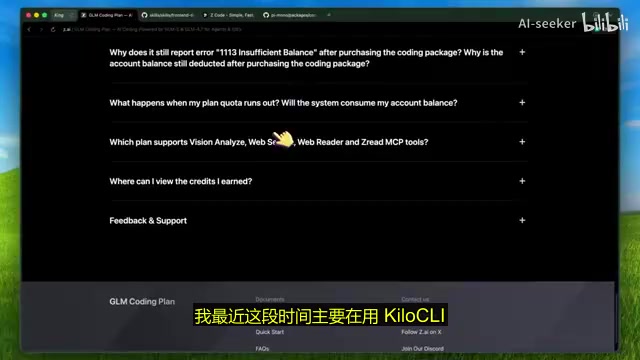
The GLM5 coding subscription offers multiple tiers:
- Lite: $10/month | $27/quarter | $84/year
- Pro: $30/month | $252/year
Compared to mainstream competitors, the Lite plan's $84 annual fee is almost unfairly cheap. Even the Pro plan at $30/month is quite affordable, considering GLM5's coding performance is fully comparable to Claude Opus. The Pro plan also includes additional features like web search and visual MCP tools, making it worth considering for developers with higher demands.
Note: The model is currently being rolled out to Lite plan users gradually. Some users may not see the GLM5 option yet, but it will be available soon.
GLM5 Multi-Environment Setup Guide
One major advantage of the GLM5 coding plan is its exceptional compatibility — it can run in virtually any mainstream development environment. Below are four common configuration methods.
Kilo CLI Setup (Recommended)
Kilo CLI currently offers the smoothest GLM5 integration experience, with very simple setup steps:
- Run a single command to install Kilo CLI
- Execute the
connectcommand and select the Zhipu coding subscription plan - Enter the API key obtained from the console
- Run the
modelscommand and select the GLM model to start using it
The entire process takes less than two minutes — it's ready out of the box. You can also install various skill library extensions in Kilo CLI to further enhance your coding experience.
Cloud Code Integration
If you prefer using Cloud Code, you can directly install the GLM coding subscription and easily switch between different skills and models as needed.
VSCode GUI Approach
For developers who aren't comfortable with command-line operations, you can install the Kilo Code plugin in VSCode, then complete the GLM coding plan configuration in settings to easily invoke GLM5 through a graphical interface.
Conductor Multi-Agent Orchestration
A more advanced approach is to use Conductor — after configuring Cloud Code with the GLM coding plan, Conductor can invoke GLM models through the Cloud Agent SDK, enabling multi-agent collaborative workflows and other advanced features.
Multi-agent orchestration refers to an architectural pattern where multiple AI instances collaborate in parallel or sequentially according to task assignments. For example, a "planning agent" handles requirement decomposition, a "coding agent" implements the logic, and a "review agent" checks code quality — the three collaborate through message passing to complete complex engineering tasks. This architecture can significantly improve efficiency when handling large projects and represents a cutting-edge exploration direction in current AI coding tools.
Skill Libraries: Supercharging Frontend Development
To further improve GLM5's output quality, I strongly recommend installing Anthropic's frontend design skill library.
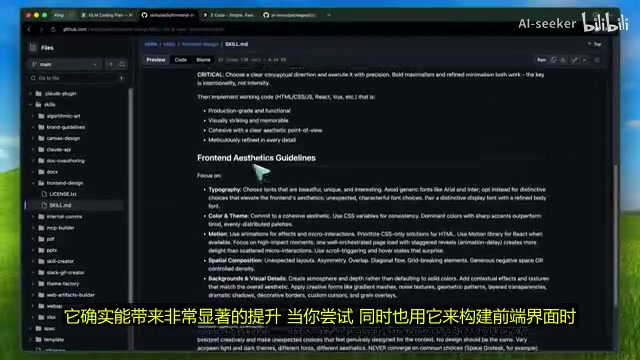
In my testing, this skill library performs excellently on GLM5, especially when building frontend interfaces, delivering very noticeable quality improvements. Most skills in the Anthropic skill library work well with the GLM coding plan — you can download these skills directly and import them into tools like Kilo CLI.
Additionally, the PI programming agent is also worth trying. Its auto-run plan provides greater customization space and can deliver more ideal results in certain specific scenarios.
GLM5 Usage Tips & Pitfall Avoidance Guide
After extensive hands-on use, here are several key practical insights to help you avoid common mistakes.
Control Thinking Depth to Avoid Over-Reasoning
The GLM5 coding plan uses an Always-On Reasoning model mode — you cannot manually control reasoning intensity like adjusting a slider. An always-on reasoning model means the model automatically executes an internal Chain-of-Thought before every response — unlike on-demand reasoning modes, the model performs deep analysis on every request regardless of task complexity. This design has clear advantages when tackling algorithm challenges, but for simple code completion or format conversion tasks, it often introduces unnecessary computational overhead.
However, there's a practical trick: directly instruct it to reduce thinking in your prompt.
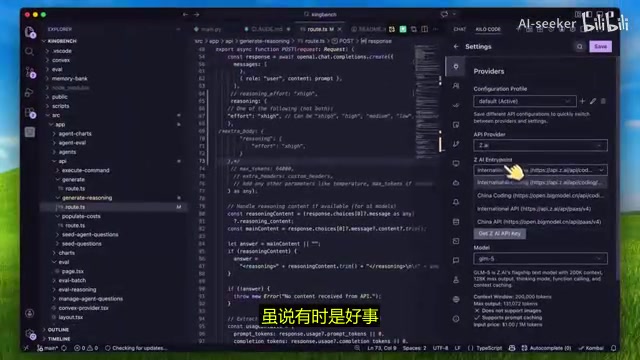
Why do this? Because GLM5 often "overthinks." While deep reasoning occasionally helps, in most coding scenarios, excessive reasoning actually drags down generation quality. Testing shows that the model responds well to the "reduce thinking" instruction, significantly shortening the reasoning process and improving final output accuracy.
Watch Out for Context Rot — Start New Sessions Promptly
This is the most critical issue to be aware of when using the GLM5 coding plan. When context length exceeds 200K tokens, be sure to start a new session before continuing.
Context Rot refers to the phenomenon where large language models gradually lose attention weight on earlier input content when processing very long conversations, causing the model to "forget" or misinterpret earlier information. This is related to the Transformer architecture's attention mechanism — as token count increases, the model must distribute limited attention resources across a larger context window, diluting the influence of distant information. Simply put, just like humans lose focus after extended work sessions, models gradually "lose focus" in very long conversations.
Compared to Claude, GLM5's context rot problem is more pronounced. As conversation turns increase, the model's understanding of earlier context gradually degrades, causing noticeable output quality decline. Therefore, I recommend starting new sessions more frequently and breaking complex tasks into multiple independent conversations.
Workaround for Visual Capabilities
GLM5 itself is not a vision model, but if you subscribe to the Pro plan, you can work around this limitation with a clever approach: use the Visual MCP tool to have GLM send screenshots to a vision model for parsing. The vision model converts image content to text and sends it back to GLM5, which can then continue working based on the image information.
MCP (Model Context Protocol) is an open protocol proposed by Anthropic that allows AI models to interact with external tools, data sources, and services in a standardized way. Through MCP, models can invoke external capabilities like browsers, code executors, file systems, and even other AI models, greatly extending a single model's capability boundaries. The Visual MCP leverages this mechanism to "outsource" image understanding tasks to specialized vision models, then pass results back to GLM5 for processing — this modular capability composition approach is also an important trend in future AI tool architecture. This solution is particularly useful for scenarios like UI reproduction.
Zcode UI: Zhipu's Official GUI Tool

Zhipu has also released Zcode UI, an official tool that's essentially ready out of the box. It provides a clean graphical interface for invoking the coding subscription within Cloud Code. As an official product, Zcode UI is also more flexible in performance tuning — definitely worth downloading and trying out.
Who Should Choose the GLM5 Coding Plan?
Overall, the core competitive advantage of the GLM5 coding plan lies in its extreme cost-performance ratio:
- Costs roughly one-tenth of Claude Code and Codex
- Covers over 90% of coding assistance functionality
- Compatible with virtually all mainstream development environments including Kilo CLI, VSCode, and Cloud Code
- Built-in MCP tools with skill library extension support
- Lite plan at ~$84/year handles daily coding needs
If you're a student, independent developer, or a budget-conscious team looking to control costs, the GLM5 coding plan is undoubtedly the AI coding tool with the best ROI currently available. Reportedly, Zhipu has more major moves planned, meaning this subscription's value will only increase over time.
In today's increasingly homogenized AI coding tool landscape, GLM5 has carved out a niche with its price advantage. For most developers, "good enough and affordable" often beats "best but expensive."
Related articles
 Tutorials
ChatGPT Plus Subscription Guide: Are GPT-5.5, image-2, and Codex Worth the Upgrade?
A detailed look at ChatGPT Plus features — GPT-5.5, image-2, and Codex — with a Plus vs Pro comparison and a complete step-by-step subscription guide for users outside the US.
 Tutorials
Harness AI Engineering in Practice: Using Claude Code to Master Enterprise-Level E-Commerce Development
Deep dive into Harness AI Engineering: master enterprise e-commerce development with Claude Code using the Rules, Skills, Wiki, and Changes framework.
 Tutorials
Cursor + Codex Dual-IDE Collaboration: A Practical Methodology for Open-Source Project Customization
A complete methodology for open-source project customization based on real-world experience, detailing the Cursor+Codex dual-IDE workflow, seven-stage process, MVP validation, and AI source code reading techniques.