Goodbye clamp() Magic Numbers: Fluid Typography with the CSS progress() Function

Replace clamp() with CSS progress() to achieve readable, maintainable fluid typography using normalized values.
The article introduces a new fluid typography approach from YouTube creator Kevin Powell: replacing clamp() with CSS's new progress() function. clamp()'s middle value requires manually constructed viewport-unit expressions, and adjusting endpoints causes the whole calculation to drift, creating hard-to-maintain magic numbers. progress() returns a unitless 0–1 value that, combined with custom properties and calc(), enables linear mapping with independent start/end points and output range. A tan(atan2()) fallback provides a gradual migration path, and combining with pow() enables exponential type scales.
CSS's clamp() function has long been the go-to solution for fluid typography, but its middle value often causes headaches—what viewport width should you put there? Plus or minus? Once you adjust the start or end points, the whole calculation has to be redone from scratch. In his video, YouTube tech creator Kevin Powell proposes a more elegant alternative: using CSS's new progress() function together with custom properties to escape the "magic number" trap entirely.
The Pain Point of clamp(): The Middle Value Is a Guessing Game
The basic syntax of clamp() is clamp(min, preferred, max), and the problem lies precisely in the middle preferred value. To make font size change linearly within a viewport range, developers have to manually construct an expression containing viewport units, like calc(1rem + 2vw). Where do the coefficients in that expression come from? Usually from trial and error or from generators like Utopia.
What's worse, when you change the min or max font size, the range over which it changes drifts along with it. Kevin demonstrates this in the video: with a set of font sizes set using clamp(), some start changing at one breakpoint, some have already stopped, and some haven't started yet—the whole typography system is like a set of gears that have fallen out of sync. He calls this process "magic numbering": developers are forced to memorize a bunch of coefficients with no semantic meaning, and every adjustment requires re-deriving them.
This is also why the fluid typography space has long relied on generators like Utopia. The generators themselves are fine, but they mean there's a black box between the values in the code and the design intent, making it hard to read or modify directly during team collaboration.
The progress() Approach: Normalize First, Then Linearly Map
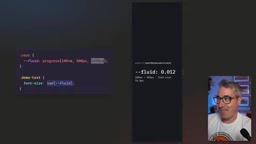
The core logic of progress() is very clear: given a value, a start point, and an end point, it returns a unitless number between 0 and 1. For example, progress(1000px, 500px, 2000px) outputs a smooth transition from 0 to 1 as the viewport width grows from 500px to 2000px.
This "progress value" from 0 to 1 is the key. Once you store it in a custom property, the remaining calculation becomes pure multiply-and-add:
--fluid: progress(100vw, 500px, 1000px);
font-size: calc(3rem + var(--fluid) * 1rem);
When the viewport is ≤500px, --fluid is 0 and the font size is locked at 3rem; when the viewport is ≥1000px, --fluid is 1 and the font size is locked at 4rem; in between, it interpolates linearly. The minimum, maximum, and change range are each independent, and changing any one of them doesn't affect the others. Kevin emphasizes that this predictability is exactly what clamp() lacks most.
According to Kevin, progress() has reached Baseline status, meaning all major browser engines now support it.
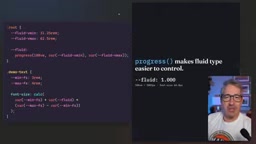
Normalization and linear mapping are core mathematical concepts in fluid typography. Normalization means mapping input values from any range to a unified 0–1 range, eliminating the influence of the original units; linear mapping then scales and shifts proportionally onto the target output range. The progress() function is exactly a wrapper for this process: it takes a value, a start point, and an end point, returns (value - start) / (end - start) clamped between 0 and 1. This separation decouples design intent (start/end points, output range) from calculation logic, so changing any parameter doesn't affect the others—whereas clamp()'s preferred value implicitly encodes range information in the expression, causing a ripple effect with any change.
Improving Readability: Driving Magic Numbers Out of the Calculation
Using progress() directly is logically clear, but the code is still hard to read. Kevin's approach is to extract the min/max font sizes and the viewport range into custom properties:
--fs-min: 3rem;
--fs-max: 4rem;
--vw-min: 500px;
--vw-max: 1000px;
--fluid: progress(100vw, var(--vw-min), var(--vw-max));
font-size: calc(var(--fs-min) + var(--fluid) * (var(--fs-max) - var(--fs-min)));
This way, when adjusting the design you only need to change a few variables at the top, and the underlying calculation never needs to be touched. He also recommends using rem for font sizes and px for viewport breakpoints—the former ensures font sizes follow the system settings when users zoom, while the latter serves as a measurement baseline that isn't affected by zoom.
For scenarios that need a complete type scale, Kevin uses the pow() function to achieve exponential scaling: on small screens the differences between levels are gentle, while on large screens higher levels pull ahead faster. pow(), as a math function, has been stably supported in browsers for years, so compatibility is not a concern. Similarly, the small-screen and large-screen coefficients of the scale are extracted into custom properties, so adjusting them only requires changing two values.
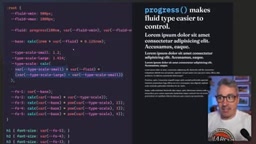
The pow() function is one of CSS's math functions, with the syntax pow(base, exponent), returning the base raised to the power of the exponent. In type scale scenarios, you typically use a ratio factor (such as 1.25) as the base and the level index as the exponent, achieving exponential growth for each level. CSS also provides companion functions like sqrt(), exp(), and log(), all part of the CSS Values and Units Level 4 specification. These functions have been stably supported in major browsers for years and can be safely used in production without compatibility concerns.
Supporting Older Browsers: The tan(atan2()) Trick
If your project can't yet rely on progress(), Kevin offers an equivalent alternative: using the tan(atan2()) combination to generate unitless ratios in CSS. This is a long-circulating "black magic" in the CSS community, whose principle is to convert a ratio of lengths into a pure number through the mathematical relationship between tangent and arctangent functions.
Specifically, you rewrite the logic of progress() as an expression in the form clamp(0, tan(atan2(100vw - 500px, 500px)), 1) (the actual syntax involves a more complete arctangent construction). The outer clamp limits the result to between 0 and 1, since older browsers don't have progress()'s built-in clamping behavior. The resulting 0–1 value is fully equivalent to progress(), and the subsequent multiply-and-add calculation doesn't change at all.
This alternative works because browser support for tan() and atan2() is far broader than for progress(). The cost is that the expression looks intimidating, but Kevin's response is the same as before: wrap it in a custom property, label it "do not modify," and users only need to care about the input variables.
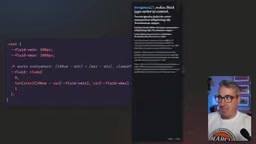
The atan2() function in CSS takes two arguments (y and x) and returns the angle in radians between the point (x, y) and the positive x-axis; tan() returns the tangent of a given angle. The mathematical essence of combining them as tan(atan2(y, x)) is to compute the ratio y/x, but CSS's type system requires the two arguments of atan2() to have the same unit, so dividing a length by a length yields a unitless number. The key to this trick is that although older browsers don't support progress(), they have long supported tan() and atan2() (as part of the trigonometric function extensions), allowing an equivalent 0–1 ratio to be constructed in environments that don't support the new function.
What This Means for Real Projects
The value of this approach isn't limited to font sizes. Any CSS property that needs to "change linearly with some continuous variable"—spacing, border radius, container width—can use the same pattern. Compared to clamp()'s trial-and-error configuration, progress() turns the "mapping relationship" into an explicit declaration: start point, end point, and output range are each independent, and the code is the documentation.
Kevin also admits that when a type scale is needed, the pure clamp() approach can hardly avoid depending on generators, because manually deriving exponential scaling coefficients isn't realistic. With the progress() plus pow() approach, all inputs are semantic values that designers can understand, turning generators from a necessity into an option.
For teams still on the fence, the tan(atan2()) fallback provides a gradual migration path: first unify the code structure with the equivalent expression, then replace the underlying implementation once progress() coverage reaches the required level—the upper-level variable names and usage remain completely unchanged.
One-line Summary
Replace clamp() with the CSS progress() function to achieve readable, maintainable fluid typography using normalized values.
Paragraph Summary
The article introduces a new fluid typography approach proposed by YouTube creator Kevin Powell: replacing the traditional clamp() with CSS's new progress() function. clamp()'s middle value requires manually constructing expressions with viewport units, and adjusting the start or end points causes the whole calculation to drift, creating hard-to-maintain "magic numbers." progress() returns a unitless progress value from 0 to 1, which combined with custom properties and calc() multiply-and-add achieves linear mapping, with start/end points and output range independent of each other. Extracting min/max font sizes and viewport breakpoints into custom properties greatly improves code readability. For browsers that don't support progress(), the tan(atan2()) combination generates an equivalent ratio, providing a gradual migration path. Combined with pow(), it can also achieve exponential type scales, reducing dependence on generators.
Related articles

Claude Code + Codex Multi-Agent System Tested: The Real Problem Behind a 98% Cache Rate
Developer shares 7-day test of a Claude Code + Codex multi-agent system: 98% cache rate, 354:1 input/output ratio, but stuck on orchestration and output share.

Cursor SDK New Feature: Real-Time Steering of Running AI Agents
Cursor SDK adds run.steer(), letting developers inject messages in real time while an AI agent runs to adjust its direction. Subagents move to the background on steer.

AI Tools Are "Invading" Retro Games: A Game of Creativity vs. Copyright
AI tools are dramatically lowering the barrier to retro game porting—browser-based Halo, iPhone Wind Waker, and MR Smash Bros. are going viral, but sparking copyright disputes and regulatory concerns.