Goodbye Repetitive Prompting: A Practical Guide to Cursor Project Rules

Cursor Project Rules make the agent read instructions in .cursor/rules before it starts — configure once, apply project-wide.
The article introduces Cursor's Project Rules mechanism: the agent reads instructions from the repo's `.cursor/rules` folder before generating code, eliminating the need to repeat coding conventions in every conversation. Creating rules is simple — type `/create rule` in the agent chat and describe your needs in natural language, and Cursor saves it as an MDC file with a metadata header. Rules have four activation modes: always on, matching files only, agent-judged relevance, and explicit chat tagging. Teams can commit the rules folder to version control for consistent agent behavior, and it's recommended to keep each rule under 500 lines.
Tired of repeating the same coding conventions every time you open Cursor? Project Rules are built for exactly this — they let the AI agent read your written instructions before it starts working. Configure once, and they apply across the whole project.
Why You Need Project Rules
Cursor's agent actively consults the project's rules files before generating code. According to the video's author, rules are essentially "instructions the agent reads before it works," stored in the .cursor/rules folder of your repository.
This means you no longer need to emphasize "use TypeScript named exports" or "call our API client" in every conversation. Once you codify these preferences as rules, every agent in the team will follow the same set of conventions.
Create Your First Rule in Three Steps
Creating a rule is straightforward. Type /create rule in the agent chat box, then describe the rule in natural language. For example: use TypeScript named exports and call our API client.

Cursor saves it as an MDC file. MDC is Cursor's dedicated rule file format, supporting a metadata header that defines how the rule takes effect.

Choosing a Rule's Scope
At the top of an MDC file, you can specify how the rule is triggered. The video lists four modes:
- Always: Always active, suitable for hard conventions that apply project-wide;
- Only for matching files: Applies only to matching files, suitable for directory-level or file-type-level conventions;
- When the agent decides it's relevant: Loaded when the agent judges it relevant;
- Only when you tag in chat: Applied only when you explicitly reference it in chat.
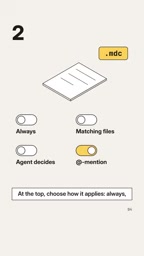
This layered design lets rules cover both the global scope and specific scenarios, preventing irrelevant instructions from interfering with the agent's decisions.
The four modes differ in their context overhead. Always rules are injected into every agent request, making them a constant cost — reserve them for truly global hard conventions (such as language, named exports, or prohibited libraries). Only for matching files matches via glob patterns (e.g., src/api/**/*.ts) and loads only when the agent is working on a matching file, making it the most effective way to control overhead. When the agent decides it's relevant relies on the agent's semantic judgment of the rule's description metadata — it's the most flexible but least predictable, better suited to domain knowledge than hard constraints. Only when you tag in chat is purely manual, often used for time-consuming or occasional workflows (such as a specific refactoring process); think of it as a reusable prompt template. In practice, prioritize file matching and keep Always rules to a minimum.
Structurally, MDC is close to Markdown with frontmatter: at the top of the file is a metadata block wrapped in delimiters, with common fields including description (a brief summary of the rule's purpose, which the agent relies on to judge relevance), globs (file matching patterns, used only in matching mode), and alwaysApply (a boolean corresponding to always-on). Below the metadata is the body of natural-language instructions for the agent, which can use Markdown bullet points, examples, and positive/negative cases. Since MDC is still plain text at its core, it can be diffed, reviewed, and merged like source code — which is why teams can code-review it. Note that MDC is a Cursor-proprietary format and may not be directly recognized by other tools; when reusing across tools, you often need to convert it to a general convention like AGENTS.md.
Team Collaboration and Maintenance Tips
Commit the .cursor/rules folder to version control, and everyone's agent on the team will follow the same rules. This is a key advantage of project rules over personal preferences — conventions travel with the code, and new teammates who clone the repo immediately get consistent AI behavior.
On maintenance, the video's author offers a practical tip: keep each rule under 500 lines. When a rule gets too long, split it into multiple smaller rule files. This not only makes it easier to read and troubleshoot but also lets the agent load only the instructions it needs, reducing context waste.
Trade-offs in Practice
Project rules solve the pain of "repeating yourself," but the rules themselves need governance. The more rules there are, the greater the context overhead each time the agent loads them, so it's best to split by responsibility: use Always for general style rules, file matching for framework-specific rules, and temporary tagging in chat for one-off tasks.
From a broader perspective, project rules reflect the evolution of AI coding tools from "conversational prompting" to "versionable engineering configuration." Prompts are no longer disposable consumables but team assets that accumulate with the repository. For long-maintained projects, the benefits of this shift grow with the scale of collaboration.
Related articles

The Road to Orbit: How Launch Megastructures Will End the Rocket Era
From mass drivers and skyhooks to launch loops and orbital rings, SFIA's long-form video maps the launch megastructure spectrum and shows how traffic volume drives technology choice.

Gordon Ramsay vs. the Michelin Father-Son Duo: A Galician Culinary Quest
Gordon Ramsay heads to Galicia, Spain, for a culinary showdown with two-Michelin-star chef Pepe Vieira. From Coast of Death goose barnacles to traditional stone-oven bread, explore Galicia's unique food culture and ingredient stories.

The 15-Year Programmer Who's Been Unemployed for Two Years: The Tech Worker's Dilemma in the AI Era
A US senior software engineer with 15 years of experience has been unemployed for two years, exhausted his savings, and sought help on Hacker News. This article analyzes the structural causes of long-term unemployment among tech workers, strategies for addressing resume gaps, and the redefinition of experience value in the AI era.