Google AI Studio Tutorial: A Complete Guide to Building AI Apps with Zero Code

A comprehensive guide to Google AI Studio: from model selection to zero-code app development.
Google AI Studio is a powerful free AI development platform integrating Gemini text reasoning, Imagen image generation, Veo video generation, and music generation across all modalities. The platform offers a Playground for experiencing model capabilities and tuning parameters like Temperature and Top P, while the core Build feature enables zero-code construction and publishing of standalone web apps using natural language. This article demonstrates the complete development and publishing workflow using an emotional healing app as an example, and recommends beginners start by configuring API keys, then gradually explore each model's capabilities before using Build to quickly bring ideas to life.
Google AI Studio has become one of the most powerful free AI development platforms available today. It integrates multi-modal large models covering text, images, video, and music, while supporting zero-code app building and publishing. This article will take you through everything from interface layout, model selection, and parameter tuning to hands-on development, giving you a comprehensive mastery of this platform.
Interface Layout and Basic Configuration
When you open Google AI Studio, the interface is divided into three core sections: the left function panel, the center workspace, and the right parameter adjustment panel. If you need bilingual Chinese-English display, you can install the "Immersive Translate" browser extension and click "Always translate this site."
Step 1: Configure Your API Key
Before starting any operation, it's strongly recommended to configure your API key first. Click "Get API Key" in the bottom-left corner and follow the instructions to link a credit or debit card (a Visa multi-currency card works fine). The API key is your credential for accessing all of Google's AI models. You may receive some free credits upon registration, and once those are used up, you'll need to pay—but costs are quite low. A simple project typically costs no more than $2.
An API Key is essentially a unique string that establishes a trust relationship between a client and a server. When your application sends a request to Google's AI models, the API key tells the server "this request comes from a legitimate, paying user." As a security best practice, API keys should never be hardcoded in frontend code or public repositories, as they could be stolen and result in significant charges. The industry standard is to store keys in environment variables or secret management services (such as Google Secret Manager), and to set up independent keys and usage quotas for different projects to achieve fine-grained cost monitoring and risk isolation.
It's recommended to create a separate API key for each development project so you can clearly track expenses per project.
Complete Model System Breakdown
After entering the Playground, click the model selection button on the right side to see Google's rich model matrix.
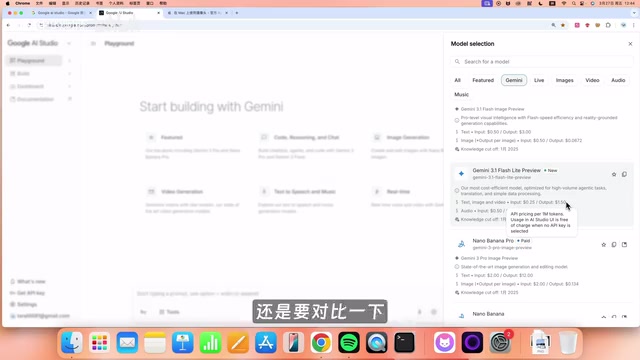
Gemini Series: Core Models for Text and Reasoning
Gemini currently offers three tiers of models suited for different scenarios:
- Gemini Pro: The most powerful model, ideal for complex reasoning and high-quality output
- Gemini Flash: Mid-tier model with excellent cost-effectiveness
- Gemini Flash Lite: Lightweight model with fast speed and low cost
Taking the Pro model as an example, text and image input costs $0.25 per million tokens, output costs $1.50 per million tokens, and audio input costs $0.50 per million tokens. A token is the smallest semantic unit when models process text—in English, a common word typically corresponds to 1 token, while in Chinese, due to different encoding methods, one character usually consumes 1.5 to 2 tokens. The "per million tokens" pricing means that processing approximately 750,000 English words or 500,000 Chinese characters costs that amount. Notably, output tokens are typically more expensive than input tokens because the computational overhead of generation is far greater than comprehension. Understanding the token mechanism helps developers control input length when designing prompts to optimize costs.
If you plan to go the development route, it's recommended to compare these prices with OpenAI and Anthropic models side by side to find the most cost-effective solution.
Other Specialized Models
Beyond the Gemini series, Google AI Studio offers several specialized models:
- Live Model: Supports real-time voice and video calls, similar to Doubao's video call feature
- Imagen Series (Image Generation): Includes Imagen 2 and Imagen Pro for AI art generation
- Veo 3.1 (Video Generation): Google's most powerful video generation model, based on a fusion of Diffusion Model and Transformer architecture. Video generation is exponentially more difficult than image generation because the model must not only ensure quality in each frame but also maintain temporal consistency between frames—including physically plausible object motion, coherent lighting changes, and stable character appearances. A major breakthrough of Veo 3.1 is its audio-visual synchronization capability, meaning the model can automatically generate matching sound effects and ambient audio based on visual content. This is known as "joint generation" in the industry, whereas competitors like Runway and Pika have primarily focused on pure visual generation. The support for 4K resolution also means generated content can be used directly for commercial-grade video production.
- Audio & Music: Text-to-speech and text-to-music generation
Parameter Tuning: Making Model Output More Precise
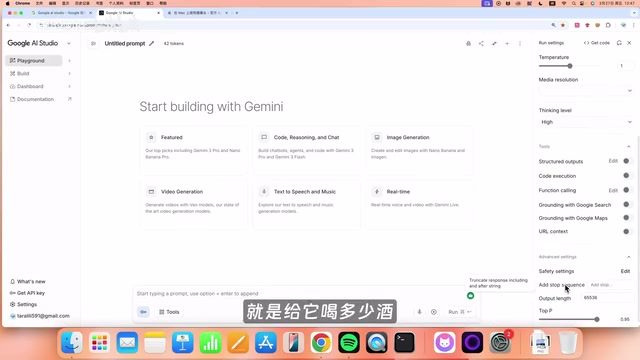
The right panel provides rich parameter adjustment options. Understanding these parameters is crucial for achieving ideal outputs.
System Instructions
This is where you set the model's "persona." You can define response style, background knowledge, and behavioral guidelines. For example, setting it to a "Chinese ancient philosopher" style will cause the model to reference Zhuangzi and Laozi's theories when answering questions.
Temperature and Top P: Dual Safeguards for Controlling Creativity
Temperature and Top P are two core parameters that control the "sampling strategy" when large language models generate text, directly affecting how the model selects the next token from a probability distribution.
Temperature can be intuitively understood as "how much wine you give the model":
- Higher → More creative, more divergent output (suitable for essays, poetry)
- Lower → More rigorous, more conservative output (suitable for official documents, technical writing)
From a technical perspective, Temperature adjusts the smoothness of the probability distribution by scaling logits (the model's raw output scores): higher values give low-probability words a greater chance of being selected, making output more diverse; lower values make the model favor the highest-probability words, making output more deterministic.
Top P acts as a "bodyguard" next to Temperature—even if the model has "had too much to drink," Top P prevents it from saying anything too outrageous. It's generally set to 0.95, filtering out the 5% most unreliable output content. Top P, also known as nucleus sampling, retains only the smallest set of tokens whose cumulative probability reaches the P value, discarding low-probability options in the tail. When working together, Temperature determines the shape of the probability distribution, while Top P trims the long tail, achieving a delicate balance between creativity and reliability.
Other Useful Parameter Settings
- Media Resolution: Output clarity for media, with multiple levels available
- Thinking Level: Reasoning depth (Low/Medium/High)
- Structure Outputs: Structured output (JSON format), ideal for Agents and programmatic calls. Structured output requires the model to return results in strict JSON Schema format rather than free text. This is critical in AI Agent development because Agents need to use model output as input for downstream programs—such as calling APIs, writing to databases, or triggering workflows. AI Agents are a hot topic in the current industry, referring to AI systems that can autonomously plan tasks, invoke tools, and iterate on execution, fundamentally different from simple Q&A chatbots. Google's Gemini models natively support function calling, and combined with structured output, developers can build intelligent agent applications capable of autonomously searching for information, operating databases, sending emails, and handling other complex tasks.
- Code Execution: Enable code mode for solving complex problems
- Grounding with Google Search: Web search for real-time information. This is essentially an implementation of Retrieval-Augmented Generation (RAG) technology. Large language models have a training data cutoff date and cannot access the latest information, while RAG compensates for this by retrieving from external knowledge sources before generating an answer. When enabled, the model first converts the user's question into a search query, retrieves real-time web information from Google Search, and then injects the retrieved results as context into the generation process. This not only solves the knowledge timeliness problem but also significantly reduces model "hallucination"—the phenomenon where models confidently fabricate non-existent facts.
- Add Stop Sequence: Set stop characters to prevent overly long model outputs
Hands-On: Building Apps with Zero Code Using the Build Feature
Build is the most exciting feature in Google AI Studio—a complete Web Coding platform that lets you describe your ideas in natural language and automatically generates runnable applications.
From a technical implementation perspective, the Build feature is essentially an AI-driven full-stack code generation platform. Its technical approach is similar to products like Vercel's v0 and Anthropic's Claude Artifacts, representing a cutting-edge application of "Natural Language Programming." After users input natural language descriptions, the system calls the Gemini model to decompose requirements into three layers of code: frontend interface (HTML/CSS/JavaScript), backend logic, and API calls, then compiles and runs them in real-time within a sandbox environment. This approach dramatically lowers the barrier to software development, but it also has limitations: generated code is typically suitable for small-to-medium applications and rapid prototype validation. For enterprise-level applications requiring complex database design, high-concurrency processing, or granular permission management, professional developers are still needed for deep customization.
Case Study: Developing an Emotional Healing AI App
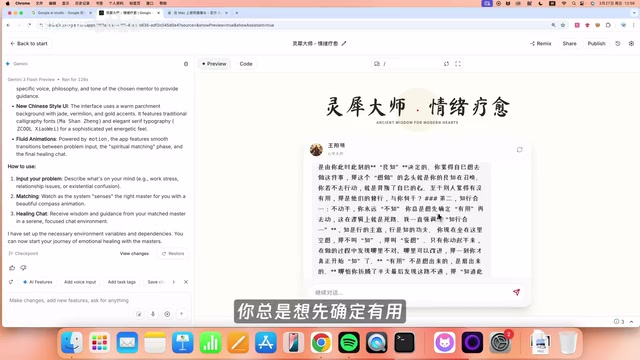
Taking the development of an "Emotional Healing APP" as an example, simply enter a creative description in Build:
I want to create an emotional healing AI application with multiple selectable characters—Laozi, Zhuangzi, Wang Yangming, Shakyamuni, Sun Tzu, Steve Jobs, Elon Musk, and other masters. After users input their questions, the system automatically matches the most suitable master to provide answers. The overall style should be modern Chinese aesthetic, lively and upbeat.
After clicking Build, the system quickly generates a complete application. When you input "I'm always worried that what I create is useless and wastes other people's time, which makes me not want to do anything," the system matches Wang Yangming to counsel you, responding with philosophical wisdom about the unity of knowledge and action.
Publishing and Deployment Process
Once the app is developed, you can preview how it adapts to mobile and desktop. After confirming everything looks good, click Publish:
- Set a monthly spending cap (e.g., $10) to prevent malicious overconsumption
- Click Publish to deploy the application
- Obtain a standalone link that anyone can access via web browser
If you want to open-source the code, you can also publish to GitHub with one click, choosing either a public or private repository.
Hands-On with Image, Video, and Music Generation
Generating AI Images with Imagen
In the Playground, select an Imagen series model (Imagen Pro recommended) and enter a prompt to generate images. For example, generating a series of "modern villa with fantasy-style interior design" images—the model can infer renovation progress at 0%, 30%, 50%, 70%, and 90% while maintaining consistent architectural structure, with excellent character consistency.
Generating AI Video with Veo 3.1
Select the Veo 3.1 model (currently Google's most powerful video model), which supports both Chinese and English prompts. You can customize:
- Resolution: 1080p or 4K
- Duration and aspect ratio
- Audio-visual synchronization is remarkably impressive
AI Music Generation
In the Audio model, there are two creative approaches:
- Text Description: Simply say "I want warm, lyrical music suitable as background music for a tech channel, with an energetic and bright style"
- Composer Mode: Like a professional composer, arrange music through structured sections including intro, verse, bridge, etc.
The quality of generated music is quite impressive and can be downloaded directly for use in video production.
Summary and Getting Started Tips
The core value of Google AI Studio lies not just in the power of individual features, but in the possibility of combining all model capabilities through the Build feature. You can add conversational features to a reader app, or integrate image generation and voice interaction into an educational tool—this is what truly makes a product "AI-powered."
For beginners, here's the recommended learning path:
- First configure your API key and payment method
- Experience different model capabilities one by one in the Playground
- Browse official examples in the Gallery for inspiration
- Use the Build feature to quickly turn ideas into usable products
The platform's learning curve is very gentle, truly delivering on the promise of "zero code, development in minutes." Whether you want to quickly validate a product idea or systematically learn AI application development, Google AI Studio is a platform well worth exploring in depth.
Related articles
 Tutorials
ChatGPT Plus Subscription Guide: Are GPT-5.5, image-2, and Codex Worth the Upgrade?
A detailed look at ChatGPT Plus features — GPT-5.5, image-2, and Codex — with a Plus vs Pro comparison and a complete step-by-step subscription guide for users outside the US.
 Tutorials
Harness AI Engineering in Practice: Using Claude Code to Master Enterprise-Level E-Commerce Development
Deep dive into Harness AI Engineering: master enterprise e-commerce development with Claude Code using the Rules, Skills, Wiki, and Changes framework.
 Tutorials
Cursor + Codex Dual-IDE Collaboration: A Practical Methodology for Open-Source Project Customization
A complete methodology for open-source project customization based on real-world experience, detailing the Cursor+Codex dual-IDE workflow, seven-stage process, MVP validation, and AI source code reading techniques.