Google AI Studio Tutorial: Free Watermark-Free Image Generation, AI Voice & Zero-Code Apps

Google AI Studio major update: zero-code watermark-free images, AI voice, and full app building
Google AI Studio received a major update, now supporting direct Gemini subscription linking for higher limits at no extra cost. Key highlights include: Playground offers watermark-free image generation, fine-grained parameter control, and multi-character text-to-speech; Build enables zero-code AI app creation using natural language, with automatic Firebase database and user authentication integration. The tool is evolving from a developer tool into an AI creation platform for everyone, making it one of the most underrated free AI tools available today.
Google AI Studio recently received a major update — not only are prices lower, but the barrier to entry has dropped significantly. Surprisingly, most people don't realize the true power of this tool: it can generate watermark-free images, create custom AI voices, and even build complete AI applications — all without writing a single line of code.
This article, based on a detailed walkthrough by YouTube creator Paul J Lipsky, systematically covers the core features and practical tips of Google AI Studio, helping you master this seriously underrated tool from scratch.
Linking Your Google AI Subscription: Unlocking Higher Usage Limits
After visiting aistudio.google.com, you'll notice an "Upgrade" button on the left side of the interface. Behind this button lies one of AI Studio's most important updates.
Previously, using AI Studio's paid models required separately binding an API Key and paying extra. An API Key (Application Programming Interface Key) is a unique identifier used for authentication — developers attach it to requests when calling cloud-based AI models, and the platform uses it for billing and rate limiting. Traditionally, using Google's AI models meant creating a project in the Google Cloud Console, generating an API Key, and then paying per call or token consumption — a relatively high barrier for non-technical users.
But now, Google has added a new option: directly link your Google AI subscription (such as the $20/month Pro or $250/month Ultra) to unlock higher usage limits and more powerful models in AI Studio, at no additional cost. This new subscription-linking mechanism essentially extends consumer-level Gemini subscription benefits into the developer tool — users don't need to understand API billing logic; they just need an active subscription to enjoy higher call quotas.
If you're already a Gemini Pro or Ultra user, the system will automatically detect your subscription status after login, and the upgrade button on the left will disappear — meaning the linking was successful. Even without a paid subscription, AI Studio's free tier is quite generous, sufficient for basic exploration.
Playground Deep Dive: An Interactive Experience Far Beyond Standard Gemini
Model Selection: Freely Switch Between Dozens of AI Models
AI Studio's Playground is essentially an interactive interface that far exceeds what standard Gemini chat offers. In the AI field, a Playground typically refers to an interactive sandbox environment that lets users directly converse with models, adjust parameters, and see results instantly — without writing code or deploying services. AI Studio's Playground is more powerful than standard Gemini chat because it exposes the complete parameter panel of the underlying models. Standard Gemini deliberately hides many adjustable options to lower the usage barrier, while the Playground is designed for advanced users who want fine-grained control over model behavior.
The biggest difference lies in the granularity of model selection. In standard Gemini, you can only switch between Thinking and Pro. In AI Studio's Playground, clicking the settings slider in the upper right lets you precisely choose from dozens of models, including:
- Gemini series text models (various versions and specifications)
- Image generation models (such as Nanobanana 2)
- Video generation models
- Audio models (including text-to-speech and music generation)
Watermark-Free AI Image Generation: The Go-To Solution for Creators
This is one of the core reasons many creators choose AI Studio. Images generated in standard Gemini Pro come with a watermark in the bottom-right corner. But in AI Studio, as long as you've linked your Google AI subscription, generated images are completely watermark-free.
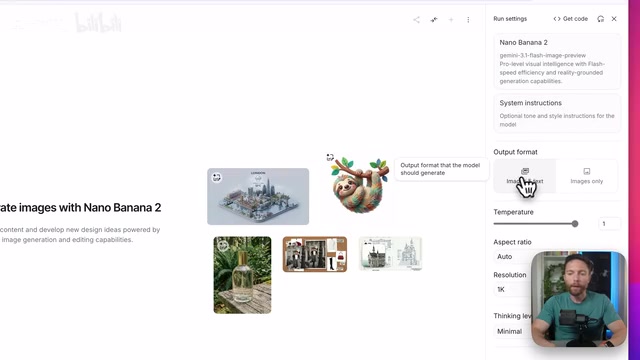
More importantly, AI Studio provides fine-grained control options not available in standard Gemini:
- Output format: Choose between "Images and Text" or "Images Only" — the latter outputs images directly, skipping Gemini's redundant text like "Here's an image of a sloth, hope you like it"
- Aspect ratio: Select from a dropdown menu with options like 16:9, 1:1, 4:3, and more — far more precise than describing ratios in text
- Resolution: Supports 4K high-resolution output
- Thinking level: Sets the model's "thinking depth" before generation — higher means more refined
- Google Search grounding: Lets the model reference Google Search results to improve image accuracy
Grounding is one of the key techniques for addressing the "hallucination" problem in large language models. LLMs derive their knowledge from training data, which has inherent limitations in timeliness and factual accuracy. Search grounding works by converting the user's question into a search query before the model generates a response, retrieving relevant information from external data sources like Google Search, then injecting the retrieved results as context into the model's reasoning process. This Retrieval-Augmented Generation (RAG) paradigm enables models to reference real-time, verifiable information sources, significantly reducing the probability of generating false content.
The author tested this with "Pearl Street in Boulder at sunset." With search grounding enabled, the generated image — while not perfect — accurately captured the closed-off street, string lights, dense storefronts, and even real shops like Pete's Coffee, Lululemon, and Boulder Bookstore appeared in the scene.
AI Text-to-Speech: Easily Create Multi-Character Audio Dialogues
In the model selector, switch to the Audio category and select "Gemini 3.1 Flash TTS Preview" (text-to-speech), and you'll enter a dedicated voice creation interface.

Highlights of this feature include:
- Multi-character dialogue: Add multiple voice blocks and assign different speakers
- Rich voice library: Each character can be assigned from a large selection of preset voices, with preview playback
- Emotion annotation: Add emotions in brackets within the text (e.g.,
[concerned]), and the AI will adjust the tone accordingly - Free download: Generated audio files can be downloaded directly
For podcast production, audio content creation, and video dubbing, this is an incredibly valuable free tool.
Advanced Chat Settings: Build Your Custom AI Assistant
After selecting a Gemini text model, the Playground unlocks a range of advanced settings unavailable in standard Gemini:
-
System Instructions: Set rules the AI must always follow, such as "never use emojis" or "always answer concisely" — avoiding the need to repeat instructions every conversation. The concept of system instructions originated from OpenAI's System Message design first introduced in the ChatGPT API. In the message sequence of a conversation, system instructions sit at the top level with higher priority than user messages — the model references them when generating every response. In practice, they function like setting a persistent "personality" and "behavioral guidelines" for the AI. You only need to set them once and they remain effective throughout the entire session, saving token consumption while more reliably constraining model behavior.
-
Temperature: A creativity slider — higher values produce more creative outputs, lower values produce more predictable and precise ones. Technically, Temperature is one of the most critical sampling parameters during LLM inference. When the model generates the next token, it calculates a probability distribution across every candidate word in its vocabulary. Temperature scales this probability distribution: when temperature approaches 0, the distribution becomes extremely sharp and the model almost always selects the highest-probability word, producing highly deterministic and repeatable output; when temperature increases, the distribution flattens, giving lower-probability words a greater chance of being selected, producing more diverse but potentially less accurate output. Typically, factual Q&A benefits from low temperature (0.1-0.3), while creative writing can be set higher at 0.7-1.0.
-
Thinking level: Four options (Minimal/Low/Medium/High) — recommended to increase for complex problems
-
Structured output: Forces AI to respond in specific formats (such as tables), making it easy to copy directly into other applications
-
Google Search grounding: Connects to live internet for fact verification
-
Google Maps grounding: Improves accuracy when planning trips or finding businesses
-
URL context: Specify particular web pages for the AI to analyze

The author demonstrated a practical use case: setting the AI as a "world-class YouTube strategist," enabling high thinking level and Google Search grounding, and asking it to analyze trending videos about "Gemini vs Claude" from the past seven days, identify content gaps, and provide title and thumbnail suggestions. The results showed the AI indeed engaged in deep thinking and output a structured strategic analysis.
AI Studio Build: Zero-Code Construction of Complete AI Applications
Get Inspiration and Templates from the Gallery
AI Studio's Build feature is the truly exciting part. Click the left-side menu to expand Build, enter the Gallery, and you'll see numerous example applications:
- Multiplayer laser tag game
- Lyria Rhythm (a Guitar Hero-style AI music rhythm game)
- GeoSeeker geographic exploration app
- Lyria Studio music creation tool
Some of these apps were built with AI, and some call AI capabilities in real-time during operation. It's worth spending a few minutes browsing these examples to understand Build's capabilities.
Describe Your Needs in Natural Language, AI Automatically Generates the App
Build's core philosophy is Vibe Coding — you simply describe the app you want in natural language, and the AI builds it for you. Vibe Coding is a concept proposed in early 2025 by Andrej Karpathy (former OpenAI co-founder and Tesla AI Director), referring to developers no longer writing code line by line but instead describing their intent in natural language, with AI automatically generating complete, runnable code. This paradigm emerged thanks to the leap in LLM code generation capabilities. Google AI Studio's Build feature productizes Vibe Coding — after users describe their requirements, the backend AI automatically generates frontend interface code (typically HTML/CSS/JavaScript) and connects it to Google's AI model APIs, forming a complete interactive application.
The author demonstrated creating an app called "Time Warp" — upload a photo and generate portraits in different era styles. The workflow is highly intuitive:
- Describe requirements: Type your app description in the input field — AI also offers auto-complete suggestions (press Tab to accept)
- Choose a design: AI provides multiple design previews to choose from while building in the background
- Iterate and refine: Tell the AI what you want to change via chat, or use Focus Mode to precisely specify which elements to modify

One detail worth noting: apps created with Build call AI models, so they consume quota. If you encounter a "quota exceeded" error, the fix is simple: switch to a model with more available quota. For example, switch from the paid Nanobanana 2 to the free Gemini 2.5 Flash Image.
Advanced Example: Building a Knowledge Management App with Firebase Integration
Build's capabilities go far beyond simple frontend apps. The author also demonstrated creating a NotebookLM-like knowledge management tool called "SourceBoard":
- Users can create different knowledge boards
- Each board supports inputting multiple web links as a knowledge base
- Users can then have Q&A conversations based on these knowledge sources
The key technical breakthrough is Firebase integration — AI Studio can automatically configure a database and user authentication system (Google Sign-in) for your app, meaning the apps you build can support multi-user login and data persistence — something that previously required considerable backend development experience.
Firebase is Google's Backend as a Service (BaaS) platform, providing real-time databases, user authentication, cloud storage, hosting, and a complete suite of backend infrastructure. In traditional development workflows, building an app that supports user login and data persistence requires setting up servers, configuring databases, implementing authentication logic, and handling security rules — typically taking weeks of backend development work. AI Studio Build's automatic Firebase integration means the AI not only generates the frontend interface but also automatically completes the backend architecture configuration, including Firestore database collection structure design and Google OAuth authentication flow integration, reducing full-stack application development barriers to near zero.
Google AI Studio Usage Strategy & Quota Management Tips
Regarding AI Studio's pricing and quotas, transparency is currently lacking. Even Google's internal team members can't fully explain the specific limits for each model. Here are a few practical strategies:
- Switch models when you hit quota limits — this is the simplest and most effective solution
- Paid models are labeled "Paid" — free models typically have larger available quotas
- Use AI Studio as a complement to Gemini — standard Gemini for daily tasks, AI Studio for scenarios requiring fine-grained control
Overall, Google AI Studio is evolving from a developer tool into an AI creation platform for everyone. Watermark-free image generation, multi-character voice synthesis, zero-code app building — this combination of capabilities makes it one of the most underrated free AI tools available today.
Key Takeaways
- Google AI Studio now supports directly linking Gemini subscriptions (Pro/Ultra), unlocking higher limits and more powerful models at no additional cost
- Images generated in AI Studio are watermark-free, with precise control over aspect ratio, resolution, thinking level, and other parameters — far exceeding standard Gemini's capabilities
- Text-to-speech supports multi-character dialogue, rich voice selection, and emotion annotation, with free audio file downloads
- Build supports zero-code construction of AI-powered apps using natural language descriptions, including Firebase database and user authentication integration
- When hitting model quota limits, the simplest solution is to switch to an alternative model with more available quota
Related articles
 Tutorials
ChatGPT Plus Subscription Guide: Are GPT-5.5, image-2, and Codex Worth the Upgrade?
A detailed look at ChatGPT Plus features — GPT-5.5, image-2, and Codex — with a Plus vs Pro comparison and a complete step-by-step subscription guide for users outside the US.
 Tutorials
Harness AI Engineering in Practice: Using Claude Code to Master Enterprise-Level E-Commerce Development
Deep dive into Harness AI Engineering: master enterprise e-commerce development with Claude Code using the Rules, Skills, Wiki, and Changes framework.
 Tutorials
Cursor + Codex Dual-IDE Collaboration: A Practical Methodology for Open-Source Project Customization
A complete methodology for open-source project customization based on real-world experience, detailing the Cursor+Codex dual-IDE workflow, seven-stage process, MVP validation, and AI source code reading techniques.