Google Android CLI Hands-On: Building an Android App with AI Agent in 10 Minutes

Google's Android CLI lets AI Agents build Android apps efficiently without an IDE
Google released Android CLI, unifying six or seven previously scattered development tools. Combined with Skills packs and a Knowledge Base, it solves three key pain points of AI-driven Android development: fragmented tools, AI-unfriendly documentation, and noisy output. Testing shows 70% reduction in token consumption and 3x faster task completion, marking Android development's entry into the CLI+Agent paradigm where developers shift from writing code to guiding AI.
Google just released Android CLI, unifying six or seven previously scattered development tools into one. Combined with AI Agents like Claude Code, you can create, code, and compile an Android application from scratch without ever opening Android Studio. This marks Android development's official entry into the "CLI+Agent" paradigm.
Three Major Pain Points of AI-Driven Android Development
Before Android CLI, AI Agents faced three very real problems when doing Android development:
Too many scattered tools. Installing SDKs required SDK Manager, managing emulators needed AVD Manager, debugging used ADB, building used Gradle — six or seven independent tools, each with its own command format, all of which the AI had to memorize and invoke correctly.
Documentation is written for humans, not AI. Traditional docs are descriptive and conceptual. What AI needs are precise, executable steps. Otherwise, it easily falls back on outdated APIs and patterns.
Tool output is too noisy. Progress bars, color codes, redundant logs — all extremely difficult for AI to parse, wasting massive amounts of tokens.
Google's Three-Layer Solution
To address these issues, Google released three purpose-built components at once:
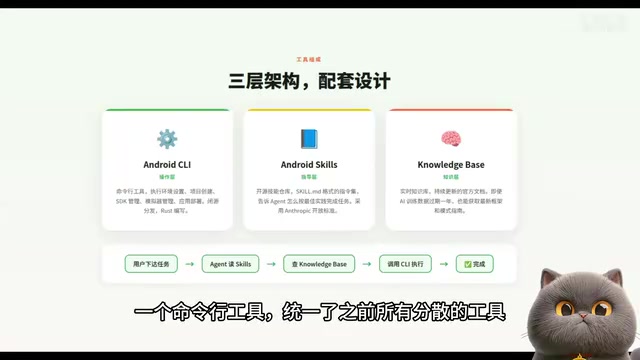
Operation Layer: Android CLI Command-Line Tool
A command-line tool written in Rust that unifies all previously scattered tools. A single entry point handles environment setup, project creation, SDK management, and app deployment. Distributed as a binary — no need to install the massive Android Studio IDE.
Guidance Layer: Android Skills
An open-source GitHub repository containing a set of Markdown-format instruction files that tell AI how to complete tasks following best practices. There are currently seven skill packs, and community contributions are not yet accepted.
Knowledge Layer: Android Knowledge Base
A continuously updated knowledge base that lets AI look up the latest official documentation, compensating for stale training data.
The collaboration flow: User issues a task → Agent reads Skills for guidance → Calls Knowledge Base when documentation is needed → Executes actual operations through CLI.
What Android CLI Can Actually Do

Functionality previously scattered across six or seven tools is now handled by a single android command:
- android create: Create a project from official templates with one command
- android sdk install: Download SDK components on demand without installing all of Android Studio
- android emulator: Create and manage virtual devices
- android run: Deploy apps to devices or emulators
- android docs: Search and retrieve the latest official documentation directly in the terminal
- android skills: Install and manage Agent skill packs
On the technical side, the CLI is confirmed to be written in Rust, built internally at Google with Bazel and Rules Rust. The current version is 0.7, in preview stage.
Efficiency Gains: 70% Fewer Tokens, 3x Faster

Google's internal testing produced two key metrics:
LLM token consumption reduced by over 70%. Previously, AI had to parse massive amounts of redundant text from SDK Manager output. Now CLI output is clean and structured — AI reads it directly, naturally saving tokens.
Task completion speed improved 3x. Previously, Agents fumbled through traditional toolchains. Now with a unified entry point and precise guidance, efficiency jumps dramatically.
Old vs. New Development Workflow Comparison
Traditional approach: Download Android Studio (2G+) → Configure SDK paths and environment variables → New Project with numerous checkboxes → Wait 3-5 minutes for Gradle Sync → Manually write code → Click Run and wait for compilation. Environment setup alone could take half an hour.
Android CLI + AI Agent: One curl command to install Android CLI → One command to install Skills → Tell AI "build a weather app" → AI automatically creates the project, writes code, compiles the APK → Installs on your phone. Total time: 10 minutes.
Industry Trend: From GUI to CLI+Agent Development Paradigm
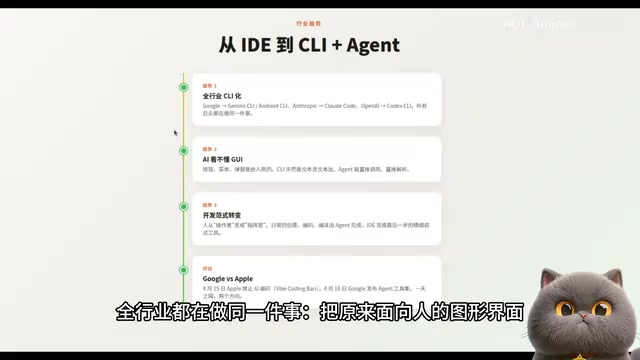
This isn't just a Google initiative — it's a clear industry trend:
- Google released Android CLI and Gemini CLI
- Anthropic has Claude Code
- OpenAI has Codex CLI
The entire industry is doing the same thing: extracting a CLI layer designed for AI from what were previously human-facing graphical interfaces.
The reason is simple — LLMs can't understand GUIs. AI processes text in, text out, and CLI is naturally built for this pattern. The development paradigm is shifting from "humans operating IDEs" to "CLI+Agent."
Hands-On Validation: Building a Weather App with Claude Code
Practical testing validated the feasibility of this toolchain:
- One curl command to install Android CLI
android skills addto load skill packs into Claude Code- Issue the task in Claude Code: build a weather app
An interesting problem came up during the process: Chinese city names couldn't be used to query weather. The AI analyzed the issue itself — OpenWeatherMap's API doesn't support Chinese — then automatically switched to a two-step query strategy: first converting Chinese city names to coordinates, then querying weather by coordinates.
The final APK compiled successfully and was transferred to a phone for installation and testing. Two conversation rounds, consuming approximately 27% of the Claude Code quota (from 4% to 31%).
Summary: Android Development's AI-Friendly Transformation
The core problem Android CLI solves is: enabling AI Agents to do Android development efficiently and correctly.
- CLI provides a unified entry point, eliminating scattered tools
- Skills provide precise guidance, ensuring AI follows best practices
- Knowledge Base updates in real-time, compensating for stale training data
It's still in preview (v0.7) with some limitations, but the direction is clear: Google is transforming Android into an AI-friendly mobile development platform. As development tools shift from "human-facing" to "AI-facing," the developer's role is evolving from "the person who writes code" to "the person who guides AI to write code." This transformation may happen much faster than we think.
Related articles
 Tutorials
ChatGPT Plus Subscription Guide: Are GPT-5.5, image-2, and Codex Worth the Upgrade?
A detailed look at ChatGPT Plus features — GPT-5.5, image-2, and Codex — with a Plus vs Pro comparison and a complete step-by-step subscription guide for users outside the US.
 Tutorials
Harness AI Engineering in Practice: Using Claude Code to Master Enterprise-Level E-Commerce Development
Deep dive into Harness AI Engineering: master enterprise e-commerce development with Claude Code using the Rules, Skills, Wiki, and Changes framework.
 Tutorials
Cursor + Codex Dual-IDE Collaboration: A Practical Methodology for Open-Source Project Customization
A complete methodology for open-source project customization based on real-world experience, detailing the Cursor+Codex dual-IDE workflow, seven-stage process, MVP validation, and AI source code reading techniques.