Google Anti-Gravity Agent Skills Hands-On Tutorial

In 2026, Agent Skills become the new AI coding standard, upgrading from temporary prompts to reusable long-term skill assets.
Google Anti-Gravity IDE now officially supports Agent Skills, marking 2026 as the Year of Skills. Agent Skills are an open-standard format developed by Anthropic that packages team knowledge, workflows, and best practices into Markdown files for AI coding assistants to load on demand and reuse reliably. The key advantage is progressive loading that avoids context explosion, enabling even non-developers to build personalized AI assistants by installing ready-made Skills. This article demonstrates official Skills installation, custom Skills creation, and practical use cases including UI/UX Pro Max.
2026: The Year of Skills — From Temporary Instructions to Long-Term Assets
Google Anti-Gravity IDE now officially supports Agent Skills. Following OpenAI Codex, this marks yet another AI giant's coding tool joining the Agent Skills ecosystem. This signals that 2026 is officially the Year of Skills — AI programming has evolved from the traditional "give a prompt and let AI improvise" approach to "equip AI with a skill set for consistent, reliable code output."
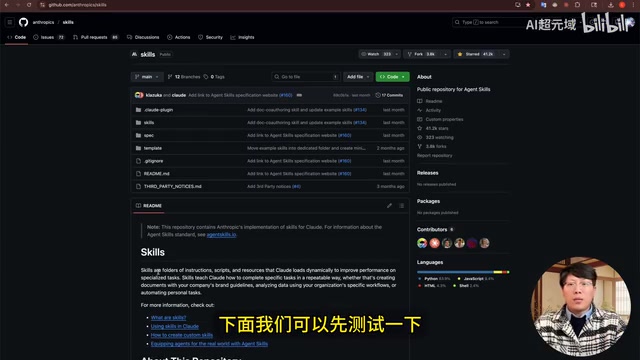
Agent Skills were originally developed by Anthropic and have since become an open-standard format for extending intelligent agent capabilities. They solve a core problem: while AI keeps getting smarter, it lacks your domain knowledge, workflows, and best practices. Skills package a company's, team's, or individual's workflows, best practices, and scripts into modular units that AI coding assistants can load on demand and reuse repeatedly.
In one sentence: Prompts are temporary instructions, while Agent Skills are long-term assets.
The Technical Essence of Agent Skills
Architecture and How It Works
Agent Skills are essentially AI-specific business manuals that use Markdown files to package knowledge, workflows, best practices, and scripts. AI coding assistants and other intelligent agents automatically discover and load specific Skills on demand, enabling capability reuse and standardization.
The origin of Agent Skills as an open standard is closely tied to the rise of the MCP (Model Context Protocol). After Anthropic launched MCP in 2024, the AI community began realizing that prompt engineering alone couldn't solve the reusability problem of AI capabilities. The Skills format essentially adds a semantic knowledge encapsulation layer on top of MCP's tool-calling capabilities — it doesn't just tell the AI "what it can do," but also "how to do it according to a specific team's standards." This aligns with the software engineering principle of "Configuration as Code": making implicit team knowledge explicit, version-controlled, and shareable.
The key feature is progressive loading — the AI doesn't read all Skills content at once but loads relevant portions on demand based on the current task, avoiding context explosion. Behind this design decision lies the core technical bottleneck of current large language models: context window limitations. Even the most advanced models today have context windows in the hundreds of thousands to millions of tokens. Stuffing too much Skills content into the context not only consumes significant inference costs but also causes the "Lost in the Middle" phenomenon — where the model's attention to the middle portions of the context drops significantly, affecting output quality. Progressive loading uses vector retrieval or semantic matching techniques to inject corresponding Skills into the context only when task-relevant — this is essentially the engineering implementation of RAG (Retrieval-Augmented Generation) technology in Agent scenarios.
What This Means for Non-Professional Developers
Anti-Gravity's support for Agent Skills benefits non-professional developers the most. Even if you have zero programming knowledge and can't write code, you can install ready-made Skills to build a truly business-savvy, personalized AI coding assistant.
Hands-On: Installing and Using Agent Skills in Anti-Gravity
Installing Official Skills
First, make sure Anti-Gravity is updated to the latest version. Anthropic has released several official Agent Skills, including frontend design Skills and presentation creation Skills. Installation steps:
- Use
git cloneto clone the official Skills project locally - Following Anti-Gravity's official documentation, place the Skills in the designated path
Anti-Gravity supports two Skills storage locations:
- Project path: Available only in the current project
- Global path: Accessible across all projects
If you're not comfortable running commands, you can simply copy and paste the Skills folder into Anti-Gravity's global Skills path.
Testing the Frontend Design Skills
Using Anthropic's frontend design Skills to create a coffee shop landing page, selecting the Gemini 3 Pro model (which is particularly well-suited for frontend UI/UX design).
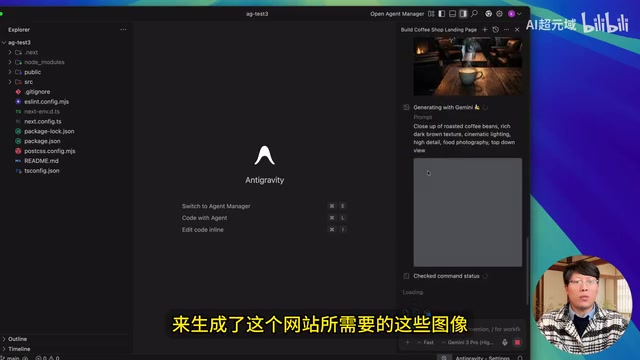
Impressively, Anti-Gravity automatically called the Nano Banana model to generate images needed for the website — including coffee shop interior shots and coffee bean images. This is a capability that other AI coding assistants lack. Neither Codex nor Claude Code will automatically generate images, but Anti-Gravity can automatically produce perfectly matched image assets for frontend UI.
The final coffee shop landing page was built with Next.js + Tailwind CSS, featuring beautiful design and excellent imagery.
Manually Creating Custom Agent Skills
Basic Creation Process
Anti-Gravity's official documentation provides steps for manually creating Skills, along with a minimal Skills example for code review.
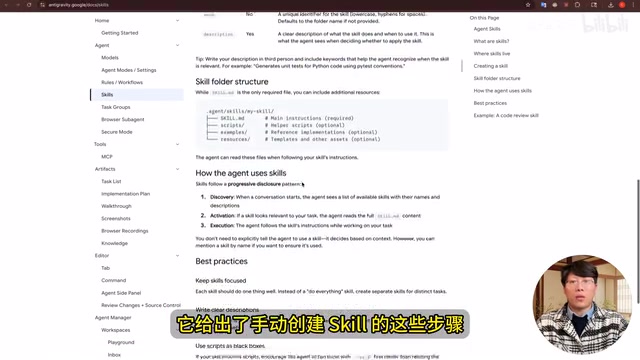
Creating Skills in your current project is straightforward:
- Create a directory for Agent Skills following the official file path
- Create a new
skill.mdfile in the directory - Paste the Skills content into the file and save
When testing, enter the prompt "Use CodeReview to review the current project's code." The system will automatically read the skill.md file, analyze the project code, and output review results with performance optimization suggestions.
Advanced: One-Click Skills Generation with Skill Seeker
For creating more complex Skills, you can use the open-source project Skill Seeker, which can convert any open-source project or website into Agent Skills with a single click. This is extremely useful for teams that need to quickly transform internal documentation, API references, or third-party libraries into reusable skills.
The "docs-to-Skills" automation approach that Skill Seeker represents is essentially a combination of Knowledge Engineering and LLM capabilities. Traditional knowledge engineering requires domain experts to manually construct ontologies and rule bases — a time-consuming and labor-intensive process. Skill Seeker leverages LLMs' text comprehension abilities to automatically extract structured operational procedures and best practices from READMEs, API documentation, and code comments, generating Markdown files that conform to the Agent Skills format. This direction is similar to the GraphRAG approach proposed by Microsoft Research — transforming unstructured documents into structured knowledge assets that AI can directly invoke, significantly lowering the barrier for enterprise knowledge accumulation.
UI/UX Pro Max: The Ultimate Interface Design Agent Skills
Installation and Configuration
UI/UX Pro Max is a powerful UI/UX design Agent Skills that supports multiple tech stacks:
- Default HTML + Tailwind
- React / Next.js
- Swift / React Native / Flutter
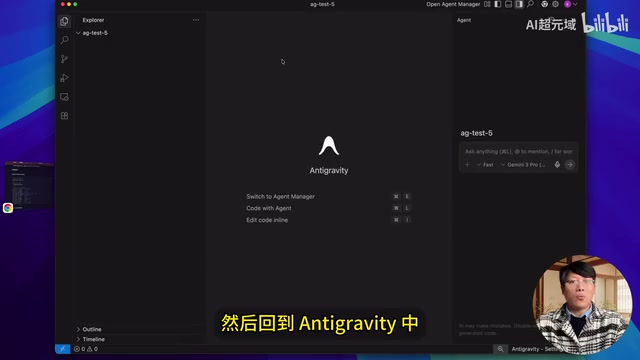
Installation steps:
- Install the project using the NPM command
- Run the Anti-Gravity-specific installation command
- Use the slash command in Anti-Gravity to invoke it
Practical Results
Using React to build a skeuomorphic-style To-Do List with requirements including add task, complete task, and delete task functionality, featuring soft shadows and subtle depth effects.
Skeuomorphism as a design style had fallen out of favor after iOS 7's flat design revolution in 2013, but has made a comeback in recent years with the rise of Neumorphism and Glassmorphism. At the CSS implementation level, skeuomorphic effects heavily rely on multi-layered box-shadow stacking, filter: blur() frosted glass effects, and precise gradient control. Tuning these parameters requires significant experience for human designers. Without professional UI/UX Skills, AI tends to generate interfaces that are functionally correct but visually mediocre — precisely because it lacks this kind of "soft knowledge." The value of UI/UX Pro Max Skills lies in encoding top designers' parameter intuition into reusable rule sets.
Paired with the Gemini Pro model, UI/UX Pro Max provides AI with professional UI/UX design experience and best practices. The final skeuomorphic interface delivers excellent results — soft shadows, refined button interactions, professional visual hierarchy — perfectly solving the "functional but unattractive" problem.
Related articles
 Tutorials
ChatGPT Plus Subscription Guide: Are GPT-5.5, image-2, and Codex Worth the Upgrade?
A detailed look at ChatGPT Plus features — GPT-5.5, image-2, and Codex — with a Plus vs Pro comparison and a complete step-by-step subscription guide for users outside the US.
 Tutorials
Harness AI Engineering in Practice: Using Claude Code to Master Enterprise-Level E-Commerce Development
Deep dive into Harness AI Engineering: master enterprise e-commerce development with Claude Code using the Rules, Skills, Wiki, and Changes framework.
 Tutorials
Cursor + Codex Dual-IDE Collaboration: A Practical Methodology for Open-Source Project Customization
A complete methodology for open-source project customization based on real-world experience, detailing the Cursor+Codex dual-IDE workflow, seven-stage process, MVP validation, and AI source code reading techniques.