Google Gemini 3.6 Flash Hands-On: Leading in Speed and Cost, But With Notable Coding Weaknesses

Gemini 3.6 Flash is fast and cheap but falls short of 3.5 Flash in front-end coding tasks.
Google launched three Flash models at once. Hands-on testing shows Gemini 3.6 Flash generates code extremely fast at lower cost, but surprisingly underperforms the older 3.5 Flash in front-end coding—producing black-screen failures. It's best for high-throughput batch tasks rather than complex development.
Google Releases Three Flash Models at Once
Recently, Google rolled out three Flash-series models in one go: Gemini 3.6 Flash, Gemini 3.5 Flash Lite, and Gemini 3.5 Flash Cyber, which targets the cybersecurity domain. From an overall positioning standpoint, the core selling point of this release isn't a leap in capability, but rather extreme token savings and improved response speed—which happens to align precisely with Google's current strategic focus: faster and cheaper.
Each of the three models has its own specialty, forming a clear product matrix:
- Gemini 3.5 Flash Lite: Focused on balancing cost-effectiveness and speed, it targets ultra-fast, high-throughput tasks such as large-scale product data scraping, bulk invoice translation, and high-concurrency Agent design tasks.
- Gemini 3.5 Flash Cyber: Designed specifically for cybersecurity scenarios, it can automatically detect vulnerabilities in projects and assist with remediation—a classic vertical-domain customized model.
- Gemini 3.6 Flash: The flagship Flash model of this release, emphasizing speed and cost advantages.

In terms of pricing, 3.6 Flash's output tokens cost $7.5 per million and input costs $1.5 per million. Compared to 3.5 Flash, the input price remains unchanged, while the output price has dropped further. Google clearly hopes to attract large-scale, high-concurrency application scenarios with lower costs and faster response times, rather than pushing the limits of single-point capability.
How to Use These New Models for Free
For ordinary users, the barrier to trying out these models is very low, with two free paths currently available.
Path One: Try It via Google AI Studio
The first method is through AI Studio. Open the AI Studio website, log in with your Google account, then enter the model selection interface. Within the Gemini series, you'll find the newly released 3.6 Flash, 3.5 Flash Lite, and other models—all available for free.
AI Studio also supports customizing the Thinking Level, allowing users to adjust the model's reasoning depth based on task complexity. This makes it ideal for side-by-side comparison testing.
Path Two: Try It via the Gemini Web Interface
The second method is to directly visit the Gemini web interface (gemini.google.com). After selecting 3.6 Flash, you can enter a prompt to get results. In hands-on testing, the results from the web interface and AI Studio are essentially identical, as they call the same underlying model. Users can freely choose their entry point based on their preferences.
Hands-On Test: 3.6 Flash's Coding Ability Is Surprising
To test Gemini 3.6 Flash's real capabilities, the test used a fairly typical front-end coding task—"Help me develop a 3D tank battle game"—with the Thinking Level set to High.
The result was unexpected. 3.6 Flash finished writing the code in just 42 seconds—an impressive speed indeed. But when clicking preview, the screen was completely black, and the game wouldn't run.
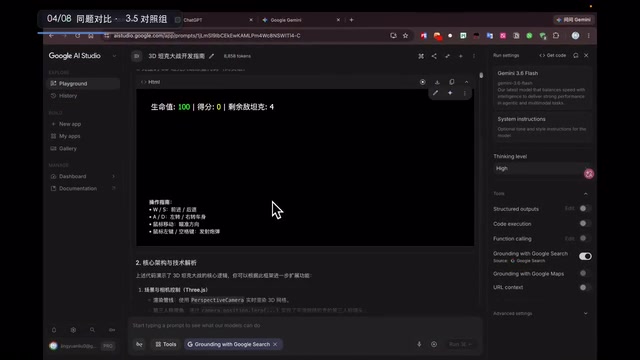
After reporting the black screen issue and requesting a fix, the model quickly provided a new version—but the preview was still a black screen. Here's a telling detail: the model even blamed the problem on "possibly a network issue," but subsequent reproduction tests showed this had nothing to do with the network.
Side-by-Side Comparison with Gemini 3.5 Flash
To rule out platform or coincidental factors, the tester used the exact same prompt to have 3.5 Flash perform the same task.

The comparison results were stark:
- Gemini 3.5 Flash: Generation speed was noticeably slower than 3.6 Flash, but it got it right on the first try. The generated 3D tank battle game ran normally, with full 3D effects and playability, and interactive functions like restart worked correctly.
- Gemini 3.6 Flash: Fast and cheap, but multiple consecutive attempts failed to produce a runnable result, always stuck on a black screen.
This comparison reveals a counterintuitive phenomenon: although 3.6 Flash is newer, has lower output costs, and responds faster, its actual performance on front-end coding tasks was actually weaker than the previous-generation 3.5 Flash.
Web Interface Reproduction: The Problem Isn't From the Platform
To further rule out the influence of the AI Studio platform itself, the tester executed the same task using 3.6 Flash on the Gemini web interface, and saved the generated result as an HTML file to open locally.

The result was identical to AI Studio—again a pure black screen, with the game failing to run. This confirms that the black screen was not caused by a platform bug or network fluctuation, but rather is a capability shortcoming of the Gemini 3.6 Flash model itself in front-end game development tasks.
Conclusion: Suited for Tool-Type Scenarios; Choose Another Model for Complex Tasks
Based on this hands-on test, the following conclusions can be drawn:
First, 3.6 Flash's speed and cost advantages are real. Completing code generation in 42 seconds far outpaces 3.5 Flash, and output costs are further reduced—closely aligning with Google's "faster, cheaper" product positioning.
Second, 3.6 Flash has clear shortcomings in complex front-end coding tasks. For a not-particularly-complex 3D game development task, 3.6 Flash failed after multiple attempts, whereas the previous-generation 3.5 Flash nailed it on the first try. Newer models aren't necessarily superior to older ones across every dimension—a point developers should note.
Third, model selection should be grounded in actual use cases. For simple tasks, high-concurrency, and large-batch processing scenarios, 3.6 Flash or 3.5 Flash Lite offer better value thanks to their speed and cost advantages. For high-quality coding tasks that need to be right on the first try, 3.5 Flash remains the more reliable choice. For cybersecurity scenarios, the specially optimized 3.5 Flash Cyber should be the priority.
For developers and ordinary users alike, the good news is that all these models can be tried for free via Google AI Studio or the Gemini web interface. Before deploying them into production, it's advisable to run several rounds of comparison tests based on your actual tasks, and let real data—rather than marketing rhetoric—determine your final model choice.
Related articles

Poison-Resistant Concept Anchoring: A New Approach to Defending Against AI Data Poisoning
Deep dive into Poison-Resistant Concept Anchoring, defending against data poisoning via signed anchors and bounded updates. Experiments show 62% poison isolation with 0% false rejection rate.

Hungarian Algorithm Explained: Principles, Complexity, and Engineering Implementation Guide
In-depth explanation of the Hungarian Algorithm: core principles, O(N³) time complexity advantages, and engineering implementation. Covers assignment problem definition, step-by-step algorithm walkthrough, Python/C++ libraries, and applications in multi-object tracking and resource scheduling.
OpenAI's First Enterprise AI Report: H…
OpenAI's First Enterprise AI Report: How ChatGPT Is Changing the Way Organizations Work
OpenAI's first enterprise AI report reveals three key traits of ChatGPT Enterprise adoption: the shift from novelty to necessity, writing and coding as top use cases, and data governance as a core prerequisite.