Google Jules 1.5 Upgrade: Free Task Quota Increased 12x, Development Experience Completely Revamped

Google's async AI coding assistant Jules 1.5 gets a major upgrade with 12x more free daily tasks.
Google's asynchronous AI coding assistant Jules is now officially open to all developers with a major 1.5 version upgrade. Key improvements include underlying performance optimizations to eliminate lag, new code copy/download buttons, task window context preservation, resizable panels, and most importantly, daily free tasks increased from 5 to 60. While it still lacks a web app preview feature, Jules is rapidly catching up to competitors like OpenAI Codex.
What is Jules? Google's Asynchronous AI Coding Assistant
If you're not yet familiar with Jules, here's a quick overview: Jules is Google's asynchronous AI coding assistant, essentially Google's direct response to OpenAI Codex. It helps developers handle everyday development tasks like fixing bugs, processing requirements, and generating code snippets, with support for one-click export of changes to GitHub repositories.
The term "asynchronous" AI coding assistant refers to a new paradigm that differs from traditional real-time code completion tools (like GitHub Copilot's inline suggestions). Traditional AI coding tools use a synchronous model—as developers type code, AI provides real-time suggestions, and developers must wait and immediately decide whether to accept them. In the asynchronous model, developers submit a complete task description to the AI, which independently handles code writing, modifications, and even testing in the background, while developers can work on other things in the meantime. This approach is more akin to assigning tasks to a junior developer, making it suitable for relatively independent, clearly defined development tasks. OpenAI's Codex, Anthropic's Claude Code, and Google's Jules all belong to this category of products.
Previously, Jules was in a limited invitation phase, accessible only to users who joined the waitlist. Now, Jules is officially open to all developers and comes with a series of exciting upgrades. This update covers performance optimization, interaction improvements, and a massive increase in usage quota—let's break them down one by one.
Jules 1.5 Major Performance Boost: No More Lag, More Responsive
In this upgrade, Google made several key optimizations to Jules' underlying architecture. The most noticeable improvement: faster startup, smoother code generation, and noticeably more responsive overall performance.
Previously, users frequently encountered lag and unresponsive behavior when using Jules, seriously disrupting their development rhythm. After this round of optimization, the entire experience has become much smoother. For development scenarios that require frequent AI interaction, response speed improvements directly determine the upper limit of productivity. Each task execution by an asynchronous AI coding assistant involves large language model inference computation, code sandbox environment startup and execution, and communication with external services like GitHub—delays in any of these steps accumulate into user-perceivable lag. Google's optimization likely covers multiple layers including model inference acceleration, sandbox environment warm-up mechanism improvements, and network communication pipeline streamlining.
Although Google hasn't published specific performance metrics, based on actual user feedback, the effects of this underlying optimization are quite significant.
Interaction Experience Upgrades: Four Practical Improvements Explained
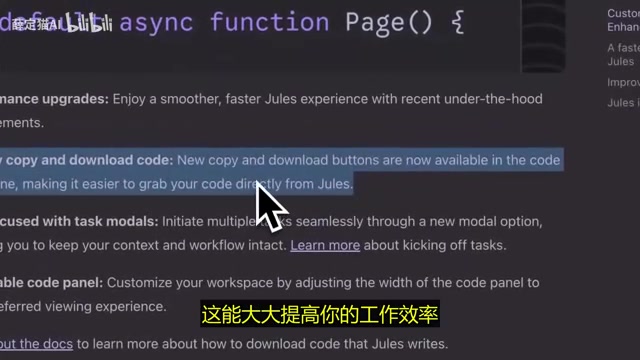
New Copy and Download Buttons in the Code Panel
Jules has added two seemingly simple but extremely practical buttons to the code panel: Copy and Download.
Previously, getting code generated by Jules required manual selection and copying—a tedious process prone to errors. Now you can simply click the copy button to grab the code, or even download it directly as a file. This means you can quickly insert code snippets into your local project, verify them, and then commit, significantly improving workflow efficiency.
Task Window Supports Context Preservation
This is an improvement developers have long been waiting for. Previously, when starting a new task in Jules, there was virtually no way to reference context from the previous task—you had to describe requirements from scratch every time, which was quite cumbersome.
Now Google has added the ability to create new tasks directly within the same window, supporting context preservation and starting new tasks while maintaining workflow continuity. The system automatically generates a new execution plan based on previous content, eliminating the hassle of switching back and forth between multiple sessions.
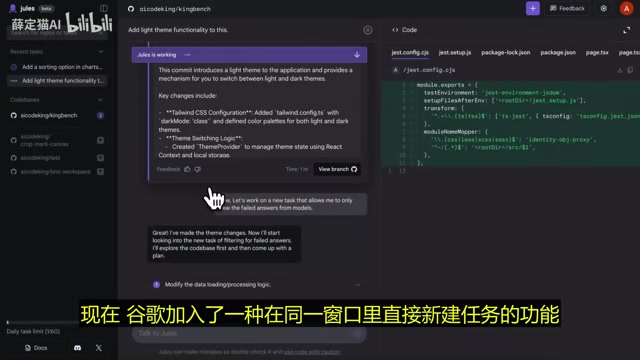
This improvement is particularly crucial for multi-task parallel development scenarios. For example, after having Jules add a light theme, you can immediately ask it to add a filter feature in the same conversation—the entire process flows seamlessly. The technical implementation of context preservation typically relies on compression and summarization of conversation history—the system distills key information from previous tasks (such as code structure, completed modifications, project configuration, etc.) into concise context summaries for subsequent tasks to reference, rather than simply passing the entire conversation history to the model. This maintains coherence without compromising inference quality due to excessive context length.
Resizable Code Panel
Google has also introduced a freely resizable code panel. While this feature may seem minor, it's incredibly practical in actual use.
The operation is intuitive: simply drag the panel border, and the code panel width changes instantly. When you need to read large amounts of code, you can expand the panel; if you're just quickly browsing or need to multitask, keep the panel small. A simple interaction design that significantly improves coding comfort.
The Biggest Highlight: Daily Free Tasks Surged from 5 to 60
This is undoubtedly the most significant change in this update.
Previously, free Jules users could only complete 5 tasks per day—a limit that was extremely restrictive for normal development work. Now, the daily task cap has been raised to 60, a 12x increase from before.
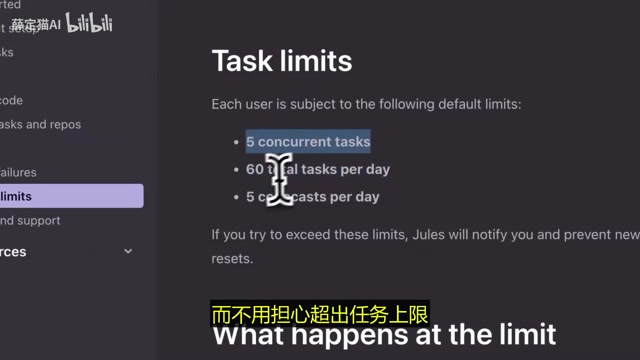
The business logic behind this increase is worth noting. Each AI agent task execution consumes substantial computing resources—including LLM inference compute, code sandbox environment operating costs, and API call fees for third-party services like GitHub. Google raising the daily free tasks from 5 to 60 means they're willing to absorb 12x the operational costs in exchange for user growth. This strategy isn't uncommon in the tech industry, similar to how cloud computing providers offered generous free tiers early on to cultivate user habits. Once developers deeply integrate Jules into their daily workflow, migration costs create natural user stickiness.
What does this increase mean?
- Individual developers can more freely use Jules for daily coding tasks without carefully rationing their daily quota
- Development teams can smoothly integrate Jules into their workflow without worrying about frequently hitting limits
- Multi-task parallelism becomes reality—you can simultaneously launch sorting tasks, theme switching tasks, filtering feature tasks, etc., and Jules efficiently handles these parallel requests
All tasks are tracked in an organized manner in the sidebar, where you can check progress at any time and review detailed code diffs when tasks complete, examining the specific changes made by each task. Code Diff is a core concept in software development, referring to comparing two versions of code files and displaying additions, deletions, and modifications with line-by-line annotations. This mechanism originates from the diff command in Unix systems and later became a foundational feature of version control systems like Git. In the context of AI coding assistants, Code Diff is particularly important—it allows developers to precisely review every change made by the AI rather than blindly accepting entire blocks of generated code, which is crucial for code quality control and security auditing.
Room for Improvement: Missing Web App Preview Feature
Despite the many highlights in this upgrade, Jules currently still lacks a key feature—web app preview mode.
Currently, if you want to see the actual results of code generated by Jules, you need to push changes to GitHub first, then clone the repository locally to see the live effect. This workflow is quite cumbersome for frontend development.
In comparison, some competitors (such as Replit Agent) already offer online preview capabilities. Hopefully Google will address this shortcoming in subsequent versions, allowing developers to preview web application results directly within the Jules interface. Implementing this feature technically requires running a complete web server environment in the cloud, compiling and rendering user frontend code in real-time, and presenting it to users via iframe or a separate window. This involves a series of engineering challenges including sandbox security isolation, port mapping, and hot reloading—but for Google with its powerful cloud infrastructure, technical implementation isn't the core obstacle. It's more likely a matter of product prioritization.
Summary: Jules is Becoming a More Mature AI Coding Assistant
This Jules 1.5 upgrade didn't introduce groundbreaking new features, but every improvement precisely addresses developers' actual pain points:
- Performance optimization solves lag issues, making interactions smoother
- Copy/download buttons simplify the code retrieval workflow
- Context preservation makes multi-task workflows possible
- 60 tasks/day quota makes it genuinely usable for free users
From a product strategy perspective, Google is rapidly expanding Jules' user base through dramatically increased free quotas, forming direct competition with OpenAI Codex. The current AI coding assistant landscape has formed a multi-layered competitive structure: at the real-time completion layer, GitHub Copilot dominates with its first-mover advantage, while IDE products like Cursor and Windsurf are rising rapidly; at the asynchronous agent layer, OpenAI Codex, Google Jules, and Anthropic's Claude Code form a three-way standoff; meanwhile, products like Replit Agent and Bolt.new focus on building complete applications from scratch, targeting a broader non-professional developer audience. Each company's competitive strategy has different emphases: OpenAI leverages the GPT model ecosystem, Google draws on Gemini models and cloud infrastructure, while Anthropic excels in depth of code understanding. For developers, the more intense the competition in the AI coding assistant space, the more end users ultimately benefit.
If you haven't tried Jules yet, now is a great time to get started.
Related articles
 Tech Frontiers
A Rare Quiet Day in AI: Recursive Self-Improvement Stirs Beneath the Surface
A rare quiet day in AI sees multiple sources go silent simultaneously. Behind the calm, Recursive Self-Improvement (RSI) research continues. What this means for the industry.
 Tech Frontiers
Reve 2 vs. Ideogram 4: A Deep Dive into Layout Control in AI Image Generation
A deep comparison of Reve 2 and Ideogram 4's layout control capabilities, covering technical approaches, real-world use cases, and industry trends for designers and creators.
 Tech Frontiers
In the Weights: Check Your Influence Score in the AI World
In the Weights is an AI influence search engine that quantifies your presence in the AI world with a score. Explore how it evaluates practitioners and what it means for digital identity.