Google Jules Official Launch: A Complete Guide to the Free AI Coding Agent

Google officially launches Jules, a free AI coding agent that autonomously completes coding tasks in the background.
Google has officially launched Jules, an AI coding agent that goes beyond traditional code completion tools by autonomously fixing bugs, writing tests, and building features in the background, then creating GitHub Pull Requests automatically. The production release offers a free tier with 15 tasks per day, plus new CLI tools, an open API, and GitHub Issue label triggering. Jules is best for small, well-scoped tasks — it's not suited for major architectural changes, and human code review remains essential.
Google has officially launched the production version of Jules, its AI coding agent. Unlike ordinary code completion tools, Jules can automatically fix bugs, write tests, and build complete feature modules in the background — and the basic tier is completely free. For developers and technical founders, this may be one of the most noteworthy AI coding tool releases of 2025.
What Is Google Jules: An AI Coding Agent That Goes Beyond Chatbots
Jules is fundamentally different from traditional AI coding assistants. It's not a chatbot where you ask a question and get an answer — it's an autonomous agent capable of genuinely completing coding tasks on its own.
AI Agents represent one of the most significant paradigm shifts in artificial intelligence today. Traditional AI assistants follow a "request-response" model: the user asks, the AI answers, and the interaction ends there. AI Agents, by contrast, have the ability to plan autonomously, call external tools, and execute multi-step workflows — they can break down a complex goal into subtasks, invoke different tools to complete each step, and dynamically adjust strategy based on intermediate results. This capability is built on the combination of large language model reasoning and external toolchains. 2025 has been widely dubbed the "Year of AI Agents" by the industry, with Google, OpenAI, Anthropic, and others all actively building Agent products. Jules is Google's flagship Agent product in the coding domain.
In practice, Jules clones your entire codebase to a secure Google Cloud server, analyzes the code structure, determines what needs to be done, and automatically implements the changes. The workflow looks like this:
- You assign Jules a task (e.g., fix a bug, add a new feature, update dependencies)
- Jules reads the code and formulates an execution plan
- It automatically writes and modifies code
- It shows you all operations and a complete diff
- It creates a Pull Request on GitHub
- You review and merge
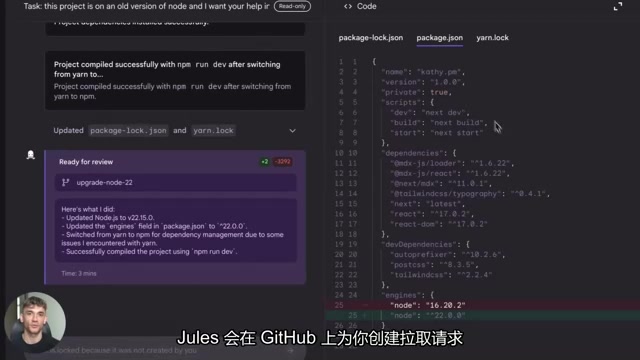
A Pull Request (PR) is a core collaboration mechanism in modern software development, built on top of the Git version control system. After a developer completes code changes on a separate branch, they submit a PR to request merging into the main branch. The PR displays a diff of all code changes, allowing team members to review line by line, add comments, and suggest revisions. Code is only merged after passing review. Jules's ability to automatically create PRs means all of its work goes through the standard code review process rather than directly modifying production code — an important safety guarantee.
Critically, all of this happens asynchronously in the background. After you assign a task, you can go work on something else, and when you come back, Jules will have the code changes ready. Jules supports all major programming languages, including Node.js, Python, Rust, and more — it can handle any tech stack.
Five Major Feature Updates in the Jules Production Release
Google recently moved Jules out of beta and into general availability as a production product, bringing several noteworthy feature updates.
Free Tier Now Available
The free tier allows 15 tasks per day with up to 3 tasks running simultaneously. This is more than enough for developers working on side projects or small applications. If you need more capacity, Pro and Ultra tiers are also available.
Command Line Interface (CLI) Support
This is a highly practical update. Developers can now invoke Jules directly from the terminal without opening a browser or navigating a web interface — just type a command and Jules gets to work immediately.
The command line interface is one of the most central working environments for professional developers. Compared to graphical interfaces, the CLI lets developers execute operations quickly via text commands and easily combine them with shell scripts and automation toolchains. Many high-efficiency developers do almost all of their daily work in the terminal — from code editing (Vim/Neovim) to version control (Git) to deployment and operations. Jules's CLI support means developers don't need to switch to a browser; they can assign tasks directly from the terminal, seamlessly integrating with existing workflows and significantly reducing the efficiency cost of context switching.
API Now Open
If you're building your own development tools or automated workflows, you can now integrate Jules's API directly. This opens up more possibilities for automation pipelines and lays the groundwork for deeper future integration with CI/CD pipelines and project management software.
CI/CD stands for Continuous Integration and Continuous Deployment/Delivery — foundational practices in modern software engineering. CI means developers frequently merge code into a shared branch, with each merge automatically triggering builds and tests to ensure new code doesn't break existing functionality. CD automatically deploys code that passes tests to staging or production environments. Common CI/CD tools include GitHub Actions, Jenkins, and GitLab CI. Jules's open API means it can be embedded into these automated pipelines — for example, when CI detects a test failure, it can automatically trigger Jules to analyze and fix the problem, creating a fully automated loop from bug detection to code fix.
Deep GitHub Integration
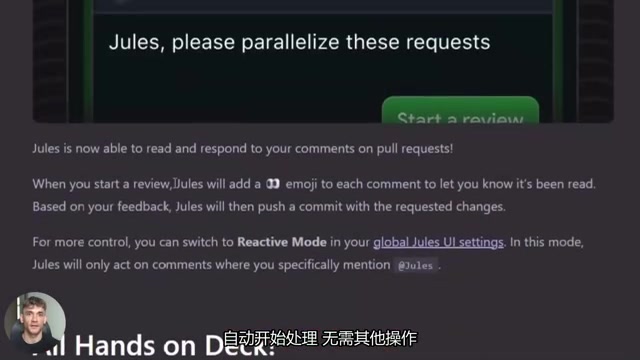
This feature is simple yet extremely powerful — you can add a Jules label to any GitHub Issue, and Jules will automatically take over and start working on it, with no other action required. For team collaboration, task assignment and workflow management become remarkably straightforward.
Upgraded Base Runtime Environment
This includes a new version of Node.js, a new version of Python, and improved runtime isolation. Runtime isolation is one of the core technologies in cloud computing security — when Jules processes user code on Google Cloud, each task runs in an isolated virtual machine or container, completely separated from other users' tasks. This isolation ensures that one user's code cannot be accessed by another, and prevents malicious code from attacking the host system. After this upgrade, all operations are faster and more stable; the occasional slowdowns Jules experienced when handling complex tasks have been significantly reduced, and code comprehension and context analysis are more accurate.
Which Development Scenarios Jules Excels At
Based on real-world usage, Jules performs particularly well in the following types of tasks:
- Repetitive coding tasks: Upgrading dependency versions, writing unit tests, fixing known minor bugs
- Tedious multi-file changes: Cross-file modifications that aren't logically complex but are time-consuming, such as batch renaming or interface adjustments
- Parallel workload sharing: If you have 5 bugs to fix, let Jules handle 3 while you work on the other 2 simultaneously
A typical team workflow looks like this: team members submit Issues and mark them with the Jules label, Jules automatically handles them and creates Pull Requests, and someone on the team reviews and merges. The entire process is streamlined, efficient, and highly automated.
Limitations You Must Understand Before Using Jules
Despite Jules's capabilities, it's not a universal tool. Here are some important limitations to keep in mind:
Not suitable for large-scale architectural changes. If you need to redesign your entire application architecture or make major technical decisions, Jules isn't up to the task. It excels at small, well-scoped coding tasks. This is a shared limitation of all current AI coding agents — large language models perform excellently on localized, specific code tasks, but for architecture-level decisions that require holistic systems thinking and weighing the trade-offs of multiple technical approaches, they still cannot replace experienced engineers.
Free tier quota is limited. 15 tasks per day can run out quickly during intensive development; full-time developers may need to consider upgrading to the Pro tier.
Human review is essential. Jules can misinterpret instructions, and the code it writes may work technically but not be the optimal solution. Always review the code diff before merging, and always test every change.
Community feedback indicates that Jules performs inconsistently when handling overly vague or complex tasks, which can lead to task failures or unexpected outputs. The key principle is: keep tasks small and specific, give Jules clear instructions, and don't ask it to handle too much at once.
How Jules Protects Your Code Security
Many developers will wonder: is it safe to hand your code over to Google?
According to Google's public statements:
- Jules does not use your private code to train models
- Your code is private by default and cannot be accessed by other users
- All code runs in an isolated cloud environment
- Code executes in secure virtual machines and does not remain on local machines
Google Cloud itself has industry-leading security infrastructure, including data-in-transit encryption (TLS), data-at-rest encryption, and fine-grained Identity and Access Management (IAM), among other multi-layered protections. This security framework is shared with Google Search, Gmail, and other products serving billions of users, and has been validated through years of large-scale security testing.
For most developers, this privacy protection framework is reliable. However, if you're working with highly sensitive or classified code, it's still advisable to carefully evaluate the relevant permission settings before deciding whether to use it.
Jules's Future Direction: From Coding to Full-Process Automation
Looking at Jules's product roadmap, the level of automation will continue to increase. Foreseeable development directions include:
- End-to-end coverage: Not just writing code, but also automatically testing, deploying, and monitoring in production
- Deep tool integration: Connecting with project management software like Jira and seamlessly integrating into CI/CD pipelines
- Code review automation: Automatically reviewing Pull Request code quality and security
Competition in AI coding tools is intensifying. GitHub Copilot, built jointly by Microsoft and OpenAI, holds a first-mover advantage through deep integration with VS Code and GitHub, and currently has the largest user base. Cursor is an AI-native code editor that has won over a large number of independent developers with its excellent code comprehension and context-awareness. There's also Anthropic's Claude Code, Amazon's CodeWhisperer, and others. Jules's differentiated positioning is as an "asynchronous autonomous agent" — rather than assisting you in real time while you code, it independently takes over entire tasks and completes them in the background. This model is better suited for task delegation and team collaboration scenarios, making it complementary to rather than a complete replacement for other tools.
But Jules has Google behind it, with ample resources, robust cloud infrastructure, and a world-class engineering team, positioning it to hold an important place in the AI coding agent space for the long term.
Four Practical Tips for Using Jules Effectively
If you're planning to start using Jules, here are some tips to help you get up to speed quickly and avoid common pitfalls:
- Start with small tasks: Give Jules simple tasks first, observe how it works and its coding style, then gradually increase complexity as you get familiar with the workflow
- Make the most of GitHub label integration: Once your workflow is configured, team members just need to label an Issue to automatically trigger Jules
- Keep task descriptions clear and specific: Avoid vague descriptions — give clear instructions and expected outcomes. For example, "Fix the form validation error on the login page" works much better than "Fix the login issue"
- Always do a code review: Don't blindly trust auto-generated code; carefully review the diff and run tests before merging
For developers, Jules's core value lies in automating large amounts of tedious, routine work — fixing bugs, updating versions, writing tests — freeing you to focus on more creative work like architecture design and product planning. For companies and startup teams, this means faster development velocity, quicker feature releases, and more efficient bug resolution. That's the real competitive advantage AI coding tools deliver.
Key Takeaways
- Google Jules is now officially available, with a free tier offering 15 tasks per day, plus CLI and API support
- Jules can autonomously complete code fixes, test writing, and feature building in the background, supporting all major programming languages
- New deep GitHub integration lets Jules automatically handle tasks triggered by Issue labels, greatly simplifying team workflows
- Jules is not suited for large architectural changes and performs inconsistently on vague or complex tasks; human code review remains essential
- Google commits to not using private code for model training, with all code running in isolated cloud environments for baseline security assurance
Related articles
 Tutorials
ChatGPT Plus Subscription Guide: Are GPT-5.5, image-2, and Codex Worth the Upgrade?
A detailed look at ChatGPT Plus features — GPT-5.5, image-2, and Codex — with a Plus vs Pro comparison and a complete step-by-step subscription guide for users outside the US.
 Tutorials
Harness AI Engineering in Practice: Using Claude Code to Master Enterprise-Level E-Commerce Development
Deep dive into Harness AI Engineering: master enterprise e-commerce development with Claude Code using the Rules, Skills, Wiki, and Changes framework.
 Tutorials
Cursor + Codex Dual-IDE Collaboration: A Practical Methodology for Open-Source Project Customization
A complete methodology for open-source project customization based on real-world experience, detailing the Cursor+Codex dual-IDE workflow, seven-stage process, MVP validation, and AI source code reading techniques.