GotEmail: A Native Mac Email Client with One-Click Verification Code Extraction + AI Assistant

GotEmail targets a niche market with native Mac email, one-click verification codes, on-demand AI, and a one-time purchase.
GotEmail is a native macOS email client debuting on Product Hunt with a unified inbox for Gmail, Outlook, iCloud, and any IMAP account. It skips Electron for a purely native approach, delivering lower resource usage and smoother system interactions. Its standout feature is one-click login verification code retrieval, compressing client-browser back-and-forth into a single click. AI handles drafting and summaries on demand, without forced bundling. A one-time purchase covers all Macs, contrasting with mainstream subscriptions. AI model, licensing scope, and sync stability remain undisclosed—try before buying.
The email client space may seem crowded, but truly native lightweight options built for Mac users are few and far between. GotEmail debuted on Product Hunt with the positioning of "native Mac mail + one-click login codes + AI," earning 79 upvotes and ranking 20th for the day. Its approach is straightforward: don't build an all-in-one platform—just serve the people who "live in their inbox."
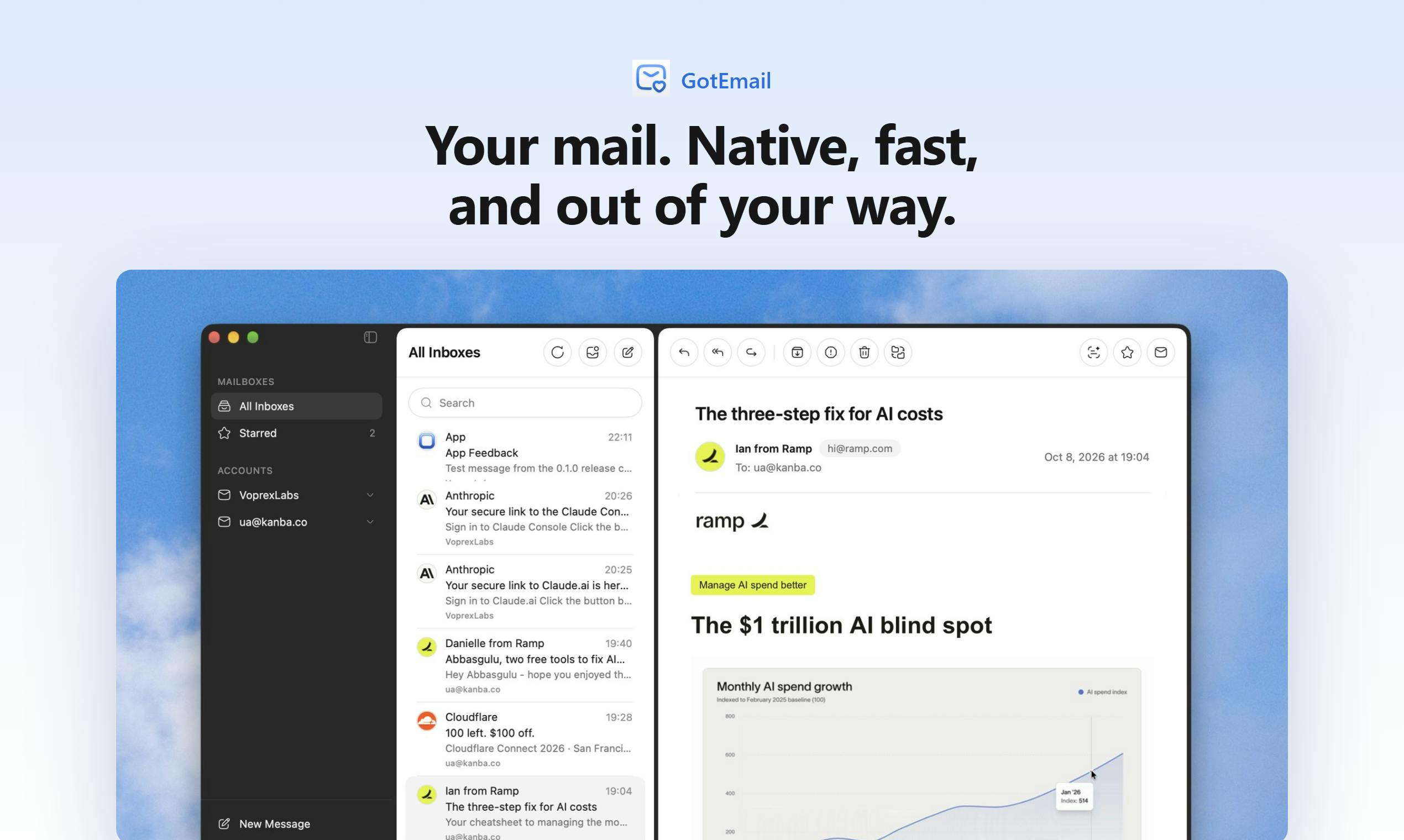
All Your Mailboxes in One Window
GotEmail supports Gmail, Outlook, iCloud, and any IMAP account, all consolidated into a single fast window. This combination covers the vast majority of personal and light office scenarios—Gmail and Outlook dominate enterprise email share, iCloud serves Apple ecosystem users, and IMAP catches self-hosted domains and niche providers.
There are plenty of "unified inbox" products out there. GotEmail's differentiation lies in being native. It doesn't take the Electron wrapper route but instead opts for native macOS development (the official messaging emphasizes "Native Mac mail"). This means lower resource usage, system-integrated gestures and shortcuts, and faster cold starts. For people who open and close email dozens of times a day, the cumulative benefit of these details far outweighs a few flashy features.
IMAP (Internet Message Access Protocol) is one of the standard protocols email clients use to read messages from a server. Unlike the older POP3, it retains copies on the server by default and supports multi-device synchronization of folder structures—which is precisely the foundation for "unified inbox" products. Nearly all mainstream email providers (including Gmail, Outlook, and iCloud) offer IMAP access, but the setup process typically requires manually entering server addresses, port numbers, and SSL encryption methods, which isn't friendly to non-technical users. GotEmail claims to support "any IMAP account," and the actual experience depends on how well it covers preset configurations for various providers and whether the OAuth authorization flow is smooth; self-hosted domain email is often the ultimate test of a client's compatibility.
Electron wrapper refers to packaging a web app with Chromium + Node.js to quickly ship cross-platform. Slack, Notion, and many early versions of email clients took this route. The trade-off is large installation packages, high memory usage, and sluggish scrolling and input response—especially noticeable on Mac. Native macOS development (Swift/AppKit or SwiftUI) can directly call system-level APIs, such as Quick Look shared with Apple Mail, the system Notification Center, and Handoff, and can better adapt to Apple Silicon's power efficiency scheduling. Native development costs more and only covers a single platform, but for a small team focused on Mac, this is precisely what creates a differentiation moat against cross-platform giants.
One-Click Login Verification Code Extraction: Hitting a Real Pain Point
The most noteworthy feature is "one-click login verification code retrieval."
Nearly every internet service now requires an email verification code, but the conventional flow is cumbersome: switch to the email client → find the latest email → open it → memorize the six-digit code or click the link → switch back to the browser and enter it. GotEmail compresses this chain into a single click, with the code or login link appearing right at hand, eliminating the back-and-forth between apps.
The technical sophistication here isn't high, but the product insight is spot-on. It doesn't solve the need to "read email"—it addresses the high-frequency auxiliary scenario of "email as an identity verification channel." Many email clients lump verification code emails together with regular emails, overlooking this high-frequency action that happens almost daily.
From a technical implementation standpoint, "one-click verification code extraction" typically relies on two mechanisms: first, content recognition, using regex or local models to extract 4–8 digit numbers, letter combinations, or magic links from email bodies; and second, system-level integration, leveraging macOS clipboard monitoring, notification action buttons, or global shortcuts so users can copy and paste back without actually opening the email. The built-in verification code autofill on iOS and macOS (inferred from SMS or email) has already validated the feasibility of this interaction. Third-party clients aiming for the same level of smoothness need to correctly prioritize verification code emails versus regular emails in the inbox.
The value of this feature is also constrained by one prerequisite: the client must receive new emails as quickly as possible. With IMAP's IDLE push mechanism, latency is typically in the seconds range; with polling, verification codes may arrive embarrassingly late. Therefore, the verification code shortcut experience is fundamentally tied to the backend sync architecture—and is one of the most important things to test before buying.
AI Drafting and Summarization: On-Demand, No Forced Bundling
GotEmail includes built-in AI capabilities covering two main areas: drafting emails (AI drafts) and summarizing long emails (summarizes). Unlike some products that cram AI buttons all over the interface, GotEmail's AI "only acts when you ask"—it's there when you need it and stays out of the way when you don't.
This restraint is commendable. AI summaries are genuinely helpful for handling long threads, English emails, and meeting invitations, but forcibly embedding them into every step makes the interface heavier and creates extra cognitive load. On-demand invocation better suits the "quiet, efficient" character of an email tool.
Of course, the company hasn't disclosed which AI model it uses, how good the summaries are, or whether it supports Chinese-language optimization—these require hands-on testing to verify.
Email AI features typically rely on the text generation and summarization capabilities of large language models (LLMs). Common industry approaches fall into three categories: calling cloud APIs from OpenAI, Anthropic, and others; calling self-hosted or open-source models; and using on-device models provided at the system level by Apple (such as Apple Intelligence's writing tools). These differ significantly in privacy, cost, and response speed—cloud APIs generally perform best but mean email content is sent to third-party servers, a major consideration for users handling sensitive business correspondence; on-device models offer the best privacy but often have limited summary quality and multilingual support. GotEmail hasn't disclosed which approach it uses, so users should proactively check its privacy policy regarding the processing and retention of email content when evaluating.
Pay Once, Use on Every Mac
Pricing is another distinctive label for GotEmail: "Pay once, use on every Mac."
In today's world of subscription overload, this choice is user-friendly. The signal it sends is that the developer treats GotEmail as a finished tool to sell, not a perpetual revenue stream. For tools like email clients that you're unlikely to switch away from once adopted, a "one-time purchase" actually lowers the decision cost of migrating.
One thing to note: whether "every Mac" distinguishes by number of Apple IDs, whether it supports Family Sharing, and whether major version updates are free after purchase—the product page doesn't specify. These details affect the actual long-term cost.
Worth Watching, But Also Worth Verifying
Overall, GotEmail doesn't try to be an "all-in-one email manager" but instead concentrates its resources on three things: native speed, verification code shortcuts, and restrained AI assistance. All three correspond to genuine high-frequency needs of Mac email users.
As a new product ranked 20th on Product Hunt with 79 upvotes, it currently has limited discussion buzz and fairly sparse public information. If you're a heavy email user tired of clunky cross-platform clients and ubiquitous subscriptions, GotEmail is worth adding to your shortlist—but we'd suggest first using a trial or basic account to verify email sync stability and AI output quality before deciding whether to buy.
One-line Summary
GotEmail targets a niche market with native Mac email, one-click verification codes, on-demand AI, and a one-time purchase.
Paragraph Summary
GotEmail is a native macOS email client that debuted on Product Hunt, featuring a "unified inbox" that supports Gmail, Outlook, iCloud, and any IMAP account in one place. Rather than using an Electron wrapper, it takes a purely native approach for lower resource usage and smoother system-level interactions. Its key differentiator is "one-click login verification code retrieval," compressing the back-and-forth between client and browser into a single click—tapping into the high-frequency but overlooked scenario of email as an identity verification channel. Its AI capabilities cover drafting and summarization but adhere to on-demand invocation without forced bundling. Pricing is a one-time purchase usable on all Macs, contrasting with mainstream subscriptions. The article also notes that key details such as the AI model, licensing scope, and multi-device sync stability haven't been disclosed, so trying before buying is recommended.
Related articles

AI Visibility Metrics: Definitions Matter More Than Dashboards
AI visibility measurement tools are proliferating, but the lack of unified definitions makes data incomparable. This article analyzes the mismatch and explores why repeatable methodology matters more than dashboards, and how a shared vocabulary can make AI search measurement truly credible.

Tev Cracks Long-Horizon Agent Training with Dense Progress Rewards
Tev-Gym and progress potential reward shaping (PPRS) provide verifiable intermediate states and dense reward signals for long-horizon agents. Tev-27B matches closed-source models on ALE-CM and Terminal-Bench. This article analyzes its latent-world-first design, checkpoint strategy, and deployment limits.

Liquid AI Releases LFM2.5-24B-A2B: A 2B Active-Parameter MoE Built for On-Device Agents
Liquid AI releases LFM2.5-24B-A2B, an open-weights MoE model with 24B total and 2B active parameters for on-device agents, scoring 48.09 on LiveClaw and hitting 184 tokens/s on Apple M5 Max.