GPT-Image 2.6 Dual Release: A Double Upgrade in Speed and Precision

OpenAI launches GPT-Image 2.6 with dual versions for speed and quality, plus markup editing, SVG, and GIF capabilities.
OpenAI has released GPT-Image 2.6, split into speed-focused Flare and detail-oriented Sunburst, letting developers quickly generate candidates then refine key assets. The API adds three capabilities: markup editing for circling or annotating areas to edit, SVG output for losslessly scalable editable vector assets, and GIF generation via sprite sheets for lightweight looping animations. The direction is to push image generation from one-shot output toward iterable, editable, integrable production workflows, though specific speed data and GIF limits remain undisclosed.
OpenAI has officially launched GPT-Image 2.6, featuring two new versions, Sunburst and Flare, along with a range of practical API features including markup editing, SVG, and GIF support. For developers who need to generate images in bulk but are frustrated by wait times, the most direct signal from this update is clear: speed is no longer an excuse for sacrificing detail, and fine-grained control now has a more intuitive entry point.
Dual-Version Strategy: Flare for Speed, Sunburst for Stability
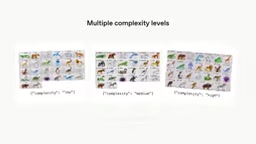
GPT-Image 2.6 is split into two clearly positioned branches. According to the official announcement, the Flare version prioritizes speed, generating images faster than previous models, making it suitable for time-sensitive, frequently iterating scenarios such as draft previews, batch generation, or real-time interaction. Sunburst, meanwhile, targets complex tasks that require "waiting longer to get the details right"—the official blog explicitly notes that when creating dense infographics or using complex prompts, Sunburst is worth the extra time for the sake of completeness.
This dual-version approach is nothing new, but applied to an image generation model, it means developers can flexibly switch based on workflow stage: first use Flare to quickly produce candidates, then use Sunburst to refine key assets. The official announcement didn't provide specific speed comparison data, but based on the phrasing "faster than previous models," Flare's speed boost is one of the core selling points of this update.
Markup Editing: Circle It Instead of Describing It Repeatedly
The new markup feature transforms image editing from "guessing what the model understands" to "point and edit." The specific workflow: upload an image with circled areas or annotations, then add a text description of the desired changes, and the model can parse the markup and execute specific, detailed local edits.
This solves a long-standing pain point—describing spatial locations in pure text is both tedious and error-prone. Drawing the area to be changed directly dramatically reduces communication overhead. For design scenarios requiring repeated fine-tuning, such as modifying parts of an icon, adjusting a character's pose, or replacing background elements, this interaction method is closer to how human designers collaborate. The official blog notes that when using markup, you can also create assets in different sizes and match brand colors, indicating that the editing workflow itself is moving toward branding needs.

Inpainting is a foundational capability of image generation models, referring to regenerating or modifying only designated areas while preserving most of the original image. Early implementations typically relied on masks—black-and-white images marking the pixel range to be repainted, with the model working only within the masked area. Pure text-driven local editing requires the model to infer spatial locations from descriptions, which can easily lead to "editing the wrong place." GPT-Image 2.6's markup feature essentially hands the mask generation process to the user—circling or annotating directly constitutes the spatial constraint, and the text description only needs to specify "what to change it to" rather than "where to change it." This lowers the barrier to mask creation and makes local editing precision more controllable.
SVG and GIF: From Static Images to Editable Assets
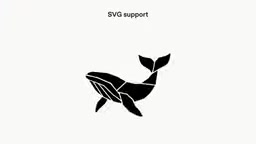
The API's new SVG and GIF support opens up two new workflows. SVG's value lies in its vector nature: illustrations can be scaled losslessly, and shapes and colors can be modified as needed. The official blog specifically notes it's suitable for icons and illustrations—scenarios that need to maintain consistent visual characteristics. In other words, the model no longer delivers just "an image" but a design asset that can be further processed.
GIF generation logic is even more interesting: describe a scene and a small movement, and the model first generates a sprite sheet to capture poses, then automatically extracts frames and assembles them into a looping GIF. This pipeline automates the relatively tedious frame-splitting and compositing steps in animation production. The official recommendation is to "describe a scene plus a small movement," suggesting that current GIF capabilities are better suited for lightweight dynamic effects rather than complex narrative animations.
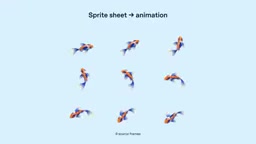
A sprite sheet is a technical format that arranges multiple consecutive animation frames on a single bitmap. Traditionally, animators draw each frame's pose, then assemble them in sequence into one large image, and playback switches display regions at fixed intervals to create motion. Sprite sheets are widely used in game development because they reduce texture-switching overhead and simplify frame sequence management. In GPT-Image 2.6's GIF pipeline, the model first generates a sprite sheet containing several key poses, then post-processing logic automatically crops out individual frames and composites them into a looping GIF. This "capture poses first, then assemble frames" approach hands the most labor-intensive steps of frame splitting and alignment to the model, but it also means animation smoothness is limited by the density and consistency of pose sampling in the sprite sheet.
What This Means for Developers
GPT-Image 2.6's two product lines plus three new capabilities all point in the same direction: pushing image generation from "one-shot output" toward an "iterable, editable, integrable" production stage. Flare reduces trial-and-error costs, Sunburst guarantees the quality ceiling, markup provides precise control, and SVG/GIF expand output formats—this combination brings API calls closer to a complete design toolchain.
Of course, the information officially disclosed so far remains fairly general: specific parameter differences between the two versions, the magnitude of speed improvements, and GIF frame rate and duration limits are not detailed in this announcement. Developers can try GPT-Image 2.6 in the API immediately, with new parameters documented in the official docs and the OpenAI developers plugin. For technical teams evaluating image generation solutions, the priorities to test are the editing precision of the markup feature in real projects and the consistency of SVG output in batch icon library generation.
Overall, this update doesn't pursue dramatic leaps in parameters but instead focuses effort on the areas causing the most daily friction for developers: wait times, editing precision, and output formats. This pragmatic iteration direction may be more valuable to teams incorporating image generation into formal workflows than pure image quality improvements.
The difference between vector and raster graphics determines the unique value of SVG output in engineering workflows. Raster images (such as PNG, JPEG) record colors on a pixel grid, showing jagged edges or blur when enlarged; vector graphics (SVG) record shapes through mathematically described paths, shapes, and fill rules, losing no clarity at any scale, with properties like color, stroke, and corner radius modifiable node by node. For assets like icon libraries and brand illustrations that need multi-size adaptation and unified visual standards, SVG means the model delivers source files that can directly enter a design system, be referenced by code, and have parameters batch-replaced—rather than finished images that need to be re-traced. This is also why the official blog emphasizes SVG's suitability for "maintaining consistent visual characteristics."
One-line Summary
OpenAI launches GPT-Image 2.6 with dual versions balancing speed and quality, plus new markup editing, SVG, and GIF capabilities.
Paragraph Summary
OpenAI has released GPT-Image 2.6, split into Flare (speed-focused) and Sunburst (detail-completeness-focused), allowing developers to quickly generate candidates first and then refine key assets. The API simultaneously adds three capabilities: markup editing lets users circle or annotate images to specify modification areas, freeing spatial positioning from text descriptions; SVG output provides losslessly scalable vector assets with editable shapes and colors; and GIF enables lightweight looping animations by first generating a sprite sheet and then automatically splitting frames for compositing. The overall direction is to push image generation from one-shot output toward an iterable, editable, and integrable production workflow, though specific speed data, frame rates, and duration limits have not yet been disclosed.
Related articles

How Accurate Are Sci-Fi's Predictions About AI?
How accurate are sci-fi's predictions about AI? Drawing on a Hacker News discussion, this article analyzes sci-fi's foresight and blind spots in AI development, arguing its true value lies in inspiring thought rather than precise prediction.

SwarmEvolve: Latent-Space Agent Swarms Accelerate Evolutionary Search
SwarmEvolve lets hundreds of low-cost agents swarm-reason in latent space, sharing info via KV caches to achieve fast evolutionary search for math and science problems—reaching in a median of 3–8 minutes the best scores other frameworks need 60 minutes for.

trainlint: Static Checks Catch ML Training Bugs That Don't Crash
trainlint is a static analysis tool that finds ML training bugs that don't throw errors, including data leakage, leftover eval mode, and softmax/CrossEntropyLoss conflicts across 14 categories. This article covers its principles, validation results, and limitations.