Graphiti MCP Server Configuration Tutorial: Giving Cursor and Claude Code Persistent Memory

Graphiti MCP Server builds persistent memory for AI coding assistants via temporal knowledge graphs
Current AI coding assistants like Cursor and Claude Code suffer from cross-session memory loss. Graphiti MCP Server solves this through temporally-aware knowledge graphs, persistently storing coding preferences, project architecture, bug fix history, and more. Compared to traditional RAG solutions, it can express multi-hop entity relationships and information timeliness, supports team-shared knowledge bases, and truly enables cross-conversation context awareness and knowledge accumulation.
The Memory Dilemma of AI Coding Assistants: Why You Need Graphiti
When working on projects with Cursor or Claude Code, you've almost certainly run into these frustrations: close the IDE and reopen it, and the AI assistant knows nothing about the previous project context, forcing you to re-index the entire project and burn through tokens for nothing; bugs you've already fixed get stepped on again next time; team members can't share technical experience and lessons learned.
At its core, the memory of current AI coding assistants is ephemeral and fragmented. These tools' memory mechanisms primarily rely on the Context Window—the maximum number of tokens a model can process in a single conversation. Cursor is built on VS Code and provides code completion and chat capabilities by indexing project files to generate vector embeddings, but these indexes don't form persistent semantic memory after a session ends. Claude Code, Anthropic's command-line AI coding tool, supports project memory files like CLAUDE.md, but these are essentially static text lacking structured knowledge management capabilities. This means the AI assistant starts in a near-"amnesiac" state each time, needing to re-understand the full project picture.
The built-in memory features of Cursor and Claude Code have limited effectiveness and can't achieve true cross-conversation persistent memory. Graphiti MCP Server was created precisely to solve this core pain point—through a temporally-aware knowledge graph, it builds a true "persistent memory brain" for AI coding assistants, enabling cross-session context awareness and knowledge accumulation.
What Is Graphiti? Core Advantages of Temporally-Aware Knowledge Graphs
The Fundamental Difference from Traditional RAG Solutions
Graphiti is an open-source framework for building and querying temporally-aware knowledge graphs. Unlike traditional Retrieval-Augmented Generation (RAG) solutions, it continuously writes structured and unstructured data from user interactions into a coherent, queryable knowledge graph.
Temporal awareness means that on top of traditional knowledge graph triples (entity-relationship-entity), temporal attributes like timestamps and validity periods are introduced for each edge and node, capable of expressing dynamic information like "a certain fact was true during a specific time period." This is particularly important for software development scenarios—for example, an API endpoint might accept JSON format in v1.0 and switch to Protocol Buffers in v2.0. A temporally-aware graph can accurately record this evolution rather than simply overwriting old information with new.
Traditional solutions (like Cursor's knowledge base) typically use document vectorization, storing information in unstructured form and relying primarily on similarity matching for queries, making it difficult to understand complex entity relationships. Specifically, the core RAG workflow involves splitting documents into text chunks, converting them into high-dimensional vectors through embedding models, and storing them in vector databases, with queries retrieving the most relevant text chunks via metrics like cosine similarity. This approach works well for flat document retrieval but has several structural deficiencies: inability to express multi-hop relationships between entities (such as the transitive relationship "A depends on B, B depends on C"), difficulty handling information timeliness (vectors from old and new documents may both be retrieved), and lack of global knowledge structure understanding.
Graphiti uses a knowledge graph structure, explicitly modeling entities and relationships, naturally supporting these capabilities with the following core advantages:
- Complex relationship reasoning: Through entity and relationship management, enables deep-level association analysis
- Temporal awareness: Understands temporal relationships and development trajectories of information, knowing what happened and when
- Complete data lifecycle management: Supports a full suite of operations including addition, deletion, search, and maintenance
What Information Can Graphiti MCP Server Remember?
After integration via the MCP (Model Context Protocol) protocol, Graphiti enables AI coding assistants to automatically store, retrieve, and reason about information from interactions. MCP is an open protocol standard released by Anthropic in late 2024, designed to establish a unified communication interface between AI models and external tools and data sources. It adopts a client-server architecture and defines three core primitives: Tools, Resources, and Prompts. AI applications act as MCP clients that can discover and invoke various capabilities exposed by MCP servers—similar to how HTTP works in the web domain, standardized interface specifications allow different AI applications to connect to various external services in a unified manner. Currently, mainstream AI coding tools including Cursor, Claude Code, and Windsurf all support the MCP protocol.
Specifically, Graphiti MCP Server can remember the following information:
- Coding preferences: Your preferred tech stack, code style, and framework choices
- Project requirements and architecture: The project's technical architecture and module dependencies
- Code standards: Team-agreed coding standards and best practices
- Bug fix history: The cause, fix approach, and final result of each bug
- Refactoring records: The reason, process, and result of each module's refactoring, preserving historical decision context
More critically, it also supports team-shared knowledge bases—tracking inter-service dependency changes, API evolution history, and enabling team members to share technical experience and problem solutions.
Practical Demo: Knowledge Graph-Driven Intelligent Development
Cross-Session Memory Verification
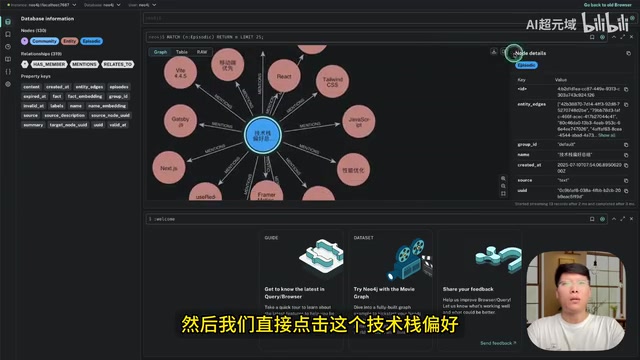
Asking directly in Claude Code "What are my tech stack and technical preferences?" triggers Graphiti MCP Server to automatically query the knowledge graph and return previously recorded complete tech stack information—including preferences for Next.js, Tailwind CSS, React, and more. This information persists even after closing the IDE, achieving true cross-conversation persistent memory.
In the knowledge graph's visualization interface, clicking on entity nodes reveals detailed information. For example, clicking the "Tech Stack Preferences" node shows all associated projects; double-clicking a bug node displays the bug's detailed description and fix solution.
Intelligent Bug Fixing with Automatic Recording
Here's a practical case: in a smart vocabulary flashcard React component built with Chakra UI, the text on the word cards appeared mirror-flipped.
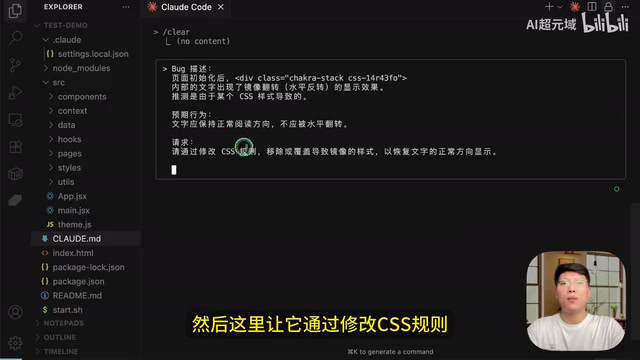
After entering a prompt describing the problem, the Graphiti MCP workflow proceeds as follows:
- Query the knowledge graph: First retrieves project information and similar issues from history
- Locate the problem: Quickly pinpoints the problematic CSS file through project structure information in the knowledge graph
- Execute the fix: Modifies relevant CSS rules to restore normal text display
- Automatic recording: Stores the fix solution in the knowledge graph, including the problem cause and solution
After closing and reopening Claude Code, entering "What problem did you just fix for this project?" successfully retrieves the text mirror-flip issue and its solution. This is the value of persistent memory—avoiding repeated mistakes while continuously accumulating project knowledge assets.
Complete Graphiti MCP Server Configuration Tutorial: Building from Scratch
Below are the detailed installation and configuration steps for Graphiti MCP Server, covering Neo4j database installation, environment variable configuration, and integration methods for Cursor and Claude Code.
Step 1: Install Neo4j Graph Database
Graphiti relies on the Neo4j graph database under the hood to store knowledge graph data. Neo4j is the world's most popular native graph database, using the Property Graph Model to store data where both nodes and edges can carry any number of key-value pair properties. Unlike relational databases, Neo4j uses "Index-free Adjacency" technology—each node directly holds physical pointers to its adjacent nodes, making graph traversal operations independent of the total graph size and dependent only on the local subgraph being traversed. Neo4j uses the Cypher query language, whose syntax intuitively expresses graph pattern matching in ASCII art style, e.g., (a)-[:DEPENDS_ON]->(b) represents node a depending on node b. This data model is naturally suited for storing entity relationship networks in knowledge graphs.
Download and install the Desktop version from the Neo4j official website. When creating an instance, set the following parameters:
- Instance Name: Customize based on your project needs
- User: Keep the default
- Password: Set an easy-to-remember password (you'll need it for configuration later)
Step 2: Clone the Project and Configure Environment Variables
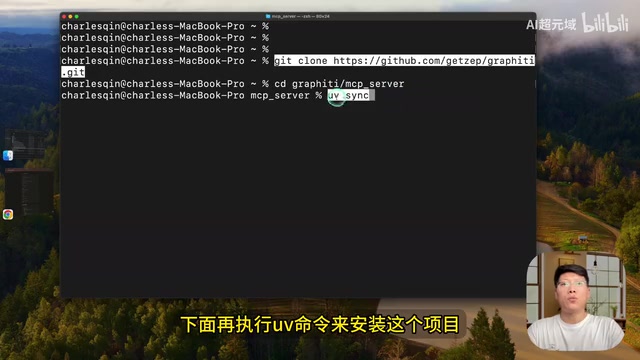
# Clone the Graphiti project
git clone <graphiti-repo-url>

# Navigate to the MCP Server directory
cd graphiti/mcp_server

# Install dependencies
uv install

# Copy the configuration file
cp .env.example .env

# Edit the configuration file
nano .env
The uv tool used here is a Python package and project management tool developed by the Astral team (also the creators of the Ruff linter), written in Rust and 10-100x faster than traditional pip. uv integrates virtual environment management, dependency resolution, package installation, and Python version management into one tool, similar to Cargo in the Rust ecosystem or npm in the JavaScript ecosystem. Its uv run command automatically handles virtual environment creation and activation, greatly simplifying the project environment setup process.
The following key parameters need to be filled in the .env configuration file:
- NEO4J_PASSWORD: The password you set in Neo4j in the previous step
- OPENAI_API_KEY: Your OpenAI API Key (uses GPT-4.1-mini model by default)
- If you don't have an OpenAI API Key, you can also configure other compatible APIs, such as pointing the base URL to DeepSeekAd and filling in the corresponding model name
Once configured, start the MCP Server:
# Start the service in SSE mode
uv run start-sse
Step 3: Integrate Graphiti MCP in Cursor
Steps to integrate Graphiti MCP Server in Cursor:
- Open Cursor Settings → Tools → Add MCP Server
- Enter the SSE connection address for the MCP Server and save
- Confirm the interface shows Graphiti MCP Server with its 8 available tools
- Add Graphiti MCP usage instructions in your project rules file, explicitly requiring the AI to use knowledge graph tools to find preferences and project settings, and to keep the knowledge graph updated after each interaction
Step 4: Integrate Graphiti MCP in Claude Code
# Add MCP Server in SSE mode
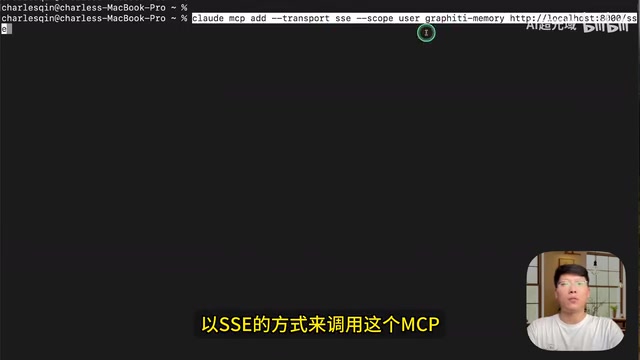
claude mcp add graphiti-sse --transport sse <server-url>

# Verify connection status
/mcp
SSE (Server-Sent Events) used here is a unidirectional real-time communication technology based on HTTP that allows the server to push event streams to the client through persistent HTTP connections. In the MCP protocol, SSE is one of two main transport methods (the other being stdio, standard input/output). The advantage of the SSE approach is that the MCP server runs as an independent process that can be connected to by multiple clients simultaneously, making it ideal for team-sharing scenarios; it also supports remote deployment, so the server doesn't need to run on the same machine as the AI coding tool. In contrast, the stdio approach is better suited for single-user local use cases, where the client directly spawns the server as a child process.
It's recommended to also configure Claude Code's User Memory file with the same Graphiti MCP usage instructions as the Cursor rules file. This ensures the AI proactively calls the knowledge graph for queries and updates during every interaction.
Real Development Scenario: Complete Experience Building a Project from Scratch
Once configured, entering "Build a simple Todo List app based on my tech stack preferences" in Claude Code triggers the following workflow:
- Automatically calls Graphiti MCP to query your tech stack preferences
- Selects the corresponding frameworks and tools (e.g., Next.js + Tailwind CSS) based on preferences for development
- Automatically records project initialization information, technical architecture, etc., to the knowledge graph
- Every subsequent modification (such as adjusting input field text color) is also recorded in real-time
In the knowledge graph's visualization interface, you can clearly see the relationships between project nodes, tech stack nodes, and developer preference nodes, forming a complete project knowledge network.
Conclusion and Future Outlook
Graphiti MCP Server fundamentally fills the memory gap of AI coding assistants through temporally-aware knowledge graphs. It's not just a simple memory storage tool—it's an intelligent knowledge management system capable of relationship reasoning and temporal tracking.
For individual developers, it helps you accumulate programming experience and avoid repeating mistakes; for team collaboration, it enables sharing technical knowledge and tracking project evolution. As the MCP ecosystem continues to mature, the "AI + Knowledge Graph" combination pattern will likely become standard in the next generation of AI-assisted development tools.
If you're looking for a way to make Cursor or Claude Code truly "remember" your projects, Graphiti MCP Server is worth a try.
Related articles
 Tutorials
ChatGPT Plus Subscription Guide: Are GPT-5.5, image-2, and Codex Worth the Upgrade?
A detailed look at ChatGPT Plus features — GPT-5.5, image-2, and Codex — with a Plus vs Pro comparison and a complete step-by-step subscription guide for users outside the US.
 Tutorials
Harness AI Engineering in Practice: Using Claude Code to Master Enterprise-Level E-Commerce Development
Deep dive into Harness AI Engineering: master enterprise e-commerce development with Claude Code using the Rules, Skills, Wiki, and Changes framework.
 Tutorials
Cursor + Codex Dual-IDE Collaboration: A Practical Methodology for Open-Source Project Customization
A complete methodology for open-source project customization based on real-world experience, detailing the Cursor+Codex dual-IDE workflow, seven-stage process, MVP validation, and AI source code reading techniques.