Greypaint: Update All Your Mac Apps in One Click — With Rollback Support

Greypaint unifies Mac's three update channels in one place, with one-click rollback for $6.49.
Greypaint is a Mac app update aggregator that consolidates App Store, Homebrew, and built-in updaters into a single interface for one-click batch updates. Its key differentiators are two safety features: pre-installation update validation, and one-click rollback to previous versions — directly addressing the anxiety of irreversible updates. Priced at a one-time $6.49, it targets both everyday Mac users and developers sensitive to version stability. Still in early stages; real-world reliability of its validation and rollback features awaits broader user testing.
Mac users know the frustration all too well: App Store, Homebrew, and built-in app updaters each do their own thing, making update management scattered and tedious. Worse, one hasty update can break a perfectly working tool. A new app called Greypaint, featured on Product Hunt, takes a straightforward approach to solving this — unifying all update sources under one roof, with an "undo button" to boot.
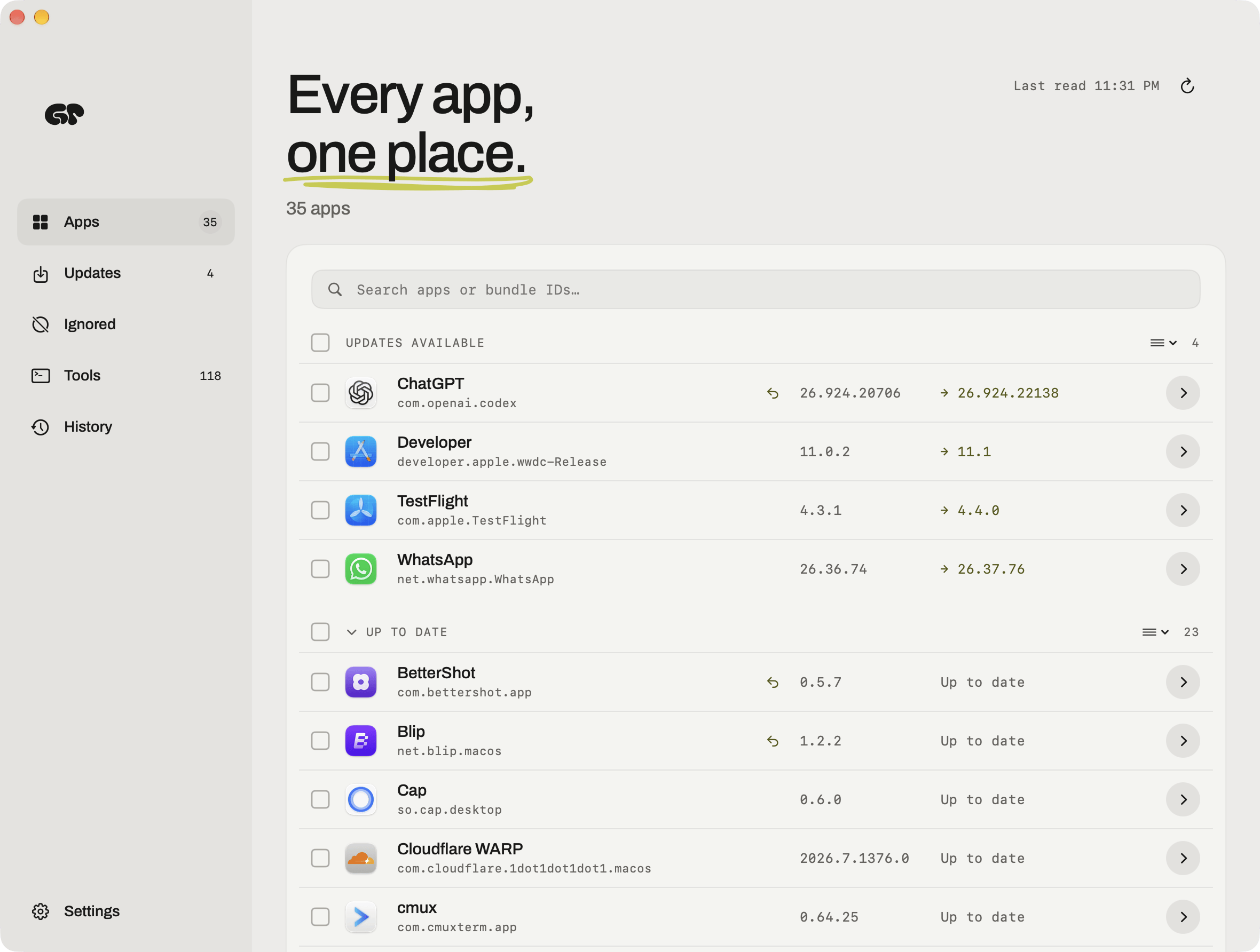
One Interface for All Your Updates
Greypaint's core feature is automatically scanning your installed Mac apps and finding available updates across three sources: Mac App Store, Homebrew, and each app's built-in updater. For most Mac users, these three channels are completely siloed — the App Store has its own updates page, command-line users rely on Homebrew, and another set of apps sends its own pop-up notifications. Greypaint pulls them all into a single interface, letting you update everything with one click.
This "aggregator" approach isn't new — Homebrew itself and several established tools have tried similar ideas. But Greypaint's differentiator is that it covers the App Store and built-in updaters, two channels that are notoriously hard to manage together, theoretically reducing the overhead of jumping between different tools.
Homebrew is the most popular open-source package manager for macOS, letting users install and manage thousands of packages and apps via the command line. Its update logic is entirely separate from the App Store — users need to manually run brew update && brew upgrade for bulk upgrades, otherwise it's one-by-one. For users without a developer background, that command-line workflow is a barrier in itself. Meanwhile, apps like Slack, Zoom, and Chrome bypass the App Store entirely and rely on their own built-in update mechanisms, updating on their own schedule with no unified visibility for the user. This fragmented "three-track" update landscape is exactly the management gap Greypaint is trying to fill.
Pre-Update Checks and an "Undo" Mechanism
What truly sets Greypaint apart from a basic update aggregator is its two safety-focused design features.
The first is pre-update validation: the product page explicitly states "Every update is checked before it lands" — meaning each update goes through a verification step before it's installed. That's an added layer of protection for users who've been burned by problematic releases.
The second is rollback support: if a new version causes issues after installation, users can revert directly to the previous version. This "undo button" is Greypaint's most prominent selling point, and it addresses the most anxiety-inducing update scenario — when an upgrade breaks something that was working fine. For developers and creative professionals who depend on specific toolchains, this kind of reversibility is especially valuable.
Why Rollback Matters
Software updates are typically treated as one-way operations: once you upgrade, rolling back gracefully is rarely easy. Manual downgrading usually means uninstalling, reinstalling, tracking down old installers, and risking lost settings. Greypaint turns rollback into a one-click action — essentially adding a safety net to what is otherwise a high-risk operation.
The rollback problem is especially acute for Homebrew-managed tools. Homebrew keeps only the latest formula version by default; downgrading requires manually switching to an old commit or using brew pin to lock a version — a cumbersome process that assumes the user anticipated the risk in advance. The App Store offers no official downgrade path whatsoever; once you update, you're essentially stuck. For developers, a version bump in a compiler, runtime (like Node.js or Python), or database client can break a project build outright. For creatives, new versions of video editing or design software sometimes change file formats or plugin compatibility in ways that disrupt workflows unexpectedly. If Greypaint can reliably provide version snapshots and restoration at this layer, it would genuinely fill an important gap in the existing toolchain.
Pricing and Positioning
Greypaint uses a one-time purchase model at $6.49, rather than the subscription model that has become common in recent years. For small utility apps, a one-time price tends to be more popular with users and lowers the barrier to trying it out.
On Product Hunt, Greypaint is categorized under Mac, Productivity, and Developer Tools, with a clear target audience: everyday Mac users who want hassle-free app management, as well as developers with heavy Homebrew dependencies who are sensitive to version stability.
At the time of writing, the product has received 7 upvotes on Product Hunt and is ranked #11 — still in the very early stages, and market reception remains to be seen.
Worth Keeping an Eye On
Greypaint addresses a real but often overlooked pain point. Its value isn't in any technical breakthrough — it's in tackling both "fragmented update sources" and "update risk" at the same time. For users who want a clean system without being derailed by bad updates, the small one-time investment could be well worth it.
That said, as an early-stage product, questions remain: how effectively its pre-update checks can actually catch problematic versions, and whether the rollback mechanism holds up for complex apps — especially those involving data format changes — will require more real-world validation. If you're curious, it's worth trying as a lightweight addition to your toolkit.
Related articles

Why Does the Tesla Roadster Need to Fly? A Deep Dive into Musk's Wild Demo
Tesla's Roadster launch showed wall-climbing, upside-down driving, and flying stunts—but The Vergecast notes the demo car may lack a battery, the Rocket version is invite-only and not street-legal, and the website terms don't guarantee delivery. After nine years of delays, why does this car still need to exist?

AI Is Not a Replacement: Human-AI Collaboration Through the Lens of Factory Root Cause Analysis
Starting from factory root cause analysis, this article explains how AI accelerates evidence chain construction rather than replacing human experts, exploring the pragmatic implementation logic and business value of 'AI supporting people rather than replacing them.'

AI Agent Decision Auditing: Building an Evidence Chain in Regulated Workflows
Starting from a Reddit discussion, this article analyzes three core issues in AI agent decision auditing within regulated workflows: what fields audit records should contain, how to handle feedback latency for erroneous decisions, and how to continuously calibrate LLM judge consistency with human judgment.