Grok Bot Complete Guide: From Setup to Multi-Agent Team Collaboration

Grok Bot lets you build multi-agent AI teams with low setup effort for cloud-based collaborative workflows.
This guide covers the full Grok Bot workflow: installation, subscription, Bot creation, multi-agent team setup, cloud Agent deployment, and security hardening. Grok Bot uses conversational setup instead of forms, supports a shared cloud workspace for multi-Bot information sharing, and enables automated group chat collaboration for tasks like news collection and content planning. Key advantages include low barrier to entry and remote execution; main drawbacks are cloud latency and fast token consumption.
Introduction: Why Grok Bot Deserves Your Attention
AI Agents are evolving from single-purpose conversational assistants into collaborative, task-executing teams. xAI's Grok Bot is a direct product of this trend — it doesn't just let you create individual AI assistants, it supports building multi-Bot "teams" that collaborate through group chats to tackle complex tasks, complete with dedicated cloud environments for remote execution.
This guide is based on a hands-on tutorial from a Bilibili creator, systematically walking through the entire Grok Bot workflow: installation, subscription, Bot creation, team collaboration, cloud Agent deployment, and security hardening.
AI Agent refers to an AI system capable of perceiving its environment, autonomously planning, and executing multi-step tasks — distinct from traditional chatbots limited to single-turn Q&A. A Multi-Agent framework takes this further by allowing multiple specialized agents to collaborate with a division of labor, much like a virtual team where each member focuses on a specific role and communicates via message passing. xAI is the AI company founded by Elon Musk in 2023. Grok is its flagship large language model, and the Grok Bot platform is an Agent development and deployment environment built on top of it, providing a cloud sandbox (an isolated remote computing environment) where agents can execute code, browse the web, and perform real-world operations without consuming local resources.
Installing and Subscribing to Grok Bot: Your First Step
Downloading and Installing the Grok Bot Client
Installing Grok Bot is straightforward: visit the X.ai website, hover over "PriorityX," click the Bot option at the bottom, and select "Download for Mac OS" or the corresponding Windows version. Once downloaded, double-click to install and drag it into your Applications folder.
Subscription: Bundled, Not Standalone
Interestingly, Grok Bot currently has no standalone subscription. It's bundled into two types of plans:
- Cursor plan: If you already subscribe to Cursor, you can log in directly with that account — and it won't consume your existing Cursor quota.
- Grok plan: Similarly, Grok subscribers can log in and use it right away.
For newcomers who just want to try it out, the tutorial recommends starting with Cursor Pro ($20/month). If you find yourself running out of quota frequently, you can upgrade to Cursor Pro Plus or SuperGrok Plus. This subscription model keeps the barrier low for new users and reflects Grok Bot's ecosystem integration strategy.
Cursor is an AI-powered code editor built on a heavily customized fork of VS Code, with subscription plans that include usage quotas for multiple major language models. xAI's decision to bundle Grok Bot with Cursor and its own Grok subscription — rather than pricing it separately — is a classic ecosystem lock-in strategy: lowering user switching costs while leveraging Cursor's large developer user base to rapidly expand Grok Bot's potential audience. For non-developers, SuperGrok Plus (Grok's premium subscription) is the more direct path; for developers already using Cursor, the Bot features are available at virtually zero additional cost.
Creating Your First Bot: Building a Personal AI Assistant
From Blank Canvas to Role Definition
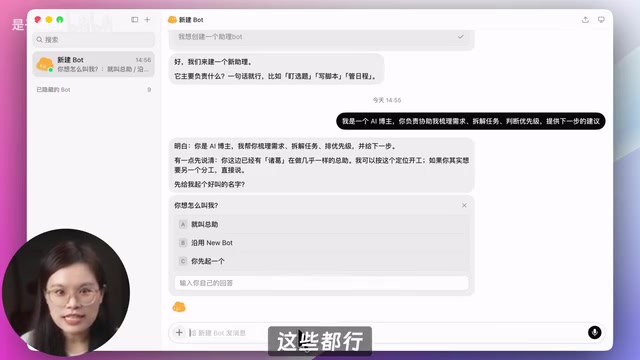
Click the plus icon in the top-left corner to create a new Bot. The system will generate a blank template and proactively greet you. The core step that follows is "talking" your Bot into existence through conversation — a stark departure from traditional form-based configuration.
The tutorial recommends making your first Bot a "personal assistant." When you tell it "I want to create an assistant Bot," it will ask what its primary responsibilities are (e.g., topic selection, scriptwriting, schedule management). You'll need to define its role clearly: organizing requirements, breaking down tasks, prioritizing, and providing next-step recommendations.
Upload Your Materials and Build a Shared Workspace
Once created, don't rush to put the Bot to work. Instead, start by uploading your work materials (role definition, personal style, workflows, etc.), have the Bot read and organize them into Markdown documents, and save them to the shared workspace.
There's a key design feature here: the shared workspace points to the cloud computer's workspace. This means every Bot you create — current or future — can access those files and understand your baseline information, without you having to re-explain yourself at the start of every new conversation. This dramatically improves information consistency across multi-Bot collaboration.
Testing Your Bot's Understanding
After setup, run a quick test to verify the Bot is working properly. For example, ask it to "Based on my positioning and content principles, evaluate whether a given topic is worth pursuing — provide a suitability score, three reasons, and a potential angle. Do not search the web." Focus on whether it understands the uploaded attachments, strictly follows instructions, and whether its reasoning is clear.
Building a Bot Team: Multi-Agent Group Chat Collaboration
Task Decomposition Is the Core Idea
The foundation of building a Bot team is breaking down your work into as many granular tasks as possible, then creating a dedicated Bot for each one. In the tutorial demo, the author planned three types of roles:
- Assistant Bot: Handles overall planning and task coordination;
- Trending Topics Bot: Collects AI news and developments;
- Content Strategy Bot: Handles topic selection and content planning.

Fine-Tuning the Trending Topics Bot
Taking the Trending Topics Bot as an example, the author provided clear instructions: collect two types of information — (1) new tools, versions, and features released by companies like OpenAI, Anthropic, and Google; and (2) high-value statements on AI trends from industry leaders like Karpathy and Altman. Filter criteria were also explicitly defined: exclude marketing content, funding news, duplicate reports, and opinions lacking substantive insights.
Notably, the workflow mapped out by the Assistant Bot demonstrated a preference for primary sources — something the author described as reaching "junior specialist level." Given that Grok Bot consumes quota quickly, the author added a constraint: output no more than 5 trending items per run.

How Bots Automatically Collaborate
Creating a group chat is simple: click the plus icon in the top-left, select "Create Group Chat," and add the relevant Bots. In live testing, the Bots automatically message each other to coordinate work — the Assistant Bot dispatches tasks to the Trending Topics Bot, and the resulting briefs closely matched the day's major news. The author noted that compared to earlier experiences, this group chat collaboration felt noticeably smoother, indicating Grok Bot has been iterating actively.
Three Principles for Running an Efficient Bot Team
The tutorial outlines several key rules for high-performing Bot collaboration:
- Assign only one owner per step to prevent Bots from "competing for tasks";
- Define clear deliverable standards so each Bot knows exactly what format and content to output;
- Set priority conditions to ensure tasks progress in the correct sequence.
When assigning tasks, have the Assistant Bot lead while the others act independently. Since they all operate in the cloud, you can close your laptop without interrupting their progress.
Cloud Agent Deployment: Installing Open-Source Agents
Configuring the Environment and API Keys
One of Grok Bot's standout features is its dedicated cloud environment. To install an open-source Agent, send the official project link to your Assistant Bot and ask it to check the cloud runtime environment and install necessary dependencies. The tutorial uses DeepSeekAd as an example: create an API Key on the open platform (note: it's only shown once — save it immediately), then return to Grok Bot to complete the configuration.

Best Practices for Securely Configuring API Keys
Here's an important security tip worth noting: never paste an API Key directly into a chat window — that's highly insecure. Instead, ask the Bot for the secure configuration method. It will provide an encrypted input box; paste the key and click "Save Securely." Permission confirmation prompts will appear during the process — if you're unsure about any of them, take a screenshot and ask another Bot to help assess.
An API Key is a credential for accessing AI services. If leaked, others can impersonate your account to consume your quota or trigger large unexpected bills. The risk of pasting a key directly into a chat window is that conversation content may be logged, synced to servers, or accidentally exposed in screenshots. Industry best practice is to store keys in environment variables (OS-level encrypted storage) or a dedicated secrets management service (e.g., AWS Secrets Manager), allowing programs to read them dynamically at runtime rather than hardcoding them in any visible text. Grok Bot's encrypted input box essentially encrypts the key locally before transmission, preventing it from appearing in plain text in your conversation history.
Calling and Debugging Cloud Agents
Once installed, there are two ways to use the Agent: verbally describe tasks for the Agent to execute, or open the cloud desktop and manually enter commands in the terminal. If errors occur during testing, simply paste or screenshot the error message and send it to the Bot — it will patch the issue and re-run. The author acknowledged the overall experience is "average," and concludes that cloud Agents are best suited for users who need to run tasks remotely at any time.
Grok Bot also supports a "teaching mode" — start a screen recording, manually demonstrate a task (e.g., drawing an emoji and saving it), then let the Bot learn from it. It will organize the demonstration into a reusable skill.
Security Hardening: Protecting Your Account and Data
Avoiding Account Security Risks
While open-source Agents can be installed in the cloud, it's not recommended to log into accounts like Codex or Claude Code directly in the cloud environment — if the cloud IP changes, your account risks being flagged or banned. A safer approach is to call these services via plugins: click the marketplace in the bottom-left corner and add the Codex plugin. The marketplace also contains a wide variety of Bot templates you can import directly.
Cloud environment IP addresses are typically shared or dynamically assigned — multiple users may share the same IP range, or a new IP is randomly assigned at the start of each session. Risk control systems at platforms like OpenAI (Codex) and Anthropic (Claude) monitor for abnormal login IP changes; an account logging in from different geographic IPs in rapid succession can easily trigger security alerts or bans. Using plugin/OAuth authorization to call these services eliminates the need to store credentials in the cloud. The platform authorizes specific operations via tokens, limiting the scope of permissions while preventing account credentials from being directly exposed in the cloud environment — making it the recommended integration approach.
Setting Up Automatic Review Rules
In your personal settings, you'll find "Automatic Review Rules." For example:
- "Ask me first before replying to emails on my behalf";
- "Ask me before reading, displaying, or copying any API key";
- "Ask me before uploading or sending files containing keys to the web".
These rules should be configured flexibly based on task sensitivity, adding a layer of manual confirmation as a safeguard for sensitive operations.
Summary: Grok Bot's Strengths, Weaknesses, and Who It's For
Grok Bot's greatest strength is the extremely low barrier to creating Bots and group chats. Combined with its dedicated cloud environment, it's well-suited for remote work and team collaboration scenarios. Its shortcomings are equally apparent: the cloud desktop can feel sluggish, and token consumption is fast.
Overall, regardless of your role or industry, it's worth trying Grok Bot to build your own Bot team — delegating repetitive, process-driven work to a network of collaborating agents. As the platform continues to iterate, there's significant room for improvement in collaboration experience and stability, making it well worth keeping an eye on.
Related articles

Cursor AI in Practice: Weighing Efficiency Gains Against Costs in an AI IDE
An in-depth look at Cursor AI IDE's interface layout, four modes (Agent/Plan/Debug/Ask), model selection, and Git context integration, with hands-on demos weighing subscription costs against going direct to Claude.

Free Landing Page Design Rules Library: A Practical Guide for Claude Code and Cursor
A free landing page design skill for Claude Code and Cursor: MIT licensed, nearly 9,000 stars, asks about offer/audience/action before planning 12 sections with hard font and spacing constraints.

Cursor Keeps Writing Wrong Code? The Problem May Be Context, Not Prompts
Cursor keeps writing wrong code? The problem may be context, not prompts. Learn how to supply relevant files, full error messages, and expected results, plus a plan-first, small-step, test-driven workflow to reduce AI coding errors—while remembering code review remains the developer's job.