Grok CLI Caught Silently Uploading Local Files to the Cloud: Sensitive Credentials Stored Unencrypted

Grok CLI silently uploads local files including plaintext credentials to unencrypted GCP cloud storage.
xAI's Grok CLI tool was found to be silently uploading entire local working directories — including source code, plaintext `.env` credential files, and full Git histories — to unencrypted GCP storage buckets without user knowledge. The Git history leak is especially dangerous, as previously deleted secrets remain recoverable. The vendor's initial response blamed developers, sparking community backlash over the violation of "Secure by Default" principles. The incident highlights the growing tension between AI tool convenience and data security.
Incident Overview
Recently, several developers using xAI's Grok CLI tool discovered a serious security vulnerability: the command-line tool was quietly uploading all files from local directories to a Google Cloud Platform (GCP) storage bucket — without users' knowledge. Even more alarming, the uploaded files included not just ordinary code, but also .env environment variable files containing sensitive credentials and complete Git commit histories — and none of this data was encrypted in transit or at rest.
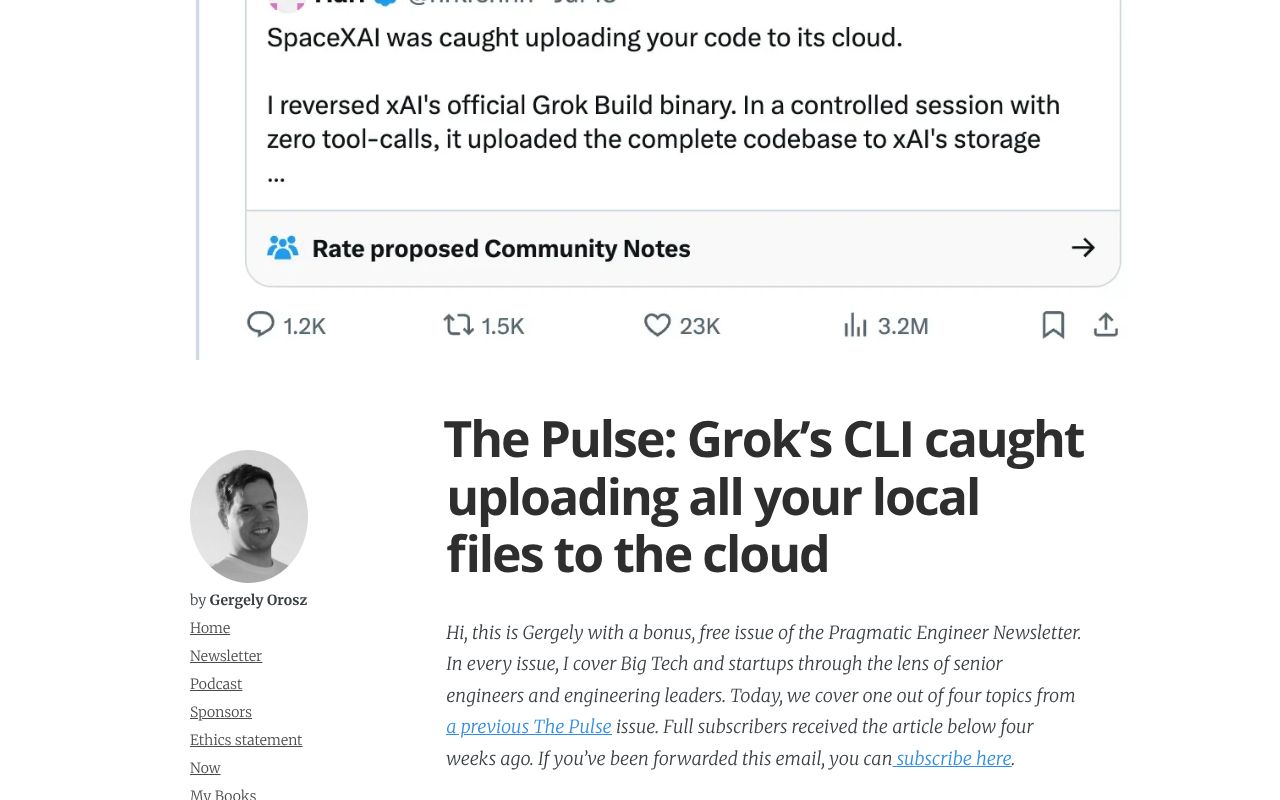
For any development team, .env files are often the crown jewels of the security infrastructure — they typically contain database passwords, API keys, and access tokens for third-party services. Once this information is uploaded in plaintext to a third-party cloud, the risk level spikes immediately, potentially leading to production environment breaches, data leaks, and exposure of trade secrets.
Technical Details
What Was Uploaded
Based on feedback from the developer community, Grok CLI packages and uploads the contents of the current working directory during execution. This specifically includes:
- Source code files: The entire project codebase copied to the cloud.
.envconfiguration files: Containing plaintext keys, passwords, and other sensitive information.- Git history: The complete
.gitdirectory, potentially exposing old keys from past commits, internal discussion records, and sensitive data that was deleted from the latest version but remains in history.
The Git history leak deserves special attention. Many developers may have accidentally committed a key in the past and later removed it from the latest version — but that information remains fully intact in the Git history. An attacker only needs to walk back through historical commits to easily uncover these "deleted" secrets.
Security Risks of Unencrypted Storage
Another critical issue in this incident is that data was stored unencrypted in the GCP storage bucket. This not only violates basic data security best practices, but also means that if the bucket is misconfigured (e.g., with public read access), anyone could potentially download these raw files directly. Misconfigured cloud storage buckets have historically been a leading cause of data breaches, and countless companies have suffered as a result.
A cloud storage bucket is the fundamental object storage unit in public cloud services — GCP Cloud Storage, AWS S3, and similar services all use this concept. Bucket access control relies on IAM policies and ACL configurations. If misconfigured (e.g., set to "allUsers readable"), all files stored within become fully accessible to the public internet. Historically, such misconfigurations have caused data breaches at thousands of organizations, exposing medical records, financial data, and government documents. More dangerously, attackers have built automated scanning tools capable of detecting misconfigured buckets and exfiltrating data within minutes — far faster than most organizations can detect and respond. This means that even if a vendor fixes the permissions after the fact, it's nearly impossible to verify whether sensitive data uploaded during the vulnerability window was already accessed by a third party.
Vendor's Initial Response Sparks Controversy
Faced with developer criticism, SpaceX — an entity affiliated with xAI — initially responded by blaming the developers. This stance triggered strong backlash in the developer community.
From a security engineering perspective, a developer tool that uploads local files to the cloud by default is inherently a high-risk design decision. Even if this behavior is mentioned somewhere in a terms document or buried in documentation, most developers would not expect a CLI tool to upload all their files — including secret files — without explicit consent. Shifting blame onto users rather than acknowledging a design flaw typically further damages trust between the vendor and the developer community.
The Core Debate Over Responsibility
Incidents like this typically trigger a classic debate: Who is responsible for the default behavior?
The widely accepted principle in the industry is "Secure by Default" — a tool's default configuration should be the safest possible, and any behavior that could introduce risk should be disabled by default, requiring explicit user authorization to enable. By this standard, Grok CLI's decision to make file uploading the default behavior while storing data unencrypted clearly deviates from industry best practices. Vendors deflecting responsibility by claiming "developers didn't read the docs" or "misconfigured the tool" is unlikely to win community support.
The "Secure by Default" principle traces back to Microsoft's "Trustworthy Computing" initiative proposed in 2002 and has since been widely adopted by mainstream security frameworks including OWASP and NIST. Its core logic is that user attention is limited, and you cannot assume every user will carefully read the documentation — system designers have a far deeper understanding of risks than ordinary users, so designers should bear the responsibility for "secure defaults." The counterpart to this is the "Opt-in" model: any feature that could create privacy or security risks must be actively enabled by the user, rather than enabled by default and requiring users to actively disable it (Opt-out). Grok CLI making file uploads the default behavior — without clear, real-time prompts to users — violates the Opt-in principle, which is the most concentrated point of criticism in the developer community.
How Developers Can Protect Themselves
In light of this incident, developers should exercise heightened caution when using any third-party CLI tools or AI coding assistants.
Immediate Actions
- Rotate all potentially exposed credentials: If you used Grok CLI in an affected directory, immediately replace all keys, passwords, and tokens in your
.envfiles. - Audit Git history: Use tools like
git-secretsortruffleHogto scan your repository history for sensitive information. - Check cloud storage: Determine whether any data has been uploaded and contact the vendor to request deletion.
Long-Term Protection Strategies
- Isolate sensitive files: Store
.envand other secret files outside the project directory, or manage them centrally through a secrets management service (e.g., HashiCorp Vault, AWS Secrets Manager). - Carefully evaluate tool permissions: Before running any new tool, understand its network behavior — and if necessary, test it in a sandbox or restricted network environment.
- Network monitoring: Keep an eye on outbound network traffic from development tools to quickly detect abnormal upload behavior.
Security Reflections on the AI Tool Ecosystem
As AI coding assistants and various CLI tools proliferate rapidly, these tools inherently need to read local code to function — which naturally creates ambiguity around data boundaries. The Grok CLI incident is a telling example: the tension between functional convenience and data security is becoming increasingly acute.
For vendors, transparent data handling policies, clear user authorization workflows, encryption by default, and minimal data collection should all be non-negotiable baselines. For developers and enterprises, it's essential to establish review mechanisms for third-party tools — you cannot unconditionally trust a tool just because it's "smart and useful."
This incident is yet another reminder to the entire industry: security in the AI era isn't just about the models themselves — it's about the entire toolchain built around them. A lapse at any single point can lead to the exposure of core secrets.
Background
git-secrets and truffleHog are two commonly used tools for scanning Git history for sensitive information. git-secrets (maintained by AWS Labs) primarily uses predefined regex rules to match common credential formats such as AWS keys, and supports custom rules — making it well-suited for integration into pre-commit hooks to prevent new leaks. truffleHog uses a dual-engine approach combining entropy analysis and regex, traversing the entire commit history of a repository to identify high-entropy strings (high randomness typically indicates a key or token). For situations where a leak has already occurred, scanning is only the first step — more importantly, use git filter-repo or BFG Repo Cleaner to permanently remove sensitive data from history, and force all collaborators to re-clone the repository, since locally cached old histories also carry risk.
Related articles

Fifty Years Studying Power: Robert Caro's Writing and Insights on Power
Robert Caro reflects on 50 years studying power: Lyndon Johnson's persuasion and leverage, Robert Moses's transformation from idealist to ruthless builder, the dilemmas of large-scale construction, and his methods of compressing themes and solitary focus in biography writing.

Can a $20,000 Robot Do Your Chores? The Test Results Are Surprising
A YouTube test video shows how a $20,000 robot responds to commands like washing dishes, turning off lights, taking out trash, and feeding the dog. This article analyzes its real capability boundaries, the state of voice interaction technology, and how far household robots are from mainstream adoption.
The Complete Guide to Running AI Models Locally: Inference Engines and Tool Stack Explained
A systematic breakdown of the complete local LLM tool stack: from PyTorch and GGML compute libraries to llama.cpp, vLLM, SGLang inference engines and Ollama, LM Studio wrapper layers, with benchmark data on performance differences and selection logic.