Hands-On Test: 5 Habits That Cut Claude Code Token Usage by 85%

Five habits—streamlining claude.md, choosing Sonnet, writing clear prompts—cut token usage by 85% on the same coding task.
Controlled experiments reveal the truth about Claude Code usage: every interaction resends the entire conversation history, claude.md, and tool list, so context size matters more than message count. Testing five habits one by one, the experimenter found streamlining claude.md (45% savings) and switching to Sonnet medium effort (34% fewer tokens, 72% lower cost) most effective, while clear prompts and noise reduction saved 16% and 10% respectively. The popular advice to "start a new session for a new task" instead increased usage by 22% because discarding the cache forces full-price rebuilding. Combined, the five habits produced a non-linear effect, cutting token usage by 85% and reducing task rounds from about 30 to 8. The article also explains the five-hour session window and weekly limit mechanics, the shared usage pool, strategies after hitting limits, and the trap where the ANTHROPIC_API_KEY environment variable can bypass subscription billing.
Why Your Claude Code Usage Is Never Enough
The same programming task can consume wildly different token counts across two runs—this isn't model instability, it's context management at work. One developer ran controlled experiments and found that after changing five usage habits, the same task's token consumption dropped by 85%, with all tests still passing.
Claude Code's usage limits are often misunderstood. Pro and Max plans run two limits simultaneously: the five-hour session window starts counting from when you send your first message, not resetting on a fixed hour; the weekly limit resets at a fixed time based on your account cycle. Both can be viewed on the usage page in settings or via the /usage command.
What's easy to overlook is that claude.ai chat, the desktop app, and Claude Code share the same usage pool. A long research conversation in the morning directly eats into your coding quota for the afternoon.

Where Tokens Go: The Repeatedly Sent Context
To understand usage, you first need to understand a mechanism: every time Claude Code interacts with the model, it resends the entire conversation history, the claude.md file, and the tool list. Reading cached text costs less, but it isn't free—if a session has around 30 interaction rounds, every element in the context is billed roughly 30 times.
Use the /context command to see the current context composition. The experimenter found that a bloated claude.md file approaching 600 lines occupied 17,000 tokens, transmitted repeatedly with every request. The problem isn't how many messages you send, but how much content each conversation round carries.

Cache text (Cache) refers to the temporary storage Claude Code establishes with the model for already-processed context fragments (such as conversation history and claude.md) during interaction. When the same content appears again, the model doesn't need to recompute from scratch—reading the cache suffices, so the cost is lower than fresh input. But caching isn't permanently free: it has an expiration (typically minutes to hours), and each request still incurs a small fee for cache reads. The key insight from the experiment is that even if a single cache read is cheap, when the context is large and there are many conversation rounds, the accumulation is still considerable. Moreover, once the cache expires (e.g., after using /clear or being idle for a long time), rebuilding the cache requires full-price processing—which explains why "start a new session for a new task" may actually increase consumption after a short task.
Measured Savings Ranking of the Five Habits
To quantify each habit's impact, the experimenter ran controlled tests changing only one variable at a time, running each version three times and taking the median.
1. Streamline claude.md (45% savings)
Compressing claude.md from 597 lines to 12 lines, moving content like release steps into skills loaded on demand. This alone reduced the same task's token consumption by 45%, with /context showing the memory file dropping from 17,000 tokens to 229. Anthropic officially recommends keeping this file under 200 lines, with occasionally-used content placed in skills.
2. Choose the Right Model (34% fewer tokens, 72% lower API cost)
Switching from Opus high effort to Sonnet medium effort reduced token consumption by 34%; since Sonnet's unit price is lower, cost calculated at API pricing dropped by 72%. Anthropic states that Sonnet handles most coding tasks, with Opus reserved for complex design problems. You can switch models mid-session with /model, lower thinking intensity with /effort, and delegate simple auxiliary tasks to Haiku.
Auxiliary agents have an additional benefit: they isolate noisy work like searching the codebase outside the main conversation, returning only results—but their own consumption still counts against the plan, so they're suited to noisy tasks.
3. Write Clear Prompts (16% savings)
After clearly specifying column names, date formats, and involved files, Claude doesn't need to explore the codebase or guess intent, and each run produces consistent results. For larger tasks, press Shift+Tab to enter plan mode—but the experimenter candidly notes that plan mode doesn't save on small, clear tasks and may even cost more, because of the extra planning step; its value lies in when the first approach goes wrong, fixing the plan costs far less than fixing finished code.
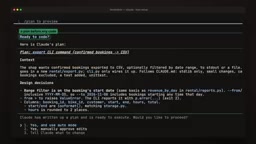
Plan Mode (Plan Mode) is an interactive feature of Claude Code, activated with Shift+Tab. Once entered, Claude doesn't directly modify code but first outputs an execution plan (including steps, involved files, and potential risks) for your review and adjustment. After confirmation, it implements according to the plan. This "plan first, execute later" approach significantly reduces rework for large, ambiguous, or multi-file tasks—because fixing a plan costs far less than fixing generated code. But experiments also show that on small tasks with clear requirements, plan mode adds an extra planning interaction, increasing token consumption. Therefore, whether to enable it should be judged based on task complexity and uncertainty.
4. Cut Noise (10% savings)
Disconnecting unneeded tool servers and adding hooks to trim test output to only failure information. Since Claude Code now loads tools on demand, the server's own cost is lower than expected—this 10% mostly comes from shorter test output.
5. Clean Up Sessions—A Counterexample to Popular Advice
"Start a new session for a new task" is common advice, but in the experiment it didn't save—it used about 22% more. The reason is that the old task was short and still cached, so re-reading the cache was cheap; after /clear discards the cache, the new session requires full-price rebuilding.
The right timing is: when the old conversation is long or irrelevant to the current task, or after a break when the cache has expired. If you need to retain some context, use /compact to keep a summary (it needs to read the full text, so it isn't free), and you can attach instructions like /compact keep the export decisions. Use /rename to name before cleaning up, and /resume to restore afterward.
effort is a reasoning intensity parameter introduced in Anthropic models (such as Claude 3.5 Sonnet), adjusted via the /effort command. It controls the depth of internal thinking the model performs before generating a response: in high-effort mode, the model spends more tokens on multi-step reasoning, suitable for complex problems; medium or low effort reduces thinking steps, responding faster and with lower consumption. In the experiment, switching Opus from high effort to Sonnet medium effort reduced tokens by 34% and API cost by 72%, partly because Sonnet's unit price is lower and partly because medium effort reduces reasoning overhead. For most coding tasks, medium effort suffices; only when designing complex algorithms or troubleshooting deep bugs is high effort worth using.
The Non-Linear Combined Effect
When the five habits stack, task token consumption drops by 85%, far exceeding the sum of individual savings. The reason is that small context, cheaper models, and clear prompts amplify each other: the task drops from about 30 rounds to 8 rounds, and each round's savings compound in subsequent rounds.
What to Do After Hitting Limits
First read the error message: if it mentions the Opus limit, switching to Sonnet lets you continue working; if it's the session or weekly limit, changing models won't help because that limit is shared across models. When hitting the limit mid-response, Claude Code may stop after completing the current step, and newer versions can wait for the reset and automatically continue the task.
A trap to check immediately: if the ANTHROPIC_API_KEY environment variable is set on your machine, Claude Code will prioritize it over your subscription, and charges go through API billing. If you only want to use plan quota, remove that variable and choose to decline when prompted about API credits.

The new version's /usage lists usage contributors with suggestions; press F to directly apply fixes. Note that this list covers all Claude Code sessions on that computer, and fixes may affect beyond the current project.
ANTHROPIC_API_KEY is an API key environment variable provided by Anthropic for programmatic access to models. When this variable exists in the environment, Claude Code prioritizes it for authentication and billing rather than your Pro/Max subscription plan. This means all requests are billed at API prices (typically higher than the subscription's marginal cost) and consume API account quota rather than plan usage. If you want to use only subscription quota, ensure this variable is unset (or unset it before launching Claude Code) and choose to decline when prompted to "use API credits." This trap often causes users to incur unintended extra charges, especially on machines configured with development environment variables.
Daily Habits You Can Apply Directly
- Keep
claude.mdlean and put the rest into skills - Use Sonnet by default, reserve Opus for hard problems
- Write specific requirements in prompts, plan first for large tasks
- Disconnect unused tools, keep only failures in test output
- Clean up sessions when old context is large or expired
These adjustments don't reduce capability—the tasks in the experiment passed the same tests, just without paying for content you don't need.
Related articles

Gemini 4 Neon Leak: A Potential Strong Contender Against Opus 5.5
A Hacker News thread suggests Gemini 4 Neon looks like an Opus 5.5 competitor. This article unpacks the product positioning behind this community signal, shifts in the top-model competitive landscape, and what it means for developers' model selection strategy.

Claude Fable 5.2's Self-Authored Short Film 'Fable' Sparks Discussion
A short film 'Fable,' credited to Claude Fable 5.2 for script, visuals, and directing, appears on Hacker News. This article analyzes the significance of full-pipeline AI creation, community reactions, and what it means for content creators.

Anthropic IPO Pricing: A Signal of AI Giants Going Public
Anthropic's IPO pricing draws attention. This article analyzes its potential impact on AI industry valuation, commercialization paths, and the competitive landscape, and highlights public-market expectations and challenges for AI companies.