Hands-On with the Gemini 4 Argon API: Thinking Levels and Background Mode Explained

A 20-minute Free Code Camp tutorial demonstrates the full Gemini 4 Argon workflow, from API key to generating a Breakout game.
Google's most powerful model, Gemini 4 Argon, is now available via API, and Free Code Camp has released a crash course under 20 minutes covering the complete path from getting a key and setting up the environment to calling the model. The article outlines Argon's three key features: thinking before answering (thinking levels low/medium/high), a context window of over 4 million tokens, and background execution capability. The tutorial uses an average-score bug to test the difference in time and token consumption between low and high thinking levels, recommending trying each level and choosing the lowest that works; it demonstrates one-line multi-turn memory with previous_interaction_id; and finally uses background mode with high thinking and max_output_tokens of 131072 to have the model generate a complete Breakout game in a single HTML file. It also includes insights from a Google DeepMind engineer on Argon's creative writing and multi-tool collaboration abilities.
Google's latest flagship model, Gemini 4 Argon, is now available to developers through the API. Free Code Camp released a crash course that demonstrates the entire workflow—from requesting an API key to having the model generate a Breakout game in the background—in under 20 minutes. For developers who want to get up to speed with Argon quickly, this content packs a lot of information.
What Is Gemini 4 Argon: A Reasoning Model Built for Hard Tasks
According to Free Code Camp, Gemini 4 Argon is Google's most capable model to date, with a clear positioning—it specializes in hard tasks like complex coding, math, and science. When calling it in code, the model ID is the string gemini-4-argon (referred to verbally in the video as "Gemini 4 Argon").
For beginners, there are three features worth understanding first:
- Think before answering: The model reasons before producing output, and the depth of that reasoning is controlled by
thinking level, which can be low, medium, or high, defaulting to medium. - Massive context window: Over 4 million tokens, shared across input, thinking process, and output. As the video puts it, a token is roughly a small fragment of a word.
- Background execution capability: You can hand a large task to the model and retrieve the result later; the computation happens on Google's servers rather than locally.
Environment Setup: Keys, Billing, and Project Initialization
The first step in the tutorial is to log in to Google API Studio with a Google account, click to get an API key, and create a key. The video specifically emphasizes: the project associated with the key must have billing enabled, otherwise Argon will reject requests outright. Treat the key like a password—never put it in your code, and never push it to GitHub.
Project setup follows the Node.js route: create a new folder, run npm init, install the official Google SDK (referred to verbally in the video as the @google/genai package), then add "type": "module" to package.json to support imports and top-level await. The key is stored in a .env file under the GEMINI_API_KEY variable, which the SDK reads automatically, so the code never touches the key directly, and .env goes into .gitignore.
First Call: interaction Is the Core Concept
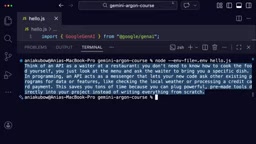
In hello.js, import the SDK and create a client (passing an empty object is fine, since the key is read automatically from the environment variable), then call client.interactions.create().
The video explains an interaction as "one round trip with the model": you send input and get back output. In the call you specify the model and input (i.e., the prompt), and finally print interaction.output_text to get the plain-text answer. When running, use node --env-file to load the key.
The first request takes longer than expected because the default medium thinking level reasons before answering. This naturally leads into the next topic.
The relationship between SDK and API: The @google/genai mentioned in the article is the official JavaScript/TypeScript SDK maintained by Google, which wraps the underlying REST API's authentication, serialization, and error handling. Developers don't need to manually construct HTTP request headers or parse JSON responses—the SDK reads the GEMINI_API_KEY environment variable and automatically attaches it to every request. Methods like client.interactions.create() are essentially typed wrappers around REST endpoints, and the returned interaction object structure matches the API's raw response.
Why use node --env-file: Node.js has included the --env-file flag since version 20.6, which loads variables from a .env file at startup, replacing the previously common dotenv package. This keeps the key out of the code repository and requires no extra dependencies—it's the currently recommended approach for local development.
Testing Thinking Levels: The Cost Difference Between low and high
To observe the effect of thinking levels, the tutorial designs a small experiment: a function that calculates the average exam score, passed 80, 90, and 100, expected to return 90, but actually returns NaN.
The bug itself isn't hard to find—the loop uses less-than-or-equal-to, so it runs one extra time, scores[i] is undefined, and adding it to a number yields NaN. The video wraps the call in a hunt function, sets the thinking level via generationConfig, and records both the elapsed time and the thinking token count from interaction.usage, running once each with low and high.
The result is that both levels find the bug, but the difference in seconds and token consumption is significant. So should you just use high blindly? The tutorial's advice comes from Google: test your task on all three levels and choose the lowest level that produces a good answer. Thinking tokens are billed as output, so the more it thinks, the slower and more expensive it gets. For a simple bug like this, low is sufficient.
How thinking tokens are billed: In Gemini's billing system, the tokens consumed by the model's reasoning process before output (i.e., "thinking") are classified as output tokens and billed at the output rate. This means the high level is not only slower but also significantly more expensive than low. interaction.usage typically lists input tokens, output tokens, and thinking tokens separately, making it easy for developers to calculate the cost of a single call. For batch or high-frequency scenarios, choosing the right thinking level controls expenses more directly than optimizing prompts.
Multi-Turn Conversation: One Line of previous_interaction_id Solves Memory
Previously, each call was isolated—Argon didn't remember what was asked before. In chat.js, the tutorial first has it fix the aforementioned bug, then asks a follow-up: "What happens if the array is empty?"—this question only makes sense if the model remembers that function.
The approach is to set previous_interaction_id to the ID of the first interaction. The conversation history is maintained on Google's side, and the model continues from where it left off, adding a check to prevent division by zero. The video's commentary is blunt: if you're building a chatbot, this one line is basically all there is to "giving it memory."
Background Mode: A Playable Breakout Game from a Single Prompt
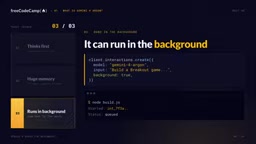
The finale demonstration is having Argon write a complete Breakout game in a single HTML file. Such a large task can take several minutes, and a regular request might time out, so you need to enable background mode—same create call, with three changes: set background to true, set the thinking level to high, and raise max_output_tokens to 131072.
The video notes that without setting max_output_tokens, background mode stops at around 64K tokens. The interaction returned by this create call has a status of queued or in progress, and you need to poll with client.interactions.get every 5 seconds. When complete, the answer is spread across multiple steps; concatenate the text from each model output step and write it to game.html.

The entire process runs on Google's servers, so you can close your laptop and retrieve the result later. When you finally open game.html, you get a complete game with a score, lives, and a restart button.
Polling and the step structure: The interaction returned by background mode is not the final answer but a task handle. When polling with client.interactions.get, the status goes through queued → in_progress → completed (or failed). When complete, interaction.steps is an array where only steps of type model_output contain the actual text; the thinking process, tool calls, etc. appear as other step types. Therefore, when concatenating the answer you must filter by step type, otherwise you'll mix reasoning content into the final file. This is why the article emphasizes "concatenate the text from each model output step."
A Google Engineer's Perspective: More Than Just Writing Code
The video features Jack Weatherspoon from the Google DeepMind Developer Experience team. His favorite aspect is that you can throw an idea directly at the model, and it will do a lot of reasoning, search the web, and ultimately deliver an elegant solution that you might not have fully thought through yourself.
One demo he mentions is quite convincing: his colleague Genevieve took a photo of her desk and sent it to Argon, asking it to turn it into a 3D racing scene. The model built the components via Blender MCP, used nano banana to generate textures for the car body and background, and even went online to search for engine sound effects and added the audio itself.

When asked about less obvious use cases, Weatherspoon's answer is creative writing. He believes Argon is his favorite writing model on the market—the prose doesn't read like AI and lacks the formulaic patterns of many models—the team has invested heavily in writing training.
Blender MCP and nano banana: MCP (Model Context Protocol) is an open protocol that lets models call external tools and services. Blender MCP exposes Blender's modeling, material, and rendering capabilities to the model through this protocol. The model can create objects, set up lighting, and export scenes just like calling functions. nano banana is the community nickname for Google's image generation model (Gemini 2.5 Flash Image), which excels at maintaining character and style consistency; the article uses it to generate car body and background textures, leveraging exactly this characteristic. Together, the two make end-to-end automation from "photo → 3D scene" possible.
Getting Started Tips
The value of this tutorial lies in stringing together Argon's key switches into a reproducible path: the thinking level determines the balance between cost and speed, previous_interaction_id provides conversational memory, and background mode plus a sufficiently large max_output_tokens supports long tasks. For developers who can already write a few JavaScript functions, following along once is enough to get the API working. The rest is just trying it with your own projects.
Related articles

Building an AI Customer Service Agent from Scratch: A 92% Intent Recognition Case Study
A Bilibili case study: building an AI customer service agent from scratch with BERT intent recognition, dialogue state tracking, hybrid vector retrieval, and a weighted handoff model—raising intent accuracy from 65% to 92%, 78% conversation completion, handling 100K conversations daily.
Loop Engineering: An Engineering Paradigm for AI That Writes Code and Merges PRs Autonomously
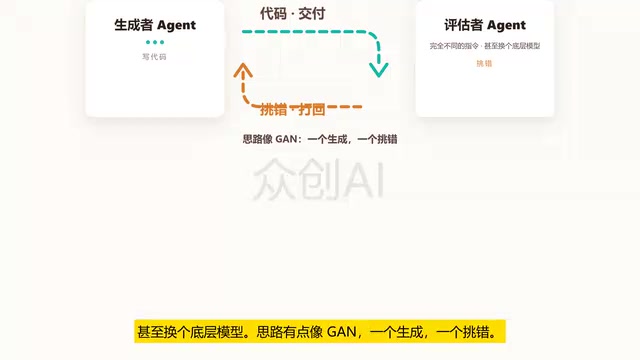
Loop Engineering is transforming AI development pipelines: Stripe's Minions system merges over 1,300 machine-generated PRs weekly. This article breaks down Loop Engineering's five core actions, six components, five failure modes, and three safety disciplines, explaining why independent evaluators, state files, and budget caps matter more than full automation.

Two Weeks of Spare Time: I Used AI to Build an Android "Book of Life" for My Parents
Inspired by the "Book of Life" AI Historian app, I took on a two-week challenge—one hour a day after work—using AI coding to build an Android Book of Life agent that turns ordinary people's stories into books.