Hermes Agent Scheduled Tasks in Practice: Three Scenarios to Let AI Work Automatically

Hermes Agent uses natural language to configure scheduled tasks for automated productivity gains
This article demonstrates Hermes Agent's scheduled task functionality through three real-world scenarios: weather forecast push, inspirational quote generation, and GitHub version tracking. Its core advantage is requiring zero code—tasks are configured entirely through natural language, with three management methods available: conversation, slash commands, and command-line. It's ideal for high-repetition scenarios like information aggregation, content generation, and monitoring.
Hermes Agent Scheduled Tasks: Three Real-World Scenario Demos
Hermes Agent (hereinafter referred to as Hermes), as an AI Agent tool, features a built-in cron scheduling capability that serves as a powerful daily productivity booster. Set it up once, and it runs automatically on schedule—completely hands-off. More importantly, the entire configuration process requires zero code—you simply describe what you want in natural language. This article walks through three real-world scenarios, demonstrating step by step how to configure and manage Hermes scheduled tasks.
Core Advantages of Hermes Scheduled Tasks
In traditional automation tools, configuring scheduled tasks typically requires writing cron expressions, debugging scripts, and handling various exceptions.
What is a Cron Expression? Cron is one of the oldest task scheduling mechanisms in Unix/Linux systems, dating back to the 1970s. A traditional cron expression consists of five fields (minute, hour, day of month, month, day of week). For example,
0 6 * * *means "execute at 6 AM every day." While powerful, this format is extremely unfriendly to non-technical users—a simple "every Monday at 9 AM" requires writing0 9 * * 1, plus additional handling for time zones, error retries, and logging. Modern automation platforms like GitHub Actions and Vercel have added some abstraction over cron, but still require users to have a basic technical background. Hermes's natural language configuration essentially builds an abstraction layer on top of the large language model's semantic understanding capabilities, automatically translating human intent into underlying scheduling instructions.
Hermes completely transforms this workflow:
- Natural language configuration: Simply tell Hermes what you want to do, and it automatically parses and creates the task
- Conversational management: Want to modify or delete? Just say so in the conversation
- Multiple operation modes: Supports conversation, slash commands, and command-line—choose whichever suits you
Behind this is the AI Agent's "perceive-plan-execute" closed-loop architecture. Unlike simple Q&A-style AI, an Agent can understand user intent, decompose task steps, invoke external tools (such as weather APIs, GitHub APIs, Feishu Webhooks), and decide next actions based on execution results. This architecture is commonly known as the ReAct (Reasoning + Acting) pattern, one of the mainstream paradigms for deploying large language models in practical applications.
Scenario 1: Automatically Send Daily Weather Forecasts to Feishu
The first case is highly practical—having Hermes automatically check the weather every morning and push it to Feishu.
The operation is incredibly simple. Just tell Hermes:
Check today's weather in Nanjing at 6 AM every day and send it to Feishu
Hermes automatically completes the following steps:
- Parses your task intent and execution time
- Attempts to send a test message to verify the channel works
- After successful testing, automatically sets up the scheduled task
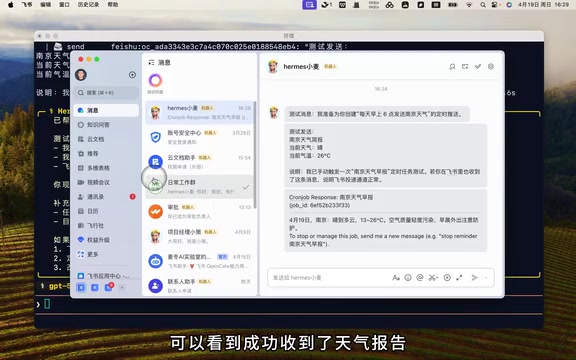
From the Feishu reception results, you can see that Hermes sent two messages: one is a test briefing to verify whether the Feishu channel is functioning properly, and the other is the complete weather report actually triggered by the scheduled task.
Why send a test message first? Feishu's message push relies on the Webhook mechanism of its open platform. A Webhook is essentially an HTTP callback interface—when an external system sends a POST request to a specific URL provided by Feishu, Feishu pushes the message in real time to the designated group. Hermes sends a test message before officially setting up the scheduled task precisely to verify the validity of the Webhook URL and network connectivity. This is a standard defensive practice in automation engineering, allowing configuration errors to be discovered before the task actually runs, preventing scheduled tasks from silently failing without anyone noticing.
The entire process requires no manual intervention—configure once and it runs long-term.
Scenario 2: Daily Inspirational Quotes Auto-Push
The second scenario is more lighthearted—having AI send you an inspirational quote every day.
Same approach, just have a conversation:
Generate a random inspirational quote at 8 AM every day and send it to Feishu
The scheduled task is set up instantly. Besides triggering tasks through conversation with Hermes, you can also test by manually entering commands:
Type /cron run, paste in the task ID, and press Enter. After a brief moment, you'll see the current inspirational quote on Feishu. From then on, you'll enjoy a bowl of carefully crafted "chicken soup for the soul" from Hermes every morning.
Scenario 3: Automatically Track GitHub Version Updates
The third case is what developers care most about—automatically tracking version updates of open-source projects.
Check the latest versions of Hermes Engine and OpenCloud on GitHub at 10 PM every night, summarize the updates and send them to me
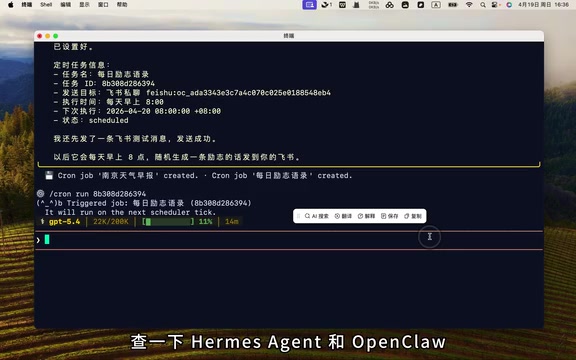
How does Hermes track GitHub versions? GitHub provides comprehensive REST APIs, where the
/repos/{owner}/{repo}/releases/latestendpoint directly returns a repository's latest Release information, including version number, release time, Release Notes, and other structured data. When Hermes executes version tracking tasks, it essentially uses the AI Agent to call these public APIs, then has the large language model perform semantic understanding and summary extraction on the returned JSON data, ultimately generating a human-readable nightly update report. This "API call + LLM summary" combination pattern is more stable than directly scraping webpage HTML and less likely to break due to page redesigns.
Here's a useful tip worth noting: after you type the test command and press Enter, Hermes won't execute the scheduled task immediately. Instead, it places the task into a task pool, waiting for Hermes to schedule it. This is a common queue scheduling mechanism in Agent architectures—tasks are serialized into a queue, and an independent scheduler triggers them at appropriate times, avoiding concurrency conflicts and resource contention. Scheduling time ranges from a few tens of seconds to a few minutes, so patience is needed.
Once execution is complete, Hermes compiles the project's latest updates into a nightly report and pushes it to Feishu. From then on, no need to manually check GitHub every day—just review the push notifications to stay on top of project developments.
Task Management: Three Methods to Choose From
Once tasks are running, management is equally simple. Hermes provides three management approaches covering different usage preferences.
Method 1: Conversational Management
The simplest and most intuitive approach—operate directly in conversation:
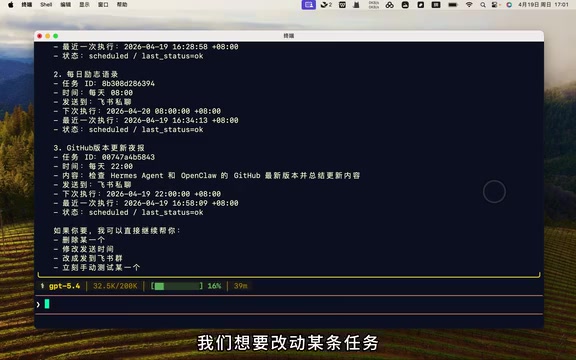
- View tasks: Ask "What scheduled tasks do I have now?" and Hermes will list all tasks with their IDs, execution times, and task descriptions
- Modify tasks: Simply say "Change the weather one to run at 6:30 AM every day"
- Delete tasks: Say "Delete the inspirational quotes one"
Method 2: Slash Command Management
Type /cron in the conversation interface to see all commands. The five commonly used ones are:
| Command | Function |
|---|---|
List | View all tasks |
Pause | Pause a task |
Resume | Resume a paused task |
Run | Execute once immediately |
Remove | Delete a task |
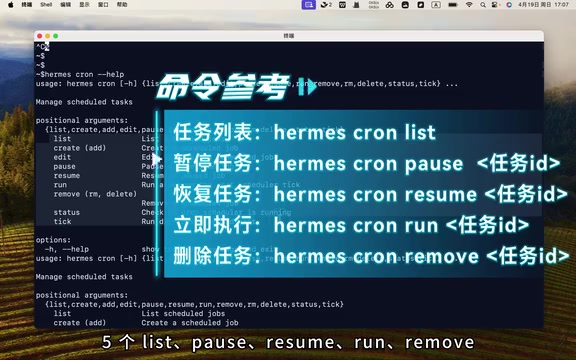
No need to leave the conversation interface at all—very efficient.
Method 3: Command-Line Operation
Type hermes cron help to view specific commands, which are basically the same as those in the conversation interface.
An important note: Except for the List command which requires no parameters, all other commands need the task ID appended at the end. Task IDs can be obtained through the List command—in the conversation interface, IDs are displayed directly; in the command line, they appear at the top.
Practical Recommendations and Use Case Summary
As the three scenarios above demonstrate, Hermes's scheduled task functionality covers a very broad range:
- Information aggregation: Weather forecasts, news summaries, stock quotes, and other scheduled pushes
- Content generation: Daily quotes, weekly report templates, study plans, and other auto-generated content
- Monitoring and tracking: GitHub version updates, competitor activity, website changes, and other automated tracking
The common characteristic of these tasks is: high repetition, fixed execution logic, but requiring manual operation every time. By delegating them to Hermes's scheduled tasks, you truly achieve "set it once, benefit long-term."
Related articles
 Tutorials
ChatGPT Plus Subscription Guide: Are GPT-5.5, image-2, and Codex Worth the Upgrade?
A detailed look at ChatGPT Plus features — GPT-5.5, image-2, and Codex — with a Plus vs Pro comparison and a complete step-by-step subscription guide for users outside the US.
 Tutorials
Harness AI Engineering in Practice: Using Claude Code to Master Enterprise-Level E-Commerce Development
Deep dive into Harness AI Engineering: master enterprise e-commerce development with Claude Code using the Rules, Skills, Wiki, and Changes framework.
 Tutorials
Cursor + Codex Dual-IDE Collaboration: A Practical Methodology for Open-Source Project Customization
A complete methodology for open-source project customization based on real-world experience, detailing the Cursor+Codex dual-IDE workflow, seven-stage process, MVP validation, and AI source code reading techniques.