Hermes Agent Setup in Practice: Run a Complete AI Agent Workflow in 3 Minutes

Install and run Hermes Agent in minutes with a single command, connecting any LLM backend you choose.
Hermes Agent is a framework-model separated AI agent platform that handles tool calls, memory, and task execution while connecting to your LLM of choice (Ollama, Anthropic, OpenRouter, etc.). This guide covers installation, initial configuration, first-run verification, essential commands, and beginner safety tips — no sudo required.
AI agents are rapidly becoming one of the hottest areas in tech. Unlike simply chatting with a large language model, an agent can actually execute tasks — manipulating files, running code, browsing the web, and creating scheduled jobs. This article walks through a practical guide to installing, configuring, and running Hermes Agent for the first time, so even beginners can get their first agent session up and running in just a few minutes.
It's worth clarifying the technical nature of agents first. The core difference between an AI Agent and a standard LLM conversation is the ability to act. Traditional LLM interactions are single-turn or multi-turn Q&A — the model just generates text. The agent architecture adds a closed loop of "perceive → decide → execute": agents can call external tools (Tool Use), access real-time information, break complex tasks into multi-step plans, and dynamically adjust subsequent actions based on results. This capability is typically implemented through frameworks like ReAct (Reasoning + Acting) or Plan-and-Execute, evolving the model from "answering questions" to "completing tasks."
What Hermes Is — It's Not a Language Model
The first key thing to understand about Hermes is: Hermes Agent itself is not a language model. It needs to connect to an external LLM to function. That model can be one running locally on your machine, or a cloud-based model accessed via API — such as Anthropic, Google, OpenRouter, or Ollama.
In one sentence: Hermes handles tool calls, memory management, and task execution, while the LLM you choose handles reasoning and generating responses. This decoupled design makes Hermes more like a "cognitive shell" — you can swap out the underlying reasoning engine at any time without affecting the agent's accumulated memory, skills, or configuration.
Hermes's "framework-model separation" architecture reflects the mainstream design philosophy in agent engineering today. Similar frameworks include LangChain, AutoGen, and CrewAI. The core advantage of this design is model agnosticism: given how quickly LLMs evolve, today's best model may be superseded in three months, and a decoupled architecture lets users switch reasoning engines without rebuilding the entire agent system. Ollama is the go-to solution for running local models, supporting dozens of open-source models including Llama, Mistral, and Qwen. OpenRouter is an aggregated API gateway that provides unified access to dozens of cloud model providers — particularly useful for users who want to compare different model capabilities side by side.
This also clarifies a common misconception: installing Hermes locally does not mean the AI model is running locally. If you choose a cloud provider, requests are still sent to that provider's servers. For a fully local setup, you'll need to run a suitable model separately via Ollama or LM Studio, then connect it to Hermes.
Installation: One Command Does It All
Installing Hermes Agent is straightforward. The only prerequisite to check is that Git is installed — any other dependencies will be handled automatically by the installer script.
The process involves copying the install command from the Hermes website and running it in your terminal. The installer checks dependencies, downloads Hermes Agent, creates a dedicated virtual environment for it, and registers the hermes command in your system.
Creating an isolated Python virtual environment for Hermes is standard engineering practice. Python's virtual environment mechanism isolates package dependencies, solving the "dependency hell" problem of library version conflicts between projects. For an application like an agent with complex dependency chains (typically involving dozens of third-party libraries), an isolated virtual environment ensures Hermes runs without interfering with your system Python environment or other projects.
By default, the agent is installed in the .hermes folder under your home directory, and the startup command is added to the local bin directory. Thanks to this design, regular users don't need to run the entry script with sudo, avoiding permission pollution. The no-sudo requirement is an additional security benefit: it avoids running scripts you don't fully control with superuser privileges, aligning with the Principle of Least Privilege — a fundamental security best practice.
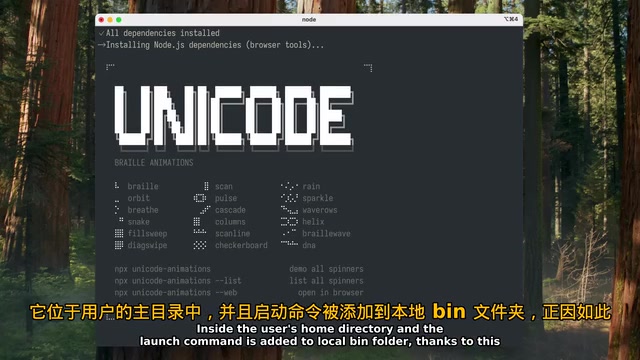
Once installation is complete, the initial configuration wizard launches automatically. The most important decision at this step is: which LLM model will Hermes use? There's no single "right answer" for everyone — it depends on which model you have access to, whether you have a subscription or API key, and whether you prefer a cloud or local solution.
If you don't have a strong preference yet, just connect whichever model you can access right now and start using it. After a day or two of getting familiar with how it works, you can switch providers and models as needed.
Verification and First Run
After the initial setup, you'll need to refresh your current shell environment so the hermes command is available directly in the terminal.
To confirm everything is configured correctly, run the hermes doctor command. This step is optional, but worth remembering — when something goes wrong, it checks Hermes's runtime environment and quickly identifies issues with installation, paths, configuration, or dependencies.
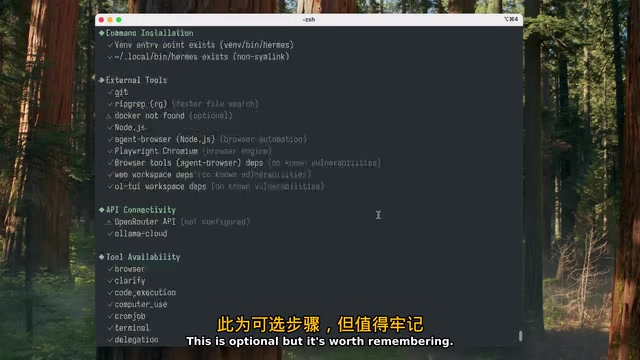
Once the main checks pass, you can start the agent. On startup, you'll see a splash screen showing the core details of your current configuration: the selected model, available tools, and skills.
A simple first test is to ask the agent to briefly introduce itself and list its available capabilities. When you get a normal response, you've simultaneously verified three things: Hermes started correctly, the API key is valid, and the selected model is responding.
One deployment recommendation worth noting: if you plan to run the agent continuously and grant it broader permissions, it's best to use a dedicated virtual machine, container, or separate machine. The tutorial author personally uses a Zima Board 2 single-board computer with 16GB of RAM and an extra SSD, which is more than sufficient for everyday tasks. Single-board computers (SBCs) provide always-on capability at extremely low power consumption (typically 5–15W) — compared to running a background process on your main PC, this is better suited for agent scenarios that require continuous listening, scheduled tasks, and responding to external messages. 16GB of RAM is plenty for running the agent framework itself, but running a mid-sized LLM locally at the same time (such as a 7B parameter model) typically requires at least 8GB of dedicated VRAM or larger unified memory. This hybrid architecture — "lightweight agent node + cloud LLM inference" — is the most cost-effective approach for individual and small-team agent deployments today.
This isolation approach is critical for security: an agent with file manipulation and code execution permissions should not be running on your primary workstation. Running an agent with broad system permissions in an isolated environment is a direct application of the "sandboxing" principle from AI safety in practice. If a "prompt injection attack" occurs — where malicious content embedded in documents, web pages, or external data processed by the agent sneaks into its instructions — the agent could perform unintended actions. Using a VM or container (such as Docker) for isolation contains potential damage to the sandbox, protecting the host system and sensitive data.
Common Commands and Data Management
Once the basics are working, a few high-frequency daily commands are worth knowing.
Switching Models and Configuring Tools
modelcommand: Opens the model configuration menu to switch providers, update API keys, or change the default model.toolscommand: Running it without arguments displays the list of currently available tools.gateway setupcommand: Used to connect messengers like Discord, Slack, and Telegram, enabling remote control of Hermes.
A handy shortcut: type a forward slash / and a list of all available commands will appear, each with a brief description. Browsing through it occasionally is a good way to review features and discover newly added capabilities.
All Data Stored Locally
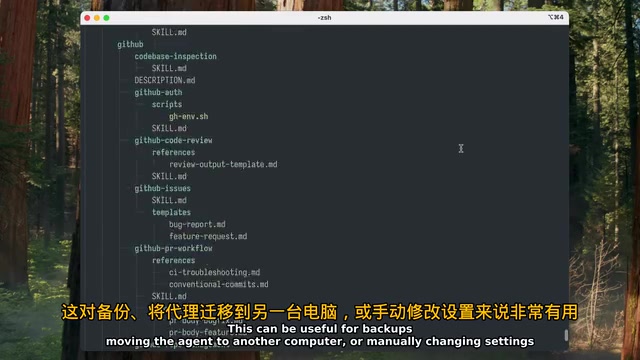
All of Hermes's core data — including configuration, sessions, memory, and skills — is stored in the .hermes folder under your home directory. The "memory" here isn't just a simple chat log: agent memory is typically divided into short-term memory (the context window for the current session), long-term memory (persistent storage across sessions, usually implemented with a vector database or structured files), and procedural memory (skills and operation patterns the agent has learned). Unlike the parametric knowledge baked into an LLM, this memory is dynamically accumulated and represents a personalized "agent state" that evolves through use.
This local storage approach makes it easy to back up, migrate to another machine, or manually modify settings.
Tips for Beginners
Finally, one important piece of advice from practitioners: don't connect every possible integration from the start. Voice features, messenger integrations, and similar capabilities are powerful, but configuring all of them at once during your first launch makes it nearly impossible to pinpoint where something goes wrong.
A more reliable path is:
- First confirm the agent itself and your chosen model are working correctly;
- Start with simple tasks in a test folder;
- Observe how the agent calls tools;
- Then gradually grant it more capabilities and data access permissions.
This "minimum viable start, incremental permissions" approach not only makes troubleshooting easier, but also aligns with the basic principles of safely deploying AI agents. At this stage — when the boundaries of agent capabilities aren't yet fully transparent — building trust incrementally is far more prudent than granting full permissions all at once.
In summary, Hermes's value lies in packaging the complex infrastructure of intelligent agents — tool calling, memory management, task scheduling — into a form deployable with a single command, while maintaining flexibility in model selection. For developers and tech enthusiasts who want to quickly validate AI agent capabilities, it's a remarkably low-barrier starting point.
Related articles
AWS AgentCore Gateway: Connecting AI A…
AWS AgentCore Gateway: Connecting AI Agents to Enterprise Backends with MCP
How AWS AgentCore Gateway acts as a primary MCP server to aggregate REST APIs, Lambda, and existing MCP services? Analyzing its AST real-time mapping, zero cold start, semantic search for tool overload, session isolation, and key injection security design, plus the architectural approach to decoupling enterprise AI agents from backends.

One Link Gives Figma AI a New Skill: Hands-On with MCP Connectors
Paste one MCP server link and the AI Agent in Figma gains new tool capabilities. We break down the setup flow, 20+ one-click apps, read/write permissions and execution policies, and the public HTTPS requirement.

Cognition SWE-2 in Practice: One Prompt to Handle the Whole Product Launch Process
Analyzing a YouTube creator's prompt for using Cognition SWE-2 to launch a product: a landing page, seven-email sequence, and non-buyer follow-up tool, plus how the 'test and report' constraint changes AI delivery quality.