Hermes + Qwen3.6 Local Deployment Tutorial: Build Your Private AI Agent at Zero Cost

Complete tutorial for locally deploying a Hermes + Qwen3.6 AI Agent system
This article explains how to build a zero-cost, unlimited-token AI Agent system by combining the Hermes Agent framework with the Qwen3.6 open-source LLM on a local GPU. It covers the full process including WSL Linux subsystem installation, GPU passthrough verification, llama.cpp inference framework deployment, and choosing the right model size based on available VRAM. Testing shows the 27B model runs smoothly on 24GB VRAM with generation speeds of 40-60 Token/s.
Why Choose the Hermes + Qwen3.6 Combination?
Subscription costs for various large language models keep rising, with many people spending hundreds per month on token quotas. If you have a decent GPU, you can run a complete Hermes + Qwen3.6 AI Agent system locally — zero monthly fees, unlimited tokens, and all data stays on your machine.
Core advantages of this combination:
- Qwen3.6 (Tongyi Qianwen 3.6) is one of the strongest open-source LLMs currently available, excelling in Chinese comprehension, logical reasoning, and code generation
- Hermes Agent provides a complete Agent framework with support for scheduled tasks and multi-platform integration (Telegram / Discord / WeChat, etc.)
- Together, they let you call your local model from your phone anywhere, anytime, executing various automated tasks
Technical Background on Qwen3.6: Qwen3.6 (Tongyi Qianwen 3.6) is an open-source large language model series developed by Alibaba's DAMO Academy. It uses a Transformer architecture deeply optimized for Chinese corpora. Unlike the GPT series, the Qwen series incorporates massive amounts of Chinese internet content, code repositories, and academic literature into its training data, giving it significant advantages in Chinese understanding and generation tasks. The 27B parameter version performs close to some commercial models on mainstream benchmarks like MMLU and HumanEval, while supporting context windows up to 128K tokens, making it suitable for long document analysis tasks.
About the Hermes Agent Framework: Hermes Agent is an open-source AI Agent orchestration framework designed for individuals and small teams. Its design philosophy draws from LangChain and AutoGPT architectures but emphasizes lightweight deployment and out-of-the-box usability. The core value of an Agent framework lies in upgrading LLMs from mere "chat tools" to "autonomous agents" capable of perceiving their environment, planning steps, invoking tools, and executing tasks. Hermes communicates with underlying models through standardized OpenAI-compatible API interfaces, meaning it can seamlessly switch between local models (such as those served by llama.cpp) and cloud models (like OpenAI or Anthropic) without requiring changes to upper-level business logic.
In practice, running the Qwen3.6 27B model on a 24GB VRAM GPU achieves approximately 40 tokens per second generation speed without optimization, reaching 50-60 Token/s after optimization — completely sufficient for daily use.
Token/s Speed Reference: For Chinese content, 1 token corresponds to roughly 0.5-1.5 Chinese characters; normal human reading speed is about 500-800 characters per minute, equivalent to approximately 8-15 tokens per second. Therefore, 40 Token/s generation speed already far exceeds human reading speed, and users barely experience any waiting. Key factors affecting token generation speed include memory bandwidth (not memory capacity), quantization precision, batch size, and KV Cache hit rate. GPUs with 24GB VRAM like the RTX 4090/3090 offer high memory bandwidth and are currently the optimal choice for consumer-grade local inference.
Preparing the Deployment Environment
Installing WSL Linux Subsystem
If you're on Windows, the first step is installing WSL (Windows Subsystem for Linux). WSL is a Linux compatibility layer built into Windows 10/11 that allows users to run Linux binaries directly in a Windows environment without a virtual machine or dual-boot setup. WSL2 uses a real Linux kernel (implemented through a lightweight Hyper-V virtual machine), offering significant improvements in file system performance and system call compatibility compared to WSL1. For AI inference scenarios, Microsoft partnered with NVIDIA to implement GPU passthrough, allowing programs within WSL2 to directly access the host machine's NVIDIA GPU for CUDA computing with minimal performance overhead, essentially matching native Linux performance.
Open PowerShell as administrator and run the one-click installation command to deploy Ubuntu 24.04.
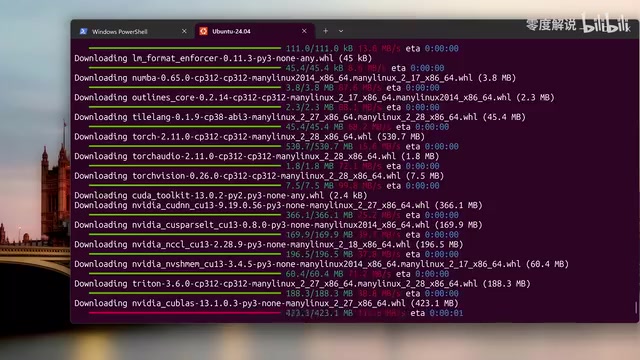
The installation takes some time. Once complete, the system will require a restart. Bookmark this tutorial page before restarting so you don't lose it. After restarting, continue installing Ubuntu 24.04 and set up your username and password.
After successful installation, you'll see the Ubuntu system option in the Windows Terminal dropdown arrow. Click it to enter the Linux environment.
Verifying GPU Passthrough and Installing Dependencies
Once inside the Linux system, first confirm that the NVIDIA GPU has successfully passed through to the WSL environment. Run the nvidia-smi command to check if the GPU is properly recognized.
If you get an error, it's most likely because your GPU driver version is too old. Download the latest driver for your model from the NVIDIA website — make sure to select the correct version for desktop or laptop. After updating the driver, install Python, pip, and other dependencies.
Model Download and Launch
Installing the CUDA Toolkit
Considering varying VRAM sizes among users, llama.cpp is recommended over vLLM or DeepSpeed for better stability and more VRAM-friendly operation.
llama.cpp Technical Principles: llama.cpp is a pure C/C++ inference framework developed by Georgi Gerganov, originally designed to run LLaMA models on MacBooks, and has since evolved into a universal inference engine supporting virtually all mainstream open-source models. Its core technology is the GGUF quantization format, which compresses model weights from FP32/FP16 to lower precision formats like INT4 and INT8, reducing model size by 50%-75% while maintaining over 90% of model performance. Compared to vLLM and DeepSpeed, llama.cpp has lower hardware requirements, needs no complex distributed configuration, and runs smoothly on a single consumer GPU — making it the go-to solution for personal local deployment.
If you encounter errors during installation, it's usually due to a missing CUDA toolkit. Install the approximately 2GB CUDA toolkit first, then set the path and recompile — compilation takes about 5 minutes.
Choosing the Right Model Size Based on VRAM
Model selection depends on your VRAM size. Here are the recommendations:
| VRAM Size | Recommended Model | Model Size |
|---|---|---|
| 24GB | Qwen3.6 27B | ~17GB |
| 12-16GB | Qwen3.5 9B | Smaller |
| 8GB | Qwen3.5 4B | Even smaller |
| 4-6GB | Qwen3.5 0.8B/2B | Smallest |
The model file size being much smaller than the theoretical size corresponding to the parameter count is thanks to GGUF quantization compression. For example, the 27B model has an original size of approximately 54GB at FP16 precision, but after INT4 quantization it compresses to about 17GB, with VRAM usage reduced accordingly.
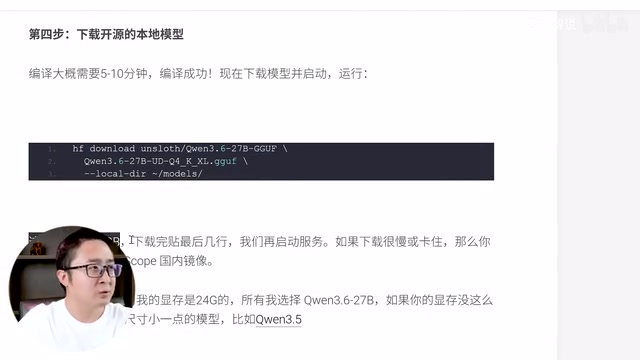
Users in China who cannot directly access HuggingFace can switch to ModelScope or domestic mirror sites for downloads. For the 27B model, at 100Mbps download speed it takes about 2 minutes to complete.
Starting the Local Model Service
After downloading, start the model service with the appropriate command. If your model differs from this tutorial, make sure to replace the model name in the command. Once started successfully, visit localhost:8080 in your browser to see the chat interface.
The model enables deep thinking mode (similar to CoT reasoning) by default. If you want faster response times, press Ctrl+C to stop the service and restart with the command that disables deep thinking.
About CoT Reasoning and Deep Thinking Mode: CoT (Chain-of-Thought
Related articles
 Tutorials
ChatGPT Plus Subscription Guide: Are GPT-5.5, image-2, and Codex Worth the Upgrade?
A detailed look at ChatGPT Plus features — GPT-5.5, image-2, and Codex — with a Plus vs Pro comparison and a complete step-by-step subscription guide for users outside the US.
 Tutorials
Harness AI Engineering in Practice: Using Claude Code to Master Enterprise-Level E-Commerce Development
Deep dive into Harness AI Engineering: master enterprise e-commerce development with Claude Code using the Rules, Skills, Wiki, and Changes framework.
 Tutorials
Cursor + Codex Dual-IDE Collaboration: A Practical Methodology for Open-Source Project Customization
A complete methodology for open-source project customization based on real-world experience, detailing the Cursor+Codex dual-IDE workflow, seven-stage process, MVP validation, and AI source code reading techniques.