Home Data Center Setup Guide: A Complete Self-Hosted Private Cloud Implementation
A comprehensive guide to building enterprise-grade private cloud infrastructure at home for data sovereignty
Explore how to build a home data center from hardware selection to software deployment. Learn about data sovereignty drivers, cost analysis, technical architectures combining Proxmox VE and Docker, operational challenges, and hybrid strategies balancing control with reliability.
When Home Labs Go "Production-Grade"
Recently, a tech enthusiast from Alberta, Canada shared his home mini data center project on Reddit, sparking heated discussion in the self-hosting community. He called it an "over-engineered production-grade home mini data center" — a self-deprecating description of how individuals can build enterprise-grade private cloud infrastructure at home.
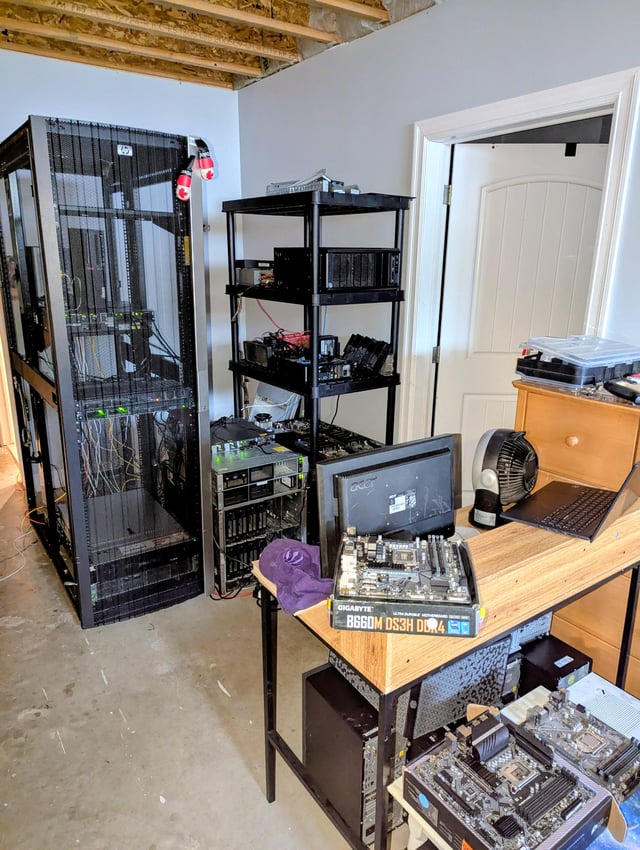
While such projects may seem niche, they reflect a growing trend: more developers and tech geeks are no longer content to entrust their data and services entirely to public cloud providers, instead choosing to control the entire stack — from hardware to software — within their own physical space.
Why Build a Home Data Center?
Data Sovereignty and Privacy Control
The core driver of the self-hosting movement is the pursuit of data sovereignty. The self-hosting movement emerged in the mid-2010s, gaining widespread attention following the Snowden revelations (2013) about mass data surveillance. Its central concept of "data sovereignty" originates from the intersection of law and technology — referring to the complete control, ownership, and disposition rights individuals or organizations have over their data, free from unilateral constraints of third-party terms of service. The EU's General Data Protection Regulation (GDPR, effective 2018) further elevated data sovereignty from a geek community concept to mainstream policy discussion. Reddit communities like r/selfhosted and r/homelab now have hundreds of thousands of members, and GitHub's awesome-selfhosted project lists over 300 self-hostable open-source applications, reflecting the scale and vitality of this movement.
When your photos, documents, code repositories, and home security footage are stored on AWS, Google Cloud, or some subscription SaaS service, you've effectively surrendered ultimate control over that data. In a home data center, all data is physically stored on hard drives you can touch, immune to third-party terms changes, account bans, or service shutdowns.
Cost and Long-Term ROI
For power users, public cloud bills scale linearly with storage and compute demands. Taking object storage, virtual machines, and managed databases as examples, long-term operational costs are quite substantial. While building a home data center requires significant upfront hardware investment, the marginal costs over years of use are extremely low — especially suitable for scenarios requiring large storage capacity or continuously running multiple services.
Sharpening Technical Skills
Building such a system is itself excellent learning practice. From network planning, virtualization, and container orchestration to backup strategies, UPS power management, and thermal management, each component involves real engineering trade-offs. This "full-stack" hands-on experience is irreplaceable by any tutorial.
Home Data Center Hardware and Software Architecture
Hardware Selection
Typical home mini data centers are built around several hardware categories:
- Compute Nodes: Options include used enterprise servers (like Dell PowerEdge, HP ProLiant) or clusters of Mini PCs, balancing performance with noise and power consumption
- Storage Arrays: NAS solutions based on ZFS or RAID, providing data redundancy and snapshot capabilities, with TrueNAS being a community favorite. ZFS (Zettabyte File System) was originally developed by Sun Microsystems in 2001 and continued as open source through the OpenZFS project. It unifies what traditionally were separate volume managers, RAID controllers, and file systems. ZFS's Copy-on-Write mechanism ensures data writes never directly overwrite existing data, fundamentally preventing file system corruption from power loss; snapshot functionality records filesystem historical states with near-zero overhead; RAIDZ provides multiple redundancy levels without expensive hardware RAID cards.
- Networking Equipment: Enterprise switches, soft routers (like pfSense, OPNsense), VLAN-capable network architecture for service isolation. pfSense (based on FreeBSD) and OPNsense (a more active community fork) are two mainstream open-source firewall/router operating systems, far exceeding consumer router capabilities. VLANs (Virtual LANs) create logically isolated subnets on the same physical network, separating service networks, IoT devices, and daily clients — even if one device is compromised, attackers cannot laterally move to segments containing important data.
- Power and Cooling: UPS ensures graceful shutdown during power loss, rack fans and proper ventilation affect hardware longevity. The core function of UPS (Uninterruptible Power Supply) isn't simply backup power, but encompasses power quality filtering and graceful shutdown buffering — the former filters surges and voltage fluctuations protecting hardware, the latter provides sufficient time for orderly shutdown during outages, avoiding ZFS write interruptions or file system corruption. Modern UPS units paired with open-source software like NUT (Network UPS Tools) enable power monitoring and automated shutdown script triggering. Stability comes from these easily overlooked infrastructure elements.
Software Stack Deployment
Software stacks typically combine virtualization and containerization. Proxmox VE is widely adopted as an open-source virtualization platform — it's a Debian Linux-based platform integrating KVM (Kernel Virtual Machine, for running full OS virtual machines) and LXC (lightweight Linux containers, sharing host kernel, faster startup) under a single web management interface. Core functionality is available without subscription, enabling individuals to run virtually identical virtualization infrastructure at home as in enterprise environments.
At the container layer, Docker packages applications and all dependencies into portable images, while Docker Compose defines multi-container application topology in a single YAML file — the mainstream approach for managing home service stacks. For users wanting to introduce cluster orchestration capabilities, k3s (Rancher Labs' lightweight Kubernetes distribution) reduces K8s operational complexity to levels acceptable for home environments. On top of this virtualization and containerization stack run self-hosted applications like:
- Nextcloud (private cloud storage)
- Home Assistant (smart home)
- Jellyfin (media server)
- Gitea (code hosting)
and others.
Challenges and Considerations in Home Server Operations
Home data centers aren't without drawbacks. First is operational burden: you're both architect and sole operations engineer — security patches, troubleshooting, data backups all depend on you. Second is the reliability ceiling: home network public bandwidth and power stability ultimately can't match the multi-path redundancy of professional data centers.
Therefore, many practitioners adopt a hybrid strategy — self-hosting core data while backing up critical data off-site or to cloud, balancing control with disaster recovery. This hybrid strategy closely resembles enterprise hybrid cloud architecture: primary data stored on local NAS (high performance, low latency, large capacity); critical data backups synced to lower-cost object storage services (like Backblaze B2, Wasabi); externally accessible services exposed via reverse proxy with Cloudflare Tunnel, eliminating the need to open inbound ports on home routers and avoiding security risks of directly exposing home IPs. This design follows the 3-2-1 backup principle: at least 3 data copies, on 2 different media types, with 1 copy off-site — finding pragmatic balance between cost, control, and disaster recovery.
Additionally, power consumption and noise are real long-term operational costs. Enterprise hardware power draw and fan noise require serious consideration in home environments, which is why many turn to low-power solutions.
Building Your Private Cloud from Scratch
For interested readers, I recommend starting with an old computer and a Docker container, gradually building your own private cloud. This path offers not just practical value, but rare engineering joy and sense of accomplishment.
This Canadian netizen's sharing resonated because it represents an ideal of technological autonomy: in an era of highly centralized cloud computing, some still choose to personally control their digital infrastructure. This isn't merely cost or privacy calculation, but a return to technological essence — understanding where every bit flows, controlling the lifecycle of every service.
Key Takeaways
- Self-hosting empowers data sovereignty and privacy control, avoiding third-party service dependencies
- Initial hardware investment is high, but long-term marginal costs are low, suitable for storage-intensive and always-on scenarios
- Typical stack combines Proxmox VE virtualization with Docker containerization, running applications like Nextcloud and Home Assistant
- Operational responsibilities include security maintenance, backup strategies, and power/thermal management
- Hybrid strategies (local primary + cloud backup) balance control with disaster recovery following 3-2-1 principles
- Home data centers offer irreplaceable full-stack engineering learning opportunities
Related articles

Salesforce Acquires Rune for $375M: AI Logistics Tech Bolsters Defense Business
Salesforce reportedly acquires defense tech startup Rune for $375M. Rune's AI logistics tech will strengthen Salesforce's Missionforce defense platform, continuing its M&A spree.

Why Fair Use Benefits Everyone in the AI Era
Starting from a Hacker News discussion, this article analyzes the legal logic and controversies of the fair use principle in AI training and content creation, and its dual impact on creators and the tech ecosystem.

Mistral Large 4 Open-Sources a Trillion Parameters, Microsoft Offers Voluntary Severance to 60,000 Employees
Mistral Large 4 open-sources a trillion-parameter multimodal model with a coding agent score of 48; SanDisk earnings show AI inference reshaping NAND demand; Google Gemini adds in-app file editing, OpenAI raises Codex quotas, and Microsoft offers voluntary severance to 60,000 employees.