How Do You Review AI-Written Code? Open-Source Tool Thimble Adds a Reading Interface to Claude Code
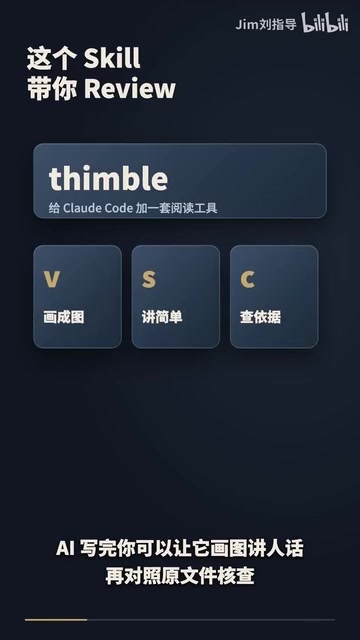
Thimble adds a reading interface to Claude Code, using diagrams, explanations, and verification to help people keep up with AI coding speed.
Thimble is an open-source reading and verification tool that hooks in after Claude Code, not a code generation tool. It tackles the problem of AI outputting dense, hard-to-digest text after changing a dozen files at once, offering three core interactions: V turns text analysis into interactive cards for a quick global view of multi-file changes; E explains selected terms and S shortens overly long answers, resolving reading sticking points in place; C calls a second Claude to verify the AI's judgments against your files, enabling AI cross-validation. The article notes the bottleneck in AI programming is shifting from generation to understanding and verification, and Thimble turns review from a binary choice of "look or don't look" into a continuous, tool-assisted understanding process — though it can't make trust decisions for you.
AI changes a dozen files in one go, then just replies "done" — do you open the code and read it line by line, or just run it and call it good if it works?
An open-source tool called Thimble adds a reading interface to Claude Code: after the AI finishes writing code, you can have it draw diagrams and explain things in plain language, then cross-check against the original files. What it solves isn't "can AI write code" but "can humans still keep up with the speed at which AI writes code."
What Thimble Is: Adding a "Readable Layer" on Top of AI Output
Thimble's positioning is clear — it's not another code generation tool, but a reading and verification tool for after AI programming. It hooks in after Claude Code, converting the AI's analysis and changes into interactive forms that are easier for humans to digest and understand.
According to a demo by a Bilibili creator, after the AI completes multi-file changes, the raw output is often a dense wall of analysis text that's painful to read. What Thimble does is turn this "gibberish" layer into an interface that people can understand, question, and verify.
This approach actually hits on a neglected link: the faster AI writes, the easier it is for human comprehension to fall behind. The value of the tool isn't in making AI write more code, but in making it easier for you to keep asking questions.
Claude Code is a command-line AI programming assistant launched by Anthropic. It can directly read project files, execute commands, and make changes across multiple files in the terminal. As a companion tool, Thimble needs to integrate into Claude Code's workflow — typically, after the AI completes a round of changes, Thimble takes over the output and renders it as an interactive interface. This "hooks in after" positioning means it doesn't change Claude Code's generation logic, but rather re-organizes existing output, so it has some dependency on the original tool's version and interface.
Three Core Actions: Draw, Explain, Verify
Thimble's interaction design revolves around a few keyboard shortcuts, each corresponding to a specific reading need.
Press V: Turn Text Analysis into Interactive Cards
Faced with a large block of hard-to-digest analysis, press the letter V to generate interactive cards. Who did what, and in what order — it's easier to see when it's in a diagram.
This is essentially having the AI reorganize "process narration" into a "structural view." For multi-file changes, this visualization quickly builds a global impression instead of being led along by the order of the text.
Press E / S: Explain Terms You Don't Understand, Shorten If Too Long
When you see a term you don't understand, select it and press the letter E to get an explanation; if the previous answer is too long, press the letter S to shorten it and make it simpler.
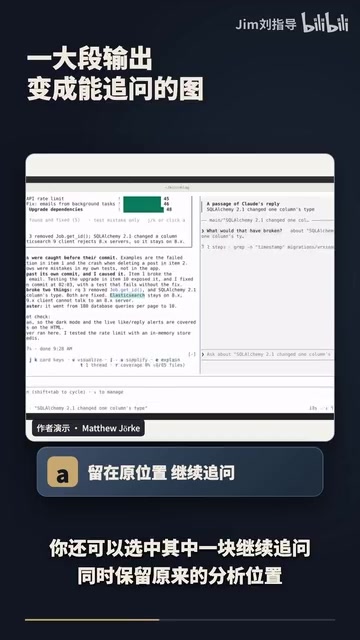
These two actions target "sticking points" in reading: terms you don't understand, explanations that are too convoluted. Rather than searching yourself or repeatedly asking, you can resolve it right there in the reading interface and keep your train of thought going.
Press C: Call Another Claude to Verify a Judgment
The action better suited for review is — select a judgment made by the AI and press the letter C, and it will call another Claude to check that statement against your files.

This is essentially turning "AI talking to itself" into "AI cross-validation." The endpoint of reading moves from "it says it's done" to "on what basis does it actually say that."
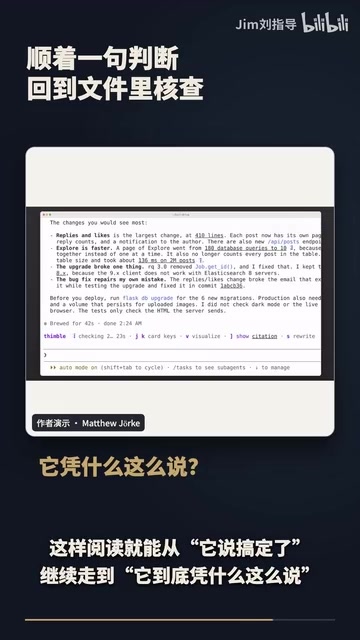
For people who don't read code line by line, this action offers a compromise: you don't have to read every line yourself, but you're not unconditionally trusting either — instead, you have another AI verify key judgments against the files.
Cross-validation here refers to using another independent AI instance to re-check the same judgment, rather than relying on the same model's self-confirmation. Because large language models have a tendency to "talk to themselves" — they may give conclusions about the same piece of code that are internally consistent but actually wrong — introducing a second Claude and forcing it to check against the source files can partially break this self-reinforcement. However, this method isn't foolproof: the two models may share similar training biases, and the verification results still require humans to make the final judgment based on the actual file contents.
Why This Kind of Tool Has Value
The bottleneck in AI programming is shifting from "generation" to "understanding and verification." When AI can change a dozen files in one go, human review capacity becomes the short board.
Thimble represents the direction of a new category of tools: not pursuing stronger generation capabilities, but filling in the reading, questioning, and verification links in human-machine collaboration. It turns review from a binary choice of "look or don't look" into a continuous process of "using tools to assist understanding."
The author also candidly says in the video that they wouldn't read code line by line anyway. This is probably the real state of many people. The question isn't whether to review, but what way of reviewing is realistic.
An Open Question: Will You Still Review AI-Written Code?
The question raised in the video is worth thinking about for everyone who uses AI to write code: will you still review AI-written code?
Read it line by line yourself, have another AI look at it again, or just let it pass if it runs? Three approaches correspond to three levels of trust, and also to three risk preferences. Thimble provides a tooled implementation of the second path — using AI to verify AI, but keeping the human entry point for questioning.
Tools can't make decisions for you, but they can make "wanting to ask questions" easier. That's perhaps its most tangible value.
One-line Summary
Thimble adds a reading interface to Claude Code, using diagrams, explanations, and verification to help people keep up with the speed at which AI writes code.
Paragraph Summary
Thimble is an open-source reading and verification tool that hooks in after Claude Code, rather than a code generation tool. It addresses the problem of AI outputting large blocks of hard-to-digest text after changing a dozen files at once, providing three core interactions: press V to turn text analysis into interactive cards for quickly building a global impression of multi-file changes; press E to explain selected terms and S to shorten overly long answers, resolving reading sticking points on the spot; press C to call another Claude to verify the AI's judgments against the files, achieving AI cross-validation. The article points out that the bottleneck in AI programming is shifting from generation to understanding and verification, and Thimble turns review from a binary choice of "look or don't look" into a continuous process of using tools to assist understanding — but tools can't make trust decisions for people.
Related articles

How Does Chemotherapy Damage Ovarian and Bone Health?
Alkylating agents like cyclophosphamide in chemotherapy can cause ovarian toxicity, affecting bone health in breast cancer patients. Learn about baseline DEXA scans, biennial follow-up, and monitoring for aromatase inhibitor, tamoxifen, and GnRH agonist users.

USMLE Radiology 12-Question Challenge: Core Imaging Diagnosis Points Explained
Using a 12-question USMLE radiology quiz, this article explains key imaging points for pneumothorax, pleural effusion, intussusception, bowel obstruction, Salter-Harris classification, gout, SAH, and ischemic stroke, plus MRI in pregnancy and multiple myeloma.

Hot Flashes and Menopausal Symptoms After Cancer: A Guide to Non-Hormonal Management
How to manage menopausal symptoms after cancer? This article reviews guideline-recommended non-hormonal options: water-based lubricants, SNRIs/SSRIs, gabapentin, plus psychological support and environmental adjustments.