How Hard Is It to Run LLMs Locally? This Open-Source Tool Compresses 5 Steps Into a Double-Click Install

An open-source graphical wizard compresses local LLM installation into a three-step double-click, shifting the barrier from "configuring an environment" to "checking your VRAM."
Addressing the pain point of locally running LLMs — where environment setup, weight downloads, and dependency configuration are all interlinked and errors are hard to understand — an open-source project provides a purely graphical installation wizard that compresses the process into a double-click. The wizard auto-detects GPU model, VRAM, disk space, and installed components, then lists only models that can actually run and marks recommendations. Existing local models are auto-discovered and reused to avoid redundant downloads. It supports context length switching from 4,000 to 64,000, real-time VRAM estimation, download progress with resume, and a VRAM recheck after download. On failure, it clearly explains where it stopped, why, and how to fix it, with one-click retry. After installation, it generates a desktop shortcut and console for model management, auto-start toggling, LAN sharing, and one-click uninstall — entirely offline, free, and open source.
Why Is Running LLMs Locally So Hard?
Most people who want to run large language models locally have been through this kind of frustration: set up a virtual environment, install an inference engine, download model weights, configure environment variables, hook up an agent framework — every step depends on the last, and if any one of them gets stuck, the whole process grinds to a halt.
What makes it worse is the error messages. For non-technical users, the red text scrolling across the terminal is basically gibberish. You just want to "chat with an AI locally," but you get blocked by CUDA version mismatches, dependency conflicts, and path issues.
According to a Bilibili creator, his open-source project tackles exactly this pain point: compressing the entire process into a purely graphical installation wizard that supposedly takes just a "double-click" to complete.
A few terms mentioned here deserve a bit of explanation. CUDA is NVIDIA's parallel computing platform and programming interface, and the vast majority of local inference engines rely on it to tap into GPU compute. It has strict version compatibility requirements with graphics drivers and inference engines, and version mismatches are almost the most common cause of local deployment failures. Dependency conflicts occur when multiple software packages require different versions of the same library — especially common in the Python ecosystem, and usually mitigated by virtual environment isolation. Model weights are the parameter files saved after model training, often dozens of gigabytes in size, which need to be downloaded locally before inference can run. These steps are tightly coupled, which is precisely the root of "every step depends on the last, and if one gets stuck, everything fails."
Three Steps to Complete Installation: From Hardware Detection to Desktop Shortcut
The logic behind this wizard isn't complicated, but every step solves a concrete problem.
When you open the wizard, it automatically reads your GPU model, VRAM size, disk space, and installed components, then tells you there are only three steps left. Once installed, it generates a launch shortcut directly on your desktop — no need to memorize command-line arguments.
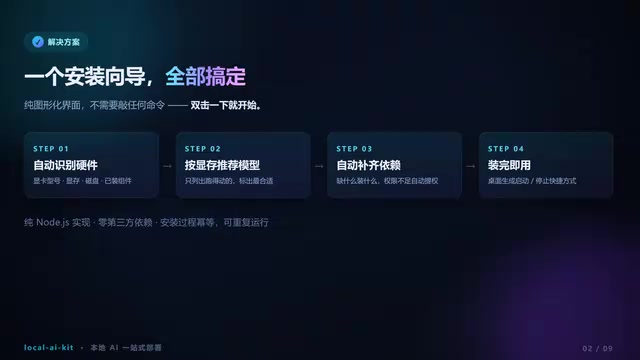
After installation, the console lets you add or remove models at any time, toggle auto-start on boot, enable LAN sharing, and supports one-click uninstall. Use it and go — it won't leave behind hard-to-clean residue in your system.
Choosing a Model: Only Lists What Can Actually Run, Auto-Discovers Existing Models
The model selection step does two things to simplify.
First, it only lists models your VRAM can handle, and marks the best fit with a "Recommended" tag. Second, models already on your machine are automatically discovered and reused directly, so you don't need to re-download tens of gigabytes of weight files.
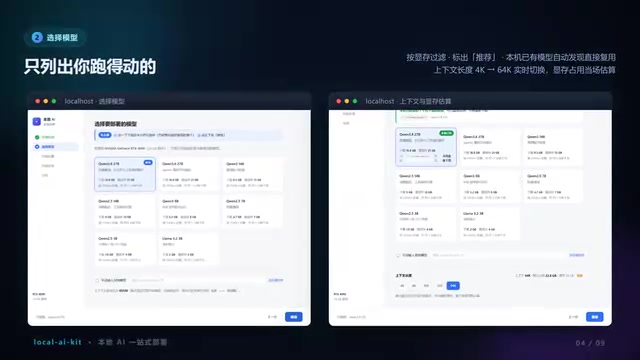
Context length supports real-time switching from 4,000 to 64,000, with VRAM usage estimated on the spot. The storage location step comes with disk usage and space warnings — if there isn't enough, it stops you rather than letting you proceed with a task that's bound to fail. If your GPU driver is too old, it also warns you before the download starts.
VRAM is the high-speed memory built into the graphics card, where model weights, context caches, and intermediate computation results all need to fit — which is why it often becomes the bottleneck before raw compute does. What precision a model can be loaded at and how long a context it can support are basically determined by VRAM size. Context length refers to the number of tokens a model can "remember" at once. The range from 4,000 to 64,000 means that long-document processing capability and VRAM usage scale up together — which is exactly why the wizard needs to estimate VRAM usage in real time. Being able to filter backward by VRAM and provide a "Recommended" tag effectively turns the frequent confusion of "which model should I pick?" into a single calculable match.
Download and Verification: Resume Support, VRAM Recheck, Retry on Failure
During model download, the interface shows overall progress, real-time speed, and estimated time remaining. If it gets interrupted, no worries — just double-click again to resume.
After the download completes, there's an extra safety check: load the model one more time to confirm it actually fits in VRAM. If it fails, it won't just throw an error at you — it clearly explains where it stopped, why, what you can do about it, and supports one-click retry.
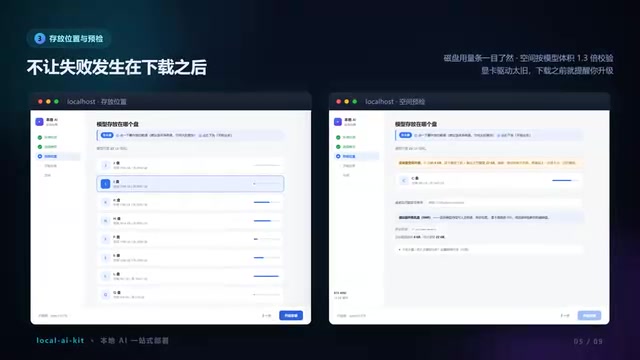
This design approach is worth noting: it treats "failure handling" as part of the workflow rather than dumping exceptions on the user. For people unfamiliar with the command line, understanding "what went wrong and how to fix it" is far more important than just seeing an error code.
Resume support means that after an interrupted download, you can continue from where it left off rather than starting over. For weight files that are tens of gigabytes, this is essential — a single network hiccup could waste hours of downloading. VRAM recheck means performing an actual verification before formal loading: model file size and real runtime usage aren't entirely equivalent — quantization methods, parallelism strategies, and context settings all affect the final requirements. Pre-loading once can block the "looks like it'll run, crashes the moment it starts" problem before you get into actual use, and also saves users from facing a crash with no clear explanation.
After Installation: Console Model Management and LAN Sharing
Once installation is complete, three icons appear on your desktop. The console among them is your daily management entry point.
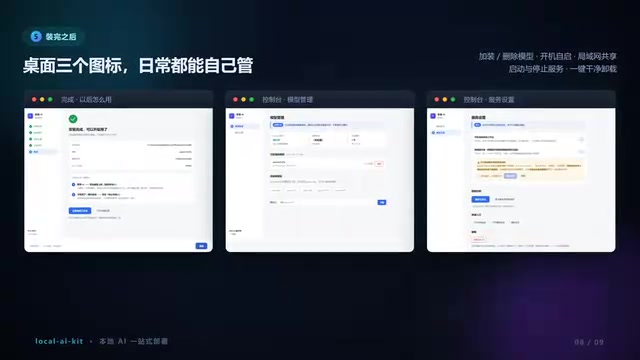
In the console, you can add or remove models at any time, toggle auto-start on boot, enable LAN sharing, and cleanly uninstall with one click. The entire process is offline, free, unlimited, and all data stays on your own GPU.
The project is fully open source. The author included a QR code in the video — scan it to find the download link. Unzip, double-click, install — that's all three steps.
What This Kind of Tool Means
The barrier to running LLMs locally is shifting from "can you configure an environment?" to "do you have enough VRAM?" What this open-source wizard does is encapsulate the complexity of environment configuration, letting hardware detection, model recommendations, download management, and failure recovery all be handled automatically by the program.
It hasn't made local inference technically simpler, but it has made the operational workflow straightforward enough: double-click, click next, start using. For people who want to try local models but don't want to wrestle with the command line, this might be one of the most effortless entry points available right now.
Of course, what the tool can cover is still limited to the installation and operation level. Model selection, parameter tuning, and agent framework integration still require users to make their own judgments. Whether the open-source project can keep up with the update pace of inference engines in the future is also worth watching.
LAN sharing means letting other devices on the same network (like phones or laptops) access the model service running on this machine — essentially turning your local GPU into a small private inference server, with data never leaving the internal network. An inference engine is the core component that actually executes model computation, such as llama.cpp, Ollama, vLLM, etc. These iterate frequently, with interfaces and default parameters changing often. This is exactly the key point behind "whether it can keep up with the update pace": the value of a wrapper-type tool depends largely on whether it can continuously adapt to changes in the underlying engine. Otherwise, once upstream upgrades, even a user-friendly wizard can quickly become obsolete.
One-line Summary
An open-source graphical wizard compresses local LLM installation into a three-step double-click, shifting the barrier from "configuring an environment" to "checking your VRAM."
Paragraph Summary
Addressing the pain point of locally running LLMs — where setting up environments, downloading weights, and configuring dependencies are all interlinked and errors are hard to understand — an open-source project offers a purely graphical installation wizard that compresses the process into a double-click. The wizard first auto-detects GPU model, VRAM, disk space, and installed components, then only lists models that can actually run on your VRAM with recommendations marked, and auto-discovers and reuses existing local models to avoid redundant downloads. During installation, it supports real-time context length switching from 4,000 to 64,000, on-the-spot VRAM estimation, download progress display with resume support, and an extra VRAM recheck after download. On failure, it clearly states where it stopped, why, and what to do, with one-click retry. After installation, it generates a desktop shortcut and console for adding/removing models, toggling auto-start, enabling LAN sharing, and one-click uninstall — entirely offline, free, and open source.
Related articles

Should U.S. College Fraternities Be Banned? A Researcher's Incisive Observations
Why not just ban U.S. college fraternities? A researcher finds the key resistance comes from decision-makers' own fraternity identities and schools' "willful ignorance."

Microsoft Discovery: Accelerating Scientific Discovery with AI Agents
Microsoft's Discovery platform runs specialized AI agents to help researchers screen and prioritize the most promising compounds and experimental paths, reducing experiments and accelerating scientific discovery.

Cambridge Heavy Industries Secretly Develops Desktop-Scale Nuclear Fusion Device
Cambridge Heavy Industries is secretly developing a desktop-scale laser-driven nuclear fusion device, targeting the equipment supply market for fusion power plants. This article analyzes its miniaturization technology path, commercialization logic, and unique positioning in the fusion startup wave.