How Much Access Should You Give Your AI Assistant? Testing Meta Muse, OpenAI Dots, and Instinct

A hands-on comparison of Muse, Dots, and Instinct reveals the real cost of convenience and the dangers of over-permissioning your AI assistant.
Based on The Vergecast podcast, this piece compares three agentic AI assistants — Meta Muse, OpenAI Dots, and Instinct — across three distinct product philosophies: embedded in messaging, standalone app, and platform-native. Instinct wins for daily usability, Dots suits business users, and Muse offers the highest ceiling but demands the most data. Two standout insights emerge: rambling at your AI works better than precise commands, and a near-accidental car purchase illustrates exactly why permission creep in agentic systems is a serious risk.
Nearly every company in Silicon Valley is working on the same thing right now: building an AI assistant you can chat with, one that dispatches agents to handle tasks on your behalf. Meta's Muse, OpenAI's Dots, and startup Instinct all share the same core premise — yet they reveal strikingly different philosophies when it comes to interaction style, use cases, and permission boundaries.
On The Verge's podcast The Vergecast, host David Pierce sat down with journalist Allison Johnson, who had spent time testing all three products, for a candid conversation. Their central question: how much information should you actually hand over to your AI assistant?
Three Products, Three Takes on the Same Idea
The three products Allison tested neatly represent the three dominant form factors for agentic AI assistants. Instinct lives primarily inside iMessage — an assistant that exists within your existing messaging apps. Muse is a standalone app Meta built from scratch. Dots, meanwhile, is a feature embedded inside the larger ChatGPT ecosystem.

Of the three, Allison found herself most drawn to Instinct. The reason: it's "everywhere yet invisible" — because it lives in her texts, she can fire off a message from her smartwatch or use it via CarPlay. Crucially, the phone keyboard constraint forces it to respond in terse, no-nonsense terms: "Got it, working on it," or sometimes just an emoji.
That "lives in your messaging app" design comes with trade-offs, though. Instinct frequently runs into Cloudflare's "prove you're human" verification walls, and once it opens an in-app browser, you're back to doing things manually. Muse, by contrast, offers a more complete list of connectors you can authorize with a tap — a higher functional ceiling, but also more complexity.
These three form factors reflect distinct philosophies about what an agentic AI assistant should be. Agentic AI refers to systems that don't just answer questions but autonomously execute multi-step tasks on a user's behalf — searching for flights, filling out forms, sending emails — rather than just telling you "here's how you could do that." The fundamental difference from traditional chatbots is that these systems have permission to call external tools and read and write real data; their action boundary extends well beyond the chat window. The "lives in messaging" approach (like Instinct) prioritizes zero-friction onboarding, trading functional ceiling for the lowest possible habit-switching cost. Standalone apps (like Muse) trade a richer connector ecosystem for a higher capability ceiling. Embedding within an existing AI platform (like Dots within ChatGPT) tries to layer agent capabilities on top of an already-established user trust relationship. Each path involves real trade-offs — fundamentally, a negotiation between "low barrier to entry" and "high functional ceiling."
Dots Is "Work Software That Will Also Order You a Burrito"
David's characterization of Dots was sharp — Allison called it "work software that will get me a burrito," implying it's genuinely useful for business users but a near non-starter for most people's everyday lives.
Interestingly, Dots' voice mode delivered a surprise. Allison had resisted the idea of "calling a robot," but when she tried spending ten minutes verbally rambling through her complaints about a website redesign, she found it worked remarkably well. "That was actually better than sitting down and typing out a few paragraphs of requirements."
This reveals a counterintuitive usage insight: many people — David included — instinctively interact with these tools the way they'd interact with a computer, issuing short, precise, step-by-step commands. But a growing body of evidence suggests the better approach is to just "ramble aimlessly for ten minutes." Models are good at distilling that stream of consciousness into something more useful than your original tightly-worded prompt ever would have been.
The Cost of Convenience: Are We Outsourcing Being Human?
The most substantive part of the conversation centered on whether friction has intrinsic value. David mentioned an Atlantic article he couldn't stop thinking about, whose central argument was that we've used technology to "convenience" ourselves into a state where we barely interact with other people anymore.

Allison felt this personally. As a working mother who'd just survived a brutal week of parenting, she realized she was exactly the kind of person these products are optimized for — a backlog of low-stakes to-dos that need to get done with as little friction as possible. She invoked the dishwasher analogy: "I love my dishwasher and I'm not giving it up. Do I gain some moral standing by hand-washing my dishes? Maybe I'm missing some texture of life — but we live in a society."
This gets at the core anxiety of the AI era: even if you don't want to use these tools, if everyone else does, you'll be left behind in some meaningful way. Just as no one insists on "I won't use email, I'll only communicate with colleagues by handwritten note" — unless you're someone like Bill Murray with enough cultural capital to pull it off. Both David and Allison admitted their own moral positions were largely overridden by professional necessity, pushing them to "err on the side of using things" more than they'd otherwise choose.
But David did draw a line: "If you want to say 'throw your phone in the ocean and go talk to your barista,' I'm with you. But I find it hard to accept that using Muse is morally worse than opening the Toast app to order takeout."
This touches on a classic problem in technology ethics, often called "the moral value of friction." Friction — the time, attention, and social interaction required to accomplish something — isn't pure inefficiency. It can be the medium through which human relationships are built (that small talk with your barista), a training ground for patience and deferred gratification, or even a mechanism that forces us to confront our own genuine needs. When technology systematically eliminates friction, what we gain isn't just efficiency — we potentially lose the experiences and meaning embedded in those "inefficient" processes. The Atlantic argument David references echoes scholar Albert Borgmann's "device paradigm": modern technological devices separate commodities (warmth, food, information) from the practices required to obtain them (building a fire, cooking, reading), making the commodity instantly accessible while gradually eroding our capacity for deep engagement with the world.
How Much Access Will You Give It? The Time David Almost Bought a Car
The permissions discussion was the most alarming part of the episode. David shared a real experience: he'd asked Muse to help filter three-row SUVs that matched his criteria, and one day the tool asked if he wanted to buy a particular one. He replied "yes" to the previous message — and the page started loading. "Oh god, did you just buy me a car?"
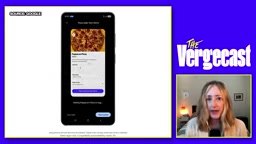
It didn't, as it turned out. But it absolutely could have: it had his credit card on file, and the limit was high enough to cover the purchase. The incident made David seriously reconsider what permission levels he was actually comfortable granting these tools.
Allison pointed out a troubling reality: Muse's connectors page asks for essentially all of your personal information — email, calendar, health data, financial data, medical records. And each one you enable makes the product linearly more useful. "The more data you give these tools, the more powerful they become." This is a genuine paradox: rationally, you shouldn't hand all of this to Meta (whose track record does not mark it as a responsible data steward) — but in practice, to make Muse work better, Allison enabled most of it anyway.
Their practical advice for regular users was refreshingly straightforward:
- Bind only one credit card, and review that account's transactions daily
- Practice basic password hygiene and use a secure password manager
- Think clearly about what you're getting out of it before deciding how much to authorize
- Trust your instincts — don't let "one more thing can't hurt" psychology lull you into complacency. Every company is working hard to make you feel exactly that way.
David's near-car-purchase has a specific name in security circles: "permission creep" or "over-permissioning." Users grant access based on an immediate, specific need at setup time, but over time the accumulated total of granted permissions can far exceed what any single use case would reasonably justify. The danger with tools like Muse isn't any single authorization decision — it's that the connector design encourages users to incrementally expand access, with each individual step looking reasonable while the aggregate constitutes near-total access to your digital life. Worth noting: these systems currently lack granular permission controls. Users typically face a binary choice between "allow everything" and "don't use it at all," with no way to specify something like "allow searching for vehicles but block any payment initiation" — which is arguably the most glaring gap in current agentic AI security design.
What Actually Sticks After the Testing Is Done?
When asked which behaviors she'd carry forward after the review, Allison's answer was measured. She hadn't gone back to Muse, but she kept Instinct's daily habit of filtering her personal email and surfacing only what matters. She could also imagine having Dots proactively find professional development opportunities for her once a month — the kind of "recurring, useful, I-know-I'll-forget-to-do-it-myself" information retrieval task.
This is essentially an "upgraded Google Alert": proactively surfacing information that's relevant to you at the specific moment you need it. Google has already validated the stickiness of this type of use case with a Gemini feature that delivers a morning briefing of your day's agenda.
At the close of the episode, David posed a question that remains unanswered: these systems are flooding every conceivable interface, and nobody has really figured out where they actually belong. Allison's response carried a note of wry humor, but also landed on something real: "The best AI hardware is the smartphone."
Related articles

AI Is Not a Replacement: Human-AI Collaboration Through the Lens of Factory Root Cause Analysis
Starting from factory root cause analysis, this article explains how AI accelerates evidence chain construction rather than replacing human experts, exploring the pragmatic implementation logic and business value of 'AI supporting people rather than replacing them.'

AI Agent Decision Auditing: Building an Evidence Chain in Regulated Workflows
Starting from a Reddit discussion, this article analyzes three core issues in AI agent decision auditing within regulated workflows: what fields audit records should contain, how to handle feedback latency for erroneous decisions, and how to continuously calibrate LLM judge consistency with human judgment.

Apple Opens Multiseat Subscription Purchasing: App Subscriptions Can Now Be Sold in Bulk to Businesses and Schools
Apple opens multiseat purchasing for auto-renewable subscriptions: businesses and schools can bulk-buy via Apple Business and Apple School Manager, adding or removing seats anytime. Enabled by default in App Store Connect—developers should verify settings; group purchasing sandbox testing opens October 2026.