How to Bulk Delete Bilibili Comment History: A Tampermonkey Script Guide

Use Tampermonkey scripts to automatically bulk delete your Bilibili comment history.
This article explains how to bulk delete Bilibili comment history by installing Tampermonkey userscripts that work with two third-party comment lookup websites, AICU and SRDS. The process requires obtaining three parameters from your Bilibili cookies—UID, BUIGTT, and SSData—after which the scripts simulate API calls to delete comments one by one. The guide also warns that recent comments may need manual deletion due to data lag, and that third-party cached records cannot be cleared.
Why You Might Need to Bulk Delete Bilibili Comment History
As awareness of online privacy grows, more and more users want to clean up the traces they've left across various platforms. Bilibili (B站), one of China's leading video communities, is home to years' worth of comments for many long-time users—potentially thousands of them. Manually deleting each one is clearly impractical.
This article introduces a method for bulk automatic deletion of Bilibili comment history using a Tampermonkey userscript combined with third-party comment lookup websites. The entire process takes just a few minutes to clear out the vast majority of your comment records.
Security Notice: This tutorial involves the use of sensitive information such as browser cookies. Please ensure you operate in a secure network environment to avoid information leakage.
Preparation: Installing Tampermonkey
What Is a Userscript Manager?
Tampermonkey is a browser extension for managing userscripts, built upon the earlier Greasemonkey specification. A userscript is essentially a piece of JavaScript code that automatically runs after a specific webpage finishes loading, allowing it to modify page behavior, inject new features, or automate repetitive tasks. Tampermonkey supports major browsers including Chrome, Edge, and Firefox, boasts over 10 million active users, and is currently the most popular userscript management tool.
Its core capability lies in bypassing a webpage's built-in interaction limitations to directly manipulate page elements or call external API endpoints. In the context of this tutorial, the script simulates the user's delete actions and sends batch requests to Bilibili's servers—this is the technical foundation that enables automated bulk cleanup.
Download and Install the Extension
- Open your browser (using Microsoft Edge as an example) and click the extensions button in the top-right corner
- Select "Get extensions for Microsoft Edge"
- Search for "Tampermonkey" in the extension store
- Click "Get" and complete the installation
Chrome users can search for Tampermonkey in the Chrome Web Store. Firefox users can similarly find it in the Add-ons manager.
Enable and Configure Tampermonkey
After installation, perform the following configuration:
- Click the extensions button in the top-right corner and go to "Manage extensions"
- Enable "Developer mode"
- Ensure Tampermonkey is enabled
- Pin Tampermonkey to the toolbar for easy access later
Clicking the Tampermonkey icon opens the management panel. If freshly installed, the panel should be blank.
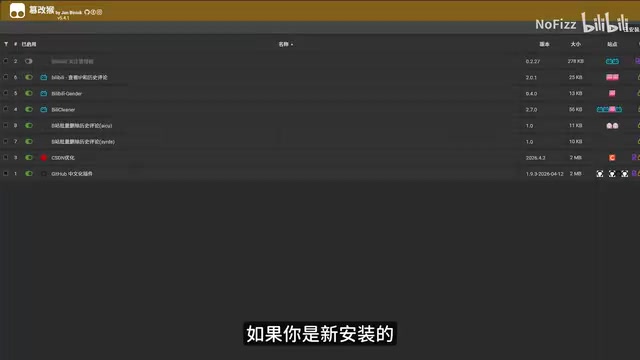
Import the Bilibili Comment Deletion Scripts
After extracting the provided archive, you'll find two script files. These two scripts correspond to two different third-party data source websites (AICU and SRDS). Simply drag them into the browser window and click "Install."
Once installed, return to the management panel to confirm both scripts are enabled.
Step-by-Step: Bulk Deleting Bilibili Comments with Tampermonkey
Step 1: Obtain Your Bilibili Cookie Parameters
The script requires three key parameters:
| Parameter | Description |
|---|---|
| Bilibili UID | Your Bilibili user ID |
| BUIGTT | An authentication parameter from your Bilibili cookie |
| SSData | Session data from your Bilibili cookie |
Understanding Cookies and Authentication
Cookies are small text files stored locally by the browser, issued by the server when a user logs in, used to maintain login state within the stateless HTTP protocol. Bilibili's BUIGTT (Bilibili User Identity Token) and SSData (Session Data) are core credentials in its authentication system—the server verifies these two fields to confirm the identity behind each request.
These tokens are typically time-limited and become invalid immediately after you log out or change your password. Because of this, providing cookie parameters to any third-party script carries inherent risk—a program holding these parameters can make arbitrary requests to Bilibili's servers on your behalf, including sensitive operations like deleting content or modifying profile information. Make sure to verify that the script source is trustworthy, and immediately change your password or manually log out after the operation to invalidate the cookies.
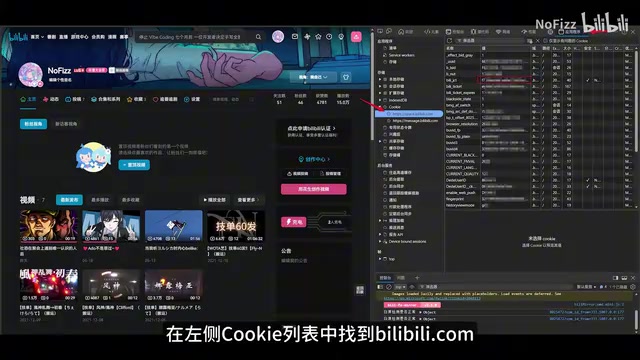
How to obtain the cookie parameters:
- Open Bilibili's website (bilibili.com) and log into your account
- Press
F12to open the browser Developer Tools - Click the "Application" tab at the top
- In the left navigation panel, find Cookie → bilibili.com
- In the right-side table, locate
BUIGTTandSSData, and double-click to copy their values
Step 2: Execute Bulk Deletion on the AICU Website
- Open the AICU.CC website—the script operation panel will automatically appear in the bottom-right corner
- Enter your Bilibili UID, BUIGTT, and SSData in sequence
- Click the "Start" button

Once the script starts, it automatically executes the following workflow:
- Fetching phase: Retrieves all your historical comment records from the AICU database
- Deletion phase: After fetching is complete, automatically calls Bilibili's API endpoint to delete comments one by one
How Automated Deletion Works Under the Hood
Modern web applications like Bilibili universally adopt a frontend-backend separation architecture. The act of deleting a comment corresponds at the underlying level to sending an HTTP request carrying authentication information to Bilibili's server. The Tampermonkey script simulates exactly this process: using your cookies as identity credentials, it constructs and sends deletion requests in bulk, eliminating the tedious process of manually clicking page buttons. To avoid being identified as abnormal automated behavior by the server (which would trigger rate-limiting), the script typically inserts brief delays between each request to simulate the rhythm of human operation—this is also why bulk deletion of thousands of comments still takes some time.
The panel provides "Pause" and "Stop" buttons, but it's recommended to let it run to completion in one go to ensure thorough deletion.
Step 3: Repeat the Process on the SRDS Website
The operation on the SRDS website is exactly the same: open the corresponding website, enter the same three parameters, and click start.

Why you need to run both websites: AICU and SRDS use different data sources, each covering a different range of comments. Running both ensures broader coverage of your historical comment records and improves cleanup completeness.
Important Notes and Limitations
Data Lag Means Recent Comments Must Be Deleted Manually
Third-party websites have data lag. For example, comments posted after May 2025 may not yet be indexed, making them impossible to delete through this method. For recently posted comments, you'll still need to go to your Bilibili personal center and handle them manually.
Third-Party Cached Records Cannot Be Cleared
This is the most critical point: Even if you've deleted every single comment on Bilibili itself, these third-party lookup websites may still display your historical comment content.
This phenomenon reveals a pervasive and profound privacy dilemma on the internet: content that users publish on public platforms is often continuously crawled and permanently archived by third-party scrapers, creating data copies that exist independently of the original platform. This behavior is not technically illegal (since it scrapes publicly visible content), yet it significantly undermines users' control over their own data.
The EU's GDPR (General Data Protection Regulation) includes the "right to be forgotten"
Related articles
 Tutorials
ChatGPT Plus Subscription Guide: Are GPT-5.5, image-2, and Codex Worth the Upgrade?
A detailed look at ChatGPT Plus features — GPT-5.5, image-2, and Codex — with a Plus vs Pro comparison and a complete step-by-step subscription guide for users outside the US.
 Tutorials
Harness AI Engineering in Practice: Using Claude Code to Master Enterprise-Level E-Commerce Development
Deep dive into Harness AI Engineering: master enterprise e-commerce development with Claude Code using the Rules, Skills, Wiki, and Changes framework.
 Tutorials
Cursor + Codex Dual-IDE Collaboration: A Practical Methodology for Open-Source Project Customization
A complete methodology for open-source project customization based on real-world experience, detailing the Cursor+Codex dual-IDE workflow, seven-stage process, MVP validation, and AI source code reading techniques.