How to Choose an AI Coding Tool? A Comprehensive Comparison and Selection Guide for Eight Leading Tools

A practical guide comparing 8 AI coding tools by control level, technical threshold, and target user type.
This comprehensive guide compares eight mainstream AI coding tools — Bolt, Cursor, Replit, Lovable, V0, Tempo, Onlook, and Windsurf — across dimensions including control level, technical threshold, integration capabilities, collaboration, and deployment. The core insight: there's no "best" tool, only the best tool for your profile. Non-technical creators should lean toward Lovable or Bolt; developers wanting full control should choose Cursor or Windsurf; those in between should consider Replit or Tempo.
The AI coding tool market is getting more crowded by the day — Bolt, Cursor, Replit, Lovable, V0, Tempo, Onlook, Windsurf… Every few days, a viral tweet claims "Bolt is replacing Replit" or "Cursor is killing so-and-so." But for people who actually want to build products, the question isn't which tool is the hottest — it's: which one should I actually use?
The explosion of AI coding tools (also known as AI Code Generation Tools) began with the widespread adoption of GitHub Copilot in 2022. The core technology behind these tools is the Large Language Model (LLM), particularly models fine-tuned on code data. They generate, modify, and debug code by understanding natural language descriptions. Most mainstream tools today are built on Anthropic's Claude series or OpenAI's GPT series, with some beginning to experimentally integrate the DeepSeekAd model developed by a Chinese team. These models are trained on millions of open-source code repositories and can understand the syntax and best practices of dozens of programming languages, from Python to TypeScript.
This article is based on the perspectives of a developer who has extensively used all the mainstream AI coding tools. The core conclusion is straightforward: there is no "best tool" — only the "best tool for your type of person." The key to choosing comes down to two dimensions: how much control you want, and how much technical background you have.
The Two Core Dimensions for Choosing an AI Coding Tool: Control and Technical Threshold
The author proposes a highly practical decision framework. If you plot all the tools on a "control" axis, Lovable sits at the far left. It barely lets you touch the code — and that's not a flaw, it's an intentional product design choice. For people who know nothing about programming, not seeing code is actually a relief.
In software engineering, "control" essentially corresponds to the concept of Abstraction Level. Low abstraction means developers directly manipulate underlying code, configuration files, dependency management, and deployment processes; high abstraction means these details are encapsulated by the platform, and users only need to focus on business logic and product features. This aligns with the traditional No-Code/Low-Code/Pro-Code classification. Historically, from assembly language to high-level languages, from bare-metal deployment to Serverless, the software industry has always been searching for the optimal balance between "control and efficiency." AI coding tools are the latest link in this evolutionary chain.
Moving slightly to the right are Bolt and V0 — they expose the code, allowing you to view and fine-tune it. Further right is Replit, which lets you create files and perform more low-level operations. At the far right are Cursor and Windsurf — you have complete control over the code, free to modify anything, install dependency packages at will.
Cursor and Windsurf are essentially enhanced IDEs (Integrated Development Environments). Cursor is a deep modification of VS Code (Microsoft's open-source code editor), embedding AI capabilities into every workflow step of the editor — from code completion and refactoring to cross-file editing. Windsurf (developed by the Codeium team) emphasizes its "Cascade" feature, an AI Agent capable of understanding the entire codebase context and automatically executing multi-step coding tasks. Their common characteristic is the assumption that users have full development environment configuration capabilities, including terminal operations, package manager usage (like npm, pip), Git version control, and other skills.
More control means more freedom, but it also means a higher barrier to entry. The author's reminder is very practical: non-technical users can certainly use Cursor and Windsurf, but they should "be prepared for numerous roadblocks, debugging sessions, and documentation deep-dives."
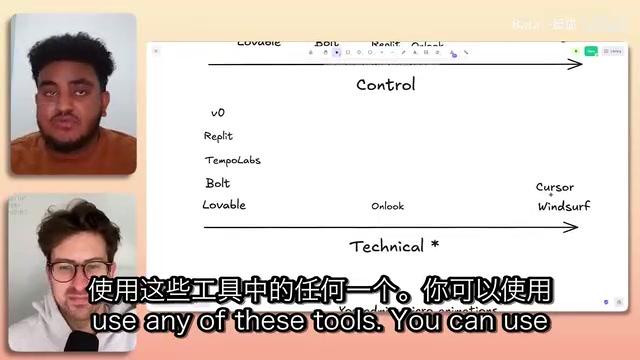
Three Camps of the Eight AI Coding Tools
Grouping these tools by target audience, they roughly fall into three camps:
- No-Code Camp: Lovable, Bolt. You don't need any technical background — input your idea and see a finished product.
- Middle Ground: Replit, Tempo, V0. They accommodate people who don't know code while also satisfying developers who want fine-grained control.
- Pure Technical Tools: Cursor, Windsurf. Built for developers and programmers.
Lovable (formerly GPT Engineer) and Bolt (developed by the StackBlitz team) represent the new paradigm of "Prompt-to-Product." StackBlitz's core technology is WebContainers — a technology that runs a complete Node.js environment in the browser, allowing Bolt to compile and run complete web applications within the browser without any local development environment. Lovable focuses on a productized experience, packaging common SaaS components like Stripe payment integration and Supabase backend databases as one-click modules, dramatically lowering the barrier for non-technical users to build fully functional applications.
Onlook is an interesting case — the author considers it particularly well-suited for people who "are technically skilled but not great at design," enabling them to quickly produce attractive landing pages and deliver the code.
Can These Tools Build Production-Grade Products? A Brutal but Honest Answer
A common concern: these AI coding tools can handle prototypes just fine, but can they support products that actually go live and serve real users?
"Production-ready" has a clear technical meaning in software engineering: an application must have high availability (typically requiring 99.9%+ uptime), scalability (handling traffic pressure from user growth), security (preventing common vulnerabilities like SQL injection and XSS attacks), observability (comprehensive logging, monitoring, and alerting systems), and maintainability (clean code structure with test coverage). Current AI coding tools generate code that is quite mature in terms of functional implementation, but gaps remain in error handling, edge case coverage, performance optimization, and security hardening — which is exactly why the author says "no tool reaches 100%."
The author's answer is refreshingly honest: No single tool reaches 100%. But several are getting very close. He gives higher marks to Replit and Tempo Labs, believing they have an advantage for production-grade applications; Bolt and Lovable are also heading in that direction. As for Cursor and Windsurf, as long as you're willing to "endure the pain," you can absolutely build production-grade applications.
Replit is a cloud IDE platform founded in 2016, having raised over $200 million in total funding. Its unique value lies in unifying code writing, running, deployment, and collaboration in the browser, requiring no local environment configuration. Replit Agent, launched in 2023, can automatically plan project structures, create files, install dependencies, and deploy applications based on natural language descriptions. Replit also provides built-in databases, secrets management, and automatic HTTPS deployment infrastructure, making it a one-stop solution from prototype to production.

Here's a thought-provoking point: precisely because no tool has fully arrived, investing time now to understand them and build a few projects is itself an asset. Because once these tools cross that critical threshold, you'll be among the first to know how to push things into production.
A Simple Test Method: Build a To-Do List
The author shares a universal practice among web developers for testing new frameworks — build a simple to-do list app. This is an industry-standard test: when a company releases a framework or someone open-sources a tool, the best way to validate it is to build a to-do list with it and see how the experience goes — are there pitfalls, and how easy are they to resolve?
The tradition of using a To-Do List App as a technical validation tool traces back to the TodoMVC project (started in 2012), which implemented the same to-do list requirement across dozens of frontend frameworks for comparison. A complete to-do list covers CRUD (Create, Read, Update, Delete) — the four basic data operations — plus state management, persistent storage, and user interface interactions, representing the core patterns of web applications. It's simple enough to complete in an hour, yet comprehensive enough to expose a framework or tool's design philosophy and potential defects in data flow, component communication, and error handling.
He recommends everyone use each tool's free tier to personally go through this exercise and get a feel for it: Do you enjoy having a lot of control, or hate it? Do you appreciate the assumptions the AI makes for you, or do you want to specify every detail yourself?
Feature-by-Feature Comparison of AI Coding Tools
The author further ranks the tools by functional dimensions. It's worth emphasizing that he repeatedly states "I've talked to all the teams, it's all love, no shade" — this is purely based on personal usage experience.
Integration Capabilities: Lovable leads by a wide margin. Connecting Stripe and Supabase is effortless, and it integrates numerous external packages and tools that ordinary users might not notice.
Supabase is an open-source Firebase alternative that provides PostgreSQL databases, authentication, real-time subscriptions, file storage, and edge functions. Stripe is the world's largest online payment infrastructure provider, supporting subscription billing, one-time payments, invoice management, and more. The integration of these two is important because they represent the two core needs of modern SaaS applications — user data management and monetization. When AI coding tools can connect to these services with one click, non-technical users gain the ability to independently build and operate paid products without needing to understand OAuth authentication flows, Webhook callback mechanisms, or PCI compliance details.
Replit follows closely but with a noticeable gap, then Tempo and Bolt.
Collaboration Capabilities: This is an area many tools overlook, and it's an important reason why Tempo and Replit are categorized as "production-grade." In reality, you often need to collaborate with others — one person handles the technical side, another does design. Tempo has a slight edge over Replit in collaboration.
Tempo Labs' uniqueness lies in its "design-first" AI coding philosophy. It integrates a visual editor that allows users to adjust UI components through drag-and-drop and property panels while keeping the underlying code in sync. This "WYSIWYG + bidirectional code sync" approach borrows from design tools like Webflow and Framer but adds AI code generation capabilities. Its collaboration features are similar to Figma's real-time multiplayer editing, allowing designers and developers to work in the same environment. This solves the "last mile" problem in traditional development workflows — after designers complete visual designs in Figma, developers need to manually translate them into code, a process typically riddled with discrepancies and rework.

Deployment Experience: Lovable, Replit, and Bolt all excel here with minimal differences. Tempo currently only supports preview deployment and falls behind for now, though the team is developing production deployment features.
Fine-Grained Control: Tempo leads, Replit is second, and Bolt is slightly stronger than Lovable — because Bolt lets you directly edit code, while Lovable requires connecting to GitHub first.
Pricing Comparison: Don't Rush to Pay
Regarding pricing, the author reveals a "secret": the base pricing for these tools is almost identical, starting in the $20-40 range, with higher tiers at $50 and $130. But more importantly — they all offer quite generous free tiers, some with daily limits and others with weekly limits.
His recommendation is to use the free tiers to try all the tools first. You could even create a spreadsheet tracking "when each tool's tokens run out," like he did, to identify patterns before deciding which one to upgrade. "Don't pay just because I said something is good. Use the free tier and draw your own conclusions."
On AI Agents: The Fundamental Differences Aren't That Big
When it comes to the buzzword "Agent," Cursor has its Agent, Windsurf has Cascade, and Replit has Replit Agent. The author's assessment is clear-headed: What matters is how well you understand what you want to build.
AI Agents differ from regular code completion tools in their core capability of a "plan-execute-feedback" loop. Traditional AI code completion is passive — it waits for you to write a line of code before predicting the next one. An Agent is proactive — after understanding your goal, it autonomously breaks down tasks, creates files, writes code, runs tests, and fixes errors, forming a complete workflow. This design draws from the "agent-environment interaction" paradigm in reinforcement learning and the "automated pipeline" philosophy in software engineering.

If you're unclear about what you want and just say "build a to-do list app," then tools like Replit Agent will directly generate various features, producing more complete output; Tempo will first set up a layout and then ask what you want next.
But he punctures a truth easily obscured by marketing: these tools use the same underlying AI models, mostly Claude, with some beginning to experiment with DeepSeek. So at the model level, the differences aren't significant. The more "finished" Agent outputs you see are largely due to product-layer differences — including Prompt Engineering strategies, context window management approaches, and Tool Use orchestration logic. The real questions to ask yourself are: How well do I understand what I want to build? How much control do I want?
Find Your Match: Which AI Coding Tool Should You Use?
Finally, the author provides recommendations by user type:
- Non-technical, idea-rich creative types: Lovable, Bolt — go wild.
- Technical, enjoys writing code: Windsurf, Cursor.
- Technical, doesn't want to write code but wants control: Replit, Tempo, Bolt.
- Non-technical but has product thinking (uses Figma, detail-oriented, wants to control the full product lifecycle): Tempo is the best fit.
- Technical but not great at design: Onlook.
The core philosophy is: No tool is perfect, and none can currently produce a complete production-grade application, but some have reached 70-80%. Rather than agonizing over which is strongest, it's better to align yourself with these rapidly iterating, well-funded, continuously evolving companies and use their tools to build more projects. When they're ready, you'll be ready too.
Key Takeaways
Related articles

Git Worktree's Three Big Pitfalls: .env, node_modules, and Port Conflicts Fully Solved
Solve git worktree's three pitfalls for parallel AI agents with one post-checkout hook: copy .env, share dependencies fast, and assign a port block.
HowToLiveBetter Open-Source Project Tested: A Life Guide with 60K Stars
HowToLiveBetter is a 62,020-star open-source life guide covering law, health insurance, finance, and parenting. We tested its performance, privacy, and setup, comparing it to paid alternatives.
photocraft Open-Source Image Editor Hands-On: A 57K-Star Project Tested
Hands-on test of photocraft, a 57,813-star open-source image editor with self-hosting and local inference. We review performance, privacy, and how it compares.