HTML Description List <dl> Element: 4 Things You Didn't Know & Best Practices

The HTML <dl> description list element hides semantic features most developers don't know about.
The HTML <dl> element was renamed from "definition list" to "description list" back in 2008, making it suitable for any name-value pair scenario. This article reveals four little-known features: a single <dt> can have multiple <dd> elements, only <div> can wrap dt/dd groups, ARIA attributes can enhance accessibility, and screen reader support remains inconsistent. Developers should prioritize <dl> for metadata display, glossaries, key-value information, and similar scenarios to improve semantics and accessibility.
You think you know HTML well? Even the most basic elements can hide details you've never noticed. A recent article by Ben Myers revealed several little-known facts about the <dl> element, sparking widespread discussion in the developer community.
It's Called a "Description List," Not a "Definition List"
Many front-end developers still refer to <dl> as a "definition list," but it was actually renamed to "description list" back in the 2008 HTML5 draft.
This naming change isn't trivial—it reflects a significant semantic expansion. <dl> is no longer limited to term-definition scenarios; it applies to any "name-value" pair relationship. Product specifications, personal profiles, FAQ lists, and more are all legitimate use cases for the HTML description list.
Background: The HTML5 Semantic Revolution
This renaming was a microcosm of the broader HTML5 semantic movement. Between 2004 and 2014, WHATWG (Web Hypertext Application Technology Working Group) and W3C undertook a massive overhaul of the HTML specification, with one core goal being to make tag semantics better reflect real-world usage rather than being confined to the early Web's document publishing model. During this period, presentational tags like
<b>and<i>were given new semantic meanings, entirely new semantic tags like<article>,<section>, and<nav>were introduced, and the renaming of<dl>was part of this "semantic revolution." The deeper logic behind this shift: HTML tags should describe what the content is, not what the content looks like, enabling both machines (search engines, screen readers) and humans to understand page structure more accurately.
Four <dl> Element Features You Probably Didn't Know
1. A Single <dt> Can Have Multiple <dd> Elements
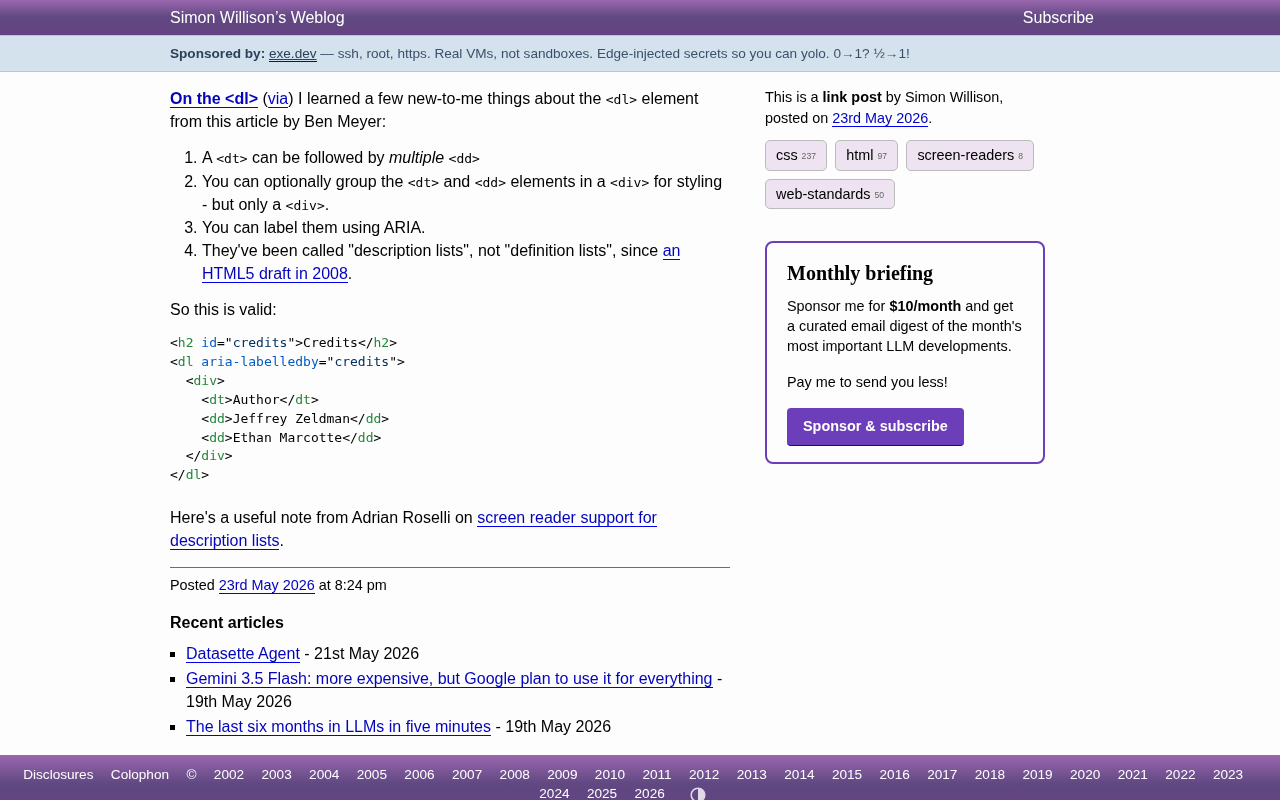
This is perhaps the most surprising one. Most developers are accustomed to a one-to-one pattern, but the HTML specification explicitly allows a single term (<dt>) to be followed by multiple descriptions (<dd>). For example, an "Author" field with multiple authors is perfectly valid:
<dt>Author</dt>
<dd>Jeffrey Zeldman</dd>
<dd>Ethan Marcotte</dd>
This is extremely practical in real-world development—think of displaying multiple directors for a film or multiple contributors to a project. The spec also allows multiple consecutive <dt> elements to share a single <dd>, which is useful for glossary scenarios where multiple synonyms share the same explanation. This flexibility enables <dl> to precisely model complex many-to-many descriptive relationships in the real world.
2. You Can Wrap <dt> and <dd> in <div>, But Only <div>
To facilitate CSS styling, the HTML specification allows you to wrap <dt> and <dd> groups inside a <div>. However, there's a strict limitation: only <div> is allowed—not <section>, <span>, or any other element.
<dl>
  <div>
    <dt>Author</dt>
    <dd>Jeffrey Zeldman</dd>
    <dd>Ethan Marcotte</dd>
  </div>
</dl>
This design provides layout flexibility without breaking the semantic structure. For instance, if you want to use CSS Grid or Flexbox to arrange each dt/dd group, wrapping them in <div> is the ideal approach.
Why Only
<div>Is AllowedThere's rigorous semantic reasoning behind this restriction.
<div>is defined in the HTML spec as a "generic container with no semantic meaning"—it exists purely to serve styling and scripting needs without introducing any additional meaning to the document's semantic layer. By contrast,<section>implies an independent content block,<article>implies independently distributable content, and<span>is an inline-level container—inserting these elements inside<dl>would break the description list's content model, lead to inconsistent parser behavior, and potentially mislead assistive technologies in their understanding of the list structure. The HTML spec maintains this semantic consistency by precisely defining each element's "permitted content" and "permitted parents," and<div>'s special exemption status is a manifestation of this design philosophy.
3. Enhancing Accessibility with ARIA Labels
The <dl> element supports annotation via ARIA attributes, which is crucial for improving web accessibility. For example, using aria-labelledby to associate a description list with a heading:
<h2 id="credits">Credits</h2>
<dl aria-labelledby="credits">
  ...
</dl>
This is highly meaningful for screen reader users, helping them quickly understand the context and purpose of the description list.
ARIA Technical Background
ARIA (Accessible Rich Internet Applications) is a technical specification first published by the W3C in 2008, with version 1.1 released in 2017. It supplements native HTML semantics in complex interactive scenarios by adding
role(roles),aria-*states, and properties to HTML elements, helping assistive technologies (such as screen readers and braille displays) interpret page content more accurately. ARIA's core principle is the "First Rule of ARIA Use": if you can achieve the desired semantics with a native HTML element or attribute, don't use ARIA. Therefore, addingaria-labelledbyto<dl>isn't replacing native semantics—it's an enhancement on top of them, providing a machine-readable label so screen readers can announce complete contextual information like "Credits, description list" during navigation, rather than merely announcing "description list."
4. Screen Reader Support Is Inconsistent
Accessibility expert Adrian Roselli has written extensively analyzing how major screen readers handle description lists. The reality isn't encouraging—different screen readers handle <dl> in significantly different ways, with some even ignoring its semantic structure entirely.
The Screen Reader Ecosystem Today
Major screen readers currently include: NVDA (NonVisual Desktop Access, free and open-source with the highest market share) and JAWS (Job Access With Speech, commercial software by Freedom Scientific, dominant in enterprise environments) on Windows; Apple's built-in VoiceOver (covering macOS, iOS, and iPadOS); Android's built-in TalkBack; and ChromeVox for Chrome users. Each tool's interpretation of HTML semantics depends on the operating system's accessibility API (UIA or IAccessible2 on Windows, NSAccessibility on macOS), which is then delivered through the browser's Accessibility Tree. Any inconsistency at any point in this chain can cause the same HTML to produce entirely different announcements across different screen readers. WebAIM's annual screen reader user survey shows that approximately 40% of users use multiple screen readers simultaneously, making cross-platform testing a necessary part of accessibility development rather than an optional step.
This means if your project has high accessibility requirements, you'll need to conduct extra cross-platform testing when using <dl> and consider whether ARIA attributes are needed as supplementary support.
When Should You Use <dl>?
The HTML description list is best suited for these scenarios:
- Metadata display: Article author, publication date, category tags, etc.
- Glossaries and term lists: Terms and their explanations
- Key-value pair information: Product specifications, profile cards
- FAQ pages: Structured question-and-answer pairs
Compared to implementing these layouts with <table> or plain <div> elements, <dl> provides more accurate HTML semantic expression, positively impacting both SEO and accessibility.
The Connection Between Semantics and SEO
Search engine crawlers (like Googlebot) build an internal representation similar to the browser's accessibility tree when parsing pages, using it to understand content structure and importance hierarchy. Using semantic tags (like
<dl>instead of nested<div>elements) sends clear content relationship signals to crawlers: this is a set of interrelated name-value pairs, not isolated text blocks. Google's structured data guidelines also encourage developers to use semantic HTML as a complement to Schema.org JSON-LD markup—the two working together can increase the likelihood of generating Rich Snippets. It's worth noting that the SEO benefit of semantics is indirect and long-term—it accumulates weight by improving crawlability and reducing content ambiguity, rather than directly triggering ranking boosts. Therefore, it should be viewed as a fundamental investment in engineering quality rather than an SEO trick.
Summary
Basic HTML elements may seem simple, but diving deeper often reveals overlooked capabilities. As a semantic tag that has existed for over twenty years, <dl>'s flexibility and semantic value far exceed most front-end developers' awareness. Next time you need to display structured "name-value" pair information, consider reaching for the <dl> description list first, rather than habitually stacking <div> elements.
Related articles
 Tutorials
ChatGPT Plus Subscription Guide: Are GPT-5.5, image-2, and Codex Worth the Upgrade?
A detailed look at ChatGPT Plus features — GPT-5.5, image-2, and Codex — with a Plus vs Pro comparison and a complete step-by-step subscription guide for users outside the US.
 Tutorials
Harness AI Engineering in Practice: Using Claude Code to Master Enterprise-Level E-Commerce Development
Deep dive into Harness AI Engineering: master enterprise e-commerce development with Claude Code using the Rules, Skills, Wiki, and Changes framework.
 Tutorials
Cursor + Codex Dual-IDE Collaboration: A Practical Methodology for Open-Source Project Customization
A complete methodology for open-source project customization based on real-world experience, detailing the Cursor+Codex dual-IDE workflow, seven-stage process, MVP validation, and AI source code reading techniques.