HuggingFace Transformers Beginner's Guide: Model Download, Pipeline Inference, Training & Saving

A systematic tutorial on HuggingFace Transformers core usage and workflows
This article systematically introduces the core usage of HuggingFace Transformers, covering two pretrained model download methods (Git LFS and from_pretrained), model storage path configuration, SafeTensors format explanation, and Pipeline API usage. Pipeline encapsulates the complete workflow of tokenization, inference, and post-processing, supporting various NLP tasks including sentiment analysis, text generation, and NER, enabling developers to accomplish complex tasks in just a few lines of code.
Introduction
HuggingFace has become the "GitHub" of the AI field, bringing together a massive collection of open-source models, datasets, and tools. Whether it's BERT, GPT, DeepSeekAd, or LLaMA, virtually all mainstream models can be found on this platform. The Transformers library is the most essential toolkit in the HuggingFace ecosystem, making model downloading, usage, and fine-tuning remarkably simple.
Background: HuggingFace was founded in 2016, originally as a chatbot company, before pivoting to become an AI open-source platform. As of 2024, the platform hosts over 500,000 models and 100,000 datasets, with a valuation exceeding $4.5 billion. Its core value lies in standardizing the way models are shared—each model repository contains uniformly formatted weight files, configuration files, and documentation, greatly lowering the barrier to reproducing AI research results.
This article systematically covers the core usage of HuggingFace Transformers, including pretrained model downloading, Pipeline API usage, Tokenizer principles, and the complete workflow of model training and saving, helping you quickly get started with this toolchain.
Model Download: Fetching Pretrained Models from HuggingFace
Two Download Methods
The first step in using HuggingFace is downloading models to your local machine. There are two main approaches:
- Git LFS Download: Clone the model repository directly via Git Large File Storage
- Transformers Library Download: Automatically download via Python code — this is the most recommended approach
Git LFS Technical Background: Git LFS (Large File Storage) is an extension protocol for Git, specifically designed to solve version management issues with large files. Regular Git repositories are not suitable for storing GB-level model weight files. LFS solves this by replacing large files with pointer files while storing the actual content on separate servers. For AI model downloads, the LFS approach is more suitable for scenarios requiring complete version history or offline deployment, while the
from_pretrained()approach is better suited for quick experimentation and on-demand downloads.
Using google-bert/bert-base-chinese as an example, the code is very concise:
from transformers import AutoTokenizer, AutoModelForMaskedLM

model_name = "google-bert/bert-base-chinese"
tokenizer = AutoTokenizer.from_pretrained(model_name)
model = AutoModelForMaskedLM.from_pretrained(model_name)
After running this, Transformers will automatically download the model files (approximately 412MB) along with the associated tokenizer, configuration files, and more from the HuggingFace Hub.
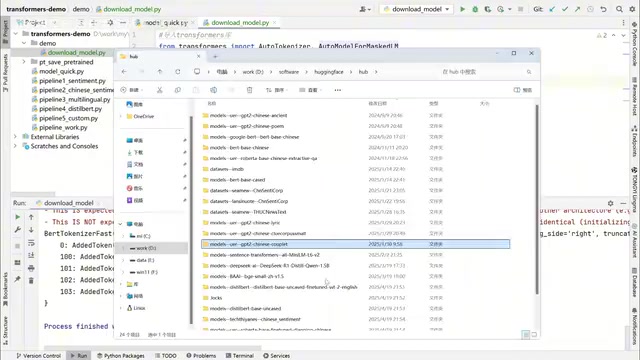
Model Storage Path Configuration
By default, models are downloaded to C drive user directory/.cache/huggingface. It's recommended to set the HF_HOME environment variable to customize the storage path and avoid running out of C drive space:
export HF_HOME=/your/custom/path
After downloading, the directory structure mainly contains the following files:
- model.safetensors: Model weight file (the core file, largest in size)
- config.json: Model configuration file
- vocab.txt: Vocabulary file
- tokenizer_config.json: Tokenizer configuration
SafeTensors Format Explanation:
model.safetensorsis HuggingFace's next-generation model weight storage format, designed to replace the earlier PyTorch pickle format (.binfiles). The core advantage of SafeTensors is security—the traditional pickle format can execute arbitrary code during deserialization, posing a security risk, whereas SafeTensors uses a simple header+data structure that contains no executable code. Additionally, SafeTensors supports memory mapping (mmap), loading several times faster than the pickle format, with particularly significant advantages in multi-GPU scenarios.
When loading models, you can either load online via model name or specify a local path to load already-downloaded models—the from_pretrained() method supports both approaches.
Pipeline API: Out-of-the-Box Inference Tool
Pipeline is the high-level API provided by Transformers that encapsulates the entire workflow from tokenization to inference to post-processing, enabling complex NLP tasks in just a few lines of code.
Pipeline Architecture Principles: The Pipeline API follows the "separation of concerns" design principle, breaking down NLP tasks into three independent stages: Preprocessing, Model Inference, and Postprocessing. Each Pipeline instance automatically loads the model and tokenizer matching the task during initialization and automatically selects CPU or GPU execution based on the runtime environment. This encapsulation allows users to avoid worrying about underlying tensor operations, but it also means reduced flexibility—for scenarios requiring custom inference logic, directly operating the model and tokenizer is the better choice.
Task Types Supported by Pipeline
Pipeline covers a variety of common natural language processing tasks:
| Task Type | Description |
|---|---|
| Sentiment Analysis | Determine positive/negative sentiment of text |
| Text Generation | Generate text based on a prompt |
| Named Entity Recognition (NER) | Identify entities like person names and locations in text |
| Fill-Mask | Predict masked words |
| Summarization | Automatically generate text summaries |
| Translation | Translate between different languages |
| Feature Extraction | Extract vector representations of text |

Sentiment Analysis Practical Code
Using sentiment analysis as an example, Pipeline can determine
Related articles
 Tutorials
ChatGPT Plus Subscription Guide: Are GPT-5.5, image-2, and Codex Worth the Upgrade?
A detailed look at ChatGPT Plus features — GPT-5.5, image-2, and Codex — with a Plus vs Pro comparison and a complete step-by-step subscription guide for users outside the US.
 Tutorials
Harness AI Engineering in Practice: Using Claude Code to Master Enterprise-Level E-Commerce Development
Deep dive into Harness AI Engineering: master enterprise e-commerce development with Claude Code using the Rules, Skills, Wiki, and Changes framework.
 Tutorials
Cursor + Codex Dual-IDE Collaboration: A Practical Methodology for Open-Source Project Customization
A complete methodology for open-source project customization based on real-world experience, detailing the Cursor+Codex dual-IDE workflow, seven-stage process, MVP validation, and AI source code reading techniques.