Ideogram 4 Deep Dive: Structured Prompts and Fully Automated Workflow

Master Ideogram 4 with structured JSON prompts and a Qwen3 VL-powered automated workflow.
Ideogram 4 stands out for its cinematic aesthetic quality, naturalistic portrait rendering, and reliable in-image text generation. This article explains how its JSON-based structured prompts work and introduces a fully automated workflow using Qwen3 VL as a prompt conversion layer — so users can generate high-quality images by simply describing what they want in plain language.
Ideogram 4: A High-Aesthetic Image Model Worth Your Attention
A new model has been generating a lot of buzz in the image generation space lately — Ideogram 4 (often called IDO4 by enthusiasts). It hasn't been out for long, but the visual quality is seriously impressive. Its aesthetic sensibility and design flair can hold its own against Midjourney.
Ideogram 4 was developed by Ideogram AI, a company founded by former core researchers from Google Brain. Compared to mainstream generative models like Midjourney and Stable Diffusion, Ideogram's training data and loss functions place a significantly stronger emphasis on "design aesthetics" and "visual composition." This gives its outputs a natural tendency toward commercially polished compositions and color palettes — which is the underlying reason it can compete with Midjourney on the aesthetic front.
From hands-on experience, the model produces distinctly impressive results, but there's one notable barrier to entry: the official prompt template structure is extremely detailed, and filling it out properly can be quite time-consuming. Many users just want to generate an image quickly — only to open the interface, see a wall of fields to fill out, and give up before they even start.
This article provides a detailed breakdown of Ideogram 4's three core strengths, its structured prompt rules, and a simplified fully automated workflow to help you get up and running with this model much more easily.
Ideogram 4's Three Core Strengths
Powerful Aesthetics and Cinematic Atmosphere
Ideogram 4's most standout quality is its strong aesthetic sense. The images it generates aren't flat or generic — they naturally carry atmosphere. Lighting, composition, color grading, and overall mood all have a quality that echoes Midjourney's best outputs.
This is especially true for images with a strong photographic, cinematic, or design-oriented feel. It consistently produces results that look polished and high-end. For posters, brand visuals, and cinematic portrait photography, it's a remarkably smooth tool to work with.
Naturalistic Portrait Rendering
One thing to keep in mind: if you're after heavily retouched, ultra-clean, picture-perfect influencer-style portraits, Ideogram 4 may not be your best bet. When generating people, it leans toward realism — skin retains texture, facial expressions aren't over-smoothed, and the overall look resembles a real person rather than a heavily filtered social media face.
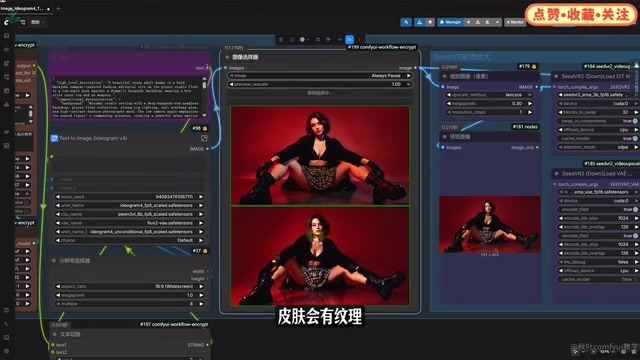
This is a double-edged sword: users who prefer highly polished portraits may find the results a bit rough. But if you appreciate authentic photographic character and natural-looking people, it has real charm. It doesn't stamp every face from the same template — it favors real, artistically expressive representation.
Reliable In-Image Text Generation
The Ideogram series has always had a strong reputation for rendering text within images, and Ideogram 4 continues that tradition. Many image generation models handle scenes just fine — but the moment text needs to appear in the image, things go sideways. Garbled characters, missing letters, distorted glyphs, broken layouts — these are common failure modes.
Ideogram 4 is significantly more stable in this area. Short English phrases, headlines, brand slogans, and poster copy all have a noticeably higher success rate. This makes it particularly well-suited for posters, covers, product promotional images, and social media graphics with text overlays. That said, it's not perfect every time — Chinese text or longer passages may still require multiple attempts.
Understanding Ideogram 4's Structured Prompts
To get the most out of Ideogram 4, the key is understanding its prompting logic. Think of it less as writing a single description and more as writing a "image generation specification document."
Why do structured prompts produce better results? Traditional natural-language prompts carry high ambiguity, which causes models to drift randomly during semantic parsing. By breaking prompts into discrete semantic fields using a structured format like JSON, text encoders (such as CLIP or T5) can more precisely map each field to independent semantic vectors in latent space — significantly improving generation consistency and controllability. This is the core reason structured prompting has become increasingly mainstream in diffusion model engineering practice.
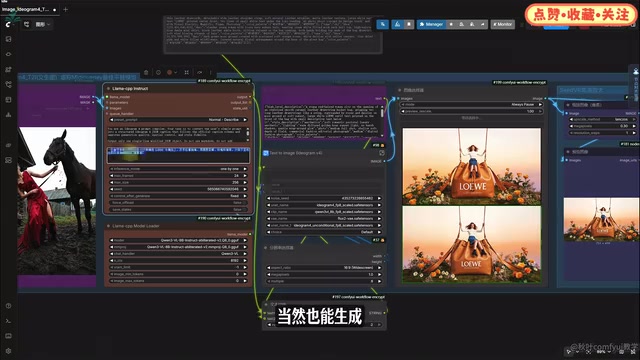
For example, say you want to generate an image of "a young woman with orange hair sitting on a giant caramel-colored bucket bag, holding the drawstrings, surrounded by moss, roses, and daisies, with a soft, romantic fashion-advertisement feel in golden sunset light." You can absolutely feed that sentence straight to the model — but the results won't always be consistent. The model might not know: should this lean into high-fashion editorial or look like a casual photo? How large is the bucket bag? Are the flowers and moss in the foreground or background? How soft should the sunset light be?
The Three Sections of a JSON Prompt
A complete Ideogram 4 structured JSON prompt is organized into three main sections:
Section 1: High-level description Summarize the entire image in one sentence — for example: "A young woman with orange hair sits on a caramel bucket bag, conveying a soft, romantic fashion-advertisement atmosphere."
Section 2: Style description
Controls the visual style. You might write: "fashion editorial, soft golden-hour light, photorealistic, warm tones, romantic mood." One important rule here: use photo for photographic effects; use art style for illustration, 3D, poster design, and other non-photographic outputs. Never use both simultaneously.
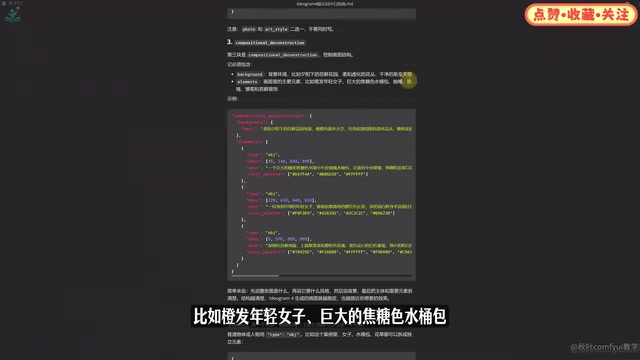
Section 3: Compositional deconstruction This is the critical section for controlling image structure. It includes several sub-fields:
background: Describe the environment — e.g., "a moss garden at golden hour, softly blurred flower clusters in the background";elements: List the main visual components — e.g., "young woman with orange hair, giant caramel bucket bag, drawstrings, roses, daisies, moss decorations";bbox: To control element placement, assign bounding boxes using 0–1000 coordinates to tell the model "the woman is center frame, the bucket bag is in the lower portion, flowers and moss surround the periphery";color palette: Define the color scheme — e.g., "caramel, orange-hair tones, moss green, rose pink, golden sunlight."
It's worth noting that bbox (Bounding Box) is a classic concept from computer vision, originally used to annotate object positions in object detection tasks. Ideogram 4 brings this concept into its prompting system, using a normalized 0–1000 coordinate system that lets users specify the spatial position of each element in the frame. In essence, this internalizes "spatial layout control" — which previously required add-on modules like ControlNet — as a native prompt syntax supported directly by the model. This dramatically reduces the complexity of achieving precise compositions.
To put it simply: first describe what the overall image is, then describe the desired style, then establish the background, and finally break down the subject and key elements one by one. The clearer the structure, the more stable and accurate Ideogram 4's output will be.
A Fully Automated Workflow: Using a Text Model as a "Translation Layer"
While structured prompts produce excellent results, writing JSON by hand is a fairly high bar for most users. The core idea behind this workflow is to package the complex prompt template into an instruction template, embed it in the workflow, and let the model handle the conversion automatically.
A Novel Visual Model Paradigm
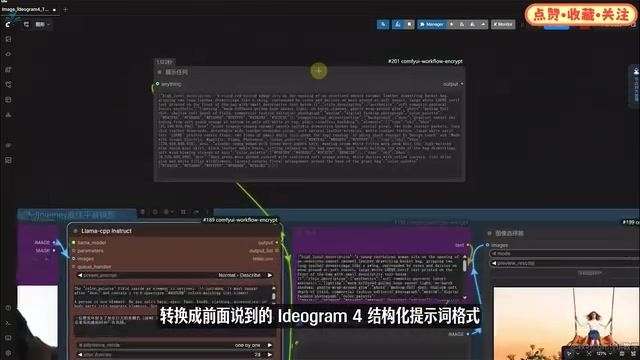
The most interesting aspect of this workflow is the introduction of Qwen3 VL 8B — a text and image-vision encoding model — as an automatic prompt conversion layer.
The Qwen VL series is a family of multimodal large language models developed by Alibaba Cloud's DAMO Academy, capable of processing both text and image inputs simultaneously. The 8B parameter version can be deployed and run locally on consumer-grade GPUs (such as the RTX 3080 or 4070), with inference speed and resource consumption both in a practical range. Its visual encoder is built on the ViT (Vision Transformer) architecture, which compresses and encodes pixel information from images into token sequences that the language model can understand — this is precisely what enables it to both "understand" your text description and "see" a reference image.
The workflow proceeds as follows:
- In the prompt input box, describe the desired image in plain language (who the subject is, what scene they're in, what overall feel you want);
- The Qwen3 VL model automatically converts this simple description into the Ideogram 4 structured prompt format described above;
- Once converted, the prompt is passed directly into the sampler and image generation begins.
This means the only two things a user actually needs to think about are: what image you want to generate, and what aspect ratio to use. Prompt optimization, formatting, and structural conversion are all handled automatically by the workflow.
Image Inversion: Image-to-Image via Caption
The workflow also includes an image reversal template. Usage is straightforward: replace the prompt conversion instruction with an image captioning instruction, remove the hand-written prompt, drop in your reference image, and click generate. The workflow will automatically reverse-engineer a prompt from the reference image and use it to generate a new image.
This "image → text → image" chain process is technically known as Image Prompt Inversion. It leverages Qwen VL's multimodal understanding to automatically describe a reference image, generating a structured text prompt that is then passed to Ideogram 4 for image generation. This transforms a human visual intention into a language instruction that the model can reproduce — a textbook example of diffusion models and multimodal large language models working in concert.
Throughout the entire process, you only need to "input an idea" or "drop in a reference image." All structured prompt conversion is handled by Qwen3.
Practical Summary
All things considered, the combination of Ideogram 4 + Qwen3 VL text encoding offers several standout advantages:
- Broad stylistic range: Whether it's portrait photography, product posters, dreamy, commercial, or photorealistic styles — it delivers solid visual results across the board;
- Genuine aesthetic sensibility: It's not just capable of generating images — it performs well on lighting, color, atmosphere, and realistic texture, which is genuinely rare;
- Strong Chinese language understanding: You don't need to translate everything into English first. Describing your desired image directly in Chinese still yields good results.
For local deployment or users with limited VRAM, this combination offers very high practical value. Using a text-vision model as the prompt encoding layer lowers the barrier to structured prompting while preserving Ideogram 4's strengths in aesthetics and text generation — making it a new paradigm well worth exploring.
Key Takeaways
Related articles

Salesforce Acquires Rune for $375M: AI Logistics Tech Bolsters Defense Business
Salesforce reportedly acquires defense tech startup Rune for $375M. Rune's AI logistics tech will strengthen Salesforce's Missionforce defense platform, continuing its M&A spree.

Why Fair Use Benefits Everyone in the AI Era
Starting from a Hacker News discussion, this article analyzes the legal logic and controversies of the fair use principle in AI training and content creation, and its dual impact on creators and the tech ecosystem.

Mistral Large 4 Open-Sources a Trillion Parameters, Microsoft Offers Voluntary Severance to 60,000 Employees
Mistral Large 4 open-sources a trillion-parameter multimodal model with a coding agent score of 48; SanDisk earnings show AI inference reshaping NAND demand; Google Gemini adds in-app file editing, OpenAI raises Codex quotas, and Microsoft offers voluntary severance to 60,000 employees.