iKnowMyMac: Using Evidence to Find the Real Reason Your Mac Is Slow

iKnowMyMac replaces raw data with "evidence + one fix action," helping ordinary Mac users understand why their computer is slow.
iKnowMyMac is a native Mac diagnostic app targeting slowdowns, full disks, and fast battery drain with diagnostic conclusions, supporting evidence, and one actionable step per issue. Unlike Activity Monitor or CleanMyMac, it uses a "chain of evidence" instead of raw metrics, adds a centralized app update tab across App Store, Sparkle, official sites, and Homebrew, and uses a one-time purchase with no subscription.
When a Mac slows down, most people's first instinct is to open Activity Monitor, stare blankly at a list of incomprehensible process names, or just restart and hope for the best. But the problem rarely goes away. A native Mac app that appeared on Product Hunt, iKnowMyMac, tries to answer this question a different way: instead of just telling you "what's slow," it provides evidence — and one actionable fix.
The Common Flaw of Diagnostic Tools: Data Without Conclusions
System monitoring tools are not scarce. Activity Monitor, CleanMyMac, and DaisyDisk each have their strengths, but they share a common experience gap — they dump raw metrics on users and leave it to them to figure out what the numbers mean and which issue to tackle first.
For developers or ops engineers, that's not a problem. But for the vast majority of ordinary Mac users, information like "CPU usage 340%" or "memory pressure yellow" is practically meaningless. What users really want to know is: why is my computer lagging, who's causing it, and what should I do right now?
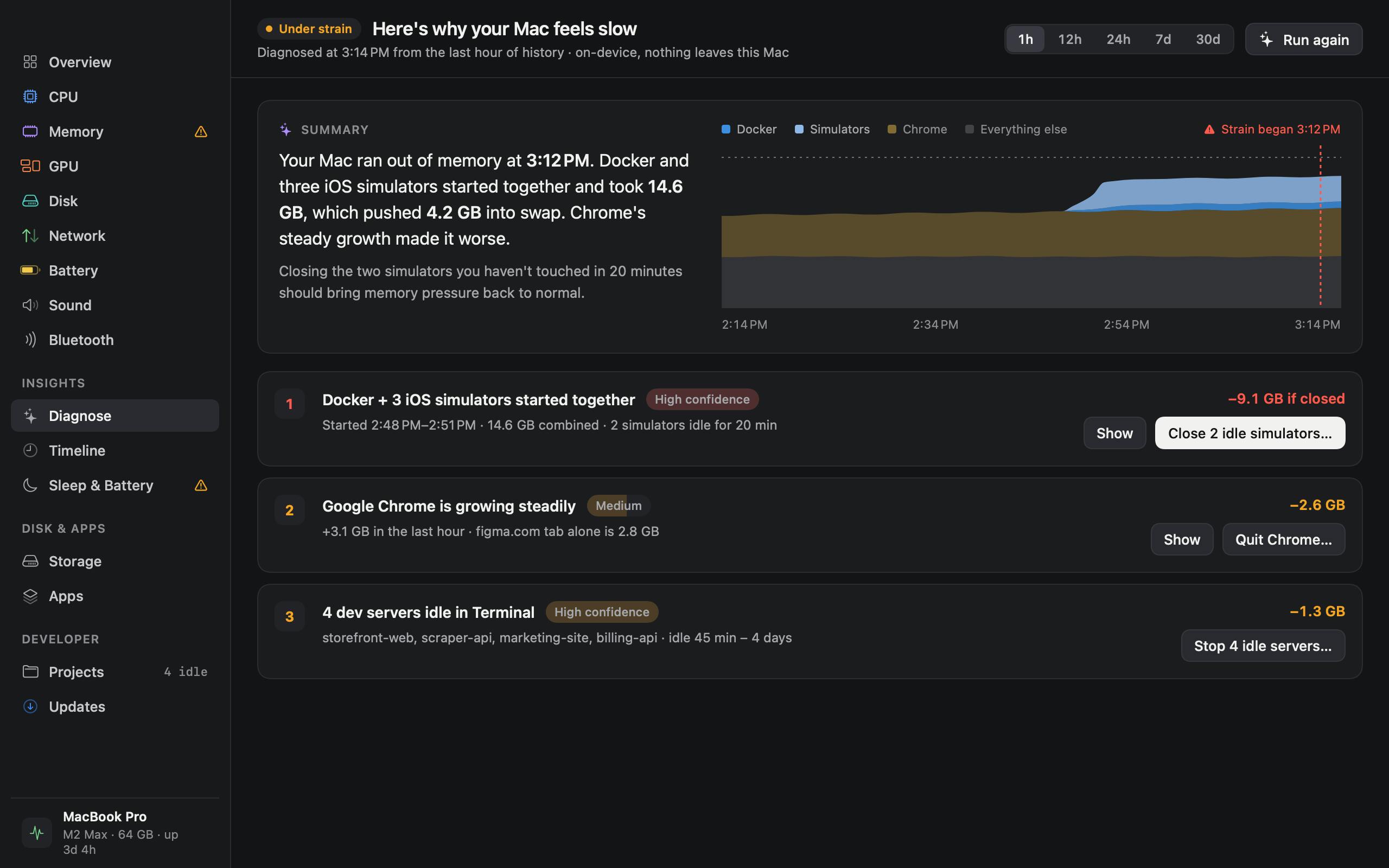
iKnowMyMac's product positioning sits right in that gap. According to its official description, it targets the three most common Mac complaints — slowdowns, a full disk, and fast battery drain — and provides a diagnostic conclusion, supporting evidence, and one suggested action for each problem. This "one problem, one action" design is the most obvious difference from traditional monitoring tools.
Three Diagnostic Dimensions and the "Evidence + Fix" Logic
Performance Slowdowns
The causes of a slow Mac are extremely scattered: background processes, memory pressure, accumulated startup items, and insufficient disk space can all play a part. iKnowMyMac's approach is to first identify the primary suspect, then show the data supporting that judgment, and finally offer a targeted action.
The value of this "chain of evidence" presentation lies in reducing misdiagnosis. In traditional tools, users are easily misled by a momentarily high-usage process, whereas complete evidence lets users see whether it's a persistent problem or a momentary fluctuation.
Memory pressure is a memory management metric introduced by macOS starting with 10.9, replacing the traditional concept of "available memory." It combines multiple underlying data points such as memory compression, swap paging, and file caching, using green, yellow, and red to indicate how strained the system's memory is: green means plenty of memory, yellow means the system has begun compressing memory or using swap, and red means memory is severely insufficient with frequent paging — usually the direct culprit behind lag. Compared with "memory usage percentage," memory pressure better reflects the real experience, because macOS proactively uses free memory as disk cache, so a high usage rate doesn't equal a performance problem.
Startup items refer to programs and background services that run automatically at boot or login, including user-level login items and system-level LaunchAgents and LaunchDaemons. They continuously consume CPU, memory, and disk I/O, and are a common hidden cause of Macs getting slower over time. Long-accumulated startup items often come from leftovers of uninstalled apps, sync tools, input method helpers, and the like — things ordinary users can hardly identify in Activity Monitor.
Disk Space
"What's eating my hard drive" is a classic Mac user conundrum. System data, caches, old backups, and leftovers from large apps often get mixed together, and manually digging through them is a poor experience. iKnowMyMac visualizes disk usage and attributes it to specific sources, pointing directly at targets that can be cleaned up.
Battery Drain
Fast battery drain usually needs to be attributed to the background behavior of specific apps. Only by tying power consumption to specific apps can users make trade-offs — turn it off, or adjust its behavior.
An Underrated Feature: It Also Manages App Updates
Beyond its core diagnostic capabilities, iKnowMyMac has another easily overlooked design: updating other apps in a single tab.
This seems unrelated to the "diagnosis" theme, but it solves a real pain point. App update channels on Mac are highly fragmented — a batch from the App Store, a batch auto-updated via the Sparkle framework, a batch manually downloaded from official websites, and another batch managed by Homebrew. To keep app versions up to date, users have to switch back and forth across four or five places. Consolidating updates into a single entry point essentially reduces one context switch.
This kind of "conveniently solving peripheral problems" design often determines long-term user retention more than the main feature itself.
Sparkle is the most widely used third-party app auto-update framework on macOS, maintained by the open-source community and adopted by a large number of independent apps distributed outside the App Store channel. It checks for new versions and completes download and installation via a built-in appcast.xml file. Because Sparkle is integrated independently by each app, users are effectively dealing with multiple mutually unaware updaters — each app pops up its own dialog, downloads on its own, and restarts on its own, with no unified entry point. This is one of the technical roots of Mac app update fragmentation.
Homebrew is the package manager on macOS, mainly used to install and manage open-source tools and some GUI apps (Cask) via the command line. Its updates rely on the brew upgrade command, and it stands alongside the App Store, Sparkle, and official website downloads as one of the four major distribution channels. The four are unaware of each other, and users need to maintain them separately, so a solution like iKnowMyMac that consolidates updates into a single interface actually saves the cognitive cost of switching across channels.
Native App and One-Time Purchase
iKnowMyMac emphasizes that it is a native Mac app and adopts a one-time purchase, no subscription business model.
Both of these carry weight in today's utility app market. Native means better system integration and lower resource usage — a tool used to diagnose performance problems would lose much of its persuasiveness if it were itself a resource hog. And a one-time purchase directly responds to many users' subscription fatigue: diagnostic tools are a low-frequency use case, and the reasonableness of monthly payments was already questionable.
Based on Product Hunt data, the product received 53 votes, ranked 20th, and had 1 comment — a small-scale early exposure, not yet what you'd call hot. The maker is Deepak Sharma.
Native Mac app usually refers to an app built using Apple's official frameworks (such as AppKit or SwiftUI) rather than cross-platform solutions like Electron or Qt. Native apps generally have advantages in launch speed, memory usage, system API calls (such as permission management, Notification Center, and dark mode support), and energy efficiency. For performance diagnostic tools, this is especially critical: if the tool itself relies on Electron and consumes hundreds of MB of memory at the drop of a hat, its "performance optimization" advice will be hard to take seriously.
One-time purchase (perpetual license) means users pay once to use the current version permanently, usually including update service for a certain period, rather than renewing monthly or annually. Over the past decade the software industry has broadly shifted toward subscriptions to secure stable cash flow, but the subscription model is not friendly to low-frequency tools — users may only use a diagnostic tool once every few months yet have to keep paying, which is hard to accept from a mental accounting perspective. The perpetual license has therefore become a differentiator for many indie tools to win users back.
Who It's For
iKnowMyMac is not aimed at geek users — they already have enough tools and knowledge to troubleshoot on their own. It truly serves users who "know their Mac has slowed down but don't know where to start," replacing data with conclusions and multiple-choice questions with a single action, lowering the troubleshooting barrier.
For a diagnostic tool, whether it can build trust is key: whether the conclusions it gives are accurate, whether the suggested actions are safe, and whether it might accidentally delete important files. These are still hard to verify at the early exposure stage and require more real-world usage feedback. From a product philosophy standpoint, the "evidence + fix" direction is right — the value of a tool lies not in how much data it displays, but in helping users finish making decisions.
One-line Summary
iKnowMyMac replaces raw data with "evidence + one fix action," helping ordinary Mac users understand why their computer is slow.
Paragraph Summary
iKnowMyMac is a native Mac diagnostic app that targets three high-frequency scenarios — slowdowns, a full disk, and fast battery drain — providing a diagnostic conclusion, supporting evidence, and one actionable step for each problem. Its difference from tools like Activity Monitor and CleanMyMac is that it no longer dumps raw metrics on users to judge for themselves, but uses a "chain of evidence" to help users avoid misjudgments caused by momentary high usage. The product also includes a built-in app update tab, consolidating the four fragmented update channels — App Store, Sparkle, official websites, and Homebrew — into a single entry point. In terms of business model, it uses native construction plus a one-time purchase with no subscription, responding to doubts about the reasonableness of monthly payments for low-frequency diagnostic tools. Product Hunt data shows 53 votes, rank 20, and 1 comment, representing early small-scale exposure, with actual diagnostic accuracy still awaiting verification through more feedback.
Related articles

Why Does the Tesla Roadster Need to Fly? A Deep Dive into Musk's Wild Demo
Tesla's Roadster launch showed wall-climbing, upside-down driving, and flying stunts—but The Vergecast notes the demo car may lack a battery, the Rocket version is invite-only and not street-legal, and the website terms don't guarantee delivery. After nine years of delays, why does this car still need to exist?

AI Is Not a Replacement: Human-AI Collaboration Through the Lens of Factory Root Cause Analysis
Starting from factory root cause analysis, this article explains how AI accelerates evidence chain construction rather than replacing human experts, exploring the pragmatic implementation logic and business value of 'AI supporting people rather than replacing them.'

AI Agent Decision Auditing: Building an Evidence Chain in Regulated Workflows
Starting from a Reddit discussion, this article analyzes three core issues in AI agent decision auditing within regulated workflows: what fields audit records should contain, how to handle feedback latency for erroneous decisions, and how to continuously calibrate LLM judge consistency with human judgment.