iLand: Turning Your Mac's Notch Into an Always-Ready Workspace

iLand repurposes the MacBook notch into an all-in-one productivity hub for everyday tasks.
iLand is a Mac productivity tool that "activates" the screen's notch area by consolidating music controls, a drag-and-drop file tray, format conversion, screenshots, screen recording, and calendar/weather widgets into one persistent hub — reducing the attention cost of switching between apps. It supports gesture controls and custom layouts, targeting workflow-focused Mac users. Built by indie developer Taha Çiftçi, it recently launched on Product Hunt with 68 upvotes. Its real value depends on how smooth the integrated experience feels, system resource impact, and whether it maintains a clear UI in a tight space.
The notch at the top of Apple's MacBook screens has long felt like wasted real estate to many users — it eats into display space without delivering much in return. A Mac productivity app called iLand aims to change that by repurposing this overlooked area into a compact workstation packed with everyday tools. The app recently launched on Product Hunt, earning 68 upvotes and landing at #19 for the day.
What iLand Actually Does
iLand's core concept is straightforward: since the notch area can't display regular content anyway, why not turn it into a quick-access hub? It consolidates music controls, file staging, screenshots, screen recording, and format conversion into the top of your screen — so you're not constantly switching between apps or hunting through menu bar icons.
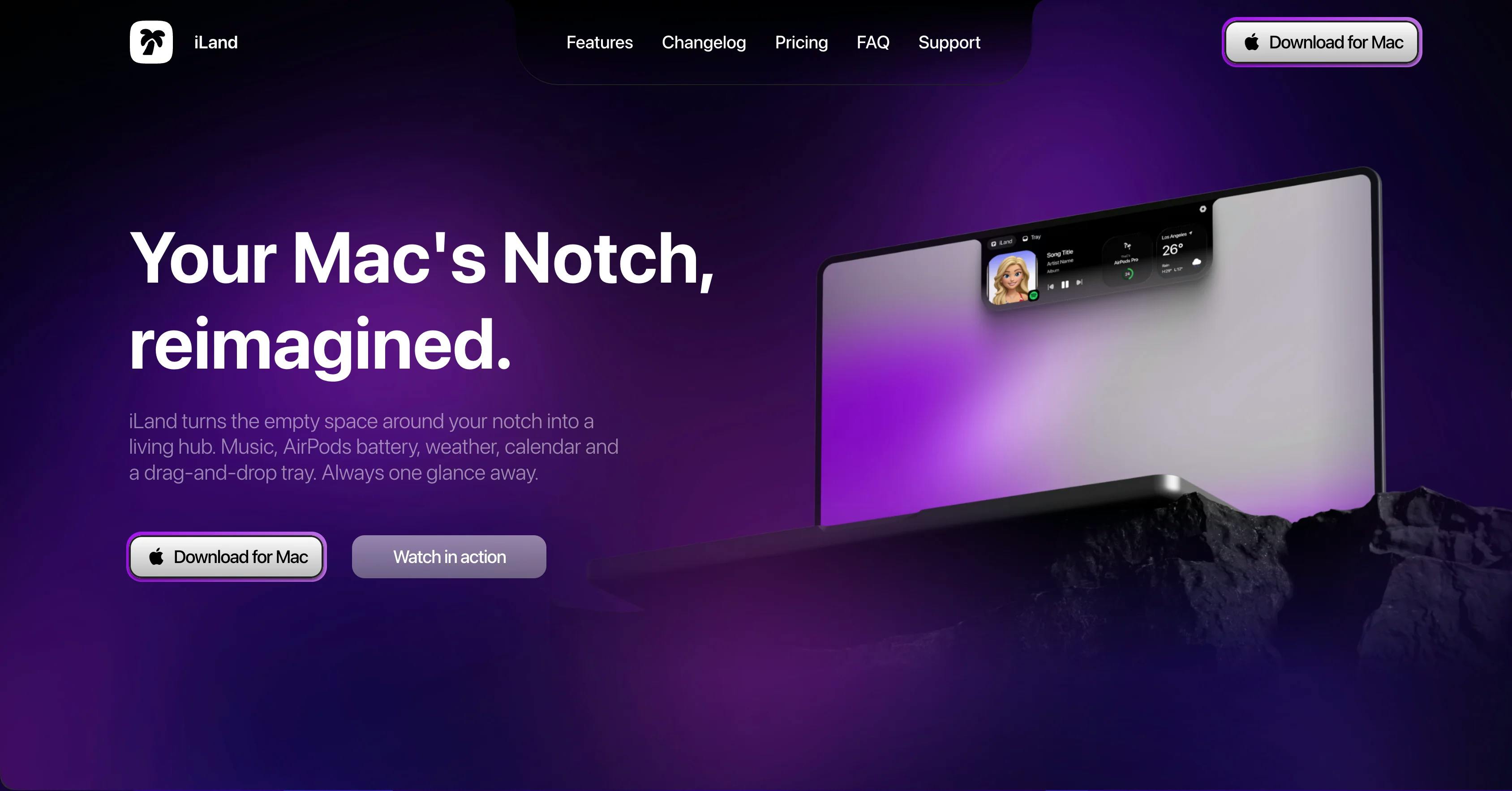
According to the official description, iLand supports: controlling currently playing music, a drag-and-drop tray for temporarily holding files, file format conversion, and screenshots and screen recording. It also offers a set of toggleable widgets covering common needs like calendar, weather, and timers. Users can interact via gestures and customize the layout to keep their most-used tools always within reach.
The Logic Behind Turning a "Dead Zone" Into a Productivity Hub
This kind of tool didn't appear out of nowhere. Ever since the notched MacBook design launched, third-party developers have been experimenting with that strip of screen — from notification animations to clipboard managers. What sets iLand apart is that it doesn't stop at a single feature; instead, it aggregates multiple fragmented everyday tasks into one place.
From an interaction design perspective, the value of this kind of aggregation lies in reducing "attention switching." In a typical workflow, adjusting your music means opening a player, staging a file means switching to Finder, and after taking a screenshot you have to track down where it was saved — every switch breaks your focus. Pulling all of these actions up to the top of the screen, where your eyes naturally land anyway, should theoretically lower the cognitive cost of getting things done. The drag-and-drop tray in particular fits naturally with macOS conventions, making it a handy staging area when dragging files between apps.
Who It's For — and What Questions Remain
iLand is categorized under Mac, Productivity, and Menu Bar Apps, clearly targeting efficiency-minded Mac users who like to optimize their workflow with quick-access tools. For people who handle files frequently, take a lot of screenshots and recordings, or simply prefer a clean desktop, it offers a "handle most small tasks in one place" approach.
That said, a few questions are worth keeping in mind based on currently available information. First, there's the balance between feature density and system resource usage — bundling music control, file conversion, and screen recording into one persistent background process means its stability and performance need real-world validation. Second, the notch area itself is physically small, so fitting this many functions into a tight space without the interface feeling cramped is a genuine interaction design challenge. Third, features like format conversion and screen recording already have plenty of mature alternatives on macOS; iLand's competitive edge depends more on whether the integrated experience feels seamless than on any individual feature being best-in-class.
Menu Bar Apps are a well-established niche within the macOS ecosystem — think Bartender (menu bar icon management), Fantastical (calendar), or CleanShot X (screenshots). These apps share a common trait: they run persistently in the background, available on demand, without taking up Dock space. iLand extends this paradigm by shifting the functional zone from the right side of the menu bar toward the visual center of the screen just below the notch. It's worth noting that macOS imposes strict rendering restrictions on the notch area itself — apps cannot draw content behind the notch. Third-party tools can only work in the space around it. So in practice, iLand occupies the extended menu bar space flanking and beneath the notch, rather than rendering UI elements inside the notch itself.
Wrapping Up
iLand represents a pragmatic product philosophy: rather than creating new needs, it reorganizes existing scattered tasks and puts them somewhere more accessible. For Mac users who feel the notch should be put to work, it's worth trying. But its real value will ultimately come down to how smooth the integrated experience feels, how it handles system resource usage, and whether it holds up reliably over the long term. As a product built by independent developer Taha Çiftçi, iLand's roadmap and future development are also worth watching.
Background: The Science of Attention Switching
The concept of "attention switching" has a solid foundation in cognitive psychology. Research shows that after completing one task and switching to a different app or window, it typically takes around 23 minutes to return to a state of deep focus — a finding from the University of California, Irvine. Even a few seconds of interruption leaves residual cognitive load in working memory, which can affect the quality of subsequent work. This is precisely why "reducing context switching" has become a central design principle for so many productivity tools in recent years. iLand's strategy is philosophically similar to launchers like Raycast or Alfred — those tools centralize access through keyboard shortcuts, while iLand anchors its hub to a fixed physical location on screen, using spatial memory to lower the friction of getting things done.
Related articles

Why Does the Tesla Roadster Need to Fly? A Deep Dive into Musk's Wild Demo
Tesla's Roadster launch showed wall-climbing, upside-down driving, and flying stunts—but The Vergecast notes the demo car may lack a battery, the Rocket version is invite-only and not street-legal, and the website terms don't guarantee delivery. After nine years of delays, why does this car still need to exist?

AI Is Not a Replacement: Human-AI Collaboration Through the Lens of Factory Root Cause Analysis
Starting from factory root cause analysis, this article explains how AI accelerates evidence chain construction rather than replacing human experts, exploring the pragmatic implementation logic and business value of 'AI supporting people rather than replacing them.'

AI Agent Decision Auditing: Building an Evidence Chain in Regulated Workflows
Starting from a Reddit discussion, this article analyzes three core issues in AI agent decision auditing within regulated workflows: what fields audit records should contain, how to handle feedback latency for erroneous decisions, and how to continuously calibrate LLM judge consistency with human judgment.