Image to ASCII: A Browser-Based Developer Tool for Generating ASCII Art
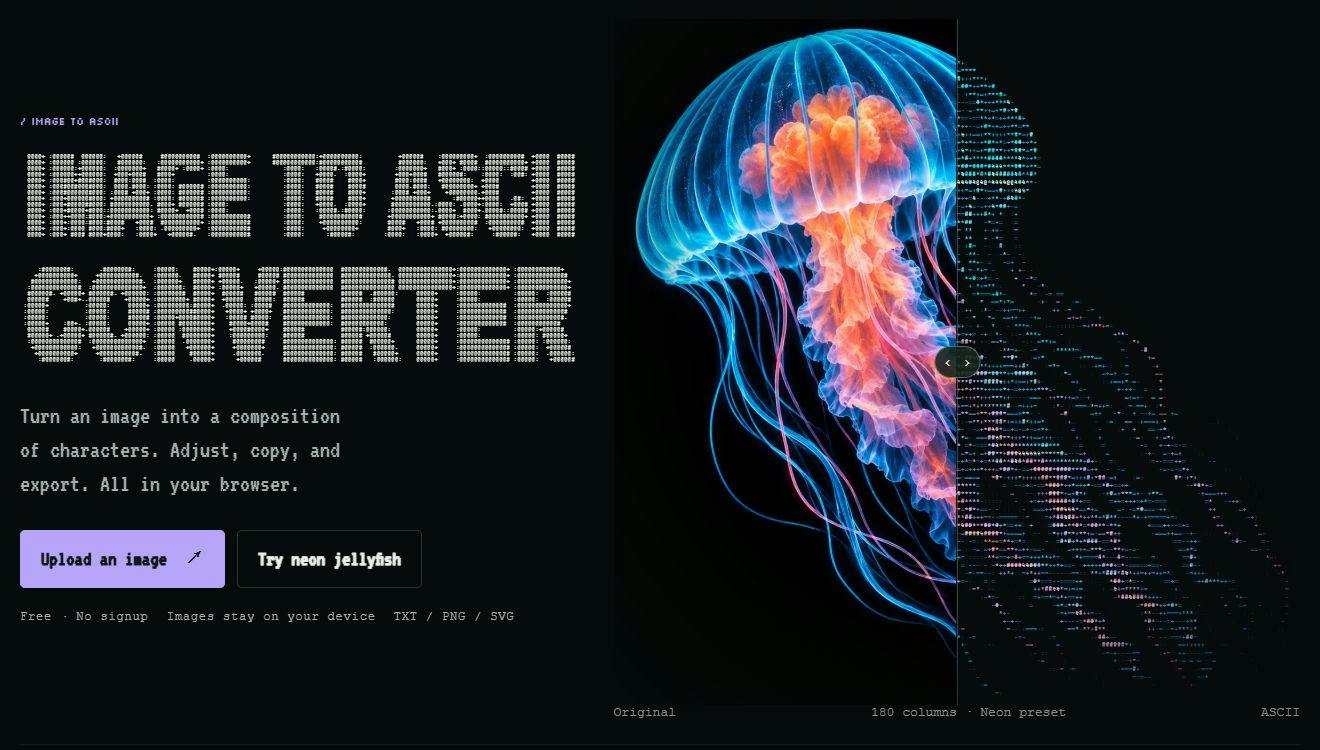
A free, browser-local image-to-ASCII art tool with multi-format export and no sign-up required.
Image to ASCII is a lightweight browser-based tool that converts images and logos into ASCII character art entirely on the client side — no server uploads, no registration, and free to use. It offers preset styles, detail level, and color controls along with a before/after preview. Export options include plain text, Markdown, TXT, PNG, SVG, HTML, and ANSI, covering both editable embedding and pixel-perfect visual output. Key use cases include README beautification, Discord mascots, and blog covers. The tool earned 80 upvotes on Product Hunt under Design Tools and Developer Tools.
Image to ASCII: A Browser-Based Developer Tool for Generating ASCII Art
Adding a signature banner to your README, creating a mascot for your Discord server, or crafting an ASCII art cover for your next blog post — these tasks used to require real design skills. Now, a single browser-based tool can handle them all. Image to ASCII is a design and developer tool that recently made its way onto Product Hunt, focused on converting images and logos into ASCII character art — entirely in your browser, with no uploads required.
Runs Locally — No Sign-Up, No Uploads
The most notable design choice behind this tool is its privacy-first approach. All conversion processing happens client-side in the user's browser. Images are never uploaded to any server, no account registration is required, and it's completely free to use.
For developers who regularly work with internal assets, company logos, or unreleased imagery, local processing means your files stay on your machine — no data security concerns to worry about. This "no uploads, no login, free" combination is a clear differentiator in the space. Many free online image conversion tools require uploading the original file to a cloud server for processing, whereas Image to ASCII keeps all computation on the client side.
From Built-In Examples to Fine-Tuned Parameters
The tool has put considerable thought into lowering the barrier to entry. Users can start with a built-in example rather than preparing their own assets upfront, and a before/after comparison view makes it easy to see the conversion results at a glance.
On the control side, it exposes several adjustment dimensions:
- Presets: Apply different character mapping styles with a single click
- Detail: Control the level of detail in the ASCII output, determining character density
- Color: Supports color output, not just black-and-white characters
The official examples include a "neon jellyfish" and an 80-column-wide fox README banner — suggesting the tool can handle both artistic visual effects and clean, repository-friendly character art. That 80-column detail is particularly developer-friendly, as it aligns with the traditional line-width convention in terminals and many code editors.
Multi-Format Export: Editable Text or Pixel-Perfect Images
Export capability is at the core of any tool like this, and Image to ASCII covers it fairly comprehensively. It supports copying as plain text or Markdown, and can export to TXT, PNG, SVG, HTML, and ANSI formats.
There's a key product logic at play here: text formats preserve editable characters, while image formats preserve visual appearance.
- If you want to embed the ASCII art in a README or code comment and continue tweaking it, choose the text or Markdown format — every character remains manually editable.
- If you need the final output to look exactly right — colors, spacing perfectly preserved — export as PNG, SVG, or another image format to avoid rendering inconsistencies caused by different platform fonts.
ANSI format support targets terminal use cases, enabling color character art output directly in the command line. This approach of offering different export strategies for different use cases reflects a clear understanding of real developer workflows.
Use Cases and Positioning
Taken together, Image to ASCII has a well-defined focus, primarily serving three types of needs:
- Repository beautification: Adding a distinctive character logo or banner to a README
- Community identity: Creating character mascots or welcome banners for Discord servers, chat groups, and similar communities
- Creative content: Blog covers, terminal startup screens, and other contexts calling for a retro ASCII aesthetic
On Product Hunt, the tool received 80 upvotes and ranked 14th, listed under both the Design Tools and Developer Tools categories. That level of attention — solid but not explosive — reflects the nature of ASCII art as a niche interest that nonetheless has a consistent, dedicated audience within the developer community.
Takeaway
Image to ASCII doesn't try to solve any grand problem. It does one specific thing — converting images to ASCII art — and does it smoothly: local processing for privacy, adjustable parameters for both ease of use and flexibility, and multi-format export that fits into real workflows. For developers who like to add a bit of personality to their projects through character art, this is a lightweight tool worth bookmarking.
Related articles

Salesforce Acquires Rune for $375M: AI Logistics Tech Bolsters Defense Business
Salesforce reportedly acquires defense tech startup Rune for $375M. Rune's AI logistics tech will strengthen Salesforce's Missionforce defense platform, continuing its M&A spree.

Why Fair Use Benefits Everyone in the AI Era
Starting from a Hacker News discussion, this article analyzes the legal logic and controversies of the fair use principle in AI training and content creation, and its dual impact on creators and the tech ecosystem.

Mistral Large 4 Open-Sources a Trillion Parameters, Microsoft Offers Voluntary Severance to 60,000 Employees
Mistral Large 4 open-sources a trillion-parameter multimodal model with a coding agent score of 48; SanDisk earnings show AI inference reshaping NAND demand; Google Gemini adds in-app file editing, OpenAI raises Codex quotas, and Microsoft offers voluntary severance to 60,000 employees.